


Around 40 seconds. Over 46,000 tokens. For a single dashboard. That's what the first version of my A2UI solution looked like – and nobody wants to see something like that in production, neither the users staring at an empty screen nor the person who pays the model provider's bill at the end of the month.
Today the same solution runs at around 0.1 seconds and a little over 1,500 tokens. That's a speedup by a factor of 300 and a reduction in token consumption by a factor of 30. The truly interesting part, though, isn't the number itself, but the surprisingly simple lever behind it – and the lesson it offers for any LLM-powered UI generation.
In a previous article, I showed how A2UI can be used to generate entire dashboards. The result looked like this:
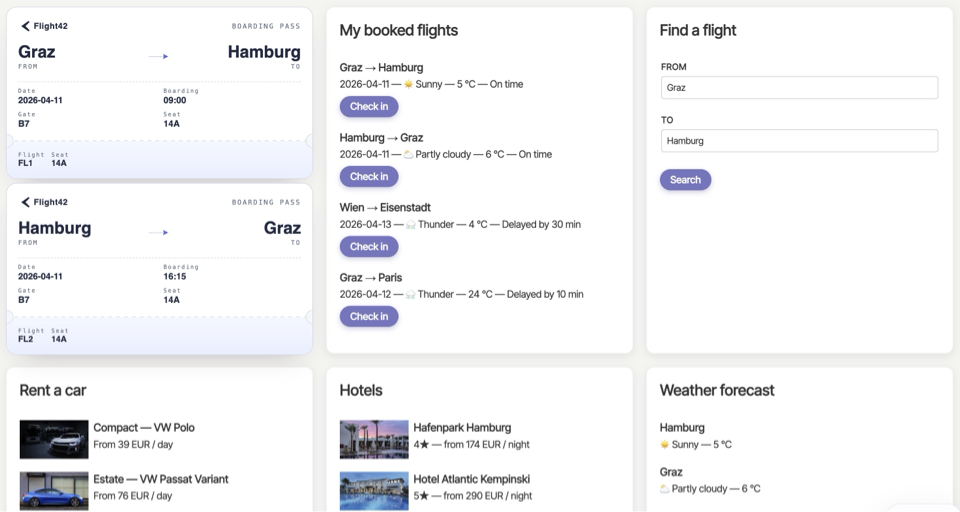
In this article, I'll show how I dramatically sped up exactly that solution – and what consequences this optimization brings with it. Because every performance gain comes at a price.
The Problem: Why A2UI Generation Was Slow and Expensive
A bit of context first: A2UI is a protocol that lets you describe user interfaces – here, a dashboard – in a way that an LLM can generate them. So the model doesn't produce finished HTML, but a structured description of the interface that the client then renders. It was exactly this generation step that was the bottleneck in the first version.
To generate A2UI, you first need a correspondingly long prompt with good examples – classic one-shot or few-shot prompting. Since LLMs handle such examples extremely well, I didn't even copy the full A2UI specification or JSON schema into the prompt. Even so, the whole thing was very large: in the example shown at the beginning, we ended up with over 43,000 input tokens.
On top of that: generating the A2UI markup from this description took correspondingly long. The model has to produce an extensive structure token by token – and that's exactly what's expensive.
In addition, the model has to repeatedly issue function calls to retrieve the data for the individual tiles. Each of these calls costs additional reasoning, and therefore time and tokens.
And finally, perhaps the most unpleasant problem: when generating A2UI, the model can get confused and produce faulty markup. A2UI's basic design – which, for instance, deliberately avoids deep nesting – does help LLMs noticeably. But errors can't be ruled out entirely, and every error forces additional correction loops. Weaker (and thus cheaper) models in particular are affected by this.
This is what a complete run looked like in the original variant:

It's easy to see: the model first gathers the data via several tool calls and then generates the complete A2UI markup in a single step lasting over 30 seconds. This one step dominates the entire runtime.
The Solution: an Application-Specific DSL Instead of A2UI Markup
The idea is remarkably simple: a small, application-specific DSL (Domain-Specific Language) – that is, a deliberately minimal description language tailored to exactly one purpose – that lets you describe precisely what should be generated: a dashboard with specific contents that fit the application. In our case, this DSL looks like this:
{
  "toolName": "renderDashboard",
  "toolCallId": "call_2mO2fjJD4ZpGHna4yXsW8QG0",
  "toolInput": {
    "tiles": [
      {
        "type": "boardingPasses",
        "count": 2
      },
      {
        "type": "bookedFlightsList",
        "showCheckInButton": true
      },
      {
        "type": "flightSearch",
        "defaultFrom": "Graz",
        "defaultTo": "Hamburg"
      },
      {
        "type": "rentalCars"
      },
      {
        "type": "hotels"
      },
      {
        "type": "weatherList"
      }
    ]
  }
}
The model is now only instructed to translate the user's request into this DSL. That's all it does. Since this leads to a very short result, the conversion is fast, less error-prone, and even weaker models handle it without any trouble.
There's another, often underestimated advantage: the application is thereby forced more strongly into a defined framework. The model can no longer do things that the application design didn't anticipate. As a result – despite the fundamentally non-deterministic behavior of an LLM – the outcome becomes much more controllable.
This DSL is then used for two purposes:
- Conversion into A2UI – deterministic, in code, without any model.
- Retrieving the necessary data – likewise without any further reasoning by the model.
The crucial point: both the translation into A2UI and the fetching of the data now happen in ordinary application code. The model is no longer involved in any of it.
And the client notices none of this. It still receives A2UI as before and therefore doesn't need to know any details of the application logic. The DSL is purely an implementation decision on the server side.
Consequences: Pros and Cons of the DSL Approach
As always in software architecture, there's no such thing as "free." Let's lay out the pros and cons.
Pros:
- Significantly more performant.
- Significantly lower token consumption – and therefore significantly lower costs.
- Behavior becomes more controllable.
- Easier for weaker (cheaper) models.
- The client doesn't need to know all possible rendering options up front.
Cons:
The controllable behavior is at the same time the central drawback: the dynamism is limited to those aspects that the DSL explicitly provides for. If you want, say, to limit the amount of data displayed (e.g., at most three hotels), add weather information, or omit the check-in button, the DSL has to provide explicit options for that. Whatever it doesn't anticipate is simply not possible. Our example DSL, for instance, can't express which information about a flight should be presented or whether it should be shown in a table or as a list.
So you trade away part of the generative flexibility in exchange for speed, cost, and control. For the vast majority of business applications, that's an excellent trade – because there, predictability and performance are almost always more important than unlimited freedom in presentation.
New: Agentic UI with Angular
If you want to embed performance and architecture decisions around A2UI not just here and there, but cleanly into larger Angular applications: in my book Agentic UI with Angular, I cover exactly these patterns and trade-offs in detail – including DSLs, caching, and open standards such as AG-UI, A2UI, and MCP.

Even More Performance: Caching
As long as the description stays the same, the generated markup can stay the same too. As a rule, that's even desirable: a fresh interpretation that leads to minor deviations would be rather confusing for users. Only the data has to be fetched anew on every call.
Here a fundamental feature of A2UI plays into our hands: you can separate structure and data. An updateComponents message lets you announce the desired structure:
{
    "version": "v0.9",
    "updateComponents": {
        "surfaceId": "dash-bf0140eb-f2e4-4c53-a74b-56e9445cc7dc",
        "components": [
            [...],
            {
                "id": "t0-t0",
                "component": "TicketWidget",
                "ticketId": {
                    "path": "/t0/tickets/0/ticketId"
                },
                "from": {
                    "path": "/t0/tickets/0/from"
                },
                "to": {
                    "path": "/t0/tickets/0/to"
                },
                "date": {
                    "path": "/t0/tickets/0/date"
                },
                "delay": {
                    "path": "/t0/tickets/0/delay"
                }
            },
            [...]
        ]
    }
}
It can contain data-binding expressions that reference a data model. In the example shown, the path property points to an array /t0/tickets whose entries have properties such as ticketId, from, to, etc.
This data can then be sent to the client with separate messages:
{
    "version": "v0.9",
    "updateDataModel": {
        "surfaceId": "dash-bf0140eb-f2e4-4c53-a74b-56e9445cc7dc",
        "path": "/t0",
        "value": {
            "tickets": [
                {
                    "ticketId": 1,
                    "from": "Graz",
                    "to": "Hamburg",
                    "date": "2026-06-06",
                    "delay": 0
                },
                {
                    "ticketId": 2,
                    "from": "Hamburg",
                    "to": "Graz",
                    "date": "2026-06-06",
                    "delay": 0
                }
            ]
        }
    }
}
This separation is the basis for our caching: with an unchanged description, the structure is deterministically reproducible; what mainly needs to be determined anew is the data transferred via updateDataModel. In our implementation, we cache the compact DSL for this purpose. From it, the entire – and usually fairly large – updateComponents message is produced deterministically in application code on subsequent calls; the model is no longer needed for that.
In our implementation, a hash of the textual description provided by the user serves as the key. In practice, each dashboard is often stored as a record in a design mode of the application – and the ID of that record, which represents the dashboard, then becomes the cache key.
The Result: 300 Times Faster, 30 Times Fewer Tokens
The DSL makes drastic speedups possible. Let's compare the two worlds directly once more:
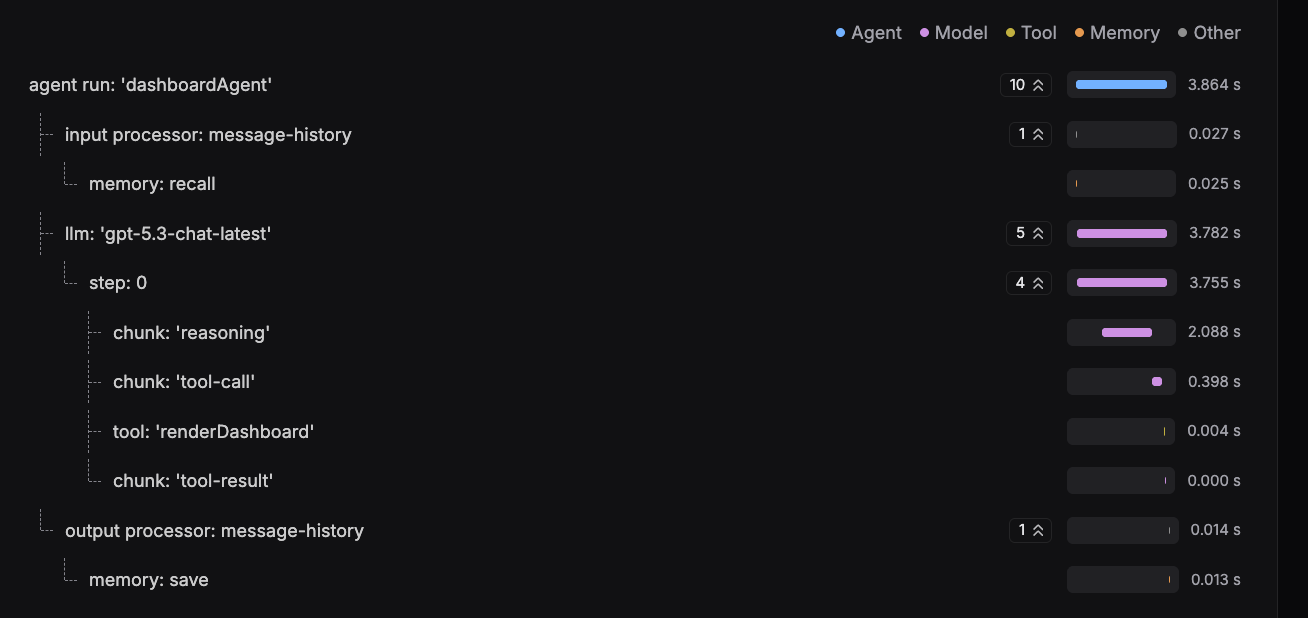
The model now only creates the DSL from the request – no longer the complete A2UI markup. This yields a nice side effect: the necessary tool calls for data retrieval can also be derived from the DSL. So the model no longer has to take care of that itself, which results in additional, smaller performance improvements – simply because less reasoning is needed for individual tool calls.
The second major improvement comes from caching: here the model is no longer needed at all for identical dashboards. The DSL comes straight from the cache; the structure described with A2UI is produced from it deterministically in application code, and only the current data is freshly loaded.
And with that we're back to the numbers from the beginning: around 40 seconds and over 46,000 tokens turned into around 0.1 seconds and a little over 1,500 tokens – a factor of 300 in speed, a factor of 30 in tokens. Importantly, the 30x token reduction already comes from the DSL alone, since the model now only has to produce this compact description instead of the complete A2UI markup. Caching goes on top of that: on a cache hit, the model isn't called at all – so no tokens are consumed whatsoever.
Conclusion: LLM for the Intent, Code for the Structure
At its core, the solution is a deliberate shift of responsibility: instead of letting the LLM generate extensive A2UI markup, it now only translates the request into a compact, application-specific DSL. The expensive work – creating the structure and fetching the data – is then handled by deterministic application code.
The result speaks for itself: 300 times faster, 30 times fewer tokens, and a much more controllable behavior that especially benefits weaker and cheaper models. With caching, the model can even be taken out of the hot path entirely for recurring dashboards.
The price for this is a bit of generative freedom: the application can only display what the DSL provides for. For most real-world business applications, however, that's not a loss but a gain – because there, predictability counts for more than unlimited dynamism. The overarching lesson is: let the LLM do what it does best – understand intent – and leave the creation of reliable structures to your code.
Interested in Production-Ready Agentic UI Architectures?
In my workshop, we dive into AG-UI, A2UI, MCP Apps, HITL patterns, and modern Angular architectures for real-world agentic systems.

English Version | German Version
FAQ
Why is direct A2UI generation with an LLM slow and expensive?
The model has to produce an extensive structure token by token from a long few-shot prompt (over 43,000 input tokens in the example) and, on top of that, issue several tool calls for the data. This single generation step dominates the runtime and can additionally produce faulty markup that forces correction loops.
How does an application-specific DSL speed up generation?
The LLM now only translates the request into a compact DSL instead of complete A2UI markup. The result is short, fast, and less error-prone. The expensive work – conversion into A2UI and data retrieval – is then handled by deterministic application code without any model.
What does caching add on top of that?
A2UI allows you to separate structure (updateComponents) and data (updateDataModel). In our implementation, the compact DSL is cached; the usually large structure is produced from it deterministically in application code, and on subsequent calls only the small data messages have to be regenerated with fresh data. For identical dashboards, the model is no longer needed at all.
What's the downside of the DSL approach?
The dynamism is limited to what the DSL explicitly provides for. Whatever it doesn't represent isn't possible. So you trade away part of the generative flexibility in exchange for speed, cost, and control – a good trade for most business applications.