

A language model is only as good as the context and the actions available to it. The Model Context Protocol (MCP) has established itself as the standard that connects agents with external tools, data, and services. It frees us from having to write a dedicated integration for every combination of model and tool.
Until now, however, these tools have mostly returned plain text or structured data, which the agent presents as a simple chat message. MCP Apps extends the protocol with interactive user interfaces, so that a tool result appears as a tailored widget instead of a wall of text. This closes the gap between conversational agents and the polished interfaces that users have come to expect from modern web applications.
This first part lays the groundwork: it shows how MCP and MCP Apps work together and illustrates the mechanics using a minimal, VanillaJS-based demo consisting of a host and an app. In the second part, we build on this and connect a business partner's MCP server to our flight portal – complete with a language model, agent, and AG-UI.
📂 Source code (branch: copilotkit)
The readme shows how to start the example including the backend and the MCP server.
MCP and MCP Apps
Before we turn to the SDK and the code, it's worth taking a look at the two building blocks on which our solution is based: MCP as the foundation and MCP Apps as the extension for interactive interfaces.
MCP
The Model Context Protocol (MCP) is an open standard through which third parties can provide tools. Anthropic introduced the popular protocol in November 2024 and handed it over to the Agentic AI Foundation at the end of 2025 – a fund under the umbrella of the Linux Foundation. MCP provides both metadata about the offered tools and the ability to invoke them:
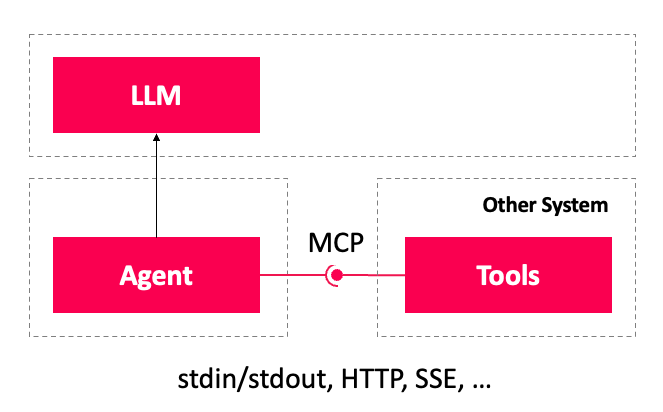
Agents therefore integrate these tools very easily. Further core responsibilities of MCP are providing resources – such as files, documents, or database contents – as well as offering reusable prompts.
MCP Apps
MCP Apps is an extension to MCP that lets you offer interactive user interfaces for the provided tools. Such an app can invoke a tool, visualize the execution progress, and present the received results. We use it here for the latter, especially since in our system the invocation happens via AG-UI.
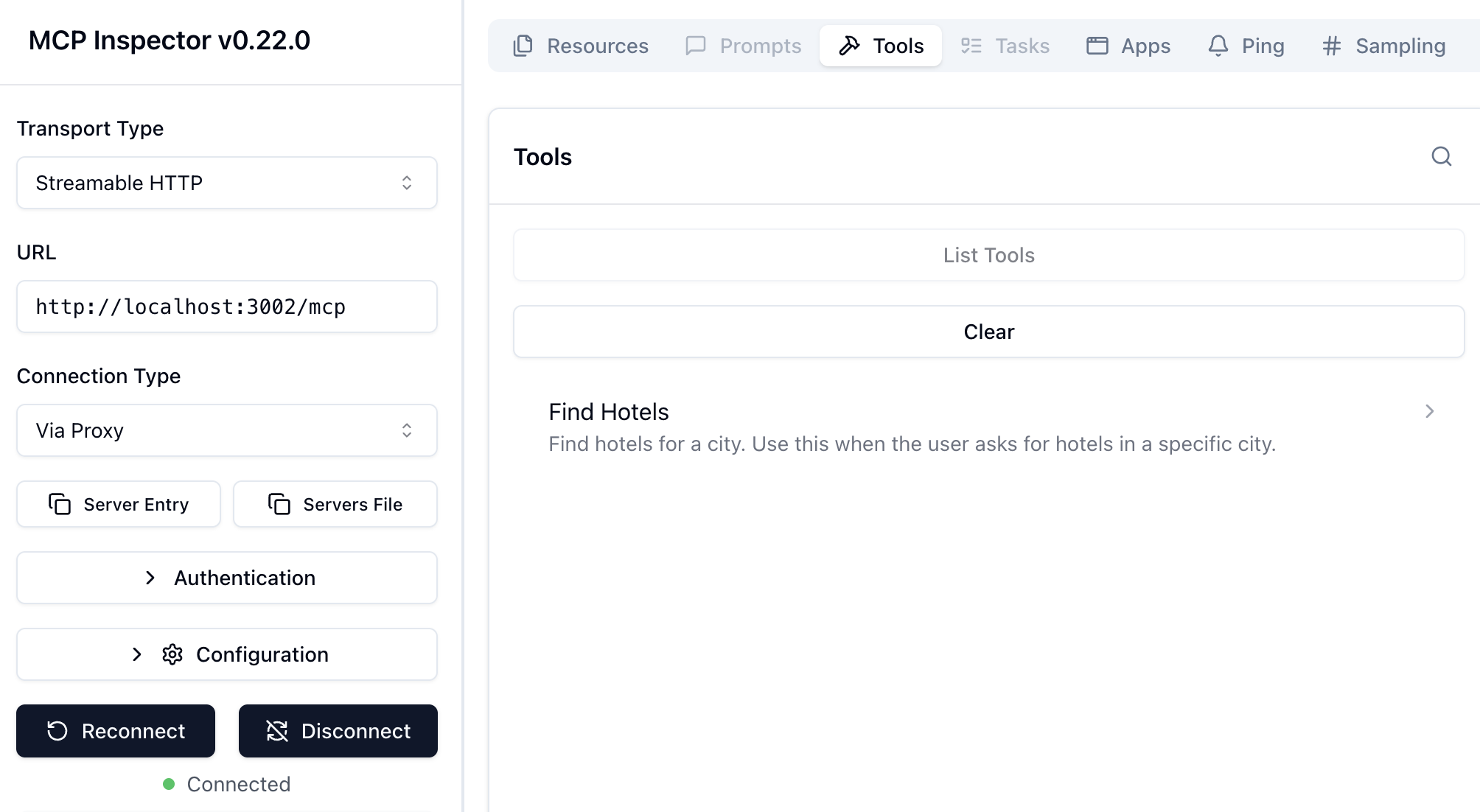
Technically, an MCP App is a standalone web application that can be based on any framework or on VanillaJS. MCP Apps are provided as resources via MCP. A tool's metadata points to the respective app using a resourceUri:
{
  "ui": {
    "resourceUri": "ui://hotels/results.html"
  },
  "ui/resourceUri": "ui://hotels/results.html"
}
Given this URI, an application retrieves the entire file via MCP and thus visualizes the respective tool. In the example shown, this URI appears twice, where the second, flat version (ui/resourceUri) exists merely for backward-compatibility reasons. The nested version corresponds to the current standard.
The application that embeds an app is called the host. To avoid conflicts, the host isolates the app in a sandbox. For this, an iframe is used. So that the app doesn't feel like a foreign body, the host passes what is known as a host context, which, among other things, specifies well-defined CSS variables for theming or provides information about the available space. In addition, the host passes the parameters sent to the invoked tool as well as the result received.
To avoid a scrollbar in the iframe, the app informs the host about its space requirements, so that the host resizes the iframe accordingly. All communication between host and app happens through the exchange of JSON documents. Both sides usually send these via the postMessage API. The JSON documents are defined in the MCP Apps protocol.
Agentic UI with Angular
If you don't just want to integrate MCP Apps but embed them into a scalable architecture:
In my book Agentic UI with Angular, I cover the underlying patterns and trade-offs in depth.
First Demo Application
The following sections illustrate how a host and an app work. For simplicity, this first example uses neither an agent nor, consequently, a language model. Instead, we use a simple, VanillaJS-based host that merely loads an app that is likewise based on VanillaJS.
The host loads this app into an iframe and sends it, among other things, a few hotels:
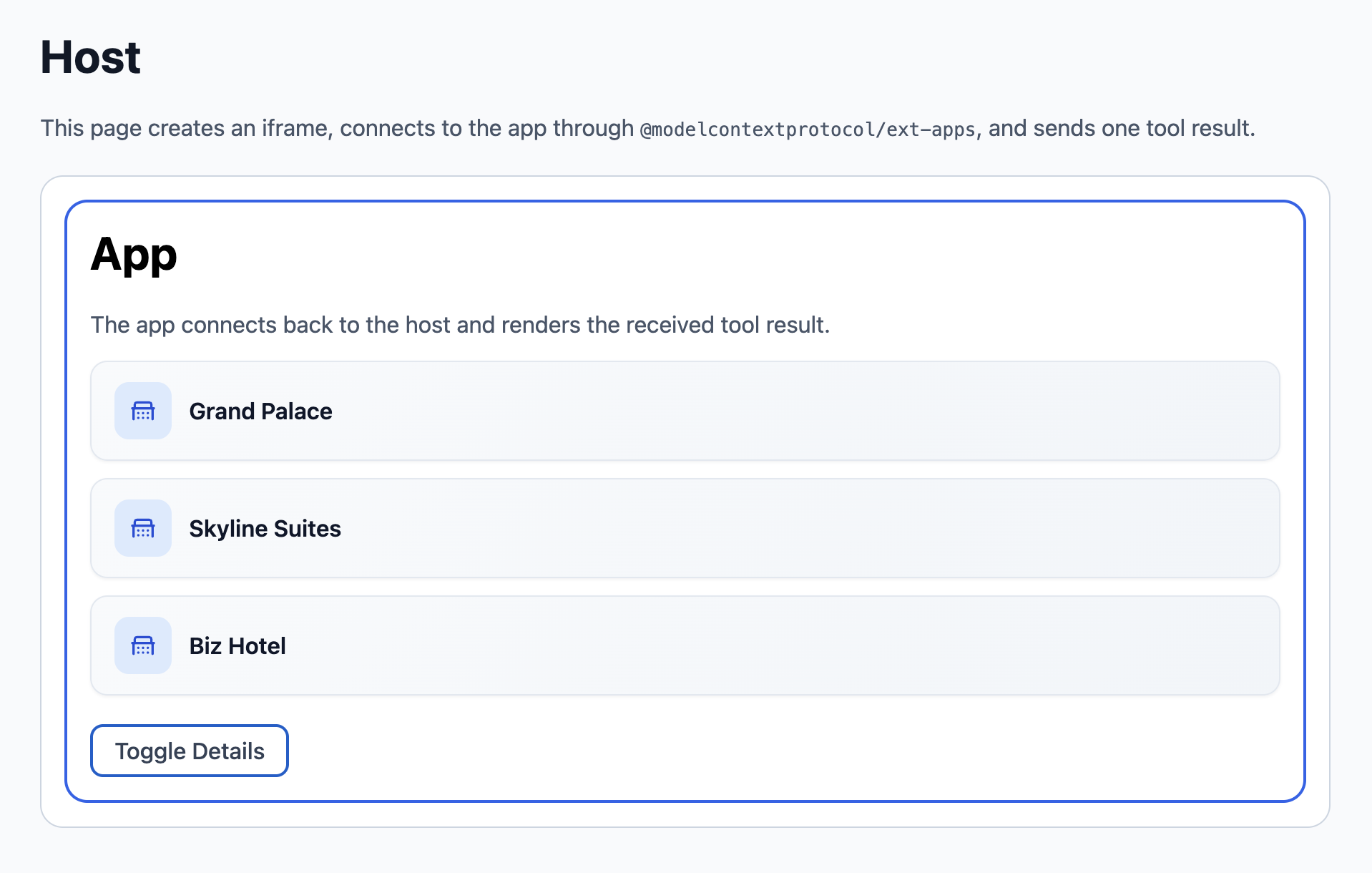
The complete source code can be found in the demo repository under mcp-apps-demo.
MCP Apps SDK
For the app, it provides an App object, and the host uses an AppBridge:
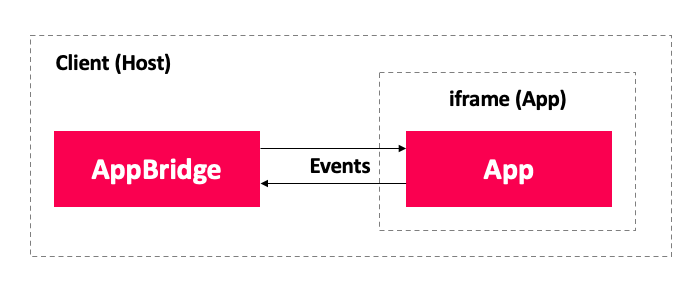
The two objects connect via what is known as a transport. The SDK ships with a transport for postMessage. Once the two parties are connected to each other, they can send messages back and forth. For sending messages, both objects have methods; messages are received via event handlers.
Providing a Host
To load an app, the host first creates an iframe, which it secures via the sandbox property. It then loads the HTML of the linked resource into it. For simplicity, we instead set the src property here to a hardcoded HTML file:
const frameHost = document.getElementById('iframe-host');

if (!(frameHost instanceof HTMLDivElement)) {
  throw new Error('Missing iframe host element.');
}

const iframe = document.createElement('iframe');
iframe.title = 'MCP App Demo';
iframe.sandbox.add('allow-scripts');
iframe.sandbox.add('allow-same-origin');
// iframe.srcdoc = '<html>...</html>';
iframe.src = './app.html';
frameHost.append(iframe);
As soon as the sandbox property is present, the browser forbids actions in the iframe such as downloads, submitting forms, or top-level navigations. By default, a sandbox also forbids the execution of scripts in the iframe and assigns the origin null to the application loaded into the iframe. In the case of MCP Apps, this would be counterproductive, especially since the app is based on JavaScript and an origin of null forbids communication via postMessage. For this reason, our host loosens the sandbox a bit with the exceptions allow-scripts and allow-same-origin.
Once the app has been loaded into the iframe, the host establishes a connection with the AppBridge:
import {
  AppBridge,
  PostMessageTransport,
} from '@modelcontextprotocol/ext-apps/app-bridge';

[...]

const bridge = new AppBridge(
  null,
  { name: 'MCP Apps Demo Host', version: '1.0.0' },
  { logging: { level: 'info' } },
);

bridge.onsizechange = (event) => {
  iframe.style.height = `${Math.ceil(event.height ?? 0)}px`;
};

await bridge.connect(
  new PostMessageTransport(iframe.contentWindow, iframe.contentWindow),
);

await waitForInitialization(bridge);

bridge.sendToolInput({
  arguments: {
    city: 'Graz',
  },
});

bridge.sendToolResult({
  content: [
    {
      type: 'text',
      text: 'The host sends this tool result to the app.',
    },
  ],
  structuredContent: {
    city: 'Graz',
    hotels: ['Grand Palace', 'Skyline Suites', 'Biz Hotel'],
  },
});

bridge.sendHostContextChange({
  availableDisplayModes: ['fullscreen'],
  displayMode: 'fullscreen',
  theme: 'light',
  styles: {
    variables: {
      "--color-background-primary": "#3f51b5"
    } as StyleVariables
  }
});
The first argument expected by the AppBridge is what is known as an (MCP) client, which allows a direct connection to the MCP server. Since we don't want any coupling to the MCP server here, however, but merely need to visualize the tool-call results received via AG-UI, we pass the value null intended for such cases.
The AppBridge makes the specified application name and version available to the app. The app can check whether it can communicate with this host or whether, for example, it is dealing with a version that is no longer supported. These checks don't happen automatically but would have to be implemented explicitly if needed – something we deliberately forgo in this example.
The info logging level gives us the ability to follow along with all exchanged messages on the JavaScript console. After initializing, the app raises the onsizechange event without any further action. The host uses this to bring the iframe to the required size. This avoids a scrollbar in the iframe.
The connect method establishes the connection to the App object in the app. The PostMessageTransport, which uses the postMessage API for communication, is given the iframe's contentWindow both as the source of the messages sent to the host and as the target of the messages sent by the host.
After calling connect, we need to wait until the app raises the oninitialized event. This is done with the helper function waitForInitialization, which turns the event into a promise:
function waitForInitialization(bridge: AppBridge): Promise<void> {
  return new Promise((resolve) => {
    bridge.oninitialized = () => {
      resolve();
    };
  });
}
After initialization, the host sends the parameters passed to the tool (sendToolInput), the result received (sendToolResult), and the host context (sendHostContextChange). The latter defines details about the presentation as well as the behavior of the app embedded in the host.
The typing requires specifying all CSS variables for styling. To limit this demo to just a single variable, a type assertion to StyleVariables is used here. Unfortunately, the SDK doesn't publish this type, which is why we have to derive it from the public API:
type StyleVariables = NonNullable<
  McpUiHostContext['styles']
>['variables'];
Providing an App
The MCP App creates an App instance, sets up event handlers for receiving the passed parameters, the tool result, and the host context, and connects to the host:
import { App } from '@modelcontextprotocol/ext-apps';

[...]

const app = new App({
  name: 'MCP Apps Demo App',
  version: '1.0.0',
});

app.ontoolinput = (input) => {
  [...]
};

app.ontoolresult = (result) => {
  [...]
};

app.onhostcontextchanged = (context) => {
  [...]
};

await app.connect();
Cleaning Up App and Host
When the host removes an app again – for example because the user closes the widget or the conversation moves on – both sides should shut down in an orderly manner. The SDK offers two mechanisms for this: a teardown request, which gives the app the opportunity to save its state, and the closing of the underlying connection.
On the host side, the AppBridge requests an orderly shutdown with teardownResource and waits for the app's confirmation. Only afterwards does it close the postMessage connection with close and remove the iframe:
await bridge.teardownResource({});
await bridge.close();
iframe.remove();
The app reacts to this request via the onteardown event handler. The handler may work asynchronously; the host waits for the returned promise before removing the iframe. For its part, the app can end the connection itself at any time with app.close():
app.onteardown = async () => {
  return {};
};
The app can also initiate the teardown itself – for example via a close button in its interface. To do so, it calls requestTeardown:
await app.requestTeardown();The host learns about this via the onrequestteardown event and decides whether it actually initiates the shutdown:
bridge.onrequestteardown = async () => {
  await bridge.teardownResource({});
  iframe.remove();
};
Both the AppBridge and the App object inherit close from the Protocol base class of the MCP SDK.
Summary and Outlook
MCP standardizes the connection of tools to agents, and MCP Apps lifts this idea to the level of the user interface: instead of a tool result in textual form, the user receives an interactive, tailored interface. An MCP App is a standalone web application to which a tool's metadata points via a resourceUri. The host loads the app into a secured iframe and communicates with it via the postMessage API – abstracted by the App object on the app side and the AppBridge on the host side.
Using a minimal, VanillaJS-based demo, we walked through the complete lifecycle: from setting up the host, through initialization, the exchange of tool parameters, results, and host context, all the way to the orderly teardown with teardownResource and close. Deliberately, neither an agent nor a language model was used, in order to focus attention entirely on the interplay of host and app.
With this, the foundation is laid. In the next article, we apply this knowledge to a complete case study: we connect the MCP server of a business partner specialized in hotel bookings to our flight portal. Along for the ride are a language model, the agent framework Mastra, and the AG-UI protocol, which after a tool call transports an ACTIVITY_SNAPSHOT to the client – which in turn the MCP Apps activity renderer shipped with CopilotKit displays as an MCP App.
Interested in production-ready Agentic UI architectures?
In my workshop, we dig into AG-UI, A2UI, MCP Apps, HITL patterns, and modern Angular architectures for real-world agentic systems.