

Agentic UI, independent of backend technologies and LLMs
As soon as an LLM does more than generate answers and starts calling tools, filling forms, changing routes, or selecting UI components, the integration quickly becomes messy. Client, agent, and model begin to intertwine, and a practical solution easily turns into a tightly coupled system. This is exactly where AG-UI comes in, defining a clear, message-based interface between frontend and agent.
This first part of the series shows which problems AG-UI addresses, how runs, messages, and tool calls interact, and why the standard enables a decoupled architecture without vendor lock-in.
📂 Source Code (see branch copilotkit)
What Is Agentic AI in the Frontend?
Agentic AI refers to systems in which a language model does more than generate text: it handles multi-step tasks, uses tools, and interacts with applications. In the frontend, this becomes visible when a language model does not just return text, but also interacts with stores, routing, and forms.
That does not mean the application can no longer be used in the conventional way: our demo application works perfectly fine without any AI integration. However, if users get stuck or want to shorten individual work steps, they can activate a so-called sidecar and chat with an LLM through a server-side agent:
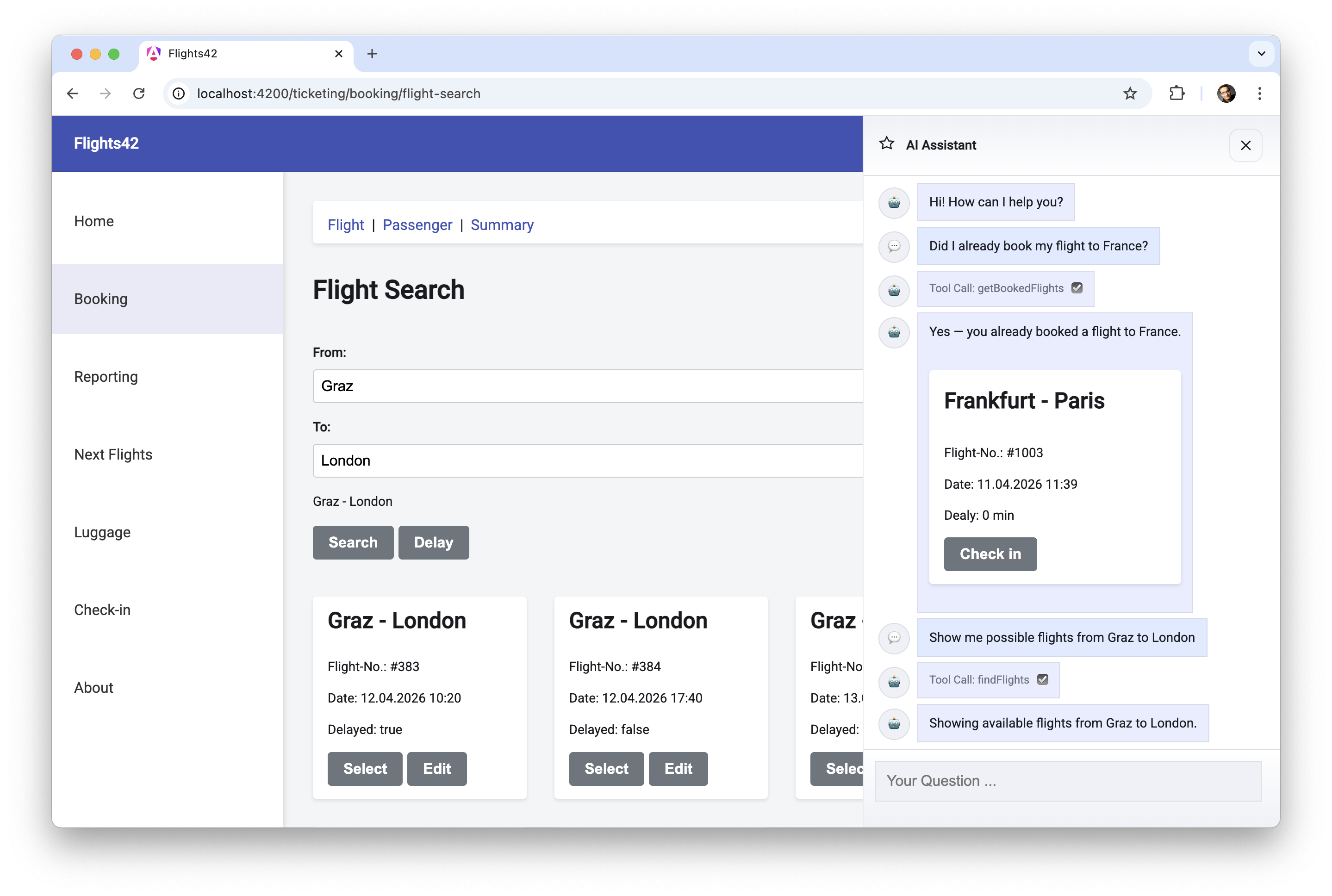
To answer questions, the LLM can rely on tools provided by the sidecar. In the backend, these tools can, for example, access databases, while in the frontend they handle tasks related to stores, forms, and routing.
In addition, the LLM can select components from a catalog, which the sidecar then displays. The sidecar passes data to these components that was provided by the language model and tools.
In the example shown, two tools are used: getBookedFlights is a server-side tool that determines the flights booked by the current user. The findFlights tool, by contrast, triggers a flight search in the client. It navigates to the route with the search form, fills it out, and starts the search.
For transparency, it is good practice to inform the user about the executed steps such as tool calls. The example shown makes this very explicit by also displaying the internal tool names. In a business application, this would usually be phrased in less technical language. Instead of Tool Call: getBookedFlights, the sidecar could write Determining booked flights ... to the chat history.
Besides the tool calls, the chat also shows textual responses as well as a flight card selected by the LLM. The sidecar passes the flight to be displayed to this card. To do so, the Angular application accesses the agent over HTTP, and the agent in turn has access to one or more LLMs:
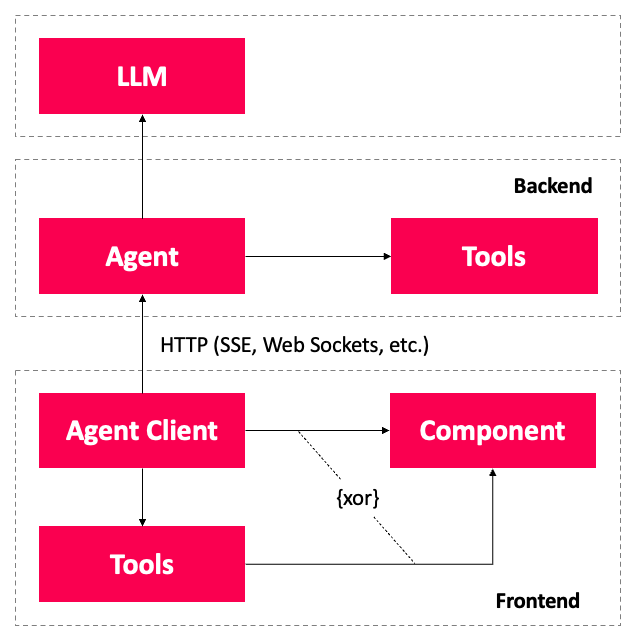
An agent client handles the details of this communication, informing the agent about the available client-side tools and components. The agent additionally has a list of server-side tools.
When the agent forwards the user's request to the LLM, it also sends the collected information about server-side tools, client-side tools, and components. The LLM now decides which additional data it needs and requests tool calls. The agent handles server-side tool calls itself and delegates execution of client-side tools to the agent client. It then reports the resulting data back to the LLM, which continues processing its task.
To provide the final answer to the request, the LLM responds with free text. It can also return a JSON document indicating which components the sidecar should display. The values for the inputs of these components are also contained in the JSON. Depending on the capabilities of the LLM, this JSON document is either a structured output or parameters passed to a client-side tool.
From a semantic point of view, the structured output is the cleaner solution. Unfortunately, some models do not support using tool calling and structured output at the same time. In addition, many LLMs support a formal description of tool call parameters via JSON Schema. For that reason, using tool calling to display components is often the more pragmatic solution.
This raises the question of how communication with the agent should be designed without creating overly tight coupling to the client. The AG-UI standard provides an answer.
What is AG-UI?
To remain independent of the chosen server technologies and to avoid vendor lock-in with individual LLM providers, the AG-UI standard defines the message types used for communication between client and agent. The standard is backed by the makers of CopilotKit, a convenient frontend SDK for building AI-based assistants and sidecars. Adapters now exist for virtually all well-known agent frameworks.
At the time this article was written, the AG-UI website listed the following supported frameworks:
- AG2
- Agno
- AWS Bedrock AgentCore
- AWS Bedrock Agents
- AWS Strands Agents
- Cloudflare Agents
- CrewAI
- Google ADK
- LangGraph
- LlamaIndex
- Mastra
- Microsoft Agent Framework
- OpenAI Agent SDK
- Pydantic AI
AG-UI defines messages exchanged between client and agent. These messages describe, for example, the transmission of text or tool calls together with their results. Subsequent messages can extend information from earlier ones. This forms the basis for streaming text as well as streaming parameters for tool calls.
AG-UI is deliberately designed to be transport-agnostic, meaning it makes no assumptions about the underlying transport protocol. Typical choices are HTTP with server-sent events (SSE) or WebSockets.
Agentic UI with Angular
If you don’t just want to integrate AG-UI but embed it into a scalable architecture:
In my book Agentic UI with Angular, I cover the underlying patterns and trade-offs in depth.
Message Types in AG-UI
For the individual messages exchanged between agent and client, AG-UI defines types that can in turn be grouped into different categories. The following table shows a selection of message types that we will use in this article:
| Category | Message Type | Description |
|---|---|---|
| Lifecycle | RUN_STARTED |
Starts a run that contains all messages for answering a question. |
RUN_FINISHED |
Completes a run | |
RUN_ERROR |
Reports an error for a run | |
| Text | TEXT_MESSAGE_START |
Starts the transmission of a text message |
TEXT_MESSAGE_CONTENT |
Delivers further parts of the text message | |
TEXT_MESSAGE_END |
Ends a text message | |
| Tool Call | TOOL_CALL_START |
Starts a tool call |
TOOL_CALL_ARGS |
Delivers further parameters for the tool call | |
TOOL_CALL_END |
Ends the tool call | |
TOOL_CALL_RESULT |
Delivers the result of a tool call |
A run is a single execution of an agent (or model) triggered by an input, producing a stream or result within a defined context. Each run results in messages related to tool calls, results from tool calls, and textual responses. Often, there is one run per user request, however, an agent can decompose a request into multiple runs, e.g., to forward them to different specialized models.
To enable streaming, AG-UI allows most information to be split across multiple messages. Examples include the message types TEXT_MESSAGE_CONTENT and TOOL_CALL_ARGS. Multiple messages of these types can gradually deliver text or additional arguments for a tool call.
The following messages reflect the first run from the example application shown earlier and illustrate the use of AG-UI:
{"type":"RUN_STARTED", "threadId":"f66a", "runId":"95e2"}

{"type":"TOOL_CALL_START", "toolCallId":"3PQX",
  "toolCallName":"getBookedFlights"}
{"type":"TOOL_CALL_ARGS", "toolCallId":"3PQX",
  "delta":"{}"}
{"type":"TOOL_CALL_END", "toolCallId":"3PQX"}
{"type":"TOOL_CALL_RESULT", "toolCallId":"3PQX",
  "content":"...JSON...", "role":"tool"}

{"type":"TEXT_MESSAGE_START","messageId":"d110",
  "role":"assistant"}
{"type":"TEXT_MESSAGE_CONTENT","messageId":"d110",
  "delta":"Yes - you already booked "}
{"type":"TEXT_MESSAGE_CONTENT","messageId":"d110",
  "delta":"a flight to France."}
{"type":"TEXT_MESSAGE_END","messageId":"d110"}

{"type":"TOOL_CALL_START", "toolCallId":"TjaS",
  "toolCallName":"showComponents"}
{"type":"TOOL_CALL_ARGS", "toolCallId":"TjaS",
  "delta":"...JSON..."}
{"type":"TOOL_CALL_END", "toolCallId":"TjaS"}

{"type":"RUN_FINISHED", "threadId":"f66a", "runId":"95e2"}
These messages describe tool calls for the server tool getBookedFlights and the client tool showComponents, as well as a textual response. For readability, the IDs, which are typically GUIDs, were shortened, and the JSON embedded in strings for arguments and tool results is only indicated. Thanks to the IDs, it is possible to see which previously started tool call the additional arguments or logged results belong to.
So that the first content can already be displayed during transmission, the agent splits its response into multiple text messages. Similar to tool calls, the messages that together form one response share the same ID. The two lifecycle messages that start and finish the run contain not only the runId but also a threadId to group all runs of a chat history.
Summary
AG-UI defines a clear interface between frontend and agent, describing runs, text, and tool calls in a consistent way. This makes it possible to standardize streaming, tool calling, and UI updates without committing to a specific agent framework or LLM provider.
For agentic frontends, this primarily means independence from backend technologies and less vendor lock-in. As the first part of this series, this article lays the conceptual groundwork.
The Next Step
So much for the theory – the next part shows how to put runs, messages, and tool calls into practice on the server and in the browser, using the official AG-UI SDK.
Interested in production-ready Agentic UI architectures?
In my workshop, we dig into AG-UI, A2UI, MCP Apps, HITL patterns, and modern Angular architectures for real-world agentic systems.
FAQ
What Is Agentic AI?
Agentic AI describes systems in which a language model does more than formulate answers: it plans tasks, calls tools, and interacts with applications. In the frontend, this includes sidecars, tool calling, and dynamically displayed UI components.
What Is AG-UI?
AG-UI is a standard for communication between client and agent. It defines message types for runs, text messages, and tool calls, creating a transport-agnostic interface for agentic frontends.
Why Do You Need AG-UI in the Frontend?
AG-UI helps keep frontend, agent, and model cleanly decoupled. That makes it possible to implement streaming, tool calls, and UI updates in a standardized way without committing too early to a specific framework or vendor.
How Do Runs, Messages, and Tool Calls Relate to Each Other?
A run is a single execution of an agent or model triggered by an input within a defined context. It produces the messages needed for that execution, including text responses, tool calls, tool results, and lifecycle events such as start, finish, or error. In many cases, one user request leads to one run, but an agent can also break a request into multiple runs, for example when delegating work to specialized models.