

Language models no longer respond with text alone, but with entire UI structures.
As soon as a language model is supposed to deliver more than a flowing text in response to a user request – say, displaying a list of flights, showing an input form, or rendering a chart – the integration between agent and frontend quickly becomes unwieldy. With A2UI, Google has introduced a standard that allows a language model to return components and their data instead of plain text – the frontend then takes care of the presentation.
This first part of the three-part series introduces the A2UI protocol and uses an Angular demo to show how the bundled renderer displays the UI structures described by the model.
📂 Source Code (see branch copilotkit)
What is A2UI?
A2UI stands for Agent-to-UI and is a standard introduced by Google that closes the gap between an agent and a dynamically generated user interface. At its core, A2UI describes a vocabulary of predefined components along with their properties as well as a message format with which the agent tells the client which components to display and with which data to populate them.
Instead of returning only text, the language model picks from a catalog of predefined components and supplies the corresponding data right along with them. The client only needs to render these components – and decides on the concrete appearance itself. The agent thus determines the "what", the client decides the "how". This way, the dynamically generated UI fragments don't feel like foreign bodies but blend into the application's existing design.
In contrast to approaches like MCP Apps, where the agent ships complete components, A2UI's strict separation between structure and presentation also prevents the client from having to load foreign code at runtime.
When this article was written, two versions of A2UI were available: the stable version 0.8 and the upcoming version 0.9 as a draft. In this article, I am already covering the latter.
A2UI in Action: Examples of Dynamically Generated UIs
We can see a dynamic A2UI response in the example of a demo application in which an agent issues a follow-up question in the form of an interactive form:
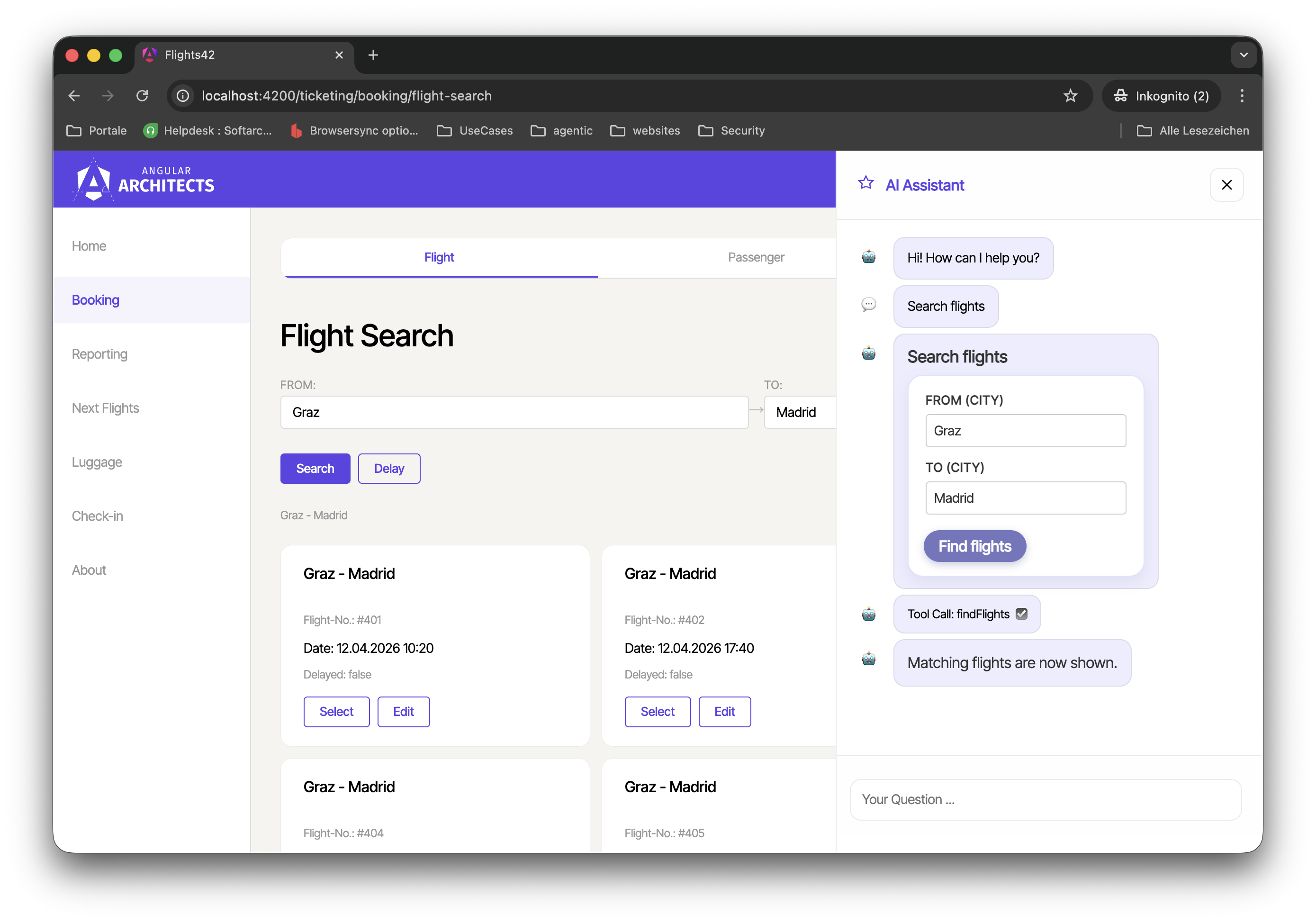
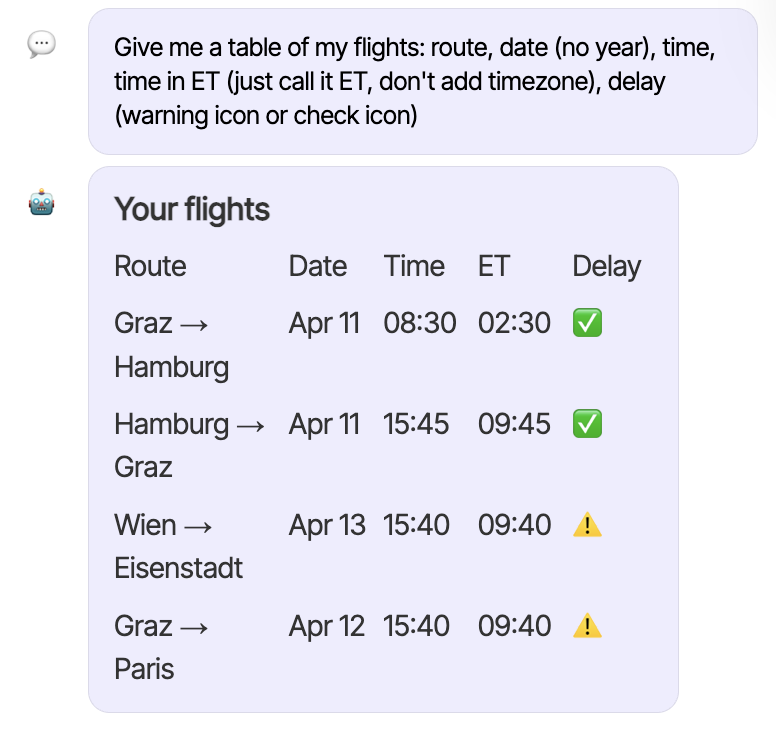
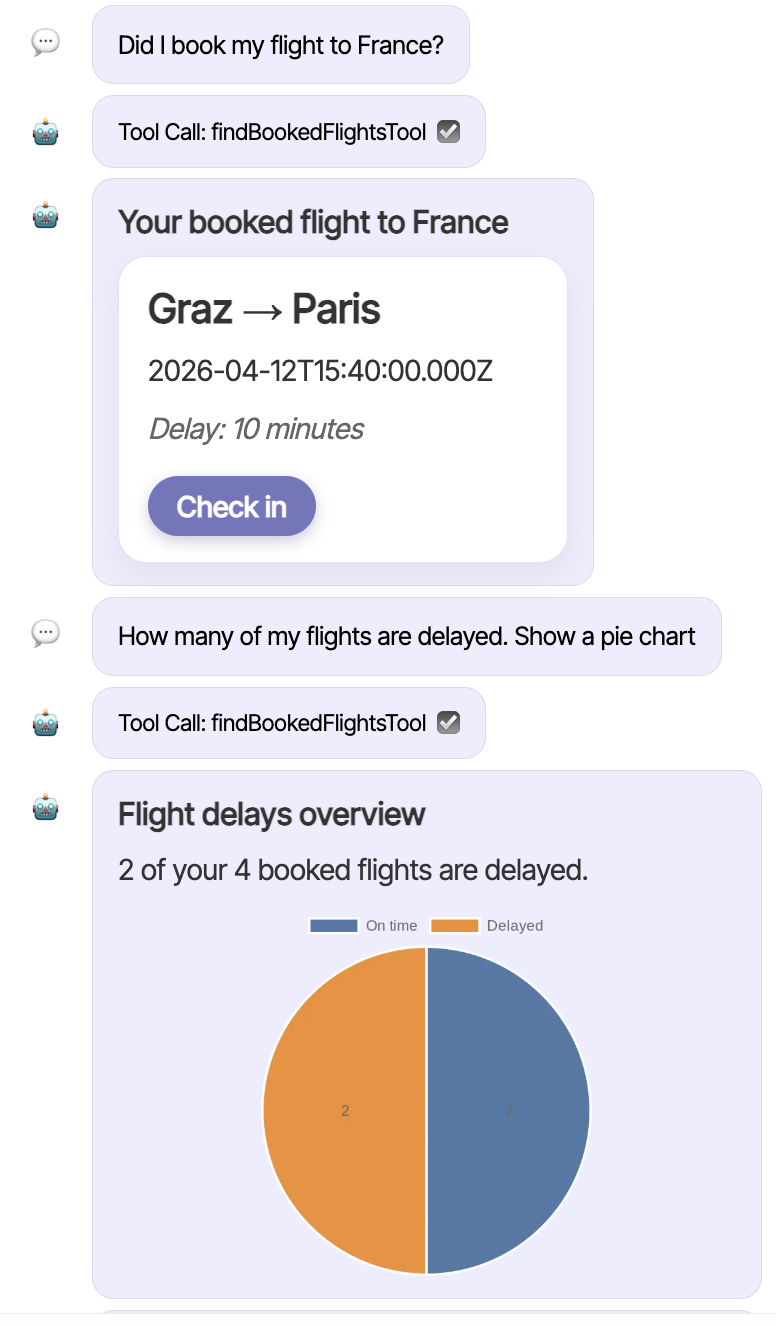
This makes it possible to extend the UI far beyond classic chat conversations. The LLM provides the components to display in the form of JSON. In this way, you can implement not only dialogs but also interactive lists, charts, or status displays. More examples of responses dynamically defined by the LLM:
What Components Does the A2UI Basic Catalog Contain?
The central idea of A2UI is what is called a component catalog. Such a catalog describes a set of components that both the agent and the client know. The Basic Catalog defined by A2UI comprises a whole range of common UI building blocks, which can be divided into the following groups. The following overview is taken from the specification:
| Category | Component | Example |
|---|---|---|
| Display | Text | Displays text. Supports basic Markdown. |
| Image | Displays an image from a URL. | |
| Icon | Displays a system-provided icon from a predefined list. | |
| Video | Displays a video from a URL. | |
| AudioPlayer | A player for audio content from a URL. | |
| Layout | Row | A horizontal layout container. |
| Column | A vertical layout container. | |
| List | A scrollable list of components. | |
| Container | Card | A card-style container. |
| Tabs | A series of tabs, each with a title and a child component. | |
| Divider | A horizontal or vertical separator. | |
| Modal | A dialog that appears above the main content and is triggered by a button in the main content. | |
| Input | Button | A clickable button that triggers an action. Supports the variants "primary" and "borderless". |
| CheckBox | A checkbox with a label and a boolean value. | |
| TextField | A field for text input by the user. | |
| DateTimeInput | An input for date and/or time. | |
| ChoicePicker | A component for selecting one or more options. | |
| Slider | A slider for selecting a numeric value within a range. |
What Functions Does A2UI Provide?
In addition to the components themselves, A2UI also provides functions that the LLM can reference inside component definitions. This way, values that have to be determined or processed at runtime – for example, formatted numbers and dates – can be described declaratively without the language model having to execute the concrete logic itself. The Basic Catalog ships with a number of frequently needed functions such as formatNumber or formatDate out of the box. The following overview is also taken from the specification:
| Category | Function | Description |
|---|---|---|
| Validation | required | Checks that the value is not null, undefined, or empty. |
| regex | Checks that the value matches a regular expression. | |
| length | Checks constraints on string length. | |
| numeric | Checks constraints on numeric ranges. | |
| Checks that the value is a valid email address. | ||
| Formatting | formatString | Performs string interpolation on data model values and registered functions. |
| formatNumber | Formats a number with thousands separators and decimal places. | |
| formatCurrency | Formats a number as a currency string. | |
| formatDate | Formats a date/time according to a pattern. | |
| Logical | and | Logical AND of a list of boolean values. |
| or | Logical OR of a list of boolean values. | |
| not | Logical NOT of a boolean value. | |
| Other | openUrl | Opens a URL in a browser. |
| pluralize | Selects a localized string based on a numeric count. |
How Do A2UI Messages and the Renderer Work?
The client displays the components via a renderer. The renderer is the instance that receives A2UI messages and produces the corresponding UI elements. For the messages exchanged between agent and client, A2UI defines four message types:
| Message Type | Description |
|---|---|
createSurface |
Instructs the client to create a new surface. |
updateComponents |
Provides a list of component definitions that are added to or updated on a particular surface. |
updateDataModel |
Provides new data to be inserted into or replace the data model of a surface. |
deleteSurface |
Explicitly removes a surface and its contents from the UI. |
A surface is a logical display area in the client that the agent creates with createSurface, populates with updateComponents, and removes with deleteSurface when needed. A2UI manages the data used in the components in a separate data model per surface, which can be updated via updateDataModel. Components access values in this data model via data binding, so changes are automatically reflected in the display.
Integrating the A2UI Renderer in Angular
So that developers don't have to implement the protocol themselves, the A2UI project already provides renderers for various languages as well as adapters for various frameworks. The renderer for JavaScript can be found in the package @a2ui/web_core, and the adapter for Angular built on top of it in @a2ui/angular. As usual, both packages can be installed via npm:
npm install @a2ui/angular @a2ui/web_coreExample: A Passenger Card with A2UI in Angular
To make how A2UI works tangible, we start with a minimal example located in the example project under projects/a2ui-demo. Instead of a real language model, our example code initially produces the A2UI messages in a hardcoded fashion. This way we can fully focus on the data format and the client-side processing.
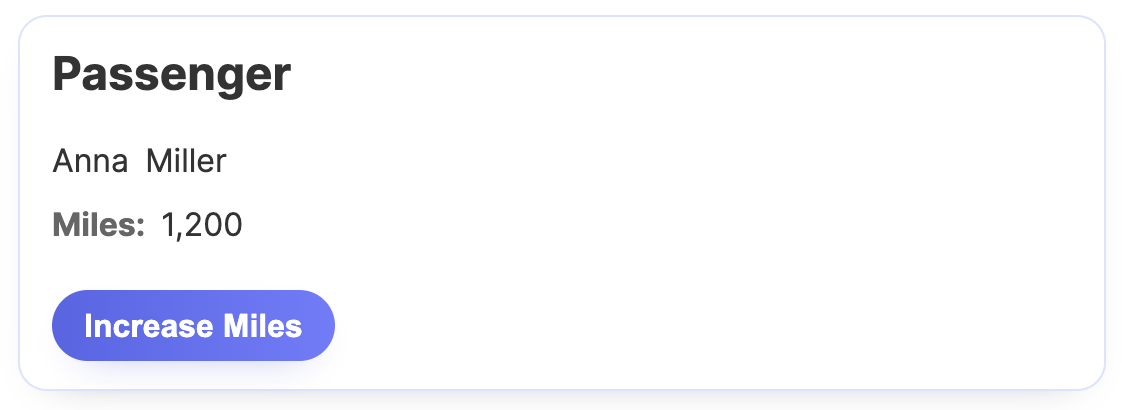
The demo presents a card with a passenger's data along with a button that increases the earned bonus miles:
The passenger card is defined with the function createSimpleCard, which produces an array of A2UI messages:
import type { A2uiMessage } from '@a2ui/web_core/v0_9';

export function createSimpleCard(
  surfaceId: string,
  catalogId: string,
  passenger: Passenger,
): A2uiMessage[] {
  return [
    {
      version: 'v0.9',
      createSurface: {
        surfaceId,
        catalogId,
      },
    },
    {
      version: 'v0.9',
      updateComponents: {
        surfaceId,
        components: [
          { id: 'root', component: 'Card', child: 'content' },
          {
            id: 'content',
            component: 'Column',
            children: ['headline', 'name-row', 'miles-row', 'button'],
          },
          {
            id: 'headline',
            component: 'Text',
            text: 'Passenger',
            variant: 'h2',
          },
          {
            id: 'name-row',
            component: 'Row',
            children: ['first-name', 'last-name'],
          },
          {
            id: 'first-name',
            component: 'Text',
            text: { path: '/passenger/firstName' },
            variant: 'body',
          },
          {
            id: 'last-name',
            component: 'Text',
            text: { path: '/passenger/lastName' },
            variant: 'body',
          },
          {
            id: 'miles-row',
            component: 'Row',
            children: ['miles-label', 'miles-value'],
          },
          {
            id: 'miles-label',
            component: 'Text',
            text: 'Miles:',
            variant: 'caption',
          },
          {
            id: 'miles-value',
            component: 'Text',
            text: {
              call: 'formatNumber',
              args: {
                value: { path: '/passenger/bonusMiles' },
                decimals: 0,
              },
              returnType: 'string',
            },
            variant: 'body',
          },
          {
            id: 'button',
            component: 'Button',
            child: 'button-label',
            action: {
              event: {
                name: 'increaseMiles',
                context: {
                  passenger: { path: '/passenger' },
                },
              },
            },
          },
          {
            id: 'button-label',
            component: 'Text',
            text: 'Increase Miles',
            variant: 'body',
          },
        ],
      },
    },
    {
      version: 'v0.9',
      updateDataModel: {
        surfaceId,
        path: '/passenger',
        value: passenger,
      },
    },
  ];
}
The first message of type createSurface creates a new surface. The second message uses updateComponents to describe the components to be displayed: a Card as root, which contains a column with a heading, a row of names, a miles display, and a button. The individual outputs are bound, in part, to values in the data model via the path property. This data model is defined by the example in the third message, which has the type updateDataModel.
Each component receives its own ID; nested components are referenced via child or children using these IDs. As a result of this kind of referencing, all nodes of the component tree are at the same level – A2UI deliberately avoids nesting in the JSON document, since it poses a challenge for language models.
The button declaratively states that an event increaseMiles should be triggered on click, with the passenger data as context. Reacting to it is the client's responsibility.
To display the described structure, the example uses the A2uiRendererService provided by the Angular adapter:
import {
  A2UI_RENDERER_CONFIG,
  A2uiRendererService,
  SurfaceComponent,
} from '@a2ui/angular/v0_9';

[...]

@Component({
  selector: 'app-root',
  imports: [SurfaceComponent],
  template: `
    <a2ui-v09-surface [surfaceId]="surfaceId" />
  `,
  styleUrl: './app.css',
})
export class App {
  private readonly renderer = inject(A2uiRendererService);
  protected readonly config = inject(A2UI_RENDERER_CONFIG);
  private readonly destroyRef = inject(DestroyRef);
  protected readonly surfaceId = 'passenger-card-surface';

  constructor() {
    this.render();
    this.registerHandler();
  }

  private render(): void {
    const passenger: Passenger = {
      id: 42,
      firstName: 'Anna',
      lastName: 'Miller',
      bonusMiles: 1200,
    };

    const messages = createSimpleCard(
      this.surfaceId,
      this.config.catalogs[0].id,
      passenger,
    );

    this.renderer.processMessages(messages);
  }

  private registerHandler(): void {
    [...]
  }
}
The A2uiRendererService processes the received A2UI messages with its processMessages method. The actual display is handled by the SurfaceComponent, which takes the desired surfaceId.
New: Agentic UI with Angular
If you don’t just want to integrate A2UI but embed it into a scalable architecture:
In my book Agentic UI with Angular, I cover the underlying patterns and trade-offs in depth.
Since the button in our card triggers an increaseMiles event, the example registers a handler for it on the onAction property:
import type { A2uiClientAction } from '@a2ui/web_core/v0_9';

[...]

private registerHandler(): void {
  const subscription = this.renderer.surfaceGroup.onAction.subscribe(
    (action: A2uiClientAction) => {
      console.log('[A2UI Event]', action);

      if (action.name !== 'increaseMiles') {
        return;
      }

      const passenger = action.context['passenger'] as Passenger;

      this.renderer.processMessages([
        {
          version: 'v0.9',
          updateDataModel: {
            surfaceId: this.surfaceId,
            path: '/passenger',
            value: {
              ...passenger,
              bonusMiles: passenger.bonusMiles + 300,
            },
          },
        },
      ]);
    },
  );

  this.destroyRef.onDestroy(() => {
    subscription.unsubscribe();
  });
}
The handler for increaseMiles takes the passenger data passed in the context and updates the bonus miles in the bound data model with an updateDataModel message. The renderer notices the change in the data model and automatically updates the bound displays.
Unfortunately, onAction is not an RxJS observable. That is why the unsubscribe here is performed programmatically via a DestroyRef.
So that the renderer knows which catalogs are available and how any Markdown content is to be converted, the Angular adapter expects a central configuration provided via providers:
import {
  A2UI_RENDERER_CONFIG,
  A2uiRendererService,
  BasicCatalog,
  provideMarkdownRenderer,
} from '@a2ui/angular/v0_9';
import {
  ApplicationConfig,
  inject,
  provideBrowserGlobalErrorListeners,
} from '@angular/core';
import { marked } from 'marked';

export const appConfig: ApplicationConfig = {
  providers: [
    provideBrowserGlobalErrorListeners(),
    {
      provide: A2UI_RENDERER_CONFIG,
      useFactory: () => ({
        catalogs: [inject(BasicCatalog)],
      }),
    },
    provideMarkdownRenderer(async (markdown) =>
      marked.parse(String(markdown ?? '')),
    ),
    A2uiRendererService,
  ],
};
The shown example configures the Basic Catalog shipped with A2UI, which the adapter exposes as a service. To do so, the catalog is registered for the A2UI_RENDERER_CONFIG token. In addition, the implementation of the Basic Catalog provided by the A2UI team requires a Markdown renderer, which has to be wired up via provideMarkdownRenderer.
Summary
A2UI enables a language model to respond to requests not only with text but with concrete UI structures that the client can render directly at runtime. The model combines existing components into appropriate interfaces – tailored to the respective context and the current interaction.
A key advantage lies in the separation of structure and presentation: the client decides on the concrete appearance and does not execute any foreign code. As a result, the dynamically generated UI fragments stay consistent with the application and don't feel like foreign bodies.
The Next Step
We now know how to render A2UI in Angular. The next part shows how to have the UI generated by an agent and wired up via AG-UI.
Interested in production-ready Agentic UI architectures?
In my workshop, we dig into AG-UI, A2UI, MCP Apps, HITL patterns, and modern Angular architectures for real-world agentic systems.
FAQ
What is A2UI?
A2UI (Agent-to-UI) is a standard introduced by Google that closes the gap between an agent and a dynamically generated user interface. It defines a vocabulary of predefined components along with their properties as well as a message format with which an agent tells the client which components to display and with which data to populate them.
What is A2UI used for?
A2UI enables language models to respond to requests not only with text but also with concrete UI structures such as lists, cards, charts, or input forms. This makes it possible to extend agentic sidecars and assistants far beyond classic chat conversations, without the client having to load any foreign code at runtime.
What is the Basic Catalog in A2UI?
The Basic Catalog is the collection of common UI building blocks shipped with A2UI. It includes display, layout, container, and input components such as Text, Image, Card, Column, Row, Button, or TextField, and additionally provides standard functions like formatNumber, formatDate, or typical validations.
How do you integrate A2UI into an Angular application?
For Angular, A2UI provides the package @a2ui/angular, which is built on top of the JavaScript renderer @a2ui/web_core. The A2uiRendererService processes the A2UI messages, the SurfaceComponent displays the rendered surface, and the desired catalog is registered via the A2UI_RENDERER_CONFIG token.