

Domain-specific widgets as first-class building blocks for the language model.
As soon as domain-specific concepts come into play, A2UI's Basic Catalog rarely suffices: a flight booking, a boarding pass, or a bonus program quickly look arbitrary as generic cards and lists. With Custom Catalogs, A2UI therefore provides a clear mechanism to make your own domain-appropriate components and functions available to the language model – without sacrificing the lean, declarative character of the protocol.
This third and final part of the series shows how to define such Custom Catalogs in Angular, register them with the renderer, and integrate them with the CopilotKit integration introduced in the second part.
📂 Source Code (see branch copilotkit; the standalone renderer example can be found in the folder projects/a2ui-demo)
What Are Custom Catalogs in A2UI?
A Custom Catalog extends A2UI with your own, domain-driven components and functions that the language model may reference like any other component. Custom Catalogs often represent a superset of the Basic Catalog, so that in addition to your own building blocks they also include the well-known general-purpose UI building blocks. From the renderer's perspective, processing remains the same; the LLM merely receives a larger toolbox.
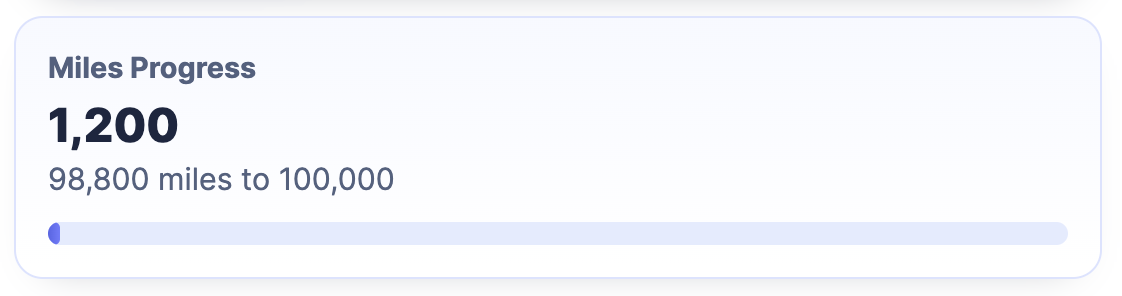
In what follows, we extend the passenger card introduced in the first part with our own MilesProgress component, which visualizes the progress to the next bonus tier:
Creating Your Own Components for the Custom Catalog
At its core, an A2UI component in Angular is just a regular Angular component. However, it receives the inputs that the agent transmits via A2UI through a defined Context object. The following listing shows the definition of such a context for our MilesProgress component. The passenger property is declared as a BoundProperty: it can hold either concrete data or represent a binding to the data model:
import type { BoundProperty } from '@a2ui/angular/v0_9';

export interface MilesProgressContext {
  passenger: BoundProperty<Passenger>;
}
The corresponding component receives this context via the props InputSignal:
@Component({
  selector: 'app-miles-progress',
  changeDetection: ChangeDetectionStrategy.OnPush,
  imports: [DecimalPipe],
  template: `
    <section class="miles-progress">
      <p class="eyebrow">Miles Progress</p>
      <p class="current">{{ passenger().bonusMiles | number }}</p>
      <p class="remaining">
        {{ remainingMiles() | number }} miles to {{ nextThreshold() | number }}
      </p>
      <div aria-hidden="true" class="track">
        <div class="fill" [style.width.%]="progressPercent()"></div>
      </div>
    </section>
  `,
  styleUrl: './miles-progress.css',
})
export class MilesProgress {
  readonly props = input<MilesProgressContext>(initialContext);
  readonly surfaceId = input.required<string>();
  readonly componentId = input.required<string>();
  readonly dataContextPath = input('/');

  protected readonly passenger = computed(() => this.props().passenger.value());

  protected readonly nextThreshold = computed(() =>
    calcNextThreshold(this.passenger().bonusMiles),
  );

  protected readonly remainingMiles = computed(() =>
    calcRemainingMiles(this.nextThreshold(), this.passenger().bonusMiles),
  );

  protected readonly progressPercent = computed(() =>
    calcProgressPercent(this.nextThreshold(), this.passenger().bonusMiles),
  );
}
Besides props, the renderer sets three further inputs when it creates the component dynamically: surfaceId names the surface the component belongs to, componentId identifies it within that surface, and dataContextPath provides the base path in the data model against which relative bindings are resolved. Our MilesProgress component does not need this information; it becomes interesting for widgets that write to the data model themselves or trigger actions.
Currently, there is no dedicated interface for this set of inputs.
The MilesProgress component shown reads the current bonus miles from the context and uses a computed signal to calculate the number of miles still needed to reach the next bonus tier. It also displays a progress indicator for that goal.
So that the renderer knows the MilesProgress component and can instantiate it correctly, a description of its inputs in the form of a schema is also required. The renderer from the A2UI team uses the popular library Zod for this:
import type { AngularComponentImplementation } from '@a2ui/angular/v0_9';
import { z } from 'zod/v3';

[...]

const passengerSchema = z.object({
  id: z.number(),
  firstName: z.string(),
  lastName: z.string(),
  bonusMiles: z.number(),
});

const milesProgressSchema = z
  .object({
    passenger: binding(passengerSchema).optional(),
  })
  .strict();

export const milesProgressEntry = {
  name: 'MilesProgress',
  component: MilesProgress,
  schema: milesProgressSchema as unknown,
} as unknown as AngularComponentImplementation;
// ^^^ Cast works around a typing issue in the current version
The schema specifies that the passenger property can be passed either as an object (passengerSchema) or as a data binding with a path property. The constant milesProgressEntry bundles the component's name and implementation as well as the schema into a single unit that the catalog can later include.
Since every property may take either a concrete value or a data binding, the example project ships a small helper function binding that pairs a value schema with the alternative of a path binding:
export function binding<T extends z.ZodTypeAny>(schema: T) {
  return z.union([schema, z.object({ path: z.string() }).strict()]);
}New: Agentic UI with Angular
If you don’t just want to integrate A2UI but embed it cleanly into larger architectures:
In my book Agentic UI with Angular, I cover exactly these patterns and trade-offs in depth.
Your Own Functions for the Custom Catalog
In addition to components, a Custom Catalog can also provide its own functions. These complement the standard functions included in the Basic Catalog, such as formatNumber and formatDate. The following listing shows a small helper function formatId, which converts a numeric ID into a readable string like P-0042. The factory createFunctionImplementation from @a2ui/web_core takes the metadata – name, return type, and a Zod schema for the expected arguments – as well as the actual implementation:
import {
  createFunctionImplementation,
  type FunctionImplementation,
} from '@a2ui/web_core/v0_9';
import { z } from 'zod/v3';

const formatIdSchema = z
  .object({
    value: z.number(),
  })
  .strict();

export const formatIdImplementation = createFunctionImplementation(
  {
    name: 'formatId',
    returnType: 'string',
    schema: formatIdSchema as unknown as FunctionImplementation['schema'],
  },
  ({ value }) => {
    const normalizedValue = Math.max(0, Math.trunc(value));

    return `P-${String(normalizedValue).padStart(4, '0')}`;
  },
);
With components and functions, the two central building blocks of a Custom Catalog are defined. As the next step, we need to make the catalog available to the renderer.
Registering a Custom Catalog with the A2UI Renderer
A Custom Catalog is an instance of BasicCatalogBase that receives a unique id, the list of additional components, and a list of functions in its constructor:
import { BASIC_FUNCTIONS, BasicCatalogBase } from '@a2ui/angular/v0_9';

import { formatIdImplementation } from './format-id';
import { milesProgressEntry } from './miles-progress';

export const customCatalog = new BasicCatalogBase({
  id: 'https://example.com/catalogs/flights42-a2ui-demo',
  extraComponents: [milesProgressEntry],
  functions: [...BASIC_FUNCTIONS, formatIdImplementation],
});
Unfortunately, the API behaves somewhat asymmetrically in the version discussed here: extraComponents complements the standard components, whereas functions replaces the standard functions, which is why BASIC_FUNCTIONS has to be spread in by hand.
So that the renderer uses the new catalog, the instance just needs to be referenced in the configuration – a dedicated Angular service is not required for this:
import {
  A2UI_RENDERER_CONFIG,
  A2uiRendererService,
  provideMarkdownRenderer,
} from '@a2ui/angular/v0_9';
import {
  ApplicationConfig,
  provideBrowserGlobalErrorListeners,
} from '@angular/core';
import { marked } from 'marked';

import { customCatalog } from './custom-catalog/custom-catalog';

export const appConfig: ApplicationConfig = {
  providers: [
    provideBrowserGlobalErrorListeners(),
    {
      provide: A2UI_RENDERER_CONFIG,
      useValue: {
        catalogs: [customCatalog],
      },
    },
    provideMarkdownRenderer(async (markdown) =>
      marked.parse(String(markdown ?? '')),
    ),
    A2uiRendererService,
  ],
};
Once the catalog is registered, the example application can use the MilesProgress component like any other component in an A2UI message. The following listing shows an excerpt of an updateComponents message in which the MilesProgress component is displayed alongside the existing passenger card:
updateComponents: {
  surfaceId,
  components: [
    {
      id: 'root',
      component: 'Column',
      children: ['passenger-card', 'miles-progress'],
    },
    [...]
    {
      id: 'miles-progress',
      component: 'MilesProgress',
      passenger: { path: '/passenger' },
    },
  ],
}
Wiring Custom Components into the CopilotKit Integration
So far we've registered Custom Components for the standalone A2UI renderer. In combination with the CopilotKit integration introduced in the second part, the approach looks similar but somewhat more convenient: in the folder util-copilotkit, the example project provides its own helper functions that encapsulate both the component description and its registration. How these helpers are built internally is shown in the section "Under the Hood: The Schema Helpers in Detail" at the end of this article.
So that the A2UI renderer in the sidecar can show not only the components of the Basic Catalog but also your own widgets, Custom Components can be added. The example project used here contains a TicketWidget that represents a boarding pass:
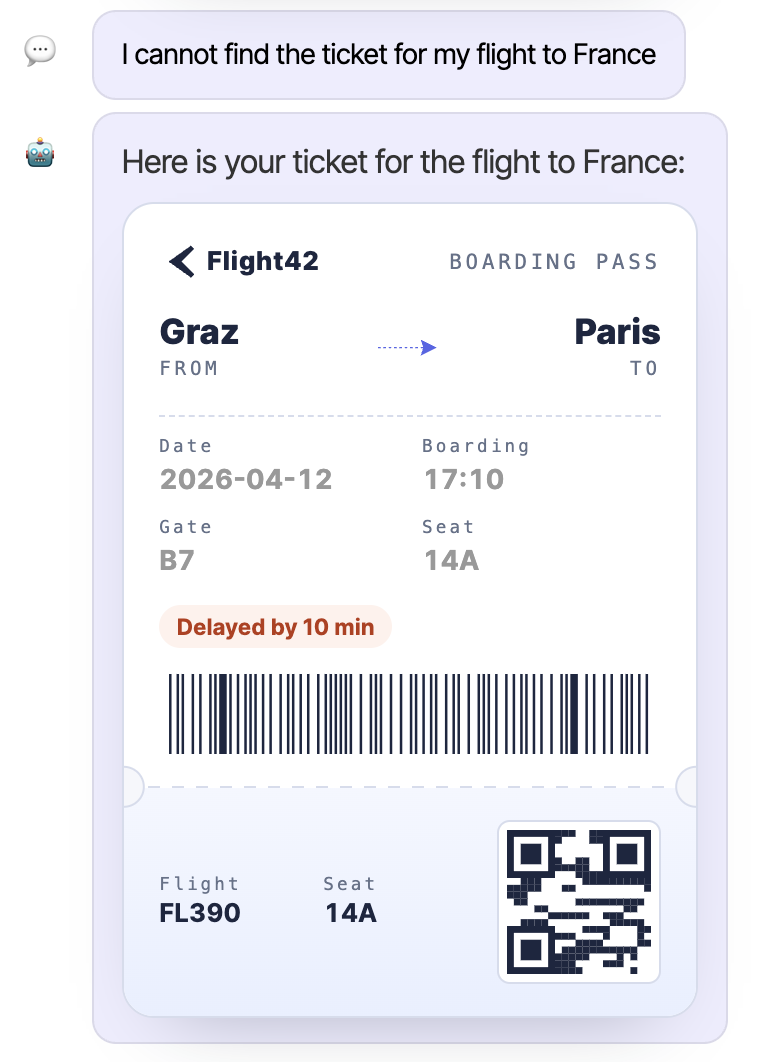
The helper function used here, createCustomComponent, takes the name, the description, the component implementation, and a Zod schema that describes the component's properties:
import { z } from 'zod/v3';

import {
  binding,
  createCustomComponent,
} from '../../../shared/util-copilotkit/a2ui/a2ui-schema';
import { A2uiCustomCatalogComponent } from '../../../shared/util-copilotkit/a2ui/types';
import { TicketWidget } from './ticket/ticket-widget';

export const ticketWidgetEntry = createCustomComponent({
  name: 'TicketWidget',
  description: 'A boarding-pass-style widget ...',
  component: TicketWidget,
  schema: z
    .object({
      ticketId: binding(z.union([z.string(), z.number()])),
      from: binding(z.string()),
      to: binding(z.string()),
      date: binding(z.string()),
      delay: binding(z.number()).optional(),
    })
    .strict(),
});

export const ticketingExtraComponents: A2uiCustomCatalogComponent[] = [
  ticketWidgetEntry,
];
The helper function binding corresponds to the variant shown earlier: it marks those fields that the LLM may either set directly or wire to values from the data model via a path binding. In addition, createCustomComponent uses its type parameters to ensure that the props signal of the given component matches the schema.
By the way, it's worth taking a look at the full description in the example project: it not only describes what the widget displays, but also gives the language model clear usage rules – for instance, that it should only use the TicketWidget when explicitly asked, and at most once per request. The description thus becomes a building block of the prompt.
The helper function createCustomCatalog bundles the components and the catalog id into a catalog descriptor:
import { createCustomCatalog } from '../../../shared/util-copilotkit/a2ui/types';
import { ticketingExtraComponents } from './ticketing-extra-components';

export const customCatalog = createCustomCatalog({
  id: 'https://example.com/catalogs/flights42-a2ui-demo',
  components: ticketingExtraComponents,
});
As the id, the example project assigns – as is customary for A2UI catalogs – a URL from its own domain in order to guarantee uniqueness. This id is more than just a label: the renderer looks up the catalog by its id, and the agent has to use exactly this id in its createSurface operations. To make this work, the client transmits the id together with the catalog description to the agent; how it makes its way into the system prompt there is shown in the next sections.
For registration, the function provideA2uiCatalog known from the second part is sufficient, which now takes the catalog descriptor:
import { provideMarkdownRenderer } from '@a2ui/angular/v0_9';
import { provideCopilotKit } from '@copilotkit/angular';
import { marked } from 'marked';

import { a2uiActivityRendererConfig } from './domains/shared/util-copilotkit/a2ui/a2ui-activity-renderer';
import { provideA2uiCatalog } from './domains/shared/util-copilotkit/a2ui/provide-a2ui-catalog';
import { customCatalog } from './domains/ticketing/ai/custom-catalog/catalog';

[...]

export const appConfig: ApplicationConfig = {
  providers: [
    [...]
    provideCopilotKit({
      renderActivityMessages: [a2uiActivityRendererConfig],
    }),
    provideA2uiCatalog(customCatalog),
    provideMarkdownRenderer(async (markdown) =>
      marked.parse(String(markdown ?? '')),
    ),
  ],
};
Without arguments, provideA2uiCatalog merely registers the Basic Catalog. Given a descriptor, the function extends this catalog with the provided components and functions:
export const A2UI_CUSTOM_CATALOG = new InjectionToken<A2uiCustomCatalog>(
  'A2UI_CUSTOM_CATALOG',
);

export function provideA2uiCatalog(
  catalog?: A2uiCustomCatalog,
  options?: ProvideA2uiCatalogOptions,
): EnvironmentProviders {
  if (!catalog) {
    return makeEnvironmentProviders([
      {
        provide: A2UI_RENDERER_CONFIG,
        useFactory: (): RendererConfiguration => ({
          catalogs: [inject(BasicCatalog)],
        }),
      },
      A2uiRendererService,
    ]);
  }

  const { sendCatalogDescription = true } = options ?? {};

  const rendererCatalog = new BasicCatalogBase({
    id: catalog.id,
    extraComponents: catalog.components.map(toAngularComponentImplementation),
    functions: [
      ...BASIC_FUNCTIONS,
      ...(catalog.functions ?? []).map(toFunctionImplementation),
    ],
  });

  const storedCatalog: A2uiCustomCatalog = sendCatalogDescription
    ? catalog
    : { id: catalog.id, components: [] };

  return makeEnvironmentProviders([
    { provide: A2UI_CUSTOM_CATALOG, useValue: storedCatalog },
    {
      provide: A2UI_RENDERER_CONFIG,
      useValue: { catalogs: [rendererCatalog] },
    },
    A2uiRendererService,
  ]);
}
The local helpers toAngularComponentImplementation and toFunctionImplementation are plain remappings of the descriptor entries onto the renderer structures shown at the beginning; their details can be found in the source code. The function also takes care of merging in BASIC_FUNCTIONS – the asymmetry mentioned earlier thus remains an implementation detail. In addition, it stores the descriptor in the injection token A2UI_CUSTOM_CATALOG; the next section shows the role this plays. The option sendCatalogDescription determines whether a description of the entire catalog or only its id is sent to the server.
The Activity Renderer introduced in the second part remains untouched by all of this: it still forwards the received A2UI operations to the A2uiRendererService, which resolves the Custom Components via the registered catalog.
Telling the Agent About Custom Components
The renderer can now display the TicketWidget – but how does the language model know that this component exists in the first place? This task is handled by the glue function initAgentStore introduced in the second part: when registering an agent, it reads the descriptor stored at the injection token A2UI_CUSTOM_CATALOG and registers it as a context entry for that agent (abridged):
import { type Context } from '@ag-ui/core';
import { inject } from '@angular/core';
import { connectAgentContext } from '@copilotkit/angular';

import {
  catalogIdToContextEntry,
  catalogToContextEntry,
} from './a2ui/catalog-context';
import { A2UI_CUSTOM_CATALOG } from './a2ui/provide-a2ui-catalog';

[...]

export function initAgentStore(config: InitAgentStoreConfig): void {
  [...]

  connectCatalogContext(config.agentId, config.catalogIdOnly ?? false);

  [...]
}

function connectCatalogContext(agentId: string, idOnly: boolean): void {
  const catalog = inject(A2UI_CUSTOM_CATALOG, { optional: true });
  if (!catalog) {
    return;
  }

  const entry = idOnly
    ? catalogIdToContextEntry(catalog.id)
    : catalogToContextEntry(catalog);

  connectAgentContext(() => ({ ...entry, agentIds: [agentId] }) as Context);
}
Context entries are a generic mechanism provided by AG-UI for passing additional information to the agent. The function connectAgentContext from @copilotkit/angular registers a factory with the CopilotKit runtime, whose result flows into the context when the requests are assembled. The property agentIds restricts the entry to the agent just registered – in an application with several agents, each one thus receives exactly its own catalog entry. Since the catalog remains unchanged at runtime, it is serialized once during initialization.
The individual agent stores therefore get by without any catalog knowledge: the function injectTicketingAgentStore shown in the second part remains unchanged; the catalog flows in automatically as soon as provideA2uiCatalog has stored it at the injection token. For agents that don't need any component descriptions but merely have to reference the catalog id, initAgentStore additionally offers the option catalogIdOnly: true.
The serialization is handled by the helper function catalogToContextEntry: it converts the catalog id, the names and descriptions of the Custom Components, and – with the help of zodToJsonSchema – their schemas into a context entry. Its implementation can also be found in the section at the end of this article.
The Server Perspective: Using the Custom Catalog from Context
On the server side, the agent has to evaluate the received context entry again. In the example project, this task is handled by the function addCustomCatalogInstructions from the folder libs/ag-ui-server. The Mastra agent used here wires it directly into its instructions:
export const ticketingAgent = new Agent({
  id: 'ticketingAgent',
  name: 'Flight42 Ticketing Assistant',
  instructions: addCustomCatalogInstructions({
    systemInstructions: ticketingAgentPrompt,
  }),
  [...]
});
Noteworthy here is the signature of ticketingAgentPrompt: the system prompt is no longer a static string but a factory that takes the catalog id and weaves it into the instructions – for instance where the prompt prescribes the structure of the createSurface operations:
export function ticketingAgentPrompt(catalogId: string): string {
  return `
[...]
- renderA2uiTool expects { messages: A2uiMessage[] } — one self-contained A2UI
  v0.9 surface that MUST contain:
  - one createSurface message with a fresh surfaceId and catalogId
    "${catalogId}";
[...]
`;
}
Behind the call to addCustomCatalogInstructions sits an instructions factory that extracts the catalog id from the runtime context, builds the base prompt with it, and appends the component description as an additional section (abridged):
import {
  A2UI_DEFAULT_CATALOG_ID,
  catalogToPromptSection,
  extractCatalogId,
} from './catalog-to-prompt.js';

[...]

export interface AddCustomCatalogInstructionsOptions {
  /** Builds the system prompt for the catalog id the client registered. */
  systemInstructions: (catalogId: string) => string;
  [...]
}

export function addCustomCatalogInstructions(
  options: AddCustomCatalogInstructionsOptions,
): (params: InstructionsParams) => string {
  const { systemInstructions } = options;

  return ({ requestContext }) => {
    const agUi = requestContext.get('ag-ui') as AgUiRuntimeContext | undefined;
    const catalogId =
      extractCatalogId(agUi?.context) ?? A2UI_DEFAULT_CATALOG_ID;
    const catalogSection = catalogToPromptSection(agUi?.context);
    const baseInstructions = systemInstructions(catalogId);

    return catalogSection
      ? `${baseInstructions}\n\n${catalogSection}`
      : baseInstructions;
  };
}
The context entries transmitted by AG-UI are available under the key ag-ui in Mastra's runtime context. The helper function extractCatalogId reads the id of the client-side registered catalog from it; if the client does not announce a Custom Catalog, A2UI_DEFAULT_CATALOG_ID kicks in as a fallback with the id of the Basic Catalog. The helper function catalogToPromptSection looks through the same context entries for the entry with the description A2UI Custom Catalog, parses the serialized catalog definition, and turns it into a prompt section. This section lists the available Custom Components including their descriptions and derives simple example props from the JSON schemas that the model can orient itself on.
This closes the loop: the client describes its Custom Components together with the catalog id, the agent takes both into the prompt, the language model references id and components in its A2UI messages, and the renderer displays them via the registered catalog.
Security Aspect: sendCatalogDescription and Prompt Injection
By default, the solution shown transmits the textual descriptions and schemas of the components to the agent, which embeds them into the system prompt. This approach is very convenient for development, but in production it can be abused for prompt injection. In such an attack, an attacker injects malicious instructions into the system prompt and thereby tricks the language model into performing unintended actions.
Therefore, in production it is advisable to set the sendCatalogDescription option of provideA2uiCatalog to false:
provideA2uiCatalog(customCatalog, { sendCatalogDescription: false }),In this case, the client keeps the full catalog definition for local rendering only; as a context entry it transmits merely the catalog id, which the agent needs for its createSurface operations anyway. The agent instead obtains the catalog's schema based on this id from a trusted registry – for example, via an internal API or database – validating the id against a list of approved catalogs in the process.
Under the Hood: The Schema Helpers in Detail
To conclude, it's worth taking a look at the implementation of those helper functions that take care of the Custom Catalog's schema on the client side. Anyone who simply adopts them from the example project can safely skip this section; anyone who wants to adapt them to their own project will find the central building blocks here.
The implementation of createCustomComponent is deliberately plain:
export interface CustomCatalogEntry<
  TName extends string = string,
  TSchema extends z.ZodObject<z.ZodRawShape> = z.ZodObject<z.ZodRawShape>,
> {
  name: TName;
  description: string;
  schema: TSchema;
  component: Type<{
    props: Signal<ContextFromSchema<TSchema>>;
  }>;
}

export function createCustomComponent<
  const TName extends string,
  const TSchema extends z.ZodObject<z.ZodRawShape>,
>(
  entry: CustomCatalogEntry<TName, TSchema>,
): CustomCatalogEntry<TName, TSchema> {
  return entry;
}
The function returns the given entry unchanged – its value lies in the type checking: the mapped type ContextFromSchema derives from the Zod schema the context type that the component has to accept via its props signal; each property is expected as a BoundProperty. If the schema does not match the component, compilation already fails.
createCustomCatalog is likewise a pure typing helper that returns the given descriptor unchanged. Besides the id, the descriptor comprises the components as well as optional functions:
export interface A2uiCustomCatalog {
  id: string;
  components: A2uiCustomCatalogComponent[];
  functions?: A2uiCustomCatalogFunction[];
}
Finally, the function catalogToContextEntry serializes this descriptor for transmission to the agent:
import { type Context } from '@ag-ui/core';
import { zodToJsonSchema } from 'zod-to-json-schema';

import { type A2uiCustomCatalog } from './types';

export const A2UI_CATALOG_CONTEXT_DESCRIPTION = 'A2UI Custom Catalog';

export function catalogToContextEntry(catalog: A2uiCustomCatalog): Context {
  const components = Object.fromEntries(
    catalog.components.map((component) => [
      component.name,
      {
        description: component.description,
        schema: zodToJsonSchema(component.schema, { $refStrategy: 'none' }),
      },
    ]),
  );

  return {
    description: A2UI_CATALOG_CONTEXT_DESCRIPTION,
    value: JSON.stringify({ catalogId: catalog.id, components }),
  };
}
The option $refStrategy: 'none' keeps the generated JSON schemas free of $ref references, so that the server side can process them further without additional resolution. The constant A2UI_CATALOG_CONTEXT_DESCRIPTION serves as the identifying marker: based on exactly this description, the server side identifies the catalog entry among the transmitted context entries.
It's worth noting that the function also yields an entry for a catalog without components: this way the catalog id reaches the server in any case – for instance when sendCatalogDescription: false withholds the descriptions. For agents that only need the id in the first place, the example project additionally offers the short form catalogIdToContextEntry(catalogId), which initAgentStore uses when the option catalogIdOnly: true is set.
Summary
Custom Catalogs extend A2UI in a targeted way with your own components and functions that the language model may use like any other building block. This makes it possible to translate generic responses into domain-appropriate interfaces without losing the character of a lean, declarative protocol. Schema validation via Zod ensures clean contracts between agent and client, while the split into components and functions keeps the catalog flexible.
In combination with the CopilotKit integration, Custom Components can be described compactly with createCustomComponent and wired in through a single call to provideA2uiCatalog. The catalog description travels, together with the catalog id, to the agent as an AG-UI context entry; the agent weaves the id into its system prompt and uses it in its createSurface operations from then on – the Activity Renderer from the second part remains unchanged in the process. Anyone planning the move to production should also consider the security aspect around sendCatalogDescription and source catalog schemas from a trusted source.
Anyone who combines protocol, renderer, CopilotKit integration, and Custom Catalogs has a solid foundation to have language models deliver not just text but real UI responses – and in a way that fits their own application.
Interested in production-ready Agentic UI architectures?
In my workshop, we dig into AG-UI, A2UI, MCP Apps, HITL patterns, and modern Angular architectures for real-world agentic systems.
FAQ
What is a Custom Catalog in A2UI?
A Custom Catalog extends A2UI with your own, domain-driven components and functions. It often includes the Basic Catalog as a superset and additionally provides domain-specific building blocks to the language model, which the renderer processes like any other A2UI component.
How do you describe your own A2UI component?
The implementation is a regular Angular component that receives its inputs via a Context object. In addition to the component itself, a Zod schema is defined that describes the expected properties. Component, name, and schema are added together as an entry in the Custom Catalog – in the CopilotKit integration in a type-safe way via the helper function createCustomComponent.
How do you register a Custom Catalog in Angular?
For the standalone renderer, an instance of BasicCatalogBase referenced in the A2UI_RENDERER_CONFIG token is sufficient. In the CopilotKit integration, this is handled by the provideA2uiCatalog function, to which a descriptor created with createCustomCatalog, containing components and optional functions, can be passed directly.
How does the agent learn about the Custom Components?
The glue function initAgentStore, which registers the agent stores, reads the catalog stored at the token A2UI_CUSTOM_CATALOG, serializes it with catalogToContextEntry, and registers it via connectAgentContext as an AG-UI context entry for the respective agent. On the server side, addCustomCatalogInstructions extracts the catalog id, builds the system prompt with it, and appends the component descriptions along with example props derived from them.
What is sendCatalogDescription for and when should you disable the option?
By default (sendCatalogDescription: true), the client transmits the component descriptions and schemas to the agent, which embeds them into the system prompt. That is very convenient, but it can lead to prompt injection. In production, it is therefore advisable to set the option to false: the client then only transmits the catalog id, and the server obtains the schemas from a trusted registry.