

From the first example to a real agent connection via AG-UI.
In practice, A2UI messages don't come from static code, but from the responses of a real language model – and these first need to be transported from the agent to the client. AG-UI offers the right transport layer for this, but the official specification leaves open how A2UI is to be transmitted over it. This article shows a pragmatic solution and connects the client using the Angular integration of CopilotKit.
This second part of the three-part series picks up where the first part left off, where we still ran A2UI and the Angular renderer with hardcoded messages.
📂 Source Code (see branch copilotkit)
How Do You Transmit A2UI Messages over AG-UI?
So far we've looked at A2UI in isolation. In practice, however, the client communicates with the agent via HTTP calls. This is exactly where the protocol AG-UI, mentioned in the previous article in this series, comes into play, standardizing the communication between frontend and agent.
We can elegantly embed A2UI into this world by transmitting the A2UI messages inside an AG-UI message of type ACTIVITY_SNAPSHOT. The browser's developer tools show such a snapshot:
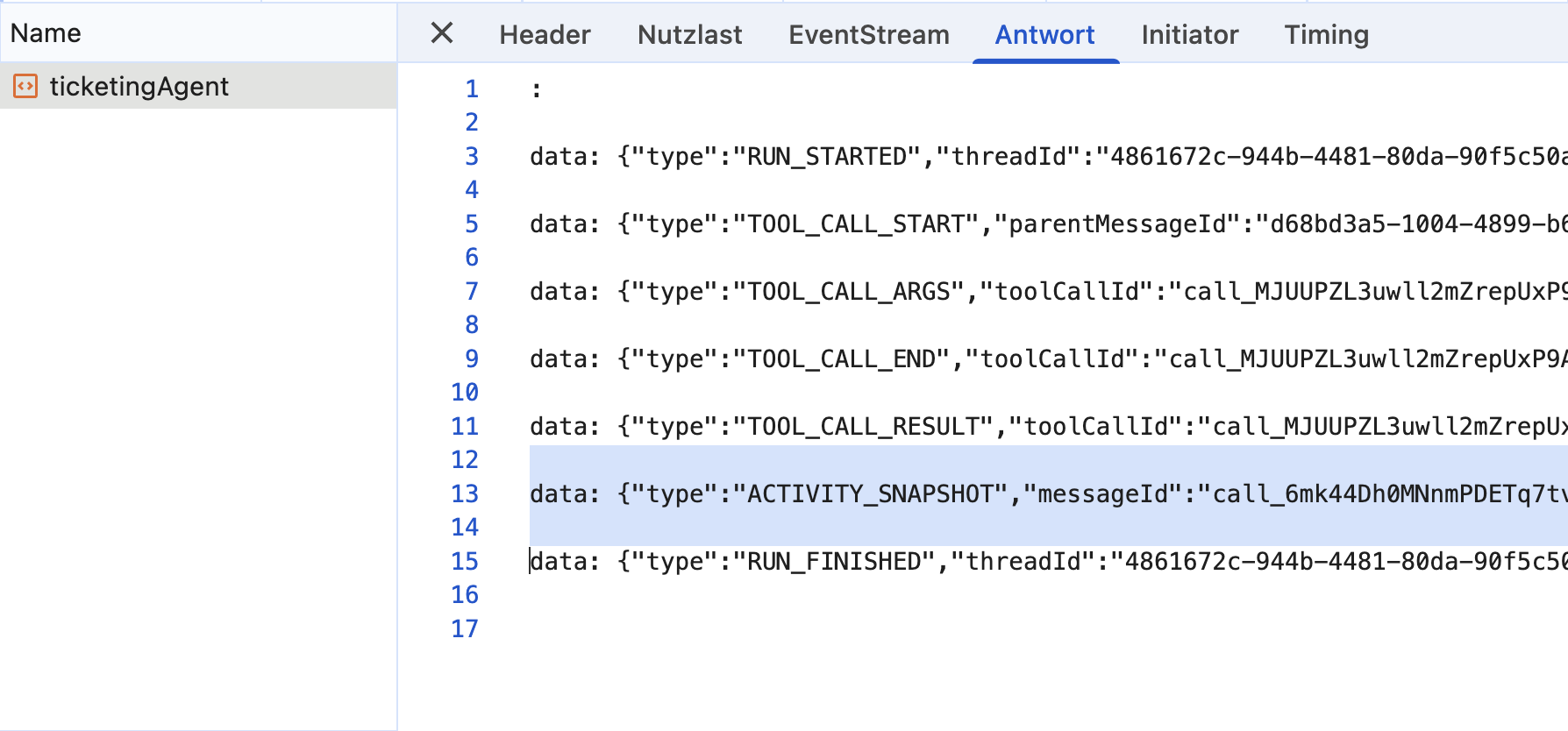
In textual form, the snapshot looks like this:
{
  "type": "ACTIVITY_SNAPSHOT",
  "messageId": "srf-france-confirm",
  "activityType": "a2ui-surface",
  "content": {
    "operations": [
      {
        "version": "v0.9",
        "createSurface": {
          "surfaceId": "srf-france-confirm",
          "catalogId": "https://a2ui.org/specification/v0_9/basic_catalog.json"
        }
      },
      {
        "version": "v0.9",
        "updateComponents": {
          [...]
        }
      },
      {
        "version": "v0.9",
        "updateDataModel": {
          "surfaceId": "srf-france-confirm",
          "path": "/dummy",
          "value": ""
        }
      }
    ]
  }
}
Unfortunately, there is no official definition for how A2UI messages are to be transmitted over AG-UI. The solution shown here, an ACTIVITY_SNAPSHOT with a corresponding activityType, fits well with the semantics of AG-UI, however, and matches exactly the interpretation of CopilotKit, whose Angular integration we also use on the client side below. Since the makers of CopilotKit are among the initiators of AG-UI, their interpretation of the standard naturally carries significant weight.
As an alternative to an ACTIVITY_SNAPSHOT, a server-side tool call would also be conceivable, especially since AG-UI informs the client about tool calls and their results. In this case, however, the client and agent would have to agree on the name of such a tool that delivers A2UI as its result.
The Building Blocks: A2UI Renderer, CopilotKit, and a Server-Side Layer
For the implementation, we rely on two building blocks: the Angular renderer for A2UI discussed in the first part, and the Angular integration of CopilotKit (@copilotkit/angular), which takes care of the AG-UI communication.
The server-side agent, which we won't look at in detail here, guides the language model via prompting to produce A2UI structures – not directly for the client, however, but as input for a server-side tool. This tool plays a central role: it validates the A2UI messages generated by the LLM and ensures that only consistent and executable structures are processed further.
The prompt does not limit itself to the request to produce A2UI. In addition, it contains a few complete example surfaces the model can orient itself on, as well as a reference to the schema of the Basic Catalog, which the agent can retrieve when needed. This way, the model doesn't just know the rough structure of an A2UI response, but can also look up the details of the individual components.
This is crucial, because LLMs are not guaranteed to deliver valid results. If validation fails, the feedback is sent back to the model so that it can try again. Only when a valid structure is available is it forwarded.
The server-side implementation then transforms the validated A2UI messages into an ACTIVITY_SNAPSHOT. This becomes part of the regular AG-UI stream and can therefore be processed uniformly by CopilotKit on the client side.
Client-Side Integration with CopilotKit
On the client side, CopilotKit takes care of the connection to the agent. The central construct here is an agent store: a signal-based object that manages the chat history, executes client-side tool calls, and provides the received messages.
This store is initialized in the function injectTicketingAgentStore. It registers the agent with its URL and the offered client tools, among other things, and then returns the store (slightly simplified):
import { inject } from '@angular/core';
import { injectAgentStore } from '@copilotkit/angular';

import { initAgentStore } from '../../shared/util-copilotkit/init-agent-store';

[...]

export const TICKETING_AGENT_ID = 'ticketingAgent';

export function injectTicketingAgentStore() {
  initAgentStore({
    agentId: TICKETING_AGENT_ID,
    url: inject(ConfigService).agUiUrl,
    useServerMemory: true,
    frontendTools: [
      findFlightsTool,
      getLoadedFlightsTool,
      toggleFlightSelectionTool,
      getCurrentBasketTool,
      displayFlightDetailTool,
    ],
  });

  return injectAgentStore(TICKETING_AGENT_ID);
}
The helper function initAgentStore belongs to a lean glue layer of the example project (folder util-copilotkit). For the given URL, it creates an agent derived from the AG-UI SDK's HttpAgent, registers it in the CopilotKit runtime as a so-called self-managed agent, and announces the passed client tools via CopilotKit's registerFrontendTool. The flag useServerMemory ensures that only new messages are transmitted to the server, because the server stores the history itself.
The actual centerpiece, however, comes directly from CopilotKit: injectAgentStore provides the signal-based AgentStore, through which the application accesses the chat history (messages), the execution status (isRunning), and the agent itself.
A service of the ticketing domain uses this function and additionally registers the event handlers for the A2UI surfaces:
import { inject, Injectable } from '@angular/core';
import { CopilotKit, injectInterrupt } from '@copilotkit/angular';

[...]

@Injectable({ providedIn: 'root' })
export class TicketingChatService {
  private readonly chatRegistry = inject(ChatRegistry);
  private readonly copilotKit = inject(CopilotKit);
  private readonly store = injectTicketingAgentStore();
  [...]

  constructor() {
    registerHandlers({
      checkIn: (action) => checkInAction(action),
      submitAnswer: (action) =>
        submitAnswerAction(action, this.copilotKit, this.store),
    });
  }

  public init(): void {
    this.chatRegistry.setChat({
      store: this.store,
      [...],
    });
  }
}
The helper function registerHandlers defines the event handlers and internally delegates to the onAction property of the A2UI renderer discussed in the first part. To send a message, the function sendMessage comes into play:
await sendMessage(
  this.copilotKit,
  this.store,
  'Did I book my flight to France?',
);
It appends the message to the agent and triggers a new run via the CopilotKit runtime:
export async function sendMessage(
  copilotKit: CopilotKit,
  store: Signal<AgentStore>,
  input: SendMessageInput,
): Promise<void> {
  const agent = store().agent;
  agent.addMessage({ id: randomUUID(), role: 'user', content: input });
  await copilotKit.core.runAgent({ agent });
}New: Agentic UI with Angular
If you don’t just want to integrate A2UI but embed it into a scalable architecture:
In my book Agentic UI with Angular, I cover the underlying patterns and trade-offs in depth.
Providing an A2UI Activity Renderer
For messages with the role activity, CopilotKit provides so-called activity renderers: Angular components that define, per activityType, how the content of a snapshot is to be displayed.
CopilotKit does already come with its own A2UI support. At the time this article was written, however, it was built on a renderer for web components, so custom catalogs could only be implemented with web components. Instead, we want to plug in the Angular renderer from the first part – and that turns out to be pleasantly little work, since the actual rendering is still handled by that renderer.
Let's start with the content of the ACTIVITY_SNAPSHOT. CopilotKit requires a schema for it and uses that to check the received content before it is displayed. We implement this schema here with Zod – in the case of A2UI, the content consists merely of the list of operations:
import { z } from 'zod';

export const a2uiSurfaceContentSchema = z.object({
  operations: z.array(z.custom<A2uiMessage>()),
});

export type A2uiSurfaceContent = z.infer<typeof a2uiSurfaceContentSchema>;
The schema is deliberately compact: it makes sure that operations is an array at all, but doesn't check the individual operations any further. The z.custom<A2uiMessage>() merely specifies the TypeScript type without validating at runtime. This satisfies CopilotKit's requirement for now; the content-level checking of the operations is handled by the A2UI renderer anyway. If you like, you can of course provide a stricter schema here.
Conveniently, z.infer also gives us the matching TypeScript type A2uiSurfaceContent.
With that, we can now implement the actual activity renderer. It passes the received A2UI operations to the A2uiRendererService, displays the resulting surface via the SurfaceComponent discussed in the first part, and manages its lifecycle (abridged):
import { A2uiRendererService, SurfaceComponent } from '@a2ui/angular/v0_9';

[...]

@Component({
  selector: 'app-a2ui-activity-renderer',
  imports: [SurfaceComponent],
  host: { class: 'a2ui-surface' },
  template: `
    @let surface = surfaceId();
    @if (surface) {
      <a2ui-v09-surface [surfaceId]="surface" />
    }
  `,
})
export class A2uiActivityRenderer
  implements ActivityRenderer<A2uiSurfaceContent>
{
  readonly activityType = input.required<string>();
  readonly content = input.required<A2uiSurfaceContent>();
  readonly message = input.required<ActivityMessage>();
  readonly agent = input.required<AbstractAgent | undefined>();

  private readonly renderer = inject(A2uiRendererService);
  private renderedSurfaceId: string | null = null;

  constructor() {
    effect(() => {
      const operations = this.content().operations;
      const surfaceId = getRenderedSurfaceId(operations);
      if (!surfaceId || surfaceId === this.renderedSurfaceId) {
        return;
      }

      this.releaseSurface();
      this.renderedSurfaceId = surfaceId;
      this.renderer.processMessages(operations);
    });

    inject(DestroyRef).onDestroy(() => {
      this.releaseSurface();
    });
  }

  private releaseSurface(): void {
    if (this.renderedSurfaceId) {
      this.renderer.surfaceGroup.deleteSurface(this.renderedSurfaceId);
      this.renderedSurfaceId = null;
    }
  }

  protected readonly surfaceId = computed(() =>
    getRenderedSurfaceId(this.content().operations),
  );
}
So that CopilotKit can address this component as an activity renderer, it implements the interface ActivityRenderer coming from @copilotkit/angular. The type parameter determines the structure of the snapshot content – in our case, A2uiSurfaceContent. The interface prescribes four inputs:
content: the checked content of the snapshot, in the case of A2UI the list of operationsactivityType: the type of the activity, herea2ui-surfacemessage: the entire AG-UI messageagent: the associated agent, through which follow-up actions can be triggered, for instance
The effect in the constructor builds the surface exactly once: it derives the surface id from the operations via getRenderedSurfaceId, passes the operations on to processMessages the first time a new id appears, and skips further runs as long as the id stays the same.
The component owns the surface's lifetime: when the component is destroyed – and when it switches to a different surface id – releaseSurface removes the surface from the renderer again via surfaceGroup.deleteSurface. The same surface id can therefore be built again later without the screen hosting the chat having to clean up – the surface's lifetime belongs to the renderer component.
There is a good reason why the handoff to the renderer happens in the effect and not in the computed: processMessages updates the state of the renderer and writes signals itself while doing so. Such side effects have no place in a computed.
That leaves the question of where the surfaceId for the SurfaceComponent comes from. The answer is provided by the helper function getRenderedSurfaceId: it searches the operations of the snapshot for the first surface id it can find:
function getRenderedSurfaceId(operations: A2uiMessage[]): string | null {
  for (const operation of operations) {
    if ('createSurface' in operation && operation.createSurface.surfaceId) {
      return operation.createSurface.surfaceId;
    }

    if (
      'updateComponents' in operation &&
      operation.updateComponents.surfaceId
    ) {
      return operation.updateComponents.surfaceId;
    }

    if ('updateDataModel' in operation && operation.updateDataModel.surfaceId) {
      return operation.updateDataModel.surfaceId;
    }
  }

  return null;
}
The reason for this search lies in the structure of the A2UI messages: the surfaceId isn't attached to the snapshot itself, but sits inside the individual operations – in a different place depending on the operation type. Usually, the very first operation of a snapshot already delivers a createSurface with the id we're looking for. When streaming step by step, however, a snapshot can also start with an updateComponents or updateDataModel for an already existing surface. If no id can be found at all, the function returns null and the template shows nothing for the time being.
So that CopilotKit knows which component is responsible for which activityType, a configuration object comes into play:
export const a2uiActivityRendererConfig: RenderActivityMessageConfig<A2uiSurfaceContent> =
  {
    activityType: 'a2ui-surface',
    content: a2uiSurfaceContentSchema,
    component: A2uiActivityRenderer,
  };
Besides mapping activityType and component, the Zod schema defined further above is used here. CopilotKit uses it to check the content of the snapshot before it reaches the component. The activity renderer therefore only ever receives content in the expected structure.
Displaying the Chat History and A2UI Surfaces in the Template
The entire chat history is located in the messages signal of the agent store. When CopilotKit receives an ACTIVITY_SNAPSHOT, it shows up there as a message with the role activity and the respective activityType. The template of the chat component iterates over the messages and distinguishes between text contents, tool calls, and activities (slightly simplified):
@for (message of messages(); track message.id) {

  @if (message.content) {
    <div>{{ message.content }}</div>
  }

  @for (toolCall of message.toolCalls; track toolCall.id) {
    <copilot-render-tool-calls
      [message]="message"
      [messages]="messages()"
      [agentId]="agentId()" />
  }

  @if (message.role === 'activity') {
    <app-copilot-activity
      [message]="message"
      [agentId]="agentId()" />
  }

}
Tool calls are handled by the component copilot-render-tool-calls that ships with CopilotKit. For activities, the example uses the small component CopilotActivity, which determines the matching activity renderer registered with CopilotKit based on the activityType and displays it.
This is exactly where the circle closes back to A2UI: for the activityType a2ui-surface, CopilotKit finds the activity renderer shown above. It is made known via provideCopilotKit in the appConfig. That's also where we find the A2UI configuration known from the first part: the Basic Catalog at the token A2UI_RENDERER_CONFIG, the A2uiRendererService, as well as the Markdown renderer wired up via provideMarkdownRenderer:
import {
  A2UI_RENDERER_CONFIG,
  A2uiRendererService,
  BasicCatalog,
  provideMarkdownRenderer,
} from '@a2ui/angular/v0_9';
import { provideCopilotKit } from '@copilotkit/angular';

[...]

export const appConfig: ApplicationConfig = {
  providers: [
    provideCopilotKit({
      renderActivityMessages: [a2uiActivityRendererConfig],
    }),
    {
      provide: A2UI_RENDERER_CONFIG,
      useFactory: () => ({
        catalogs: [inject(BasicCatalog)],
      }),
    },
    provideMarkdownRenderer(async (markdown) =>
      marked.parse(String(markdown ?? '')),
    ),
    A2uiRendererService,
  ],
};
The only new thing here is the call to provideCopilotKit, which receives the a2uiActivityRendererConfig discussed above. For better readability, the example project bundles the providers for the catalog configuration and the A2uiRendererService into a dedicated function provideA2uiCatalog, which in the third part additionally accepts a custom catalog.
This bridges the gap between agent and A2UI renderer: the agent delivers its A2UI messages via AG-UI ACTIVITY_SNAPSHOTs, CopilotKit receives them and provides them as activity messages in the agent store, and the registered activity renderer delegates the contained operations to the A2UI renderer. The individual components of our application don't need to know either the AG-UI or the A2UI protocol in detail.
Summary
In combination with AG-UI, A2UI fits seamlessly into an existing agentic architecture. AG-UI handles the structured communication between client and agent, while A2UI transports the UI-specific content. With CopilotKit's Angular integration, this combination can be used simply and idiomatically in Angular: the agent store provides the chat history as a signal, and activity renderers connect the received ACTIVITY_SNAPSHOTs with the A2UI renderer.
A not-to-be-underestimated advantage of this architecture lies in the validation on the server side: it shields the client from inconsistent responses of the language model and ensures that only verified structures end up in the browser. The optional DSL variant additionally shows that the same mechanism can be balanced for differently powerful models.
The Next Step
So far we have relied on the Basic Catalog – the next part shows how to extend it with your own domain-specific components as a Custom Catalog.
Interested in production-ready Agentic UI architectures?
In my workshop, we dig into AG-UI, A2UI, MCP Apps, HITL patterns, and modern Angular architectures for real-world agentic systems.
FAQ
How do you transmit A2UI messages over AG-UI?
There is no official definition. In practice, it has proven effective to transport the A2UI operations inside an AG-UI message of type ACTIVITY_SNAPSHOT with its own activityType (for example, a2ui-surface). This variant fits the semantics of AG-UI and matches the interpretation of CopilotKit.
Why is server-side validation part of this?
Language models are not guaranteed to deliver valid A2UI structures. Server-side validation – for example, in a tool – catches faulty responses, returns feedback to the model, and ensures that only consistent and executable structures reach the client.
What role does CopilotKit play on the client side?
CopilotKit's Angular integration (@copilotkit/angular) manages the connection to the agent via AG-UI. The agent store provided by injectAgentStore delivers the chat history as a signal, executes client-side tools, and makes received ACTIVITY_SNAPSHOTs available as activity messages. Registered activity renderers – for A2UI, for instance – display their content. As a result, individual components don't need to know either AG-UI or A2UI in detail.
When does a custom DSL make sense instead of direct A2UI?
A reduced, application-specific DSL can make generation considerably more robust for weaker or more cost-effective models. The server centrally translates it into A2UI. The price for this is an additional transformation layer and somewhat less expressiveness compared to direct A2UI.