

An Agent, the AG-UI SDK, and CopilotKit for Angular
In the previous part, we still created the AG-UI messages by hand in order to get to know the SDK. In practice, however, these messages come from a real agent that orchestrates a language model, calls tools, and remembers the conversation. This article closes exactly that gap: it shows how an agent built with Mastra is exposed via AG-UI and then consumed by two clients — a deliberately simple command-line client and a first Angular client based on CopilotKit.
This part of the series explains how the agent is built with its tool, prompt, and memory, what Mastra's AG-UI integration does, and why, thanks to AG-UI, the client does not have to care about the chosen agent framework.
📂 Source Code (see branch copilotkit)
An Agent with Mastra
Most agent frameworks offer very similar abstractions: an agent that supplies a language model with a prompt, tools the agent can call, and a memory for the conversation. We use Mastra here because it was built for TypeScript from the ground up and therefore fits seamlessly into the world of frontend teams. With LangGraph, Google ADK, or the Microsoft Agent Framework, the result would look structurally very similar.
Mastra and server-side agents are not the focus of this article series. A short look at the server side does help, however, to understand where the AG-UI messages our client later receives come from. The following sections therefore show the building blocks of our example agent step by step: the project setup, the agent itself, its prompt, and the weather tool.
Creating a New Mastra Project
A new Mastra project is created with a single command:
npm create mastra@latestThe interactive wizard generates a runnable project including an example agent. In addition, Mastra also provides official Agent Skills: packaged instructions and documentation for coding assistants such as Claude Code. Once placed in the project folder under .claude/skills, they provide the assistant with the current state of the API — helpful, since Mastra evolves quickly and the knowledge the models were trained on is often outdated.
Using these skills, we had a deliberately simple Mastra setup generated in our flights42 workspace. It can be found in the folder ai-demo/server and consists of just a handful of files.
The Weather Agent
The centerpiece is the agent, which brings together prompt, model, tools, and memory:
import { Agent } from '@mastra/core/agent';
import { Memory } from '@mastra/memory';

import { weatherTool } from './weather-tool.js';

export const weatherAgent = new Agent({
  id: 'weatherAgent',
  name: 'Weather Assistant',
  instructions: `[...]`,
  model: 'openai/gpt-5.6-luna',
  tools: { getWeather: weatherTool },
  memory: new Memory(),
});
The model property uses Mastra's model router: the string names the provider and the model, and Mastra expects the corresponding API key as an environment variable — in the case of OpenAI, as OPENAI_API_KEY. Switching to a different model or a different provider is therefore reduced to changing this string.
Under tools, the agent registers the weatherTool discussed below under the name getWeather. That is the name the language model sees and uses in tool calls. The Memory addresses a peculiarity of language models: LLMs are stateless and remember nothing between two calls. Anyone who wants to hold a conversation must therefore send along the previous conversation with every call. That is exactly the job of the Memory — it stores the history on the server and passes it to the model on every run, so the client only has to transmit the new question.
The Prompt
The instructions stored in the agent form the system prompt:
You are a friendly weather assistant.

When the user asks about the weather in a city,
look it up. Then answer in one short, natural sentence that mentions the
condition and the temperature in degrees Celsius.
The prompt defines the agent's role, describes the task, and specifies the desired answer format. Language models assign considerably more weight to the system prompt than to ordinary user messages, because they have been specifically trained to give instructions from this role priority. The system prompt is therefore the right place for behavioral rules and guardrails — and it offers at least some protection against cleverly worded user input redefining the agent's behavior.
What the prompt does not contain is also remarkable: the tool getWeather is not mentioned by name. The phrase look it up is enough, because the model selects the appropriate tool itself based on its description. What that description looks like is shown in the next section.
The Weather Tool
At its core, the tool consists of a name, a description, and schemas. This information gives the language model the basis for deciding when and how to call the tool:
import { createTool } from '@mastra/core/tools';
import { z } from 'zod';

import { getWeather } from './weather-api.js';

export const weatherTool = createTool({
  id: 'getWeather',
  description: 'Returns the current weather and temperature for a given city.',
  inputSchema: z.object({
    city: z.string().trim().min(1).describe('The name of the city.'),
  }),
  outputSchema: z.object({
    city: z.string(),
    condition: z.enum(['rainy', 'sunny', 'cloudy']),
    temperature: z.number(),
  }),
  execute: async ({ city }) => {
    return getWeather(city);
  },
});
The schemas defined with zod describe the expected parameters as well as the structure of the result and are internally passed on to the model as JSON Schema. The actual work is done by execute. The getWeather function called there merely simulates a weather service: it randomly determines the weather condition and temperature once per city and returns the same values for subsequent requests. This lets the demo run without access to an external weather API.
Providing an AG-UI Endpoint
The agent now runs on the server — but the question arises how the frontend should talk to it. Mastra does come with its own HTTP endpoints and its own client SDK — however, anyone programming against them couples their frontend to the chosen agent framework. A later switch, for example to LangGraph, would then ripple through to the client. That is exactly why we insert AG-UI as a slim, standardized waist in between: the client only knows the message types discussed in the first part and therefore remains independent of framework and model.
The bridge between the two worlds is built by the package @ag-ui/mastra. It contains the class MastraAgent, an implementation of the AbstractAgent known from the previous part. It takes a Mastra agent, calls it on every run, and translates its streaming events into AG-UI messages such as TOOL_CALL_START or TEXT_MESSAGE_CONTENT. The following route handler shows this adapter in action:
import type { RunAgentInput } from '@ag-ui/core';
import { MastraAgent } from '@ag-ui/mastra';
import type { ContextWithMastra } from '@mastra/core/server';
import { streamSSE } from 'hono/streaming';
import { concatMap, lastValueFrom } from 'rxjs';

export async function chatRouteHandler(
  c: ContextWithMastra,
): Promise<Response> {
  const input = (await c.req.json()) as RunAgentInput;

  const agent = c.get('mastra').getAgent('weatherAgent');
  const aguiAgent = new MastraAgent({ agent, resourceId: input.threadId });

  return streamSSE(c, async (sse) => {
    const send = (data: unknown): Promise<void> =>
      sse.writeSSE({ data: JSON.stringify(data) });

    await lastValueFrom(aguiAgent.run(input).pipe(concatMap(send)), {
      defaultValue: undefined,
    });
  });
}
The handler first reads the RunAgentInput from the body of the HTTP request. This is exactly the payload the HttpAgent of the AG-UI SDK sends — including threadId, runId, and the new messages. The handler passes the threadId on to the MastraAgent as resourceId. Through it, Mastra's memory assigns the individual runs to the same conversation.
The run method returns an observable with AG-UI messages. As mentioned in the previous part, the AG-UI SDK does not concern itself with the transport protocol. That job is taken over here by a bit of glue code that writes every message into the HTTP response stream as a server-sent event (SSE). Conveniently, Mastra's server is built on Hono, so its helper streamSSE can be used: it sets the necessary HTTP headers, keeps the connection open, and packs every message sent via writeSSE into an SSE frame.
That leaves the bridge between observable and stream: concatMap sends the messages one after another via send, and lastValueFrom waits until the observable has completed — only then does the callback end and Hono closes the stream.
For readability, the excerpt shown omits error handling; the full version in the repo sends a RUN_ERROR message in case of an error.
Registering the Route
Finally, the server still has to offer the route. To do so, the central Mastra instance registers the agent as well as the route handler:
import { Mastra } from '@mastra/core/mastra';
import { registerApiRoute } from '@mastra/core/server';
import { InMemoryStore } from '@mastra/core/storage';

import { weatherAgent } from './agent.js';
import { chatRouteHandler } from './chat-route.js';

export const mastra = new Mastra({
  storage: new InMemoryStore(),
  agents: { weatherAgent },
  server: {
    port: 4555,
    cors: {
      origin: '*',
    },
    apiRoutes: [
      registerApiRoute('/chat', {
        method: 'POST',
        handler: chatRouteHandler,
      }),
    ],
  },
});
Mastra comes with its own HTTP server, to which custom endpoints can be added via registerApiRoute. Our route POST /chat is thus the application's AG-UI endpoint. The InMemoryStore serves as storage for the memory; in a real-world application, a persistent store would be used here.
The CORS configuration is intended for clients running in the browser: the Angular client presented below will access the endpoint from a different origin — the dev server on port 4300. For the demo, the generous origin: '*' is fine; in a real-world application, you would restrict the allowed origins deliberately.
Agentic UI with Angular
If you don’t just want to integrate AG-UI but embed it into a scalable architecture:
In my book Agentic UI with Angular, I cover the underlying patterns and trade-offs in depth.
The AG-UI Client
To keep things simple and to focus on the essentials, we start with a command-line application. It can be found in the folder ai-demo/client and uses the same building blocks of the AG-UI SDK that will later be used in the browser as well. What is most remarkable is what the client does not contain: not a single line of Mastra-specific code. It only knows the URL of the endpoint and the AG-UI message types.
import { type AgentSubscriber, HttpAgent, randomUUID } from '@ag-ui/client';

const threadId = randomUUID();

const agent = new HttpAgent({
  url: 'http://localhost:4555/chat',
  threadId,
});
The HttpAgent known from the previous part receives the URL of the endpoint as well as a threadId that the client generates once per session. The ask function passes a single question on to the agent:
async function ask(prompt: string): Promise<void> {
  agent.addMessage({
    id: randomUUID(),
    role: 'user',
    content: prompt,
  });

  const subscriber: AgentSubscriber = {};

  if (SHOW_DETAILS) {
    subscriber.onEvent = ({ event }) => logEvent(event);
  } else {
    subscriber.onTextMessageContentEvent = ({ event }) => {
      stdout.write(event.delta);
    };
  }

  await agent.runAgent({ runId: randomUUID() }, subscriber);
}
Since the agent remembers the history on the server, it is enough for ask to store only the new user message per question via addMessage and then start a new run with runAgent.
The AgentSubscriber processes the incoming messages. Normally, a single handler is enough for that: onTextMessageContentEvent writes every received text fragment directly to the console, so the answer appears word by word — streaming in its simplest form. If, on the other hand, you start the client with the flag --details, the generic handler onEvent logs every single AG-UI message instead.
What is still missing is the user input. A small helper function based on Node's readline API displays a prompt and returns the entered line:
import { stdin, stdout } from 'node:process';
import { createInterface } from 'node:readline/promises';

const rl = createInterface({ input: stdin, output: stdout, terminal: false });

export async function readLine(label: string): Promise<string> {
  return (await rl.question(label)).trim();
}
Finally, an endless loop wires both together: it reads line by line from the console and passes every input on to ask:
async function main(): Promise<void> {
  console.log('Ask about the weather in a city.');

  for (;;) {
    const prompt = await readLine('\n> ');
    if (!prompt) {
      continue;
    }
    await ask(prompt);
  }
}

main();
The loop simply skips empty inputs. The excerpt shown deliberately omits a proper exit — Ctrl+C is entirely sufficient here. The version in the repo additionally supports the exit command.
Testing the Application
To try it out, you need two terminals in the root of the workspace as well as an API key in the environment variable OPENAI_API_KEY. The first terminal starts the Mastra server, which listens on port 4555:
npm run ai-demo-serverThe second terminal starts the client:
npm run ai-demo-clientNow you can, for example, ask about the weather in Vienna:
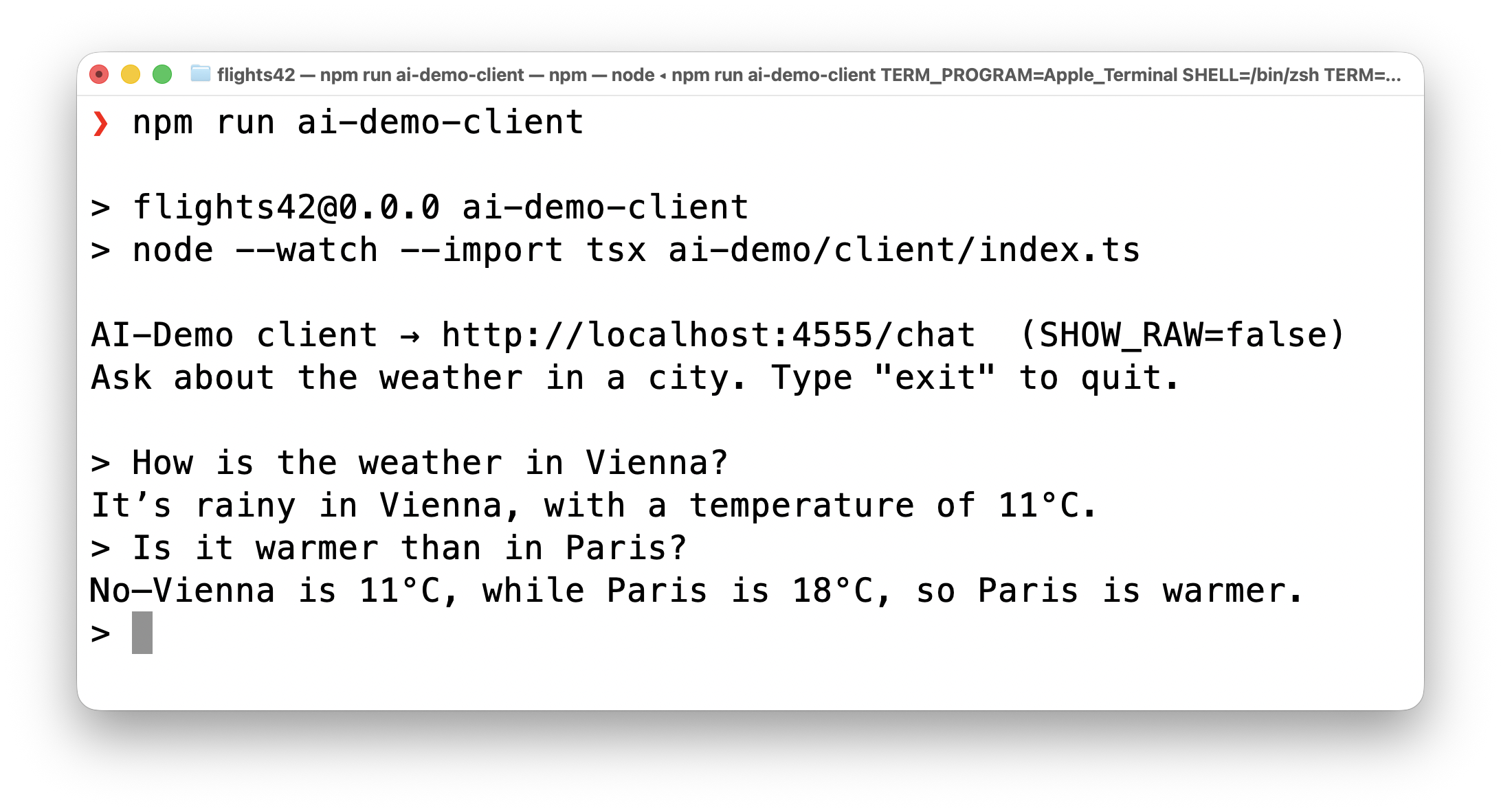
Thanks to the server-side memory, follow-up questions such as Is it warmer than in Paris? work as well — the agent correctly relates the question to Vienna, since both questions are assigned to the same conversation via the same threadId.
A look behind the scenes is where it gets really interesting. If you start the client in detail mode and ask, for example, about the weather in Graz, it displays the individual AG-UI messages that the adapter generates from the work of the Mastra agent:
npm run ai-demo-client -- --details[RUN_STARTED ]
[TOOL_CALL_START ] getWeather
[TOOL_CALL_ARGS ] {"city":"Graz"}
[TOOL_CALL_END ]
[TOOL_CALL_RESULT ] {"city":"Graz","condition":"sunny","temperature":17}
[TEXT_MESSAGE_START ]
[TEXT_MESSAGE_CONTENT] G
[TEXT_MESSAGE_CONTENT] raz
[TEXT_MESSAGE_CONTENT] is
[TEXT_MESSAGE_CONTENT] sunny
[...]
[TEXT_MESSAGE_END ]
[RUN_FINISHED ]Here, the message types known from the first part show up in action: the run starts, the model requests a tool call for getWeather, the agent executes the tool on the server and logs the result. Then the answer arrives as a stream of individual text fragments before the run is completed. This time, however, the messages do not come from hardcoded examples but from a real agent with a language model.
An Angular Client with CopilotKit
After the command line, we take a first look at the actual target environment of this series: the browser. For this, the workspace contains a deliberately minimal Angular application under projects/simple-client that talks to the same AG-UI endpoint as the command-line client.
It uses CopilotKit — the open-source frontend SDK for AI assistants and copilots whose makers are also behind AG-UI. CopilotKit comes with ready-made UI building blocks for chats and speaks AG-UI natively. The Angular support comes as a separate package via npm:
npm i @copilotkit/angularThe connection to our agent is established by provideCopilotKit in the app.config.ts:
import { HttpAgent } from '@ag-ui/client';
import { provideCopilotKit } from '@copilotkit/angular';

const chatUrl = 'http://localhost:4555/chat';

export const appConfig: ApplicationConfig = {
  providers: [
    provideBrowserGlobalErrorListeners(),
    provideCopilotKit({
      agents: {
        weatherAgent: new HttpAgent({ url: chatUrl }),
      },
    }),
  ],
};
Here the charm of AG-UI shows once more: CopilotKit simply expects an AG-UI agent. Therefore, the already familiar HttpAgent is used, pointing to our /chat endpoint. The key weatherAgent assigns a client-side name through which components can refer to this agent.
The actual user interface is provided by the chat control CopilotChat:
import { CopilotChat } from '@copilotkit/angular';

@Component({
  selector: 'app-root',
  imports: [CopilotChat],
  templateUrl: './app.html',
  styleUrl: './app.css',
})
export class App {}
<main class="chat-container">
<copilot-chat agentId="weatherAgent" />
</main>That is all it takes: copilot-chat comes with a message list, an input field, and a streaming display, and handles the AG-UI communication in the background. The agentId attribute refers to the previously registered agent. The following command starts the application via the Angular dev server on http://localhost:4300:
npm run simple-client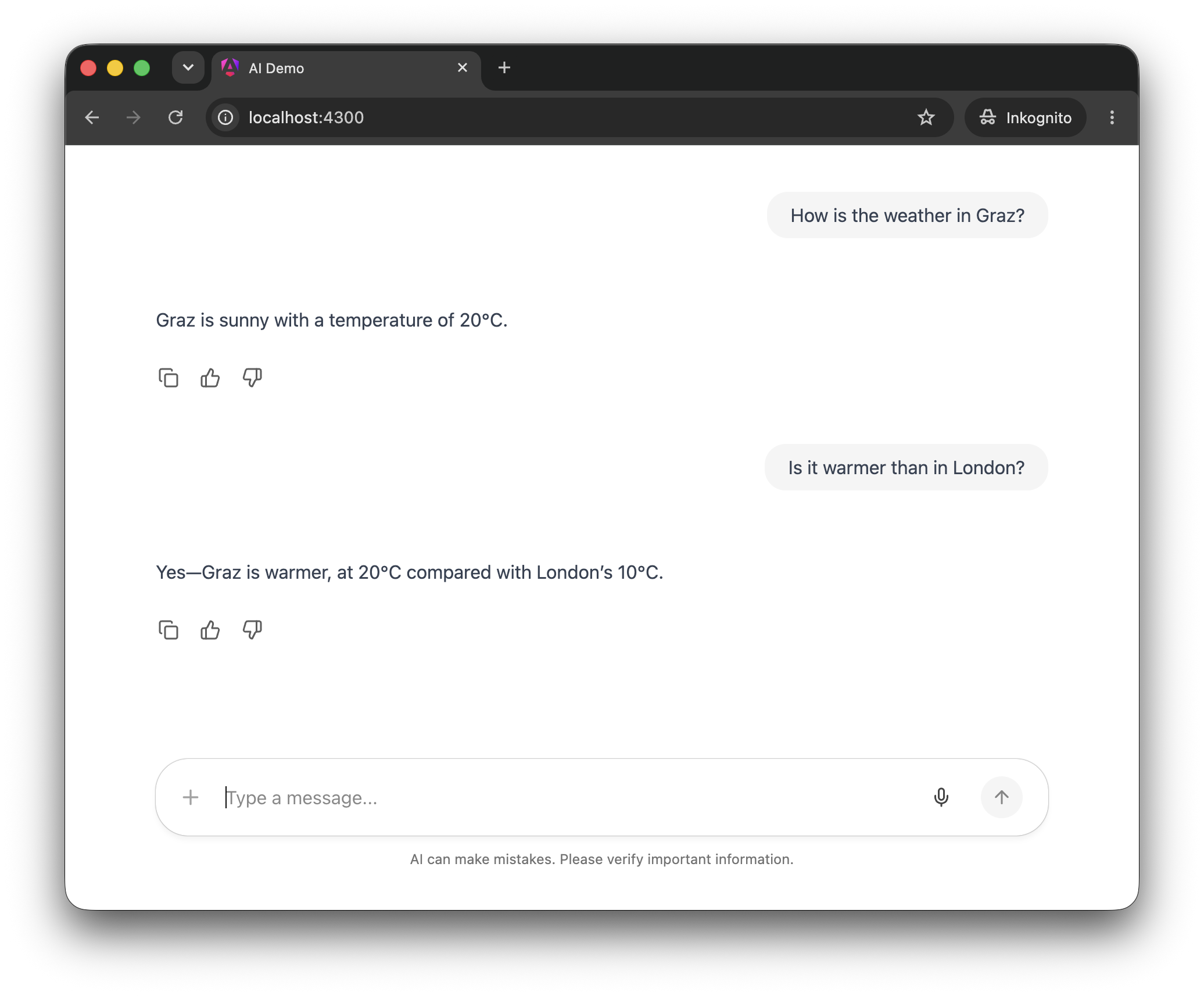
Follow-up questions such as Is it warmer than in London? work here too, because behind the chat sits the same agent with its server-side memory.
The ready-made chat control is the fastest way to a runnable result and therefore ideal for getting up and running quickly. In the coming parts of this series, however, we will use CopilotKit's headless mode: it provides the state and behavior of the chat but leaves the presentation entirely to the application. That is always important when the chat should match your own design, when custom widgets should appear in the conversation, or when tool calls should interact with the application's stores, forms, and routing.
Summary
An agent framework such as Mastra reduces the server side to a few, easily readable building blocks: an agent with a prompt and memory, a tool with schemas, and a central configuration. The adapter from @ag-ui/mastra translates the work of this agent into AG-UI messages, and a bit of glue code streams them to the client as server-sent events.
The decisive point is the decoupling: the client knows neither Mastra nor the language model being used. It speaks AG-UI exclusively. This applies to the command line just as much as to the Angular client, which comes together in a few lines of code thanks to CopilotKit's chat control. This means the agent framework could be swapped out without touching a single line of client code — exactly the promise this series started with.
The Next Step
With CopilotKit's ready-made chat control, we quickly arrived at a runnable result. From the next part on, however, we switch to the flexible headless mode of CopilotKit mentioned above and show how agents can be integrated deeply and idiomatically into Angular applications with it — with a custom-rendered chat history, client-side tools, and custom widgets.
Interested in production-ready Agentic UI architectures?
In my workshop, we dig into AG-UI, A2UI, MCP Apps, HITL patterns, and modern Angular architectures for real-world agentic systems.
FAQ
Why Does the Article Use Mastra?
Mastra was built for TypeScript from the ground up and therefore fits well into the toolbox of frontend teams. The concepts shown — agent, tools, memory, and prompt — can, however, also be found in a very similar form in other agent frameworks such as LangGraph, Google ADK, or the Microsoft Agent Framework.
What Does the Adapter from @ag-ui/mastra Do?
The class MastraAgent implements the AbstractAgent of the AG-UI SDK. It calls the Mastra agent passed to it and translates its streaming events into AG-UI messages such as TOOL_CALL_START or TEXT_MESSAGE_CONTENT. This eliminates the need to create these messages manually.
Does the Client Have to Know That Mastra Is Involved?
No. The client only knows the URL of the AG-UI endpoint and the standardized message types. The agent framework, the language model, and the server-side tools can be swapped out without changing the client.
What Is CopilotKit?
CopilotKit is an open-source frontend SDK for AI assistants and agentic UIs, created by the same people behind AG-UI. It offers ready-made building blocks such as the chat control shown here as well as a headless mode for fully custom user interfaces, and it communicates with agents natively via AG-UI.
How Does the Agent Remember the Conversation?
The client generates a threadId per session, which the route handler passes on to Mastra's memory as resourceId. This way, the agent assigns all runs to the same conversation, and the client only has to transmit the new messages.