

Implementing AG-UI with the SDK on the server and in the client
Once AG-UI defines the semantic messages exchanged between client and agent, the next practical question is immediate: how do you implement these messages concretely on the client and server side? That is exactly what the official SDKs for TypeScript and Python provide, offering ready-made building blocks.
This second part of the series shows how the AG-UI SDK for TypeScript is used on the server and in the browser, how tool calls work with it, and how client tools are described and passed to the agent.
📂 Source Code (see branch copilotkit)
What Does the AG-UI SDK Provide?
So that we do not have to start entirely from scratch, AG-UI comes not only with a protocol specification but also with SDKs for TypeScript and Python. Many of the adapters for agent frameworks build on top of them. The Microsoft Agent Framework, by contrast, comes with its own implementation so that AG-UI can also be supported server-side through C#. In addition, the official AG-UI repo contains community implementations for other languages such as Java and C++, as well as for frameworks like Spring AI.
The official SDKs for TypeScript and Python support HTTP over server-sent events (SSE): each run triggers an HTTP request, after which the server-side agent gradually sends its response to the client as individual text messages and tool calls. These messages can be encoded as JSON or in binary form using Protocol Buffers.
Using the TypeScript SDK on the Server
To use the TypeScript SDK, we install the package @ag-ui/core on the server-side. On the client-side we leverage @ag-ui/client.
To illustrate server-side use of the SDK, the following example hardcodes simple AG-UI-compliant messages without using a language model. To do so, the server follows a classic Smalltalk rule — it’s never wrong to talk about the weather:
import { HttpAgent } from '@ag-ui/client';
import { BaseEvent, EventType, RunAgentInput } from '@ag-ui/core';
import { Observable } from 'rxjs';

export class FlightWeatherAgent extends AbstractAgent {
  run(input: RunAgentInput): Observable<BaseEvent> {
    return new Observable((observer) => {
      const { threadId, runId } = input;
      observer.next({ type: EventType.RUN_STARTED, threadId, runId });
      observer.next({
        type: EventType.TEXT_MESSAGE_START,
        messageId: '1001',
        role: 'assistant',
      });
      observer.next({
        type: EventType.TEXT_MESSAGE_CONTENT,
        messageId: '1001',
        delta: 'Checking flight weather for Frankfurt...',
      });
      observer.next({ type: EventType.TEXT_MESSAGE_END, messageId: '1001' });
      [...]
      observer.next({ type: EventType.RUN_FINISHED, threadId, runId });
      observer.complete();
    });
  }
}
The FlightWeatherAgent shown here inherits from AbstractAgent. Its run method processes user requests. It starts a run, sends a text message to the client, and then finishes the run again.
Typically, run delegates to an agent framework such as Mastra, LangGraph, Google ADK, Microsoft Agent Framework, or Spring AI and transforms the received information into AG-UI-compliant messages. Usually, you do not have to write such integrations yourself, especially since the AG-UI SDK provides adapters for many frameworks and some frameworks also include their own integration.
It is important to note that the SDK does not handle integration with the chosen transport protocol, for example sending SSE over HTTP. For that reason, the accompanying demo project also contains a small amount of glue code containing a server-side route that registers with the agent and sends all messages as SSE.
Agentic UI with Angular
If you don’t just want to integrate AG-UI but embed it into a scalable architecture:
In my book Agentic UI with Angular, I cover the underlying patterns and trade-offs in depth.
Using the TypeScript SDK in the Browser
On the client side, the TypeScript SDK gives us the option of defining an AgentSubscriber with event handlers for incoming messages:
import { AgentSubscriber } from '@ag-ui/client';

const subscriber: AgentSubscriber = {
  onRunStartedEvent: ({ event }) => {
    console.log(
      `RUN_STARTED: threadId=${event.threadId}, runId=${event.runId}`,
    );
  },
  onTextMessageStartEvent: ({ event }) => { [...] },
  onTextMessageContentEvent: ({ event }) => { [...] },
  onTextMessageEndEvent: ({ event }) => { [...] },
  [...]
  onRunFinishedEvent: ({ event }) => { [...] },
};
A dedicated handler exists for each message type. With HttpAgent, which is also provided by the SDK, a connection to the server-side agent can be established:
import { FlightWeatherAgent } from './server.js';

const threadId = '4711';
const url = 'https://...';
const agent = new HttpAgent({ url, threadId });

const userMessage = {
  id: 'msg-user-1',
  role: 'user' as const,
  content: 'What is the flight weather in Frankfurt?',
};

agent.addMessage(userMessage);
await agent.runAgent({ runId: '0815' }, subscriber);
The addMessage method initially only appends a message with the user's question to a client-side array. The locally collected messages are not sent until runAgent starts the next run. As soon as the responses arrive from the agent via SSE, runAgent invokes the corresponding handlers in the AgentSubscriber passed in.
Depending on whether the agent remembers the conversation history between runs, the client either sends all previously exchanged messages or only the newly added ones.
Server-Side Tool Calling with the AG-UI SDK
So far, our demo has only sent simple text. However, requesting tool calls through the agent works in a very similar way. The information that needs to be sent for this also typically comes from the chosen language model and is transformed by the agent into AG-UI-compliant messages. To keep the demo simple, though, we still make do with a few hardcoded messages:
// Server Code
// Step 1: Tool Call
observer.next({
  type: EventType.TOOL_CALL_START,
  toolCallId: '2001',
  toolCallName: 'loadFlightWeather',
});
observer.next({
  type: EventType.TOOL_CALL_ARGS,
  toolCallId: '2001',
  delta: '{"city":"Frankfurt"}',
});
observer.next({
  type: EventType.TOOL_CALL_END,
  toolCallId: '2001',
});
// Step 2: Execute Server-side Tool
const weatherResult = [...];
// Step 3: Answer Tool Call
observer.next({
  type: EventType.TOOL_CALL_RESULT,
  toolCallId: '2001',
  messageId: '3001',
  role: 'tool',
  content: JSON.stringify(weatherResult),
});
With the first three messages, the agent indicates that the LLM has requested a tool call. Because it is a server-side tool, the agent executes it itself and returns the result to the language model. In addition, it logs the result by sending another AG-UI message.
Based on these messages, the client can inform the user about the tool call. This creates transparency and prevents the UI from appearing frozen for a longer period of time.
Client-Side Tool Calling with the AG-UI SDK
Execution of client-side tools is similar to server-side tools. Here too, the agent communicates the call and its parameters using the tool-call messages we have discussed. The difference is that the client now reacts to these messages by executing a tool and sending the result back in the next run.
However, this initially introduces a challenge: the language model must be informed about the available client-side tools. Here as well, the TypeScript SDK helps us. It provides a Tool data type that can be used to define client-side tools. Alongside a name and a textual description, this type also captures information about the expected parameters:
// Client Code
import { Tool } from '@ag-ui/client';
import { z } from 'zod';

const weatherSchema = z.object({
  condition: z.string().describe('e.g., sunny, cloudy, rainy.'),
  temperature: z.string().describe('e.g., 25°C, 77°F.'),
  wind: z.string().describe('e.g., 5 km/h, 3 mph.'),
});

export const showWeatherTool: Tool = {
  name: 'showWeather',
  description: 'Provide weather data the client can render.',
  parameters: z.toJSONSchema(weatherSchema),
};
The parameters must be defined as JSON Schema. Our example uses the popular schema library zod to provide this schema. Based on the description of the tool and its parameters, the LLM can decide when and how to call the tool.
The runAgent method accepts the tool descriptions and sends them to the agent:
// Client Code

// 1st run
await agent.runAgent({ runId: '0815', tools: [showWeatherTool] }, subscriber);

// Look into received client-side tool calls and perform respective actions
const toolCallResultMessage = [...];

// Add Tool Call Result
agent.addMessage(toolCallResultMessage);

// 2nd run
await agent.runAgent({ runId: '0816', tools: [showWeatherTool] }, subscriber);
After each run, the client checks whether the AgentSubscriber has received requests for client-side tool calls. If so, it executes those tools and sends the results back to the agent as part of another run.
AG-UI, Message History, and Client Tools
Sending the messages stored via addMessage, as well as the information about the client tools, happens through the payload of the HTTP request that starts the next run. Unlike the messages discussed so far, the AG-UI protocol does not define the structure of this payload. It is merely an implementation detail of the AG-UI SDK. Because this SDK is official, one can hope that other implementations will align with it.
Reading Client Tool Information on the Server
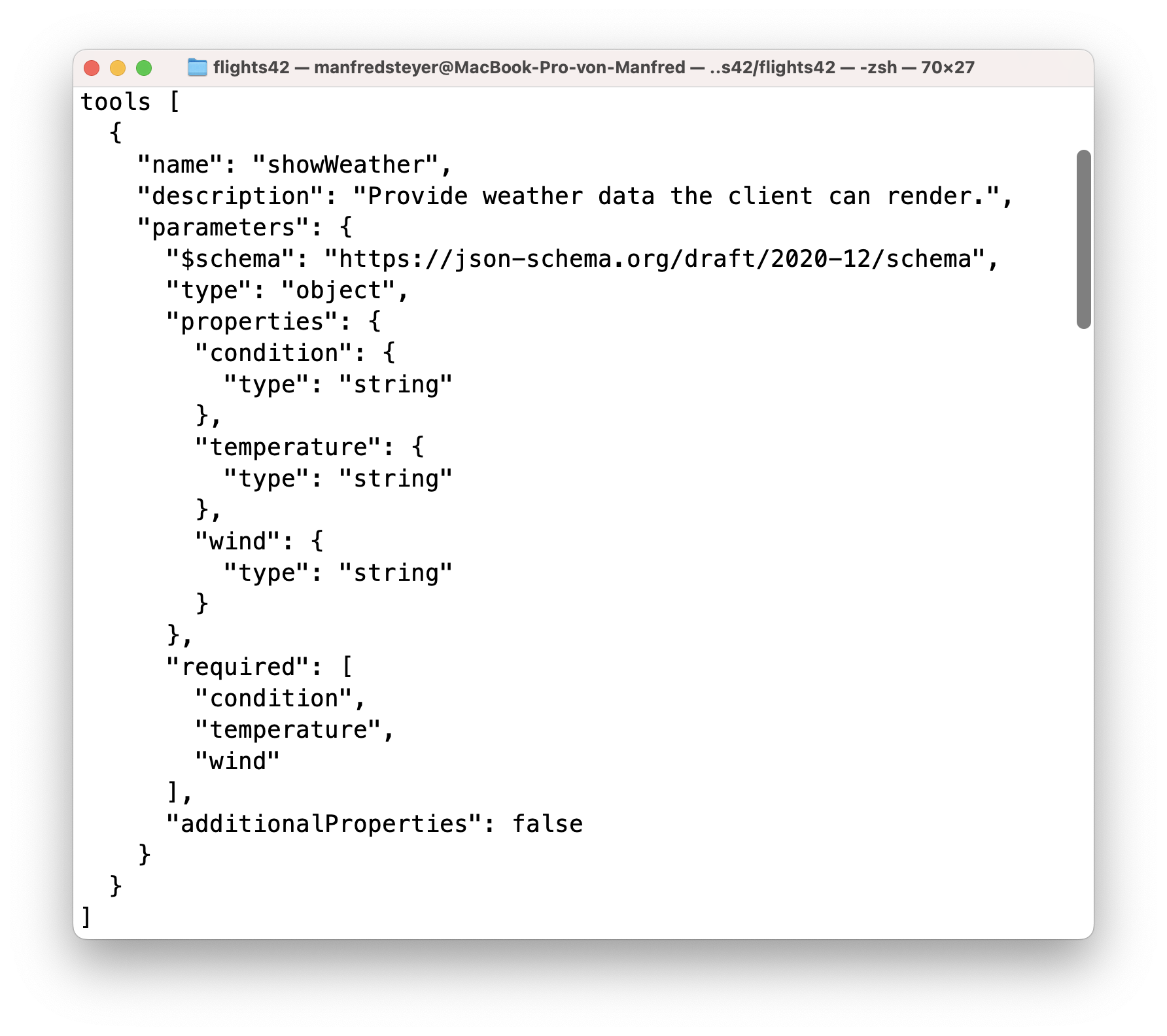
As mentioned earlier, the adapters of the individual agent frameworks pass the received client-tool information on to the LLM. However, if you want to work with this information manually inside the agent, you will find it in the tools property of the parameter object passed to run:
class FlightWeatherAgent extends AbstractAgent {
  run(input: RunAgentInput): Observable<BaseEvent> {
    return new Observable((observer) => {
      console.log('tools', input.tools);
      [...]
    });
  }
}
This is a JSON Schema containing the parameter descriptions and the textual information that the client defined using Zod:
Summary
The TypeScript SDK takes a large portion of the AG-UI integration work off your hands. It handles the correct representation and processing of messages and also provides event handlers so the client can react to incoming messages.
The SDK is intentionally low-level. As the second part of this series, this article lays the technical foundation for using AG-UI inside a concrete frontend framework.
The Next Step
Using the SDK directly leads to unnecessary boilerplate. The next article shows how to abstract all of this conveniently for Angular.
Interested in production-ready Agentic UI architectures?
In my workshop, we dig into AG-UI, A2UI, MCP Apps, HITL patterns, and modern Angular architectures for real-world agentic systems.
FAQ
What Does the AG-UI SDK for TypeScript Do?
The SDK provides building blocks for creating, sending, and processing AG-UI messages on the server and in the browser. These include agent classes, subscribers for incoming events, and data types for client tools.
Does the AG-UI SDK Support Server-Sent Events?
The SDK works well with server-sent events, but it does not handle the transport integration itself. Sending SSE over HTTP still has to be implemented by the application through glue code or a framework.
What Is the Difference Between Server-Side and Client-Side Tool Calls?
Server-side tools are executed by the agent itself, and their results are returned to the model. Client-side tools, by contrast, are requested by the agent, executed in the browser, and their results are sent back to the agent in the next run.
Why Is the TypeScript SDK Still Low-Level?
The SDK models AG-UI communication cleanly, but it intentionally leaves many convenience features open. In frameworks such as Angular, an additional abstraction is therefore often useful to reduce boilerplate and make the integration more idiomatic.