


In the first post of this series arc, I wrote about the LLMs I currently like to use for Angular development. In the second post, I looked at the apps and harnesses around those models: Codex, Claude Desktop app, Cursor, Antigravity, VS Code, WebStorm, and a few more. In the third post, I focused on money: subscriptions, API costs, enterprise plans, token usage, reasoning levels, and cost control. I originally planned to squeeze all of this into that costs post, but it quickly became too much for one article, so both topics now get their own. This fourth part is about the less comfortable question behind all of that:
What do we actually share when we use agentic coding tools?
This is where pricing, privacy, enterprise rules, EU regulations, and the very common sentence "We are not allowed to use AI here" all meet.
Is our code safe?
Before I dive in: this is not legal advice and no replacement for your company's security review – just my practical view as an Angular builder and coach who refuses to pretend that data protection is somebody else's problem.
TL;DR: Do Not Ban AI, Approve Safe Paths
If you only have thirty seconds, my practical view is this:
- personal subscriptions are great for learning, but not automatically fine for proprietary code
- "not used for training" does not mean "not retained"
- secrets, production data, customer data, and regulated personal data need clear rules
- agents don't just read code, they run commands and can be tricked into leaking it, so limit them
- companies should approve a few safe tools instead of forcing unofficial workarounds
- every generated diff still needs human review
This Is Not a Legal Guide
You know the drill by now: my current opinion as of June 2026, based on too much time spent reading vendor documentation.
And these details change fast. Vendors change plans, defaults, retention settings, enterprise controls, and subprocessors, sometimes within weeks. While I was writing this series, three new models got released (Gemini 3.5 Flash, Composer 2.5 and Opus 4.8). The next model will be out next week I guess (we're waiting for GPT 5.6, right?). Google is folding Gemini CLI and Gemini Code Assist for individual users into Antigravity CLI, while enterprise access remains unchanged. So please check the official pages again before you decide anything for real, and read this as a practical field report.
What Do We Actually Share?
This was the part where I had to do the most research because it is easy to have a strong opinion here without knowing the details. When you use an AI coding agent, you might share much more than the prompt in the chat box.
Depending on the tool and settings, the provider or tool vendor may receive:
- your prompt
- selected code snippets
- open and neighboring files
- search results from your repository
- diffs
- terminal commands and outputs
- stack traces
- package names and dependency versions
- file paths
- screenshots
- browser state
- issue, pull request, and review text
- telemetry about accepted suggestions
This does not automatically mean that the provider trains on all of that. Training is a separate question. But AI coding is still a real data-processing workflow.
For an Angular project, this can include product logic, internal architecture, API names, feature flags, business rules, test fixtures, local logs, screenshots, and sometimes personal data.
So the basic rule is simple:
Do not send secrets, production data, customer data, or regulated personal data to AI tools unless your legal and technical setup explicitly allows it.
Agents can see terminal output and files. If your .env files, logs, database dumps, screenshots, or test fixtures contain sensitive data, the agent might see them too – researchers have shown that Codex, Claude Code, and Cursor walk the working directory and can read .env files that .gitignore would normally keep out of sight.
More Than Reading: Breach and Industrial Espionage
Here is the part that worries me more than training. These tools are not passive chat boxes. They run commands, hit the network, and call MCP servers, plugins, and connectors. Codex documents an OS-level sandbox with approval modes, and Claude Code ships sandboxing built on bubblewrap and seatbelt. Good engineering – but a sandbox is a fence, not a law of physics.
Simon Willison calls the dangerous mix the "lethal trifecta": access to private data, exposure to untrusted content, and a way to send data back out. A coding agent in your repo has all three by default. And the fences leak: one team showed Claude Code escaping its own denylist and disabling its sandbox, while researchers have documented protocol-level holes in MCP that enable prompt injection and tool poisoning.
So let me say the quiet part out loud. For an enterprise Angular project, the real fear is not that the model learned some generic pattern. It is data breach and industrial espionage: your architecture, business rules, unreleased features, and customer data ending up where they should not.
It happens to the labs too. In April 2026, Anthropic accidentally exposed Claude Code's own source code through a source-map file in an npm package – a human configuration error, not an attack, and no customer data was involved. But the lesson is uncomfortable: if the company that builds the agent can leak code by accident, your proprietary code is also just data on someone else's servers, under their rules. Add a prompt-injection vector – a poisoned dependency, a malicious issue, a booby-trapped page the agent reads – and the same agent that sees your code can be tricked into sending it out.
The takeaway is not panic. It is threat modelling: where does my code live, who can reach it, how long is it kept, and what can the agent be talked into doing? That is why constraining the agent's hands – command execution, network, MCP, connectors – matters as much as the training checkbox.
What I Found in Vendor Docs
The exact wording differs between vendors, plans, products, and regions, so I would not treat the links below as a permanent legal answer. But they show why teams have to distinguish between training, retention, product telemetry, enterprise terms, and the actual tool context an agent can see.
Consumer Plans vs Business Plans
This is the most important distinction I found. Consumer plans often have data controls, but you need to check and configure them. Business, enterprise, and API products usually have stronger defaults, especially around model training.
OpenAI's help page on how data is used to improve model performance says individual services such as ChatGPT and Codex may use content to train models unless you opt out, but that it does not train on business products, ChatGPT Enterprise, and the API by default. The Codex plan usage article says the same for Codex.
Anthropic's Claude Code data usage page makes a similar distinction. Free, Pro, and Max users can allow data use for model improvement; for Team, Enterprise, API, third-party platforms, and Claude Gov, Anthropic says it does not train generative models on Claude Code prompts or code under commercial terms unless the customer opts in.
Cursor's pricing page says Privacy Mode, when enabled in settings or by a team admin, keeps code data from being stored by model providers or used for training. The security page adds that it is available to anyone, enabled by default for team members, and backed by technical controls and contractual terms such as zero data retention with model providers; the data-use overview spells out what is and isn't stored.
Google's consumer Gemini story also differs from the Google Cloud one. The Gemini Apps Privacy Hub warns users not to enter confidential information they would not want reviewed or used to improve services. In contrast, the Gemini for Google Cloud data governance docs say it does not use prompts or responses to train models, and the Gemini Code Assist Standard/Enterprise security docs describe coding context as Customer Data.
GitHub Copilot just made this split concrete. In March 2026, GitHub changed its defaults so interaction data from Free, Pro, and Pro+ users can train its models unless you opt out, while Business and Enterprise stay excluded. Independent reporting spelled out what that means for regulated industries, and the Copilot Trust Center holds the current details. Same lesson, fresh example.
So my practical conclusion is:
A personal €20 subscription is great for learning and experimentation, but it is not automatically the right setup for proprietary enterprise code.
Maybe it is allowed in your company after opt-out and review. Maybe it is not. But you should not guess.
No Training Is Not the Same as No Retention
Another thing that is easy to mix up: "not used for training" does not mean "not retained".
Providers may still retain data for abuse monitoring, security, debugging, billing, legal obligations, or product functionality. Some enterprise plans allow custom retention, some API setups offer zero data retention, and some consumer products keep conversation history unless you delete it or use temporary modes.
For example, Anthropic's privacy center says consumer users who do not allow data use for model improvement have 30-day retention, while those who do have 5-year retention.
OpenAI says individual users can opt out of training, and Temporary Chat will not appear in history, create memories, or be used to train models, though feedback may still be used.
Google Cloud says Gemini Code Assist Standard and Enterprise are stateless Google Cloud services and do not store prompts and responses in Google Cloud unless you configure logging.
For a serious company rollout, I would ask every vendor boring but important questions:
- Is our code used for training by default?
- Can we opt out organization-wide?
- What is retained, where, and for how long?
- Can we configure retention or use zero data retention?
- Do you offer EU or regional processing?
- Which subprocessors are involved?
- Are human reviewers involved?
- How are prompts, responses, diffs, screenshots, terminal outputs, and telemetry treated?
- Can admins disable connectors, browser access, MCP servers, cloud agents, or external network access?
If a vendor cannot answer these questions clearly, I would not roll it out broadly in a regulated company.
EU and Regulatory Considerations
Since I work in Europe, I also care about the EU side. For many companies, GDPR is the main topic; depending on the use case, works councils, vendor management, data residency, contractual confidentiality, and the EU AI Act can also become relevant.
The EU AI Act entered into force in 2024 and applies gradually. The European Commission's implementation timeline shows obligations for general-purpose AI models started in 2025, and the Commission's enforcement powers start August 2, 2026 – not far away. For a normal Angular developer using a coding assistant, GDPR and confidentiality are probably more immediate than the AI Act.
In the DACH region, the practical questions are usually a data processing agreement (Auftragsverarbeitung) and EU data residency – German write-ups like this DSGVO comparison of ChatGPT, Copilot, and Gemini and this Claude Code AVV walkthrough are a decent starting point. But if your company builds AI features into products, uses agents in regulated workflows, or lets AI systems influence decisions, the AI Act becomes much more relevant.
For coding agents inside a company, I would keep the policy practical:
- classify which repositories may be used with which AI tools
- ban secrets and production data in AI context
- require approved business, team, enterprise, or API terms for proprietary code
- document approved vendors and subprocessors
- require human review for generated code
- educate developers on prompt privacy and tool permissions
The goal should not be bureaucracy – we have got enough of that.
The goal should be to make AI usage possible without pushing developers into unofficial workarounds.
Green, Yellow, Red
If I had to explain the policy to developers, I would use a very simple traffic-light model.
Not because it covers every legal edge case, but because people actually remember it.
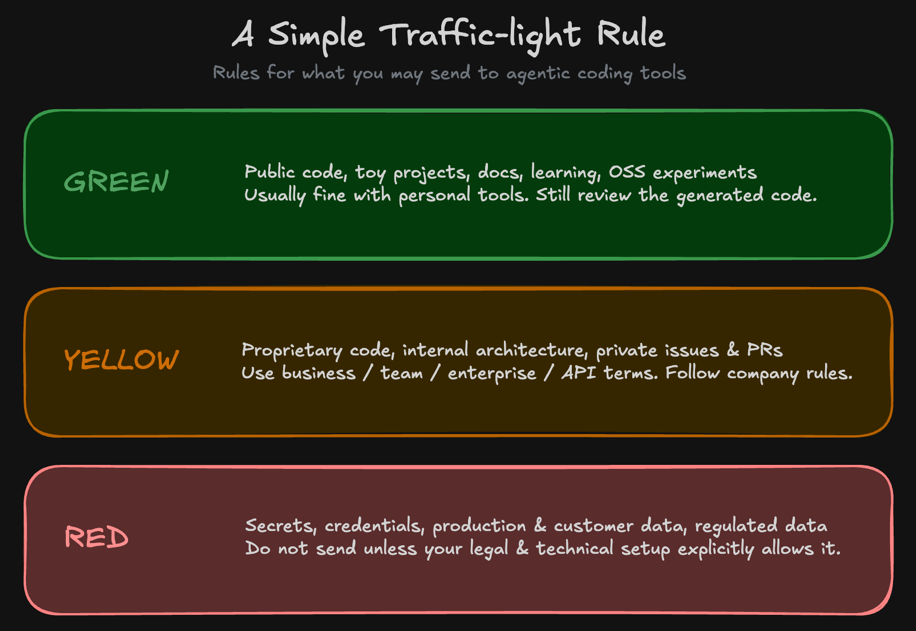
- Green: learning, experiments, public and open-source code – personal subscriptions are fine here.
- Yellow: proprietary code – allowed, but only on approved business, team, enterprise, or API terms.
- Red: secrets, credentials, production data, customer data, regulated personal data – never in the AI context, no exceptions.
Most real enterprise Angular work lives in the yellow zone. That is why a blanket ban is too blunt, but "just use whatever" is too naive.
"We Are Not Allowed to Use AI"
This is the part where I will be a bit opinionated.
I hear "we are not allowed to use AI" more and more often. Sometimes that is justified: if a company has no vendor review, no DPA, no data policy, no security story, and developers paste sensitive code into random tools, somebody should stop that. But a blanket "no AI" policy is not a serious long-term strategy. It has a hidden cost: the company becomes slower while competitors learn to use these tools safely. Long-term, I don't think that is survivable.
I believe professional software teams need agentic coding to stay competitive. Not because AI magically replaces good engineers. It does not. But because the baseline speed of software work is changing.
If one team can modernize code, write tests, review changes, and explore refactorings faster, the other team cannot keep working exactly as before and expect no consequences.
For Angular teams this is especially relevant. Enterprise Angular projects often have large, complex codebases, old RxJS flows, inconsistent test coverage, slow migrations, and a lot of technical debt – a lot of boring (I personally love it!) but important modernization work. Agentic coding helps with exactly that – if we keep strong human-in-the-loop review and a sophisticated Angular Coding Style Guide.
So I would not argue for "let everybody use everything". I would argue for this:
Do not ban AI. Approve a small number of safe paths and teach people to use them professionally.
That is the better security posture.
A Simple Company Policy
If I had to write a first version of an AI coding policy for an Angular company, I would keep it short:
- Use approved tools only (might have to approve them first, a lot of work, but AI can help 😏).
- Use business, team, enterprise, or approved API terms for proprietary code.
- Use personal consumer accounts only for learning, public code, or explicitly approved use cases.
- Do not send secrets, credentials, production data, customer data, or sensitive personal data.
- Human review of every generated diff.
- Treat AI-generated tests as useful, but not as proof that the implementation is correct.
- Control command execution, browser, network, MCP, plugin, and connector access.
- Track cost and usage during rollout.
- Review the policy every quarter because the tools change too quickly.
That is not perfect, but it is better than either "everything is forbidden" or "everybody can use whatever they want".
My Personal Verdict
For individual developers, my recommendation is simple: use personal subscriptions for learning, experiments, public code, and approved professional work. But do not assume the same subscription is automatically fine for proprietary enterprise code.
For companies, I would not start with a blanket ban. I would start with the safest option developers will actually use: one or two approved business/enterprise tools, a clear data policy, and a serious pilot.
For policy work, I would not try to predict every possible AI use case. I would define a few safe paths, educate developers, and review the setup every quarter.
Agentic Engineering Workshop
Everything in this post is really an argument for treating agentic coding as a system, not a tool: the model, the app, my Angular Guardrails, my Angular Coding Style Guide, the review workflow – and yes, the data policy – all have to fit together, or the whole thing leaks somewhere.
If you want to use agentic coding safely with proprietary Angular code – with clear data flows, real guardrails, and a policy your developers will actually follow instead of working around – join our Agentic Engineering Workshop, available in English and German. It takes advanced Angular developers from vibe coding to traceable Agentic Engineering workflows: AI-ready project setup, guardrails, spec-first and plan-first workflows, UX and component prototyping, code review, testing, and brownfield refactoring.
- 🤖 Agentic Engineering Workshop – 2 days, remote
Conclusion
AI coding tools are not just chat boxes. They can read files, search repositories, inspect diffs, run commands, see terminal output, connect to other systems and resolve nasty merge conflicts. That is what makes them useful, but it is also why privacy and governance matter.
For individual developers, the practical rule is simple: do not send secrets, production data, customer data, or regulated personal data unless the setup explicitly allows it. For companies, the practical rule is also simple: do not only say no. Approve a few safe paths, define clear boundaries, and make the official workflow better than the unofficial workaround.
Because the teams that learn to use agentic coding professionally – safely, on approved paths instead of workarounds – will simply outpace the teams that ban it. That gap grows quietly, until falling behind turns into going broke.
In the personal verdict, I pull all the threads of the original arc together – models, harnesses, costs, and privacy – into the agentic coding setup I would actually choose.
Thank you for reading 🙏 this blog post was written by Alexander Thalhammer. For feedback, remarks or questions, please reach out to me ❤️