

Why consuming agents needs a real client library — and how to get started in minutes.
The server side of Agentic AI is booming: agent frameworks, tool calling, memory, orchestration. But the moment an Angular application is supposed to integrate an agent — displaying its answers, calling client-side tools, rendering real UI instead of walls of text — the ecosystem gets surprisingly quiet. CopilotKit for Angular fills exactly this gap. Using an example, this article shows how to use this popular library together with open standards.
We Need a Library for Consuming Agents
Talking to an agent is simple in theory: send a question, receive an answer. In reality, the client has to process a stream of events. Examples are text fragments, tool calls including their arguments and results, approvals by the user, or error signals.
That is infrastructure code — and infrastructure code has no business living in application code. What we need is a library that owns the details mentioned above, so application code can focus on what makes the product special.
AG-UI: No Lock-in on the Server Stack
The second requirement is independence. Whether the backend team builds its agents with LangGraph or LangChain, with Mastra, with Spring AI, or with the Microsoft Agent Framework should be irrelevant to the frontend.
This is exactly what AG-UI delivers: an open, lightweight protocol between agents and user interfaces. The client receives a standardized stream of events — run started, tool call, text fragment, run finished — and does not need to know which framework produces them.
Three Standards, One Frontend
AG-UI is not the only standard the frontend has to care about. Two more are emerging right next to it, each covering a complementary concern:
- A2UI lets an agent describe user interfaces declaratively, so it can compose its answer out of real UI components instead of prose.
- MCP Apps extend the Model Context Protocol so that third-party tools can ship their own visualizations along with their capabilities.
These standards don't contradict each other either; they can be combined: an agent streamed over AG-UI that answers with A2UI surfaces and embeds MCP Apps from third parties. Someone has to bring these pieces into one coherent programming model — and that someone should not be every project team on its own.
Standards Alone Are Not Enough
There is a second gap: ease of use and developer experience (DX). The official SDKs for these standards are a solid first step, but they are deliberately low-level. They do provide concepts like event streams or renderers, but the wiring is left to us. That would mean infrastructure code inside the application — exactly what we want to avoid.
This is precisely where CopilotKit comes in. Built by the same team that initiated AG-UI, it packages these standards into a frontend SDK with two operating modes: a polished chat component for quick wins, and a headless mode that grants direct access to the received events and hence more freedom. With @copilotkit/angular, all of this arrives as an Angular-native package: providers, signals, and components that feel like the rest of your application.
In short: AG-UI, A2UI, and MCP Apps standardize the communication with the agent; CopilotKit provides a convenient way to integrate agents over these protocols and hence is a missing link for Agentic UI with Angular.
Creating a Demo
The demo consists of a regular Angular application with a Mastra-based agent living right next to it. Mastra is a popular TypeScript framework for building agents. Two commands scaffold both parts:
ng new angular-copilot-demo
cd angular-copilot-demo
npx mastra@latest init
The Mastra wizard adds an src/mastra folder with a working example agent and asks for an LLM provider and API key along the way, which it stores in an .env file.
We use Mastra here because it was built for TypeScript from the ground up and is refreshingly lightweight. For our purposes, however, the choice barely matters: the frontend will only ever see AG-UI. Any agent that speaks AG-UI — built with LangGraph, CrewAI, Pydantic AI, LlamaIndex, or the Microsoft Agent Framework, to name a few — could be connected in exactly the same way.
The Server-Side Agent
The scaffolded Mastra agent is a weather assistant with a single tool that looks up the weather for a given city — essentially the "Hello World" of Agentic AI. The file weather-agent.ts brings together everything an agent needs — prompt, model, tools, and memory:
// src/mastra/agents/weather-agent.ts
import { Agent } from '@mastra/core/agent';
import { Memory } from '@mastra/memory';
import { weatherTool } from '../tools/weather-tool';

export const weatherAgent = new Agent({
  id: 'weather-agent',
  name: 'Weather Agent',
  instructions: `You are a helpful weather assistant [...]`,
  model: 'openai/gpt-5.6-terra',
  tools: { weatherTool },
  memory: new Memory(),
});
The instructions hold the system prompt that defines the agent's role and behavior. For the model, a single identifier consisting of provider and model name is enough — Mastra's model router takes care of the rest, and it expects the matching API key as an environment variable.
Thanks to the configured Memory instance, the conversation history stays on the server, so the client only ever has to send the newest message. The scaffold generated by mastra init uses a local SQLite database for this.
With schemas based on the popular Zod library, the registered weatherTool describes its parameters and results:
// src/mastra/tools/weather-tool.ts
import { createTool } from '@mastra/core/tools';
import { z } from 'zod';

export const weatherTool = createTool({
  id: 'get-weather',
  description: 'Get current weather for a location',
  inputSchema: z.object({
    location: z.string().describe('City name'),
  }),
  outputSchema: z.object({
    temperature: z.number(),
    conditions: z.string(),
    location: z.string(),
    [...]
  }),
  execute: async (inputData) => {
    return await getWeather(inputData.location);
  },
});
On the one hand, these schemas provide the TypeScript types for the program code. On the other hand, Mastra derives a JSON Schema from the inputSchema at runtime and sends it to the model together with the name and the description. Based on this information, the model decides on its own when to call the tool and which arguments to pass. The outputSchema, by contrast, stays on the server: it validates and types the tool result.
The execute method holds the tool implementation, which in the case at hand merely delegates to a public weather API via getWeather.
Exposing the Agent via AG-UI
So far, the agent only speaks Mastra. The bridge to AG-UI is the MastraAgent adapter from @ag-ui/mastra: it runs the Mastra agent and translates its streaming events into AG-UI events. A custom route makes this available over HTTP — the following, slightly simplified handler publishes every registered agent under /ag-ui/:agentId and streams the AG-UI events back as Server-sent Events:
// src/mastra/server/ag-ui-route.ts
import { registerApiRoute } from '@mastra/core/server';
import { MastraAgent } from '@ag-ui/mastra';
import type { RunAgentInput } from '@ag-ui/core';
import { streamSSE } from 'hono/streaming';
import { concatMap, lastValueFrom } from 'rxjs';

export const agUiRoute = registerApiRoute('/ag-ui/:agentId', {
  method: 'POST',
  handler: async (c) => {
    const mastra = c.get('mastra');
    const agent = mastra.listAgents()[c.req.param('agentId')];
    const input = (await c.req.json()) as RunAgentInput;

    const aguiAgent = new MastraAgent({ agent, resourceId: 'anonymous' });

    return streamSSE(c, async (sse) => {
      const send = (data: unknown): Promise<void> =>
        sse.writeSSE({ data: JSON.stringify(data) });

      await lastValueFrom(aguiAgent.run(input).pipe(concatMap(send)), {
        defaultValue: undefined,
      });
    });
  },
});
The handler reads the RunAgentInput — the payload AG-UI clients send, including thread id and new messages — and hands it to the adapter, whose run method returns an observable of AG-UI events. The rest is pleasantly boring: since Mastra's server builds on Hono, its streamSSE helper takes care of the SSE headers and framing. concatMap forwards the events in order through send, and lastValueFrom keeps the callback — and with it the stream — open until the observable completes.
The central Mastra instance registers the agent as well as the route and enables CORS via middleware:
// src/mastra/index.ts
import { Mastra } from '@mastra/core/mastra';

import { weatherAgent } from './agents/weather-agent';
import { agUiRoute } from './server/ag-ui-route';

export const mastra = new Mastra({
  agents: { weatherAgent },
  server: {
    apiRoutes: [agUiRoute],
    cors: { origin: '*' },
  },
  [...]
});
For the demo, the generous origin: '*' is fine; a real application would restrict the allowed origins. That's the entire server side: a scaffolded agent, one route, one config entry.
Even Shorter: The CopilotKit Runtime
For the sake of completeness: the server side can be even shorter. CopilotKit ships its own runtime that takes care of publishing agents — with it, you don't have to write the AG-UI route at all. Registering the Mastra agent and serving it boils down to a few lines:
const runtime = new CopilotRuntime({
  agents: { weatherAgent: new MastraAgent({ agent: weatherAgent }) },
});

const app = createCopilotHonoHandler({ runtime, basePath: '/' });

serve({ fetch: app.fetch, port: 4555 }, (info) => {
  console.log(`CopilotKit runtime listening on http://localhost:${info.port}`);
});
I deliberately did not take this shortcut for our demo: to me, it is important to show that our Angular client works with any server that speaks AG-UI — no matter whether CopilotKit is involved on the server side or not. The hand-written route makes exactly this point.
New: Agentic UI with Angular
If you don’t just want to connect an agent but embed Agentic UI into a scalable architecture:
In my book Agentic UI with Angular, I cover the underlying patterns and trade-offs in depth.
The Client: Installing and Configuring CopilotKit for Angular
Time for the missing link: CopilotKit for Angular. It is installed via npm:
npm i @copilotkit/angularThe function provideCopilotKit in app.config.ts connects the application to our agent:
// src/app/app.config.ts
import { ApplicationConfig, provideBrowserGlobalErrorListeners } from '@angular/core';
import { provideCopilotKit } from '@copilotkit/angular';
import { HttpAgent } from '@ag-ui/client';

const AG_UI_URL = 'http://localhost:4111/ag-ui/weatherAgent';

export const appConfig: ApplicationConfig = {
  providers: [
    provideBrowserGlobalErrorListeners(),
    [...]
    provideCopilotKit({
      agents: {
        default: new HttpAgent({ url: AG_UI_URL }),
      },
    }),
  ],
};
CopilotKit simply expects an AG-UI agent. The HttpAgent from the AG-UI client SDK points at our /ag-ui/weatherAgent endpoint — no CopilotKit runtime, no additional middleware in between, and not a single line of Mastra-specific code in the browser. The key default is the client-side name components use to refer to this agent.
The user interface is a one-liner. The CopilotChat component brings the message list, input field, and streaming display along:
// src/app/app.ts
import { CopilotChat } from '@copilotkit/angular';

@Component({
  selector: 'app-root',
  imports: [CopilotChat],
  templateUrl: './app.html',
  styleUrl: './app.css',
})
export class App {}
<!-- src/app/app.html -->
<main class="chat-host">
<copilot-chat agentId="default" />
</main>That's it — a complete, streaming chat over a real agent, without a single line of event-handling code in the application.
Trying It Out
Running the demo takes two terminals in the project root. The .env file created by the Mastra wizard has to contain the LLM key — for OpenAI, that's OPENAI_API_KEY. The first terminal starts the Mastra dev server, which listens on port 4111:
npm run devThe second one starts the Angular dev server on port 4200:
npm startNow we ask about the weather in Vienna — the answer streams in word by word, and behind the scenes the agent has already geocoded the city and called its weather tool:
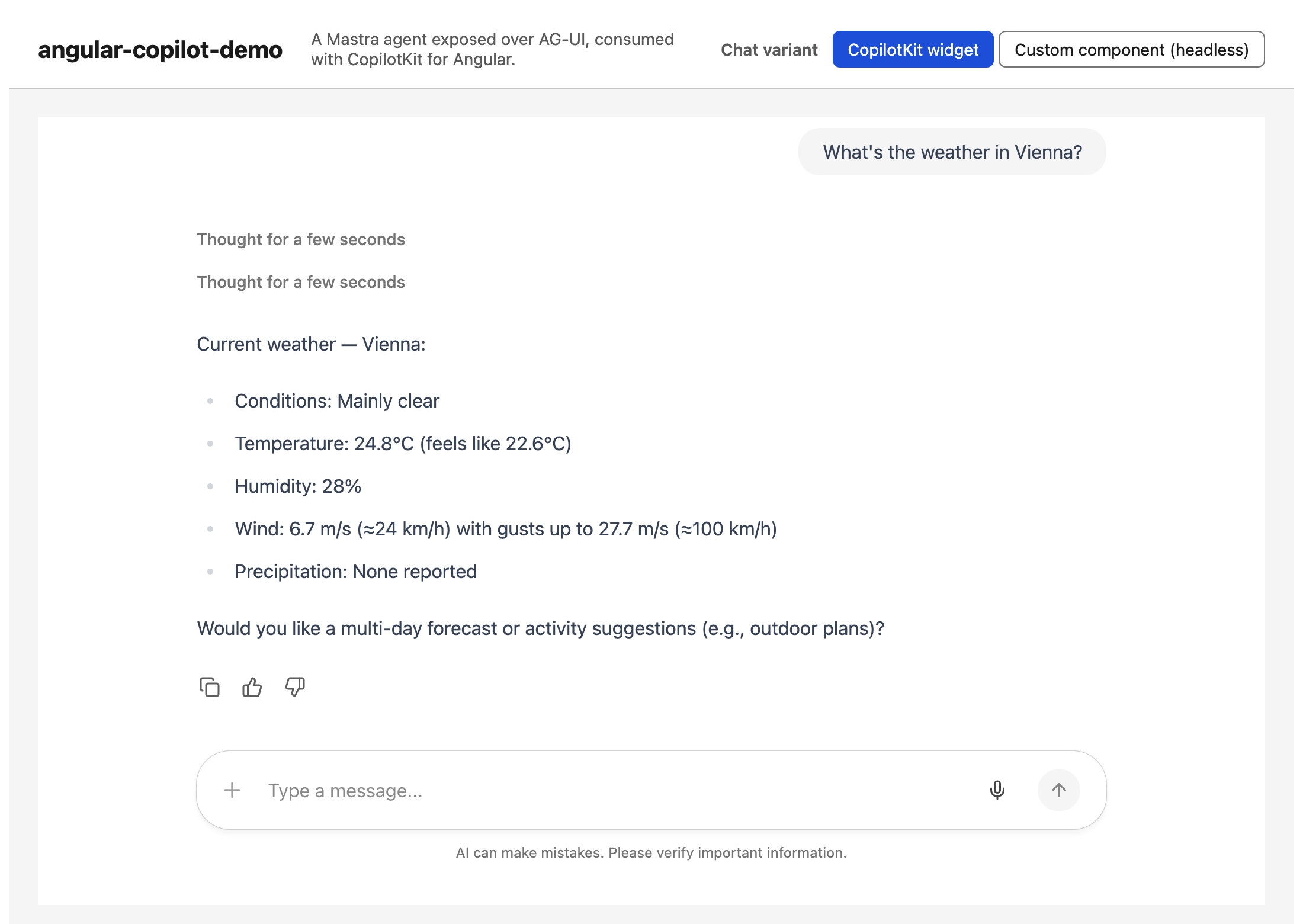
Thanks to the server-side memory, follow-up questions like Is it warmer than in Paris? work as well: both questions belong to the same conversation thread, so the agent knows what "it" refers to.
CopilotKit for Angular in Headless Mode
The prebuilt chat component is the fastest way to a running result. But real applications quickly outgrow it: the chat has to match the design system, custom widgets should appear in the conversation — and not everything is a chat. An agent may just as well drive a form, a dashboard, or an entire workflow. This flexibility is where CopilotKit's headless mode comes in: it provides state and behavior, and leaves every pixel of the rendering to us.
The demo project contains a hand-rolled chat component that consumes the same agent through the headless API:
// src/app/headless-chat/headless-chat.ts
import { Component, computed, inject } from '@angular/core';
import { CopilotKit, injectAgentStore } from '@copilotkit/angular';
import { randomUUID } from '@copilotkit/shared';

@Component({
  selector: 'app-headless-chat',
  [...]
})
export class HeadlessChat {
  private readonly copilotKit = inject(CopilotKit);
  private readonly store = injectAgentStore('default');

  protected readonly isRunning = computed(() => this.store().isRunning());

  protected readonly visibleMessages = computed(() =>
    this.store()
      .messages()
      .filter((m) => m.role === 'user' || m.role === 'assistant')
      .map((m) => [...])
  );

  protected async send(content: string) {
    const agent = this.store().agent;
    agent.addMessage({ id: randomUUID(), role: 'user', content });
    await this.copilotKit.core.runAgent({ agent });
  }
}
The function injectAgentStore returns a signal-based store for the registered agent: messages() holds the conversation, isRunning() the execution state — both plain Angular signals that plug directly into computed and the template. Sending a message is just as explicit: add the user message to the agent, then start a run via runAgent. The store updates while the events stream in, so the UI re-renders continuously.
The template is entirely ours — a plain list and a form, styled however we like:
<!-- src/app/headless-chat/headless-chat.html -->
<ol class="log" aria-live="polite">
  @for (message of visibleMessages(); track message.id) {
    <li [attr.data-role]="message.role">
      <span>{{ message.role === 'user' ? 'You' : 'Agent' }}</span>
      <p>{{ message.text }}</p>
    </li>
  }
</ol>

<form (submit)="[...]">
  [...]
</form>
Next Steps
What we've built here is only the entry point. For full-blown Agentic UIs, we need more, for instance:
- Client-side tools, so the agent can automate tasks inside the application and learn about the current user context — what is selected, which screen is open, what the user is working on.
- Client-side visualizations picked by the agent: instead of answering with a wall of text, the agent should choose from the application's components dynamically.
- A2UI support, so the agent can compose its answers as declarative UI on the fly.
- MCP Apps support, so third-party tools can be integrated and visualized inside our application.
- Human-in-the-loop patterns beyond simple approvals, so users stay in control of what the agent does.
An example of where this leads: a dynamic dashboard whose content is controlled by the agent:
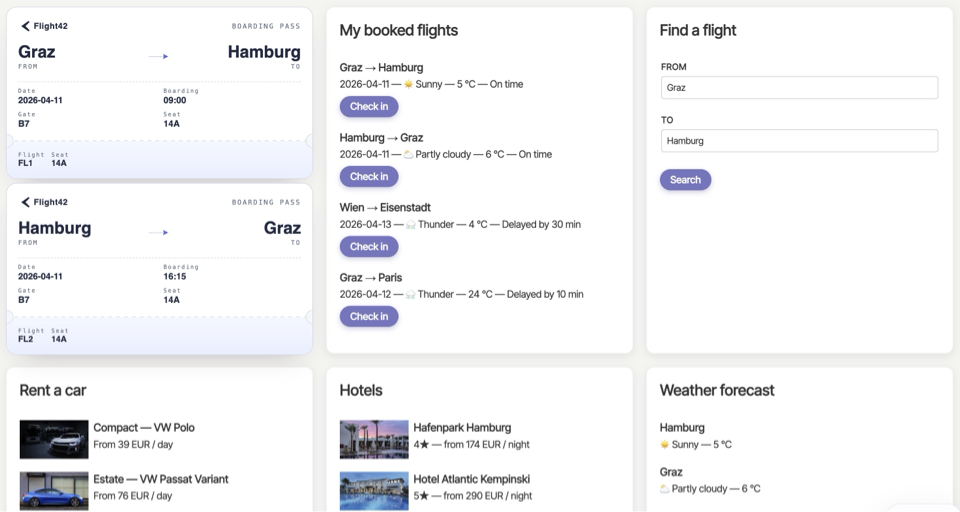
CopilotKit covers this ground as well — and my blog series takes each of these steps in turn, building, among other things, exactly this dashboard:
Interested in production-ready Agentic UI architectures?
In my workshop, we dive into AG-UI, A2UI, MCP Apps, HITL patterns, and modern Angular architectures for real-world agentic systems.