


Coarse-grained building blocks instead of single widgets: how A2UI macros make Generative UIs faster and cheaper with cloud models and pave the way for local ones
A2UI describes user interfaces with simple building blocks such as Text, Row, Column, and Button. This fine granularity makes the protocol flexible. But it comes at a price: a dashboard with six tiles quickly consists of dozens of components. The model has to generate each of them token by token, which costs time and money. This applies to cloud models and even more to local models that run on your own hardware.
The solution is coarse-grained building blocks. Instead of describing every widget, the model only names the tiles it needs and their most important properties. The server then resolves these building blocks into regular A2UI. A2UI macros build on this idea.
In this article, I show how A2UI macros work, how to use them with A2UI Express, and how a simple, generic macro mechanism brings them to TypeScript.
📂 Source code (branch AGU-a2ui-express)
📂 Source code updated for Gemma 4 (branch AGU-gemma)
A Dashboard Made of Tiles
The example application contains a dashboard that users describe in natural language. An agent assembles the requested tiles from this description:
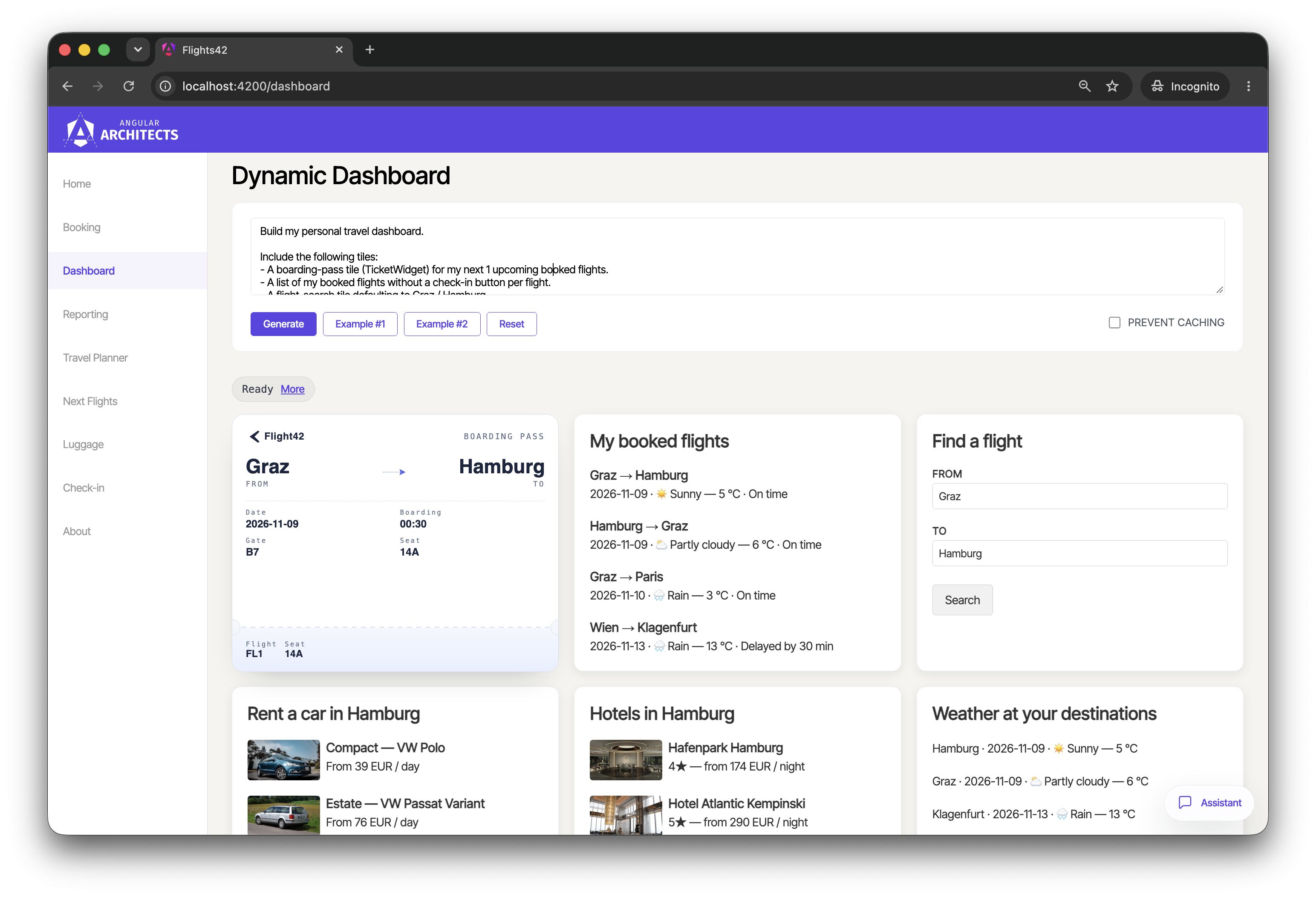
In the first version, the model generated the entire A2UI itself. A single dashboard took about 40 seconds and consumed more than 46,000 tokens. The main drivers were a long prompt with examples and the extensive structure the model had to write.
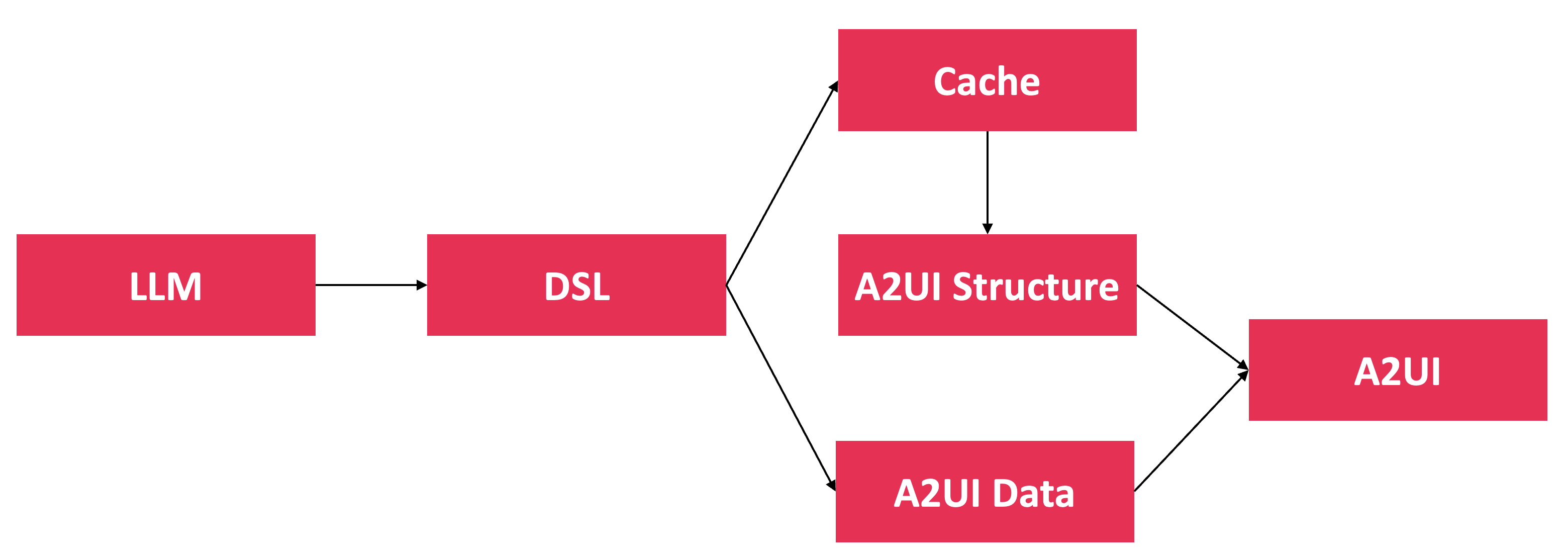
A DSL on a higher level of abstraction is much more efficient. It describes each tile with a handful of properties, such as a route or a maximum number of rows. The model only generates this compact description, and code on the server translates it into A2UI. This brought the duration down to a few seconds and cut the token consumption by a factor of 30. An additional cache for the DSL brings recurring dashboards down to about 0.1 seconds:
My article How I Made My A2UI Dashboard 300 Times Faster describes the details.
The DSL has also proven itself with local models. With it, moving the fairly complex dashboard to Gemma 4 took little effort. You can run this open-weight model on your own hardware. My article Optimizing Agentic Applications for Local Models has more on this.
A2UI Macros: The DSL Comes to the A2UI SDKs
You could always define your own DSL, but you had to specify it and translate it into A2UI yourself. The Python SDK for A2UI was the first to support such a DSL at SDK level, which simplifies the implementation. With macros, you define composite components on the server.
This article uses TypeScript, but a short look at the original Python API shows the idea behind macros. There, a macro is a function that returns a tree of base components:
# Example from the documentation of the A2UI Python SDK (shortened)
from a2ui.builder.v1_0 import Action, Button, Card, Column, DynamicString, Text
from a2ui.transformers.macros import macro

@macro
def ProductCard(title: DynamicString, price: str, on_buy: Action) -> Card:
    """Renders a product showcase card.

    Args:
        title: Display name of the product.
        price: Formatted price string.
        on_buy: Action triggered when the user clicks buy.
    """
    return Card(
        child=Column(
            children=[
                Text(text=title, variant="body"),
                Text(text=price, variant="caption"),
                Button(child=Text(text="Buy Now"), action=on_buy),
            ]
        )
    )
A so-called MacroExpander then resolves the macros into A2UI. It works recursively, so macros can build on other macros. The documentation on A2UI macros has more details.
A Dashboard in A2UI Express
The example application defines a macro for each tile. In A2UI Express, the compact inference format of A2UI, the model describes the dashboard from above like this:
<a2ui>
root = Dashboard([
  BoardingPasses(2),
  BookedFlightsList(showWeather=false),
  FlightSearch("Graz", "Hamburg"),
  RentalCars(),
  Hotels(),
  WeatherList()
])
</a2ui>
The macro calls take required arguments by position and optional arguments by name. Dashboard is a macro itself and takes the tiles as children. The previous article shows how A2UI Express works in detail.
These few lines expand into regular A2UI. The call BookedFlightsList(showWeather=false) alone turns into 11 components:
"components": [
  { "id": "root", "component": "Column", "children": ["root_children_0", "root_children_1", [...]] },
  [...]
  { "id": "root_children_1", "component": "Card", "child": "root_children_1-body" },
  { "id": "root_children_1-body", "component": "Column", "children": ["root_children_1-title", "root_children_1-list", "root_children_1-empty"] },
  { "id": "root_children_1-title", "component": "Text", "text": "My booked flights", "variant": "h2" },
  {
    "id": "root_children_1-list",
    "component": "Column",
    "children": { "componentId": "root_children_1-row", "path": "/root_children_1/flights" }
  },
  { "id": "root_children_1-row", "component": "Row", "align": "start", "children": ["root_children_1-row-col"] },
  { "id": "root_children_1-row-col", "component": "Column", "weight": 3, "children": ["root_children_1-row-route", "root_children_1-row-meta", "root_children_1-row-btn"] },
  { "id": "root_children_1-row-route", "component": "Text", "text": { "path": "route" }, "variant": "h3" },
  { "id": "root_children_1-row-meta", "component": "Text", "text": { "path": "meta" }, "variant": "body" },
  { "id": "root_children_1-empty", "component": "Text", "text": { "path": "/root_children_1/emptyMessage" }, "variant": "body" },
  {
    "id": "root_children_1-row-btn",
    "component": "Button",
    "child": "root_children_1-row-btn-label",
    "action": {
      "event": {
        "name": "checkIn",
        "context": { "flightId": { "path": "id" } }
      }
    }
  },
  { "id": "root_children_1-row-btn-label", "component": "Text", "text": "Check in" },
  [...]
]
The column root_children_1-list uses a template: the client repeats the row root_children_1-row for each entry of the list /root_children_1/flights in the data model. Inside the template, relative paths such as route refer to the current entry.
The entire dashboard consists of 45 components. As compact JSON, this structure takes about 1,300 tokens, the Express code with macros fewer than 50. I counted with OpenAI's tokenizer o200k_base. These numbers do not include the data itself, as the components get it via data binding.
Agentic UI with Angular
If you want to embed Generative UIs cleanly into larger Angular applications rather than just here and there: In my book Agentic UI with Angular, I cover the underlying patterns and trade-offs in depth, including DSLs, caching, and open standards such as AG-UI, A2UI, and MCP.
Implementation with TypeScript
When I wrote this article, the TypeScript SDK @a2ui/agent did not support macros yet. The example application therefore combines the Express parser of the SDK with a simple, generic macro mechanism of its own. It consists of about 170 lines and knows nothing about the dashboard.
In this article, I treat this macro mechanism as a black box and only show how the application uses it. If you are interested in its implementation, you find it in the example repository. The following diagram shows how the parser and the macro mechanism work together:

Defining Macros
A macro consists of a Zod schema for its arguments, an optional function load for its data, and a function render that returns the components replacing the macro. For each tile, a Zod schema describes the arguments:
// ai-server/src/mastra/dashboard-dsl/dashboard-spec.ts
import { z } from 'zod';

import type { MacroInput } from '../a2ui/simple-macros/macro.js';

const positiveInt = z.number().int().positive();

[...]

export const bookedFlightsListSchema = z.object({
  component: z.literal('BookedFlightsList'),
  showCheckInButton: z
    .boolean()
    .optional()
    .describe(
      'Whether to render a "Check in" button per booked flight. Defaults to true.',
    ),
  showWeather: z
    .boolean()
    .optional()
    .describe(
      'Whether to enrich each flight entry with a weather forecast for the destination. Defaults to true.',
    ),
  maxRows: positiveInt
    .optional()
    .describe(
      'Maximum number of booked flights to list. Defaults to no limit.',
    ),
});

export type BookedFlightsListNode = MacroInput<typeof bookedFlightsListSchema>;

[...]

export const dashboardSchema = z.object({
  component: z.literal('Dashboard'),
  children: z
    .array(z.string())
    .meta({ $ref: 'common_types.json#/$defs/ChildList' }),
});

export type DashboardNode = MacroInput<typeof dashboardSchema>;
As with every A2UI component, the property component defines the name. The descriptions end up in the JSON schema of the catalog. For the children, the schema dashboardSchema refers to the type ChildList from the common types of A2UI. This way, the parser treats the calls in this list as child components.
The type MacroInput of the macro mechanism describes a macro call as a node: an object with the arguments and the id that the Express parser assigns to the call. The functions load and render receive such a node.
The object dashboardMacros combines each schema with a loader and a renderer:
// ai-server/src/mastra/dashboard-dsl/dashboard-macros.ts
import { defineMacro } from '../a2ui/simple-macros/macro.js';
[...]

export const dashboardMacros = {
  Dashboard: defineMacro({
    schema: dashboardSchema,
    render: (node) => {
      return buildDashboard(node);
    },
  }),
  [...]
  BookedFlightsList: defineMacro({
    schema: bookedFlightsListSchema,
    load: (node) => {
      return loadBookedFlightsList(node);
    },
    render: (node) => {
      return buildBookedFlightsList(node);
    },
  }),
  [...]
};
The function defineMacro returns the macro unchanged. It only exists so that TypeScript derives the type of the node from the schema.
Loading and Rendering
The root component Dashboard is a macro, too. It needs no data, and its renderer turns it into a Column with the same children:
// ai-server/src/mastra/dashboard-dsl/dashboard-renderers.ts
export function buildDashboard(node: DashboardNode): A2uiComponent[] {
  return [{ id: node.id, component: 'Column', children: node.children }];
}
The loader of the tile BookedFlightsList returns the booked flights in the shape the components bind to:
// ai-server/src/mastra/dashboard-dsl/dashboard-loaders.ts (simplified)
export async function loadBookedFlightsList(
  node: BookedFlightsListNode,
): Promise<BookedFlightsListData> {
  const flights = [
    { id: 1, route: 'Graz → Hamburg', meta: '2026-11-20 · On time' },
    { id: 2, route: 'Hamburg → Graz', meta: '2026-11-20 · On time' },
    { id: 516, route: 'Graz → Paris', meta: '2026-11-21 · On time' },
    { id: 50, route: 'Wien → Klagenfurt', meta: '2026-11-24 · Delayed by 30 min' },
  ];
  const selected = node.maxRows ? flights.slice(0, node.maxRows) : flights;
  const emptyMessage =
    selected.length === 0 ? 'You have no booked flights.' : '';
  return { flights: selected, emptyMessage };
}
To keep the example simple, this version returns hardcoded flights. The example application loads the booked flights via HTTP instead and adds a weather forecast for the destination if showWeather is true.
Its renderer returns the components shown above:
// ai-server/src/mastra/dashboard-dsl/dashboard-renderers.ts
export function buildBookedFlightsList(
  node: BookedFlightsListNode,
): A2uiComponent[] {
  const id = node.id;
  const bodyId = `${id}-body`;
  [...]
  const listId = `${id}-list`;
  const rowId = `${id}-row`;
  [...]

  const components: A2uiComponent[] = [
    { id, component: 'Card', child: bodyId },
    [...]
    {
      id: listId,
      component: 'Column',
      children: { componentId: rowId, path: `/${id}/flights` },
    },
    [...]
  ];

  [...]
  return components;
}
The renderer does not receive the loaded data. The components it returns refer to the data via data binding. This keeps structure and data apart. Every renderer follows three rules:
- Exactly one of its components has the id of the node. This way, the references of the parent component remain valid.
- All other ids start with the id of the node. This keeps them unique across tiles.
- The data paths start with the id of the node, too, because the macro mechanism stores the result of
loadthere.
Catalog and Request Processor
The function toMacroCatalog of the macro mechanism derives a catalog from the macros. It turns each Zod schema into a JSON schema and assigns it to the name of the macro. As in the previous article, an InMemoryCatalogProvider loads this catalog for A2UI 0.9, and an A2uiGenerator creates the processor:
// ai-server/src/mastra/dashboard-dsl/dashboard-processor.ts
import {
  A2uiGenerator,
  CatalogConfig,
  InMemoryCatalogProvider,
} from '@a2ui/agent';

import { PROTOCOL_VERSION } from '../a2ui/a2ui-catalog-schema.js';
import { toMacroCatalog } from '../a2ui/simple-macros/macro.js';
import { dashboardMacros } from './dashboard-macros.js';

const DASHBOARD_CATALOG_ID =
  'https://example.com/catalogs/flights42-dashboard-macros';

export const dashboardProcessor = createDashboardProcessor();

function createDashboardProcessor() {
  const catalogSchema = toMacroCatalog(dashboardMacros, DASHBOARD_CATALOG_ID);

  const catalogProvider = new InMemoryCatalogProvider(
    catalogSchema,
    PROTOCOL_VERSION,
  );
  const dashboardCatalog = catalogProvider.load();

  const catalogConfig = new CatalogConfig(dashboardCatalog);

  const generator = new A2uiGenerator([catalogConfig]);

  return generator.createProcessor({
    supportedCatalogIds: [DASHBOARD_CATALOG_ID],
  });
}
The constant PROTOCOL_VERSION has the value v0.9. This time, the CatalogConfig gets no transformers, as the catalog only contains the macros and there is nothing to prune. Every new entry in dashboardMacros ends up in the catalog without further code.
Instructing the Agent
The prompt of the agent describes the macros as compact function signatures:
// ai-server/src/mastra/agents/dashboard-agent.prompt.ts
export const dashboardAgentPrompt = `
You compose the Flight42 dashboard.

Each turn ends with **exactly one** renderDashboard tool call. Its
"express" argument is a single statement wrapped in <a2ui> tags:

<a2ui>
root = Dashboard([FlightsTable("Graz", "Hamburg", maxRows=5), BookedFlightsList(showWeather=false)])
</a2ui>

[...]

Tile reference:

- FlightsTable(from, to, maxRows?)
  (default: 30)
[...]
- BookedFlightsList(showCheckInButton?, showWeather?, maxRows?)
  (defaults: showCheckInButton true, showWeather true, maxRows no limit)
[...]
`;
I wrote this prompt by hand because the model only has to write a single entry per tile. Alternatively, the processor provides a ready-made prompt in its property promptSnippet, as in the previous article:
import { dashboardProcessor } from '../dashboard-dsl/dashboard-processor.js';

const prompt = dashboardProcessor.promptSnippet;
However, this prompt explains the entire Express grammar, including data binding, validation, and events, which the dashboard doesn't need. At about 1,400 tokens, it is about 2.6 times as large as the entire handwritten prompt.
The model passes its Express code to the tool renderDashboard. Its only parameter, express, takes the text including the tags <a2ui> and </a2ui>.
From Express to A2UI
The function compileDashboard translates the model's Express code into A2UI messages:
// ai-server/src/mastra/dashboard-dsl/compile-dashboard.ts
import { randomUUID } from 'node:crypto';

import type { A2uiMessage } from '@a2ui/web_core/v0_9';
import { A2UI_CATALOG_ID } from '@flights42/a2ui-catalog/ticketing-extra-components';

import { expressToComponents } from '../a2ui/a2ui-express.js';
import { applyMacros } from '../a2ui/simple-macros/apply-macros.js';
import { toA2uiMessages } from '../a2ui/simple-macros/to-a2ui-messages.js';
import { dashboardMacros } from './dashboard-macros.js';
import { dashboardProcessor } from './dashboard-processor.js';

export interface CompiledDashboard {
  surfaceId: string;
  messages: A2uiMessage[];
}

export async function compileDashboard(
  express: string,
): Promise<CompiledDashboard> {
  const components = expressToComponents(dashboardProcessor, express);
  const applied = await applyMacros(components, dashboardMacros);
  const surfaceId = `dashboard-${randomUUID()}`;
  const messages = toA2uiMessages(surfaceId, A2UI_CATALOG_ID, applied);
  return { surfaceId, messages };
}
The function expressToComponents parses the Express code with the function compileExpress from the previous article. The processor checks every macro call against the schemas. The function returns the components of all updateComponents messages. For the dashboard above, these are the following macro nodes:
[
  { "id": "root", "component": "Dashboard", "children": ["root_children_0", "root_children_1", [...]] },
  { "id": "root_children_0", "component": "BoardingPasses", "count": 2 },
  { "id": "root_children_1", "component": "BookedFlightsList", "showWeather": false },
  { "id": "root_children_2", "component": "FlightSearch", "defaultFrom": "Graz", "defaultTo": "Hamburg" },
  [...]
]
The parser assigns the ids, and the renderers use them as prefixes.
The function applyMacros of the macro mechanism runs the loaders of all macro nodes in parallel. After that, it calls the renderers and replaces each node with the returned components. It passes all other components through unchanged. The loaded data ends up under the id of the node, for instance under /root_children_1 for the booked flights. With the option recursive, the function also expands macros that other macros render. Like the MacroExpander of the Python SDK, it stops at a depth of 16.
Finally, the function toA2uiMessages packs the result into A2UI messages. The message createSurface refers to the catalog of the client, not to the macro catalog, as no macros remain after applyMacros. Then updateComponents delivers the structure, and one updateDataModel message per macro delivers its data. For the booked flights, this message looks as follows:
{
  "version": "v0.9",
  "updateDataModel": {
    "surfaceId": "dashboard-[...]",
    "path": "/root_children_1",
    "value": {
      "flights": [
        { "id": 1, "route": "Graz → Hamburg", "meta": "2026-11-20 · On time" },
        { "id": 2, "route": "Hamburg → Graz", "meta": "2026-11-20 · On time" },
        { "id": 516, "route": "Graz → Paris", "meta": "2026-11-21 · On time" },
        { "id": 50, "route": "Wien → Klagenfurt", "meta": "2026-11-24 · Delayed by 30 min" }
      ],
      "emptyMessage": ""
    }
  }
}
The template from above repeats the row for each of these four flights. This separation of structure and data makes the cache possible: the server caches the Express code of the model. For a recurring request, it runs compileDashboard again without calling the model, and the dashboard shows fresh data. The server sends the messages to the client as an AG-UI event.
Once the TypeScript SDK supports macros, it can replace the macro mechanism.
What Macros Bring
As my article How I Made My A2UI Dashboard 300 Times Faster shows, the DSLs can bring a big performance gain: instead of about 40 seconds and more than 46,000 tokens, a dashboard takes about 2 seconds and less than 2,000 tokens. The variant with macros is just as fast and needs even fewer tokens.
Beyond that, the already optimized application now relies on the A2UI project instead of a homegrown format: the DSL builds on A2UI and A2UI Express. The generic macro mechanism also tidies up the code. Each macro bundles the schema, the data loading, and the rendering of a tile. A new tile only needs a new macro, and the catalog picks it up automatically.
Coarse-grained building blocks also make such dashboards feasible for local models. A few macro calls with flat arguments are easy even for smaller models. My article Optimizing Agentic Applications for Local Models shows how this approach eased moving the dashboard to Gemma 4. The combination of macros and A2UI Express makes this already optimized Gemma 4 version about 35 percent faster. The weaker the model, the more it benefits from such building blocks.
Interested in production-ready Agentic UI architectures?
In my workshop, we dive into AG-UI, A2UI, MCP Apps, HITL patterns, and modern Angular architectures for real-world agentic systems.

Conclusion
A2UI macros bring the idea of an application-specific DSL into the A2UI SDKs. With a few calls, the model describes which building blocks it needs. The server resolves them deterministically into base components, and the client stays the same.
The real lever is the level of abstraction. A few macro calls with fewer than 50 tokens replace a structure with about 1,300 tokens. This makes Generative UIs faster and cheaper and brings them to local models, too.
So far, only the Python SDK supports macros. Until the TypeScript SDK catches up, a simple, generic mechanism does the job: the Express parser of the SDK validates the macro calls, and the function applyMacros loads the data and replaces the macros with base components. Once the SDK supports macros, it can take over this part.
FAQ
What are A2UI macros?
Macros are composite components that developers define on the server. The model calls them like regular components, and the server resolves them into base components before sending them. The client only needs to know the base components.
Which SDKs support A2UI macros?
When I wrote this article, only the Python SDK for A2UI supported macros. For TypeScript, the article shows an interim solution made of the Express parser of @a2ui/agent and a simple, generic macro mechanism of about 170 lines.
Do A2UI macros support A2UI 1.0?
Yes. The Python SDK supports macros for A2UI 0.9 and A2UI 1.0.
How many tokens do A2UI macros save?
In the example, the Express code with macros takes fewer than 50 tokens, and the A2UI structure resulting from it about 1,300. Compared to a DSL made of JSON objects, mainly the input tokens dropped, by about 40 percent.
Do A2UI macros work with local models?
Compact building blocks with a few flat arguments are easy even for smaller open-weight models. With such a DSL, the dashboard of the example application moved to Gemma 4, which you can run on your own hardware.