


A compact DSL instead of verbose JSON: how agents write A2UI Express, how the server turns it into A2UI 1.0 or 0.9, and what it saves
With A2UI, an agent describes a user interface that the client renders at runtime. This kind of Generative UI lets an LLM answer with images, tables, or a dashboard instead of plain text. The price is verbosity. In the JSON format of A2UI, every text and every button is an object of its own.
Each of these characters costs tokens. So, a verbose format costs money and time. This matters even more for compact and local models that run on your own hardware.
In October 2026, the A2UI project introduced inference formats to address this. An inference format defines the notation in which the model writes the user interface, and you can define your own. Along with them, the project proposed A2UI Express, a compact DSL. Its specification is not final yet, but the current Agent SDKs already prefer it over JSON and translate it into A2UI 1.0 and 0.9. The model writes A2UI Express instead of JSON, and the server translates the result into regular A2UI messages.
In this article, I show what A2UI Express looks like, how an agent generates it, and how the server turns it into the A2UI version the client expects. A measurement shows what the format brings in practice.
📂 Source code (branch AGU-a2ui-express)
What Is A2UI Express?
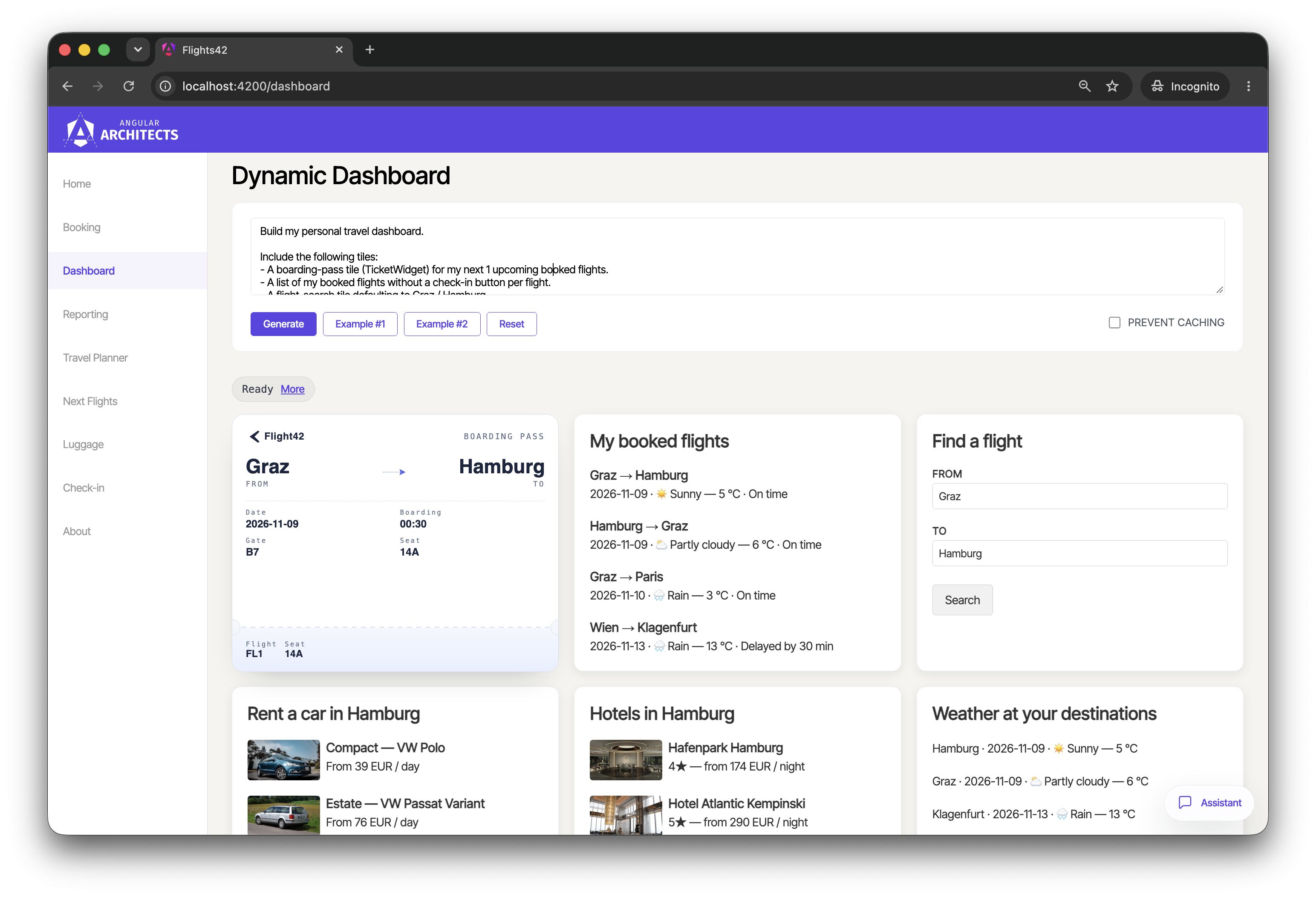
With the Agent-to-User Interface protocol (A2UI), an agent sends messages that describe surfaces, their components, and their data, and the client renders them with its own components. The following dashboard, for instance, consists of A2UI surfaces that an agent built from a natural-language request:
To keep things simple, this article sticks to a chat. There, a user asks for the upcoming flights in a compact table:
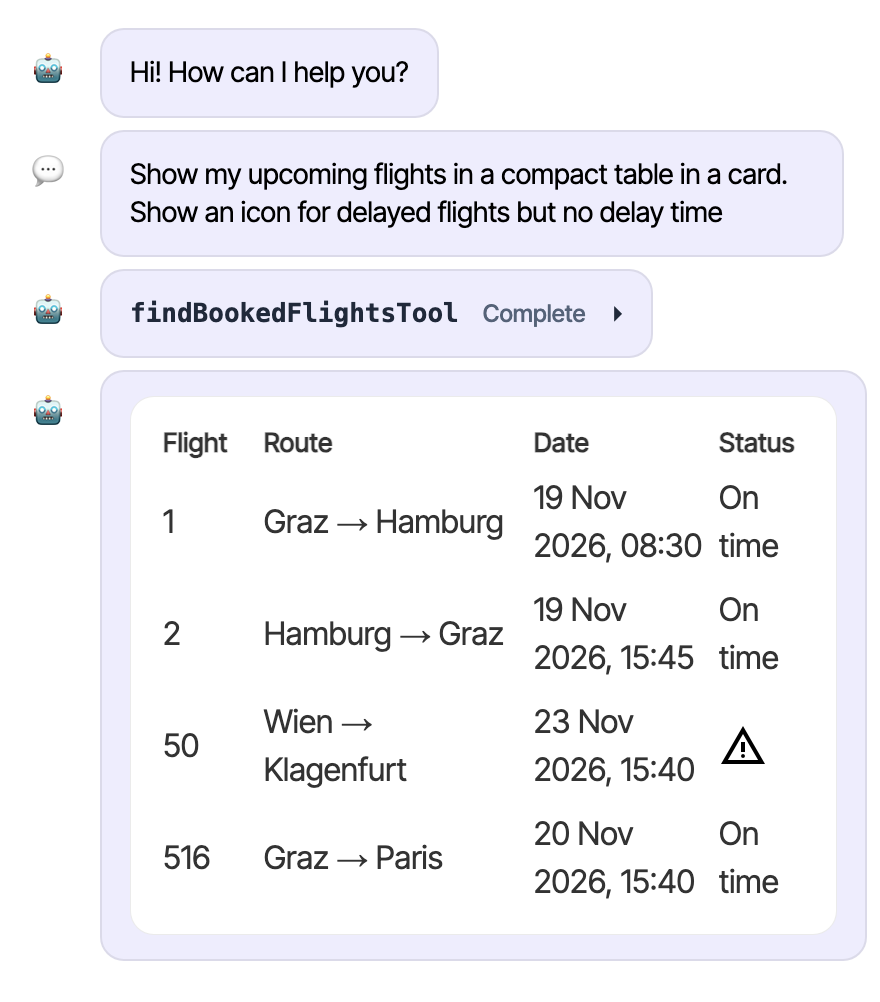
The agent loads the booked flights with a tool and describes the table with A2UI.
Classic A2UI: One JSON Object per Component
In A2UI 1.0, the agent sends this table as a createSurface message with a flat list of components:
{
  "version": "1.0",
  "createSurface": {
    "surfaceId": "upcoming-flights",
    "catalogId": "https://a2ui.org/specification/v1_0/catalogs/basic/catalog.json",
    "components": [
      { "id": "hId", "component": "Text", "text": "Flight", "variant": "caption", "weight": 1 },
      { "id": "hRoute", "component": "Text", "text": "Route", "variant": "caption", "weight": 3 },
      { "id": "hDate", "component": "Text", "text": "Date", "variant": "caption", "weight": 2 },
      { "id": "hStatus", "component": "Text", "text": "Status", "variant": "caption", "weight": 1 },
      { "id": "header", "component": "Row", "children": ["hId", "hRoute", "hDate", "hStatus"], "justify": "start", "align": "center" },
      { "id": "f1Id", "component": "Text", "text": "1", "variant": "body", "weight": 1 },
      { "id": "f1Route", "component": "Text", "text": "Graz → Hamburg", "variant": "body", "weight": 3 },
      { "id": "f1Date", "component": "Text", "text": "19 Nov 2026, 08:30", "variant": "body", "weight": 2 },
      { "id": "f1Status", "component": "Text", "text": "On time", "variant": "body", "weight": 1 },
      { "id": "row1", "component": "Row", "children": ["f1Id", "f1Route", "f1Date", "f1Status"], "justify": "start", "align": "center" },
      { "id": "f2Id", "component": "Text", "text": "2", "variant": "body", "weight": 1 },
      { "id": "f2Route", "component": "Text", "text": "Hamburg → Graz", "variant": "body", "weight": 3 },
      { "id": "f2Date", "component": "Text", "text": "19 Nov 2026, 15:45", "variant": "body", "weight": 2 },
      { "id": "f2Status", "component": "Text", "text": "On time", "variant": "body", "weight": 1 },
      { "id": "row2", "component": "Row", "children": ["f2Id", "f2Route", "f2Date", "f2Status"], "justify": "start", "align": "center" },
      { "id": "f50Id", "component": "Text", "text": "50", "variant": "body", "weight": 1 },
      { "id": "f50Route", "component": "Text", "text": "Wien → Klagenfurt", "variant": "body", "weight": 3 },
      { "id": "f50Date", "component": "Text", "text": "23 Nov 2026, 15:40", "variant": "body", "weight": 2 },
      { "id": "f50Status", "component": "Icon", "name": "warning", "weight": 1 },
      { "id": "row50", "component": "Row", "children": ["f50Id", "f50Route", "f50Date", "f50Status"], "justify": "start", "align": "center" },
      { "id": "f516Id", "component": "Text", "text": "516", "variant": "body", "weight": 1 },
      { "id": "f516Route", "component": "Text", "text": "Graz → Paris", "variant": "body", "weight": 3 },
      { "id": "f516Date", "component": "Text", "text": "20 Nov 2026, 15:40", "variant": "body", "weight": 2 },
      { "id": "f516Status", "component": "Text", "text": "On time", "variant": "body", "weight": 1 },
      { "id": "row516", "component": "Row", "children": ["f516Id", "f516Route", "f516Date", "f516Status"], "justify": "start", "align": "center" },
      { "id": "table", "component": "Column", "children": ["header", "row1", "row2", "row50", "row516"], "justify": "start", "align": "stretch" },
      { "id": "root", "component": "Card", "child": "table" }
    ]
  }
}
In A2UI 0.9, createSurface only opens the surface, and a second message of type updateComponents delivers the components. Since A2UI 1.0, createSurface can also carry the components and the initial data model, so one message is enough.
For four flights, the model has to write 27 objects. Keys such as id, component, and variant appear again and again. The model also has to invent an id for every cell and repeat it in the parent. The model generates all these tokens one after the other, so the user waits and the costs grow.
Inference Formats: A DSL for the Model
The Agent SDKs ship with two built-in inference formats. With Direct JSON, the model writes the A2UI messages itself, as in the listing above. A2UI Express describes components with positional constructor calls. In A2UI Express, the table looks like this:
<a2ui>
surface("upcoming-flights")

hFlight = Text("Flight", "caption", 1)
hRoute = Text("Route", "caption", 3)
hDate = Text("Date", "caption", 2)
hStatus = Text("Status", "caption", 1)
header = Row([hFlight, hRoute, hDate, hStatus], "start", "center")

a1 = Text("1", "body", 1)
a2 = Text("Graz → Hamburg", "body", 3)
a3 = Text("19 Nov 2026, 08:30", "body", 2)
a4 = Text("On time", "body", 1)
r1 = Row([a1, a2, a3, a4], "start", "center")

b1 = Text("2", "body", 1)
b2 = Text("Hamburg → Graz", "body", 3)
b3 = Text("19 Nov 2026, 15:45", "body", 2)
b4 = Text("On time", "body", 1)
r2 = Row([b1, b2, b3, b4], "start", "center")

c1 = Text("50", "body", 1)
c2 = Text("Wien → Klagenfurt", "body", 3)
c3 = Text("23 Nov 2026, 15:40", "body", 2)
c4 = Icon("warning", 1)
r3 = Row([c1, c2, c3, c4], "start", "center")

d1 = Text("516", "body", 1)
d2 = Text("Graz → Paris", "body", 3)
d3 = Text("20 Nov 2026, 15:40", "body", 2)
d4 = Text("On time", "body", 1)
r4 = Row([d1, d2, d3, d4], "start", "center")

table = Column([header, r1, r2, r3, r4], "start", "stretch")
root = Card(table)
</a2ui>
Every line assigns a component to a variable. The name of the variable becomes the id of the component, and the reserved variable root marks the entry point. The arguments follow the positional signatures of the catalog: Text("Flight", "caption", 1) sets text, variant, and weight. The basic catalog defines the properties of Text in this order, and A2UI Express adopts it.
The function surface names the surface, and the tags <a2ui> and </a2ui> separate the Express code from the rest of the model's answer.
In this example, the Express version has less than half the characters of the JSON version and about a third fewer tokens.
Data Binding in A2UI Express
A2UI Express also supports the data binding of A2UI. An assignment such as $/flights = [...] writes a value into the data model of the surface, and a path with a leading $ binds a property to it. The following excerpt shows the first row of our table with data binding:
<a2ui>
surface("upcoming-flights")

$/flights = [
  {id: "1", route: "Graz → Hamburg", date: "19 Nov 2026, 08:30", status: "On time"},
  {id: "2", route: "Hamburg → Graz", date: "19 Nov 2026, 15:45", status: "On time"},
  {id: "50", route: "Wien → Klagenfurt", date: "23 Nov 2026, 15:40", status: "Delayed"},
  {id: "516", route: "Graz → Paris", date: "20 Nov 2026, 15:40", status: "On time"}
]

[...]

a1 = Text($/flights/0/id, "body", 1)
a2 = Text($/flights/0/route, "body", 3)
a3 = Text($/flights/0/date, "body", 2)
a4 = Text($/flights/0/status, "body", 1)
r1 = Row([a1, a2, a3, a4], "start", "center")

[...]
</a2ui>
The SDK puts the array into the data model of the surface and turns each path into a binding such as {"@path": "/flights/0/route"}. With data binding, the agent can update the values later without sending the structure of the surface again.
Faster Generation as the Main Goal
The main purpose of A2UI Express is to speed up generation in the model. The model writes fewer tokens and doesn't have to manage ids and nested braces. According to the A2UI project, this also reduces syntax and reference errors, especially with smaller models. The compact notation can pay off on the network, too, as fewer bytes travel to the client.
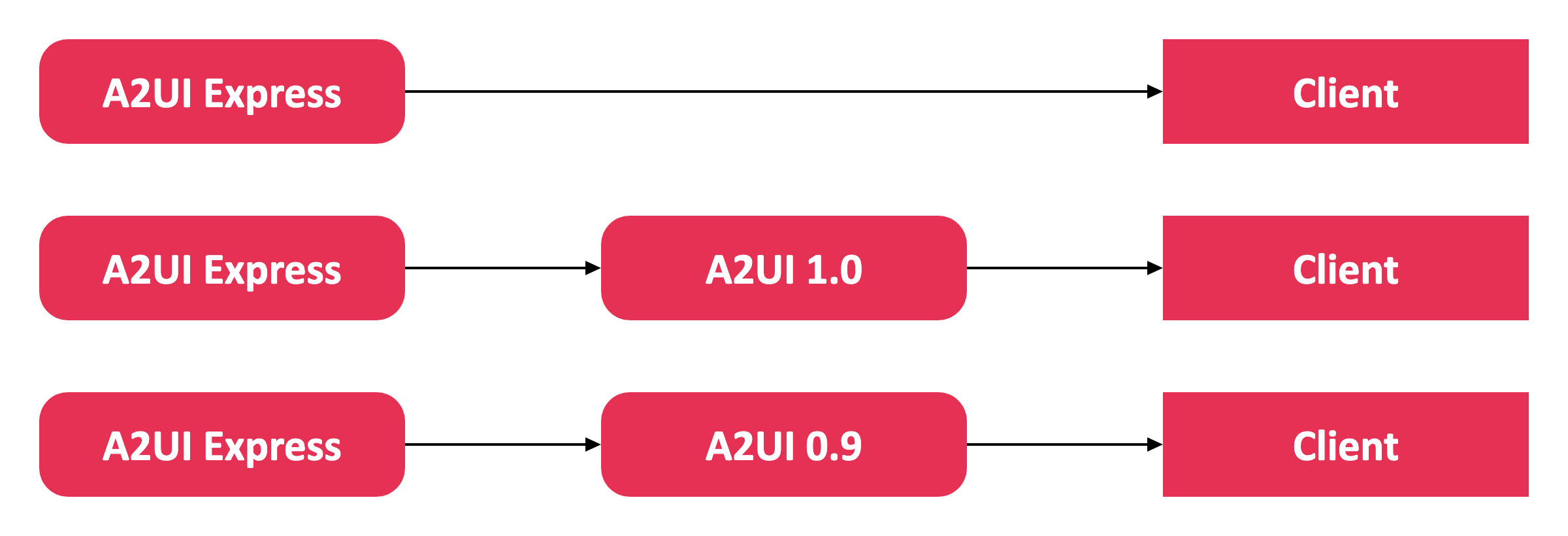
The server can deliver whatever format the client expects. A client that understands Express gets the code as it is, for instance an app that uses the A2UI Agent SDK in the browser. For other clients, the server translates the code into A2UI 1.0 or A2UI 0.9 messages:
Agentic UI with Angular
If you don’t just want to connect an agent but embed Agentic UI into a scalable architecture:
In my book Agentic UI with Angular, I cover the underlying patterns and trade-offs in depth.
Letting the Agent Generate A2UI Express
The A2UI Agent SDK for TypeScript, published as @a2ui/agent, provides what the agent needs. First, the agent has to know that it should write A2UI Express. For this, the function withA2uiInstructions appends a prompt snippet of the SDK to the system prompt:
// ai-server/src/mastra/a2ui/with-a2ui-instructions.ts
import { a2uiProcessor } from './a2ui-processor.js';

export function withA2uiInstructions(systemInstructions: string): string {
  const prompt = `
    ${systemInstructions}

    ${a2uiProcessor.promptSnippet}
  `;

  return prompt;
}
The snippet is provided by a processor. It explains the grammar of Express, and lists the positional signatures of all components and functions in the catalog, together with their descriptions.
The SDK offers this processor. The demo sets it up for the catalogs the client supports:
// ai-server/src/mastra/a2ui/a2ui-processor.ts
import {
  A2uiGenerator,
  CatalogConfig,
  ComponentPruningTransformer,
  FunctionPruningTransformer,
} from '@a2ui/agent';
import { A2UI_CATALOG_ID } from '@flights42/a2ui-catalog/ticketing-extra-components';

import { ticketingCatalog } from './ticketing-catalog.js';

const VISIBLE_COMPONENTS = ['Button', 'Card', [...]];

const VISIBLE_FUNCTIONS = ['email', 'formatCurrency', [...]];

const catalogConfig = new CatalogConfig(ticketingCatalog, [
  new ComponentPruningTransformer(VISIBLE_COMPONENTS),
  new FunctionPruningTransformer(VISIBLE_FUNCTIONS),
]);

const generator = new A2uiGenerator([catalogConfig]);

export const a2uiProcessor = generator.createProcessor({
  supportedCatalogIds: [A2UI_CATALOG_ID],
});
The constant ticketingCatalog combines the basic catalog of A2UI with the application's own components, such as a widget for tickets. The class CatalogConfig connects this catalog with transformers. The ComponentPruningTransformer and the FunctionPruningTransformer remove everything the model doesn't need, which keeps the prompt short.
The A2uiGenerator holds the catalogs for the lifetime of the agent. Its method createProcessor matches them with the capabilities of the client, here a list of supported catalog ids. The resulting processor provides the prompt snippet and parses the answers of the model, as the next section shows.
The agent uses the extended prompt as its instructions. The demo uses Mastra, but other agent frameworks work in a very similar way:
// ai-server/src/mastra/agents/ticketing-agent.ts
import { Agent } from '@mastra/core/agent';

import { render_a2ui } from '../a2ui/render-a2ui.tool.js';
import { withA2uiInstructions } from '../a2ui/with-a2ui-instructions.js';
import { model } from '../config.js';
[...]
import { ticketingAgentPrompt } from './ticketing-agent.prompt.js';

export const ticketingAgent = new Agent({
  id: 'ticketingAgent',
  name: 'Flight42 Ticketing Assistant',
  instructions: withA2uiInstructions(ticketingAgentPrompt),
  model,
  tools: {
    [...]
    render_a2ui,
  },
  [...]
});
Besides the tools for bookings, the agent gets the tool render_a2ui. The prompt of the agent instructs it to pass the generated Express code to this tool:
// ai-server/src/mastra/agents/ticketing-agent.prompt.ts
export const ticketingAgentPrompt = `
[...]
- Write the surface in A2UI Express as described under "A2UI Express DSL Output
  Contract" and pass the complete program, including the <a2ui> and </a2ui>
  tags, as the "express" argument of render_a2ui. NEVER write A2UI Express as
  plain text.
- Start every program with surface("<id>") and use a NEW id for every surface.
[...]
`;
Translating A2UI Express into A2UI 1.0 or 0.9
The client decides which format the server has to deliver: A2UI Express, A2UI 0.9, or A2UI 1.0. In the demo, the client renders with CopilotKit for Angular, which supported A2UI 0.9 at the time of writing. That is why the demo builds on the catalog of A2UI 0.9, and the tool render_a2ui translates the Express code before it reaches the client.
The input schema of the tool expects the Express code as a string:
// ai-server/src/mastra/a2ui/render-a2ui.schema.ts
import { z } from 'zod';

export const renderA2uiInputSchema = z.object({
  express: z
    .string()
    .describe(
      'Complete A2UI Express program, including the <a2ui> and </a2ui> tags.',
    ),
});
The tool itself is short:
// ai-server/src/mastra/a2ui/render-a2ui.tool.ts
import {
  A2UI_OPERATIONS_KEY,
  RENDER_A2UI_TOOL_NAME,
} from '@ag-ui/a2ui-middleware';
import { createTool } from '@mastra/core/tools';

import { compileExpress } from './a2ui-express.js';
import { a2uiProcessor } from './a2ui-processor.js';
import { renderA2uiInputSchema } from './render-a2ui.schema.js';

export const render_a2ui = createTool({
  id: RENDER_A2UI_TOOL_NAME,
  description:
    'Render a custom A2UI surface written in A2UI Express. Follow the A2UI Express DSL Output Contract in the system prompt.',
  inputSchema: renderA2uiInputSchema,
  execute: async (input) => {
    const operations = compileExpress(a2uiProcessor, input.express);
    if (operations.length === 0) {
      throw new Error('no surface rendered');
    }
    return { [A2UI_OPERATIONS_KEY]: operations };
  },
});
The tool takes its name from the constant RENDER_A2UI_TOOL_NAME of the package @ag-ui/a2ui-middleware. Its function execute translates the Express code and returns the A2UI messages under the key A2UI_OPERATIONS_KEY. If the translation yields no A2UI messages, the tool throws an error, and the model sees it as the result of the tool call.
The function compileExpress uses the processor shown above:
// ai-server/src/mastra/a2ui/a2ui-express.ts
import {
  type A2uiRequestProcessor,
  type AgentToRendererMessage,
} from '@a2ui/agent';

export function compileExpress(
  processor: A2uiRequestProcessor,
  express: string,
): AgentToRendererMessage[] {
  const parts = processor.parseResponse(express);
  return parts.flatMap((part) => (part.type === 'text' ? [] : part.a2ui));
}
The method parseResponse splits an answer into text parts and A2UI parts. It recognizes the A2UI parts by the tags <a2ui> and </a2ui>. The function drops the text parts and returns the A2UI messages from the array a2ui of the remaining parts. If the code contains a syntax error or violates the catalog, parseResponse throws an error that names the problem. In my measurements, the model occasionally wrote such invalid code and fixed it in the next step.
The processor emits the protocol version of its catalog. The demo sets this version when it loads the catalog:
// ai-server/src/mastra/a2ui/ticketing-catalog.ts

[...]
const catalogProvider = new InMemoryCatalogProvider(catalogSchema, 'v0.9');
export const ticketingCatalog = catalogProvider.load();
As described in my article on integrating A2UI with AG-UI and CopilotKit, the server turns the result of the tool into an AG-UI event of type ACTIVITY_SNAPSHOT, which CopilotKit picks up on the client. In this demo, the A2UIMiddleware of the package @ag-ui/a2ui-middleware takes care of this.
Measuring the Effect of A2UI Express
To measure the effect, I sent the prompt from the beginning to the agent: Show my upcoming flights in a compact table in a card. Show an icon for delayed flights but no delay time. For comparison, I used a version of the demo that doesn't use Express. There, the model writes A2UI 0.9 as a JSON array in the arguments of render_a2ui. Both versions use GPT-5.6 Luna by OpenAI. I sent the prompt eight times to each version and compared the medians:
| Per chat turn | A2UI as JSON | A2UI Express |
|---|---|---|
| Duration | 7.8 s | 8.4 s |
| Output tokens | about 840 | about 780 |
The savings are modest: the output tokens dropped by about 7 percent, and the duration even grew slightly. This is due to the simple example. With more complex user interfaces or weaker models, the savings carry more weight. In a benchmark by Google with Gemini 3.8 Flash, Express needed about 63 percent fewer tokens for the UI code than Direct JSON.
Interested in production-ready Agentic UI architectures?
In my workshop, we dive into AG-UI, A2UI, MCP Apps, HITL patterns, and modern Angular architectures for real-world agentic systems.

Conclusion
A2UI Express separates what the model writes from what the client receives. The model writes a compact DSL, and the server translates it into A2UI 1.0 or 0.9, depending on the client. With the A2UI Agent SDK, this takes a prompt snippet, a processor, and a few lines in a tool.
How much A2UI Express saves depends on the user interface and the model. For the simple table in my measurement with GPT-5.6 Luna, the effect was small. More complex user interfaces and weaker or local models should gain more, as every token they don't have to write counts.
FAQ
What is A2UI Express?
A2UI Express is a compact DSL in which a language model describes A2UI surfaces. Instead of one JSON object per component, the model writes positional constructor calls such as Text("Flight", "caption", 1). The A2UI Agent SDK translates this code into standard A2UI messages.
What is an inference format in A2UI?
An inference format is the notation a model reads in its system prompt and writes in its response. The server translates it into the A2UI messages that travel to the client. Besides A2UI Express, the SDK supports Direct JSON and custom formats.
Does A2UI Express work with A2UI 1.0 and A2UI 0.9?
Yes. The SDK emits the protocol version of the catalog. With the catalog of A2UI 1.0, it emits A2UI 1.0 messages, and with the catalog of A2UI 0.9, it emits A2UI 0.9 messages. In both cases, the model writes A2UI Express and follows the signatures of the respective catalog.
How does A2UI Express fit into AG-UI and CopilotKit?
A tool on the server translates the Express code into A2UI messages and returns them as its result. The A2UIMiddleware for AG-UI turns them into an ACTIVITY_SNAPSHOT, and CopilotKit renders the surface on the client. The client never sees the Express code.
Does A2UI Express pay off with frontier models?
In my measurement with GPT-5.6 Luna, the savings were small, which is due to the simple example. With more complex user interfaces, the benefit can be larger. In a benchmark by Google with Gemini 3.8 Flash, Express needed about 63 percent fewer tokens for the UI code than Direct JSON.
Does A2UI Express help with local models?
Yes. Compact open-weight models that you host on your own hardware are the main target of A2UI Express. They often run on modest hardware, so every output token they don't have to write saves noticeable time. The proposal for A2UI Express explicitly names small on-device models such as Gemma 4 E2B and E4B.