


Agentic Verdict: What's the Best Solution for You?
In the first four posts of the original series arc, I looked at LLMs, apps and harnesses, costs, and the data and governance side of agentic coding. This fifth post brings those threads together.
Update: This was the original final verdict. Since then I added the Fable 5 update and the harness setup post, which extend the story without changing the basic decision framework.
I want to start with my current rankings and then move to the practical question I get asked most often: which setup should I actually use?
This Is Still Not a Benchmark
One last time: this is my personal verdict for professional Angular work in enterprise projects (TypeScript, HTML, SCSS), not a scientific benchmark. The benchmarks are useful signals, but the final answer still depends on your codebase, your IDE, your budget, your company rules, and your willingness to review AI-generated code properly – which, in my opinion, is still necessary to avoid slop.
TL;DR: My Current Verdict
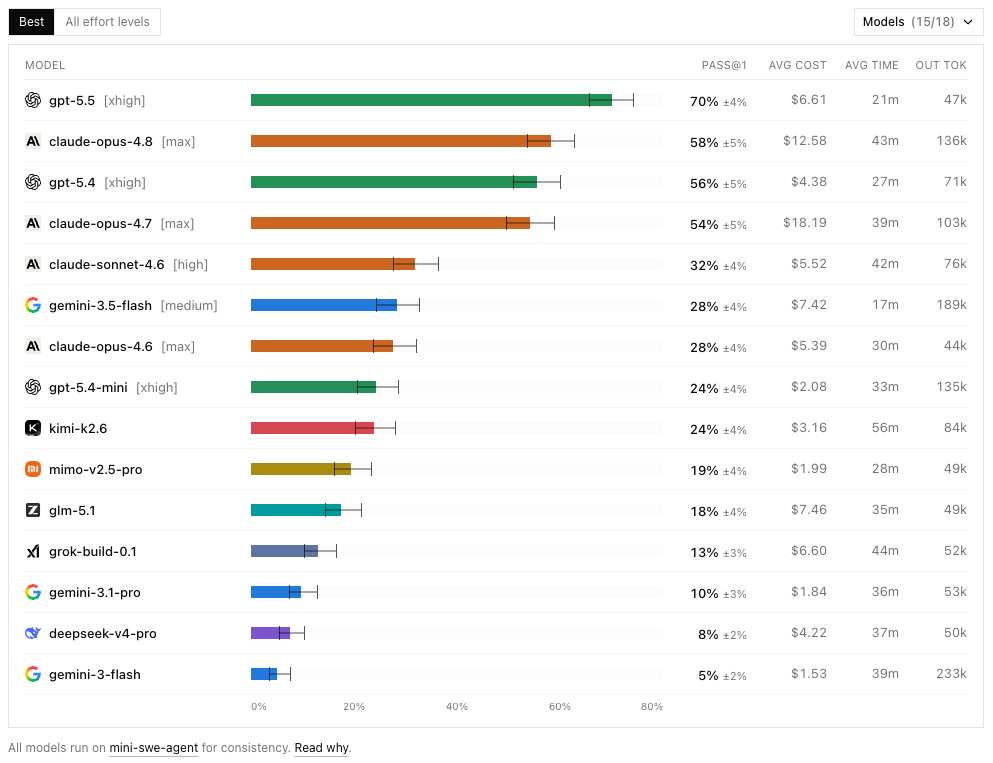
Once again, my favorite benchmark currently showing coding capabilities, DeepSWE, as discussed in the LLMs post:
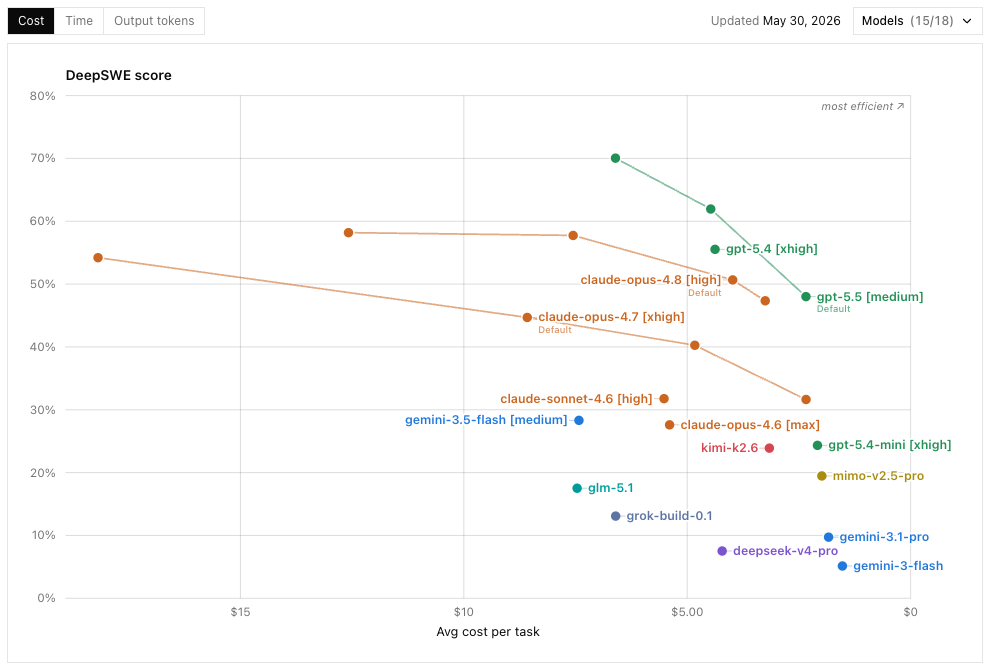
And if you're an enterprise and tokens and costs matter to you, this chart from the costs post:
And the Winner (My Current Setup) Is
- My default solution (70%): Codex app with GPT 5.5 – very good, fast (depending on effort), reliable (€100/month sub).
- For architecture, design, refactoring, writing, and often just reviewing Codex/GPT 5.5 work (35%): Claude Desktop with Opus 4.8. To me, it's the best model currently for complex, high-quality Angular work, but it's pretty slow and the app experience is not as good as in Codex (€100/month sub).
- For careful handcrafted Angular work (5%): WebStorm with Junie and Opus 4.8 (€20/month sub & API pricing).
- For high-speed work (2.5%): Cursor with Composer 2.5 (€20/month sub).
- For demoing why Antigravity and Gemini are pretty useless (0.1%): Antigravity with Gemini (€20/month sub, cos I had Drive anyway).
- For showing why Copilot is no good (0%): GitHub Copilot with any model (€8/month sub).
In parentheses, the percentage is a rough estimate of how much of my work currently goes through that setup. The percentages add up to more than 100% because I often use multiple setups for the same task – e.g. I might start with Codex/GPT 5.5 for implementation and then switch to Claude/Opus 4.8 for review and refactoring. And sometimes I just want to compare two models on the same task, which is also a good way to keep track of how they evolve.
Whichever of these you settle on, picking the app is only step one – the bigger lever is how you set up the harness around it. I walk through that end to end for Angular in the harness setup post.
So roughly that sums up to €270 each month (heavy subsidization makes it possible). Considering my hourly rate of €150–300, that means that I have to save 1–2h per month. Mediocre quote of former mayor of Vienna (legendary Michael Häupl) incoming: That's done during lunch on the 1st day of the month. Still considering not using agentic coding? I hope not.
I do actually hate the fact that in Codex I cannot switch to other model providers, because if I could, I would stop using everything else. I also hate the fact that Google has fallen far behind. Of all the big labs, I actually like Google the most as a company. But they do seem to have an organizational problem and cannot currently compete against the three frontier labs – OpenAI, Anthropic, and now Cursor, which after the SpaceXAI deal and Composer 2.5 I count as part of the frontier rather than a challenger. Hopefully Google Gemini will catch up. We need competition, and three frontier labs are already better than the old "duopoly".
And of course I do prefer open source tools like OpenCode or T3 Code where you can switch the model provider, because that gives you more freedom and flexibility. And I'd love to use open weight models. But for now those are not good enough for my work. This will probably change in 6–12 months, and I'll update my verdict & my recommendations accordingly.
Also, I worry that Chinese labs may become less generous with open weight releases. That would be understandable after Cursor's recent coup of building their astonishing Composer 2.5 upon Moonshot's Kimi K2.5.
However, I won't let them (neither OpenAI nor Anthropic) lock me in, so I will keep trying other setups and keep an eye on the market. But for now, this is my setup.
What Is the Best Solution for You?
Yes, the best solution for you depends on your company policy, your workflow preferences, and your willingness to review AI-generated code carefully. But choosing your setup is actually not that complicated.
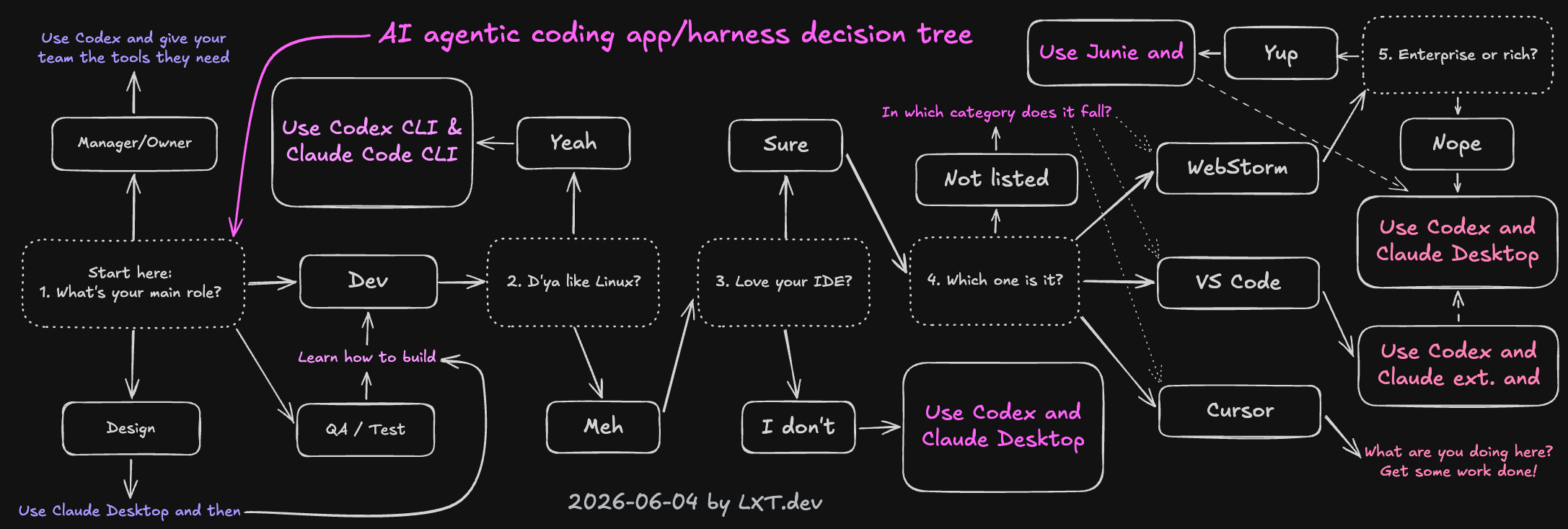
Nevertheless, I have created a sophisticated decision tree to help ya out (click to enlarge):
But Alex, My Favorite IDE Is Not Mentioned
I hear ya. Of course I mention the IDEs that I've been using the most – which is nothing other than personal preference. If you're using something different, try to apply the pattern from the decision tree above:
- Does my tool have an agent harness built in? If yes, go with the flow. If no, use Codex & Claude Desktop.
- Does my tool support plugins/extensions for Codex/Claude Code? If yes, check out those plugins. If they're good, use them. If not, fall back to Codex & Claude Desktop.
- If you're using something like Neovim, use Codex CLI & Claude Code CLI. Fine with me.
Do your own research, find the app & model that suits your preference, workflow, policy and ethics best.
Effort and Fast Mode
Easy: As I explained in the costs post, start with high effort. If your results are perfect, reduce effort to medium or low. If there are problems, try extra (or even max).
Enable fast mode by default. For the tradeoff, see the Codex speed configuration pricing and the Claude fast mode docs. If you hit your usage limits, turn it off or upgrade.
What Plan Do I Choose?
Also, an easy choice: start with the €20 plans. Upgrade once you see return on investment and frequently run into limits.
What I Would Recommend to Teams
For teams, I would recommend trying the Team Plan if your procurement and company policy allow it. Additionally:
- Pick one or two approved tools instead of banning everything.
- Start with a pilot on real Angular work.
- Measure accepted changes, review quality, and cost.
- Keep humans responsible for the final diff.
- Review the setup again every few months because the tools change too quickly.
Enterprise / API Pricing Considerations
Cursor & Composer 2.5
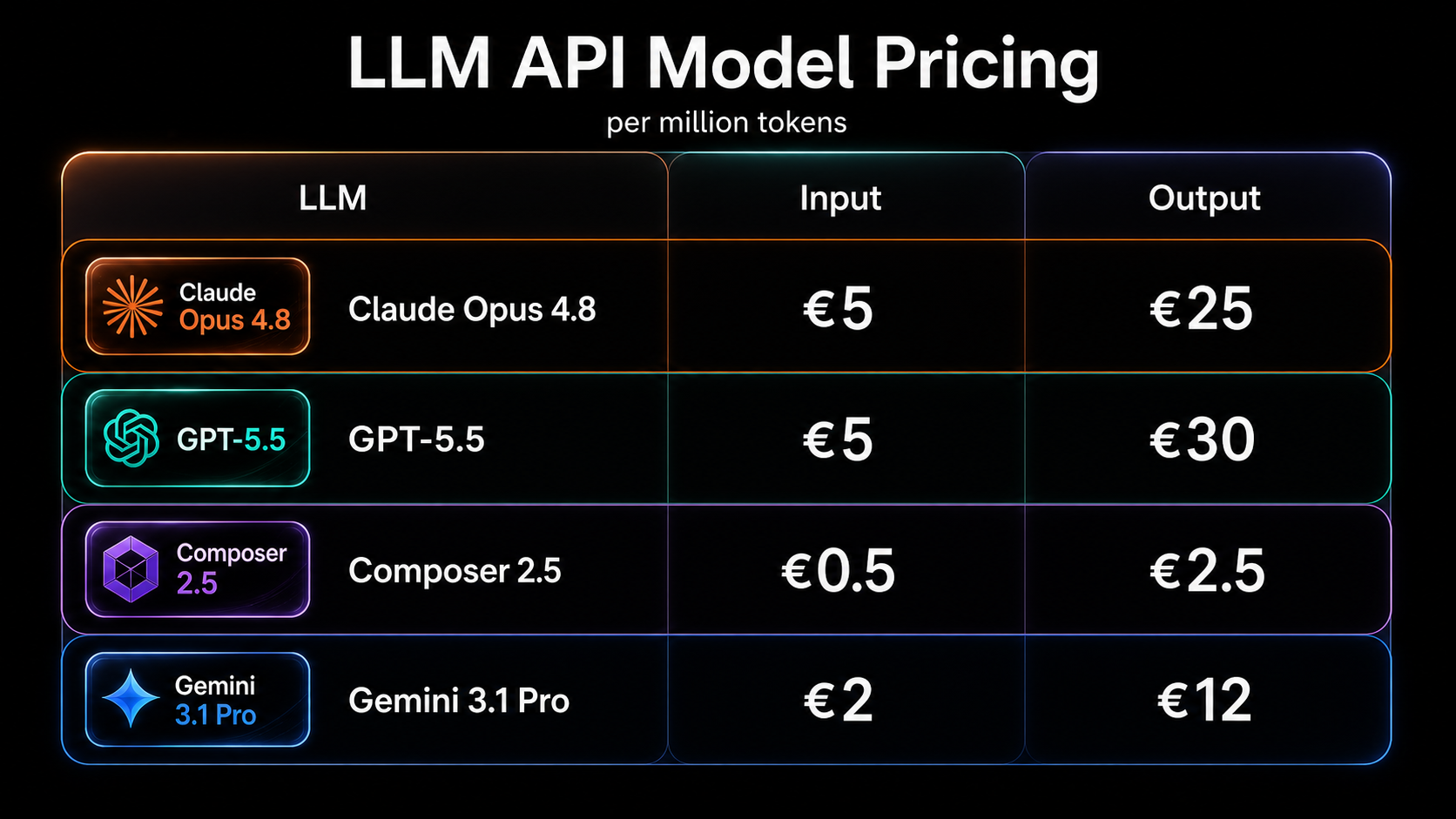
If you can (depending on your setup, company policy, and personal ethics), I would recommend trying Cursor with Composer 2.5 for very good API pricing. It's the cheapest and the fastest. Results are somewhere between the frontier models (GPT 5.5 and Opus 4.8). So for ROI this might be your best bet – at least currently.
Codex, GPT (and Claude Opus) With Low Effort
However, if you want to use the models with the best coding capabilities, I would recommend using Codex with GPT 5.5 (and Claude with Opus 4.8) with low to medium effort.
There is no need to go back in model history or use the Sonnet models. By reducing the effort you can easily reduce the costs dramatically, while still getting good results.
Agentic Engineering Workshop
If this verdict has shown one thing, it is that none of these decisions stands alone: model, harness, costs, privacy, and workflow are one setup – choose them one by one and you end up with an expensive mess.
If you want to bring all of that into one coherent, professional Angular setup – join our Agentic Engineering Workshop, available in English and German. Together we take advanced Angular developers from vibe coding to traceable Agentic Engineering workflows: AI-ready project setup, guardrails, spec-first and plan-first workflows, UX and component prototyping, code review, testing, and brownfield refactoring.
- 🤖 Agentic Engineering Workshop – 2 days, remote
Conclusion
This series started with a single question – which LLM is best for Angular – and slowly turned into something bigger, because no part of this works in isolation.
The model matters. Opus 4.8 and GPT 5.5 are genuinely different tools, and knowing when to reach for which one is half the battle.
The harness matters. Codex, the Claude Desktop app, Cursor, and your custom setup each shape the workflow differently – and setting that harness up properly for Angular is the highest-leverage thing you can do.
The pricing model matters. What counts is not the price per token but the cost per accepted, reviewed, merged change – and a subsidized subscription is still the best deal you can currently get.
And the data side matters too. Don't only say no. Approve a few safe paths and make the official workflow better than the unofficial workaround.
But if there is one thing to take away from the whole arc, it is this: the best setup is not the one that wins benchmarks, it is the one that fits your actual development workflow and still keeps code quality high. Pick a setup, run it on real Angular work, measure what it changes, and revisit it in a few months – because by then half of this will have moved again.
The teams that learn to do this professionally won't just write code faster. They will modernize faster, test faster, review faster, and learn faster. And they will stay competitive. That is the whole point.
Thank you for reading 🙏 this blog post series was written by Alexander Thalhammer. For feedback, remarks or questions, please reach out to me ❤️
Update June 21st
Updated with the new charts v1.1 by DeepSWE .