


In my first post of this series arc, I wrote about the LLMs I currently like to use for Angular development. In the second post, I looked at the apps and harnesses around those models: Codex, Claude Desktop app, Cursor, Antigravity, VS Code, WebStorm, and a few more. This third part is about the annoying but important topic: money.
Actually, money is only one part of the story. The other part is what data we share with these tools and which setups companies can actually use. I first had all of that in this post too, but it became too much for one article. So this part stays focused on costs, and I will cover the data and policy side in the next post.
And yeah, spoiler: if one of the subsidized subscriptions (or in my case all four of them) works for your setup, that is by far the best deal you can currently get. Before I dive in, let me be clear about one thing: I am not trying to sell you anything here, except, well, my brand new Agentic Engineering Workshop 😅. So this post is primarily about informing you about the options that actually exist, so you can make your own decision.
One thought runs through this whole post, so let me say it up front: what matters in the end is not the price per token. It is the cost per accepted, reviewed, merged change. More on that later.
There is also a bigger reason I keep writing about this. In my opinion, too many European teams are still too slow to adopt agentic coding seriously – and that gap will only get bigger. So please help me spread the word, and share these posts with your friends and colleagues!
This Is Still Not a Benchmark
Same disclaimer as in the previous two posts, just shorter this time: this is my current opinion as of June 1, 2026, from real Angular work and a lot of time spent playing around in Codex and the Claude Desktop app – not a scientific benchmark, not procurement advice.
I also spend some time in Cursor because it is a serious candidate – even more so since Elon is going to buy Cursor later this year (I bet he will), and I want to keep checking where it is going. Antigravity, on the other hand, is more of a tool I test from time to time. I don't use it seriously for my daily Angular work yet, because it still does not feel mature enough compared with Codex, Claude Desktop app, and lately also Cursor.
The subscription prices themselves have been pretty stable so far. What changes more often is what you actually get: model access, included usage, rate limits, fast modes, and sometimes the hidden routing behind the scenes. For API and enterprise setups, longer agent runs can also change the real cost directly.
So if you read this in a few months, check the linked pricing pages again. The included usage and enterprise/API details might have changed. One more note on the numbers: the providers list their prices in US dollars, so the euro figures in this post are approximate, not the exact amounts on your invoice. But the general shape of the cost problem will probably stay the same:
- subsidized subscriptions are amazing value when they fit your setup
- API pricing is much more transparent, but can get expensive quickly
- enterprise plans cost more, but also solve a different problem
TL;DR: Start With €40 or €60, Upgrade Only Where You Hit Limits
If you are an individual developer, freelancer, trainer, consultant, or working in a setup where these tools are available, I would not start with one tool. If you have no access yet, I would buy at least the €20 subscription from OpenAI and the €20 subscription from Anthropic. That is €40/month, and for me that is currently the most useful starting point.
If you can afford another €20, I would also add Cursor for a month. Then you are at €60/month and you can compare not only the models, but also the apps around them: Codex, Claude Desktop app, and Cursor. That is much more useful than reading another benchmark table.
The current pattern is roughly this:
- €40/month: OpenAI Plus and Anthropic Pro, the minimum setup I would recommend for serious experiments
- €60/month: add Cursor Pro if you want to compare a third strong app workflow
- +€80/month per provider: upgrade OpenAI or Anthropic from the €20 tier to the €100 tier when that specific tool becomes your bottleneck
- +€100/month more after that: move the same provider from the €100 tier to the €200 tier when you really need the 20x-style heavy-user tier
- Cursor upgrades: separate ladder, with €20 Pro, €60 Pro+, €200 Ultra, and €40/user/month Teams
- Enterprise: different billing, contracts, usage pools, overages, and usually much more expensive
If you are new to agentic coding, don't worry about the higher tiers on day one. Start with the base subscriptions, learn the apps, and upgrade only where you actually hit limits. That is what I did too.
Today my setup is heavier: OpenAI and Anthropic on the €100 tier, Cursor and Google both on the €20 tier. I don't need all of them every day, but I want to compare them quickly because this space changes so fast.
Why Subscriptions Are Such a Good Deal
These subscriptions are not just API pricing with a nicer UI. They are subsidized product bundles, and agentic coding involves a lot of hidden work: file reads, searches, tool calls, tests, terminal output, diffs, edits, and context compaction. At raw API prices, you would notice that quickly.
That is why subscriptions are so attractive. The providers want developers in their ecosystem, and right now we benefit from that. But the catch is important: these plans are usually meant for humans using the product, not as a cheap backend for your company, CI pipeline, or SaaS product. In larger companies, personal consumer subscriptions also do not match procurement, billing, reporting, and cost control.
So the real first question is not:
Which model is cheapest per token?
The real first cost question is:
Can we use the subsidized app subscription, or do we need a business, enterprise, or API setup?
That one question can easily change the cost calculation by a factor of 10 or more.
The €20 Tier Is for Getting Started
For me, the €20 tier is not only about "cheap access to a model". It is the entry ticket into the whole product around the model. That is why I would not buy only one subscription if I had no access yet. I would buy OpenAI and Anthropic first, and maybe Cursor too.
The important comparison is not only GPT versus Claude versus Composer or Gemini. The important comparison is Codex versus Claude Desktop app versus Cursor. These are the super apps where the real workflow happens: repository search, file editing, tool calls, terminal output, diffs, review, cloud tasks, local tasks, and all the little product decisions that make an agent useful or annoying.
So my recommendation is simple: spend €40 or €60 for one month and run the same real Angular tasks through the tools:
- migrate a component to signal-based
input()andoutput(), and rewrite a template from*ngIfand*ngForto@ifand@for - add tests for a service with a few dependencies
- ask for a code review of a real pull request
- try a Git workflow like rebasing one branch onto another and resolving a pile of merge conflicts
- describe a bug by explaining the current behavior and the desired behavior, and ask the agent to find and fix it
Then look at the diffs, the review experience, the terminal usage, the verification, and how much steering you had to do. After two or three evenings, you will usually know much more than any pricing table can tell you.
The Current Pricing Picture
Let's look at that pricing table anyway, but only briefly. Again, please check the official pages before you make a real decision, because these numbers are moving targets.
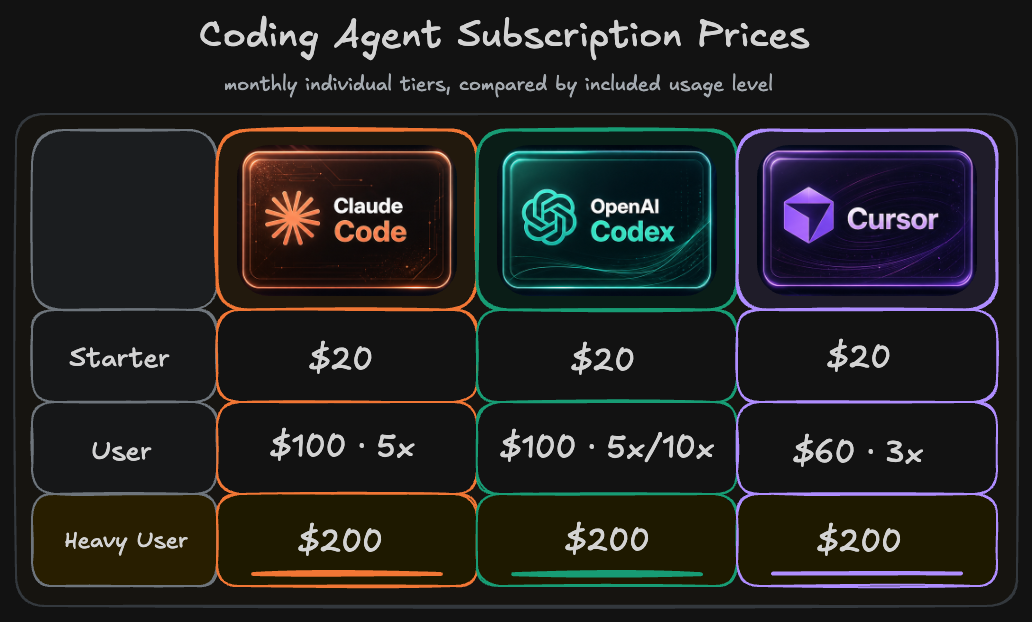
Nothing special to see here. Roughly all three Frontier Labs – OpenAI, Anthropic, and Cursor (SpaceXAI) – have the same pricing, with the minor exception of Cursor offering you the 3x plan for €60.
OpenAI / Codex
For Codex, check the Codex pricing page and ChatGPT pricing page.
Anthropic / Claude
For Claude Code, check Anthropic's Claude pricing page.
Cursor
For Cursor, check the Cursor pricing page.
Google / Gemini / Antigravity
For Google, check the Gemini subscriptions page and the Google AI subscription update.
Copilot
Meh, I would not build a 2026 setup around Copilot anymore. And the pricing story is getting weaker too: GitHub has moved Copilot to usage-based billing today (June 1, 2026), replacing premium request units with AI Credits. So Microsoft's heavy subsidizing of frontier-model usage inside Copilot is over. On top of that, the frontier LLMs are being limited more and more in Copilot. But the bigger point is simple: Copilot is just not the best harness for agentic coding. If you're forced to use it in your company, try starting a revolution. In the end, you might just be securing your employer's survival. Hopefully this post series can support you with that.
Team Plans Sit in the Middle
Between the personal subscriptions above and the enterprise contracts below, both vendors offer a team tier that keeps the per-seat price low while adding pooled usage, central billing, and admin controls.
On OpenAI's side, the Team plan comes in two tiers: a standard tier at about €20 per seat and month and a premium tier at about €100 per seat and month with much more included usage – the same ladder as the personal plans. Both bundle Codex, company knowledge, SSO/MFA, and data that is never used for training. See ChatGPT Business pricing.
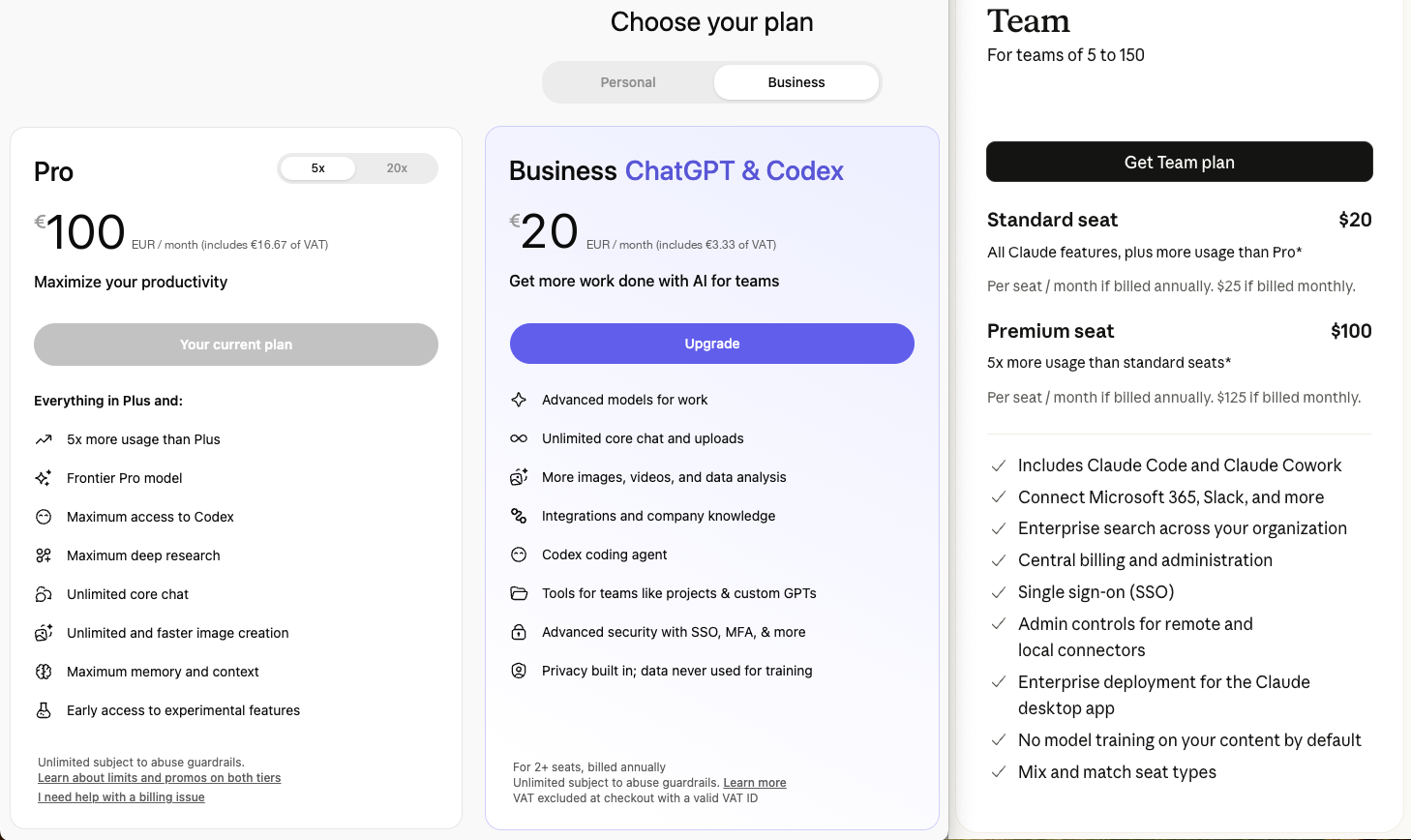
Anthropic's Team plan (for teams of 5 to 150) mirrors those two tiers: €20 or €100 per seat and month, again depending on how much included usage your developers need. Both tiers include Claude Code and Desktop, and the team gets the full agentic tooling, SSO, and "no model training". For the details, see Claude team pricing.
Enterprise Is a Different Game
It is easy to look at a €20 subscription and ask why a company should pay so much more. I get that reaction, but enterprise is not "more Plus". It is a different cost model: seats, pooled usage, overages, central billing, usage reports, admin controls, support, and predictable invoices.
The real question is what happens when 50 developers use the tool every day. Tight limits can turn cheap plans into overages, waiting time, retrying, and cleanup.
So I would start with a small pilot. Give a few strong developers two paid setups for four weeks, use them on real Angular work, and measure cost, accepted changes, review time, PR cycle time, and limits.
API Usage: Paying the Real Cost
Subscriptions and enterprise plans hide cost. API usage does not. The official OpenAI API pricing page and Claude API pricing docs currently list USD prices. Converted roughly for comparison, GPT 5.5 is about €5 per million input tokens and €30 per million output tokens, while Claude Opus 4.8 is about €5 input and €25 output.
Per million tokens that sounds manageable, and output tokens are usually much more expensive than input tokens.
Here is the current API price snapshot I would use for agentic coding discussions. Most official pricing pages still quote USD, so treat this as a practical comparison and check billing currency, VAT, and enterprise discounts before you make a procurement decision.
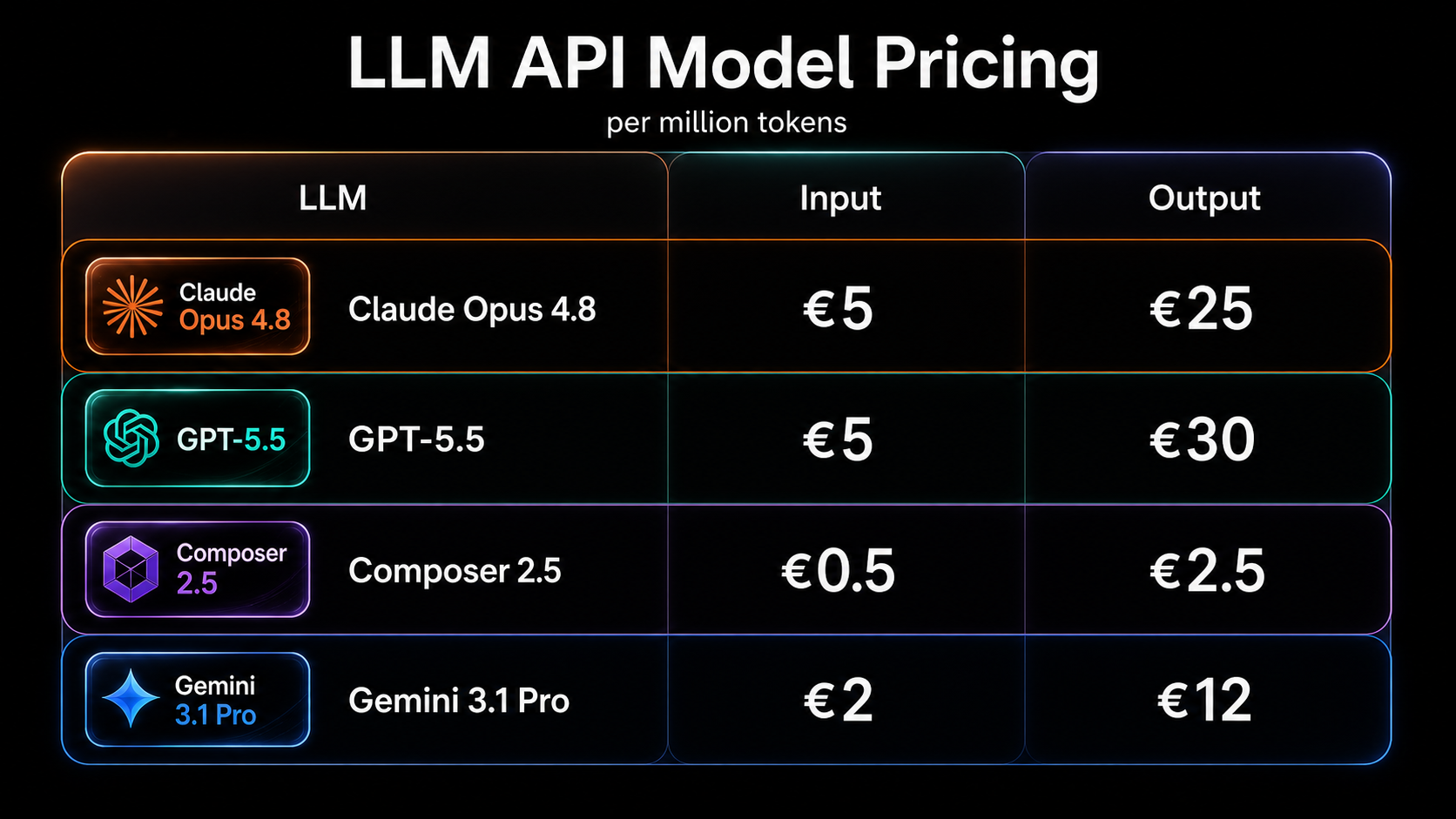
All prices are per million tokens, sourced from each provider's API pricing. The table is deliberately simple: no batch discount, no extra tool-call fees, no VAT, no currency conversion, no enterprise discount.
For IDE-heavy teams, BYOK (bring your own key) can be interesting, no matter whether you live in WebStorm or VS Code. On the JetBrains side, the JetBrains AI plans and Junie BYOK docs allow it, and most VS Code AI extensions offer the same idea: keep the IDE, connect provider keys, pay the provider.
But the catch is how many tokens an agent actually moves per task – and that is the real cost driver I look at next.
Token Usage Is the Real Cost Driver
OpenAI's help page on tokens says one token is roughly four characters of English text. For a coding agent, 200,000 input tokens are not some crazy edge case. Repository instructions, tool schemas, file excerpts, diffs, terminal output, and chat history pile up fast. Anthropic's pricing docs say the quiet part too: tool names, schemas, calls, and results are billed.
At current API prices, one turn with 200,000 input tokens and 20,000 output tokens costs roughly €1.60 on GPT 5.5 and €1.50 on Claude Opus 4.8. Fine once. Annoying after 20 turns. Expensive if the agent starts doing laps.
Prompt caching helps, but it does not make output cheap and it definitely does not fix a messy workflow. So I would not worship token price. A more expensive model can still be cheaper if it gets the work done in fewer turns.
This is also why I don't care too much about raw tokens per second. A model can stream quickly and still feel slow if it needs too many turns, too many tool calls, or too much reasoning to finish the task. For agentic coding, the practical speed metric is end-to-end time until I have a reviewed diff. A slower-streaming model can still be faster if it gets to the right files quickly and produces less unnecessary output.
So the number that matters is not cost per token. It is cost per accepted, reviewed, merged change.
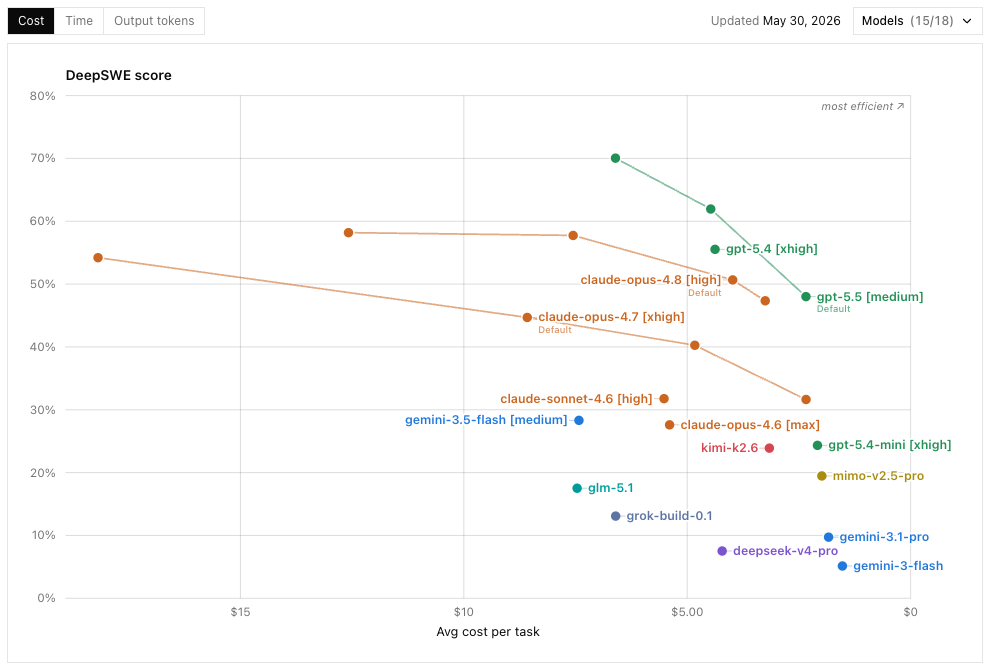
The DeepSWE benchmark is the one I currently trust the most. Higher percentages mean stronger benchmark results; further right means better cost efficiency. Sadly it's missing Composer due to the lack of a public API.
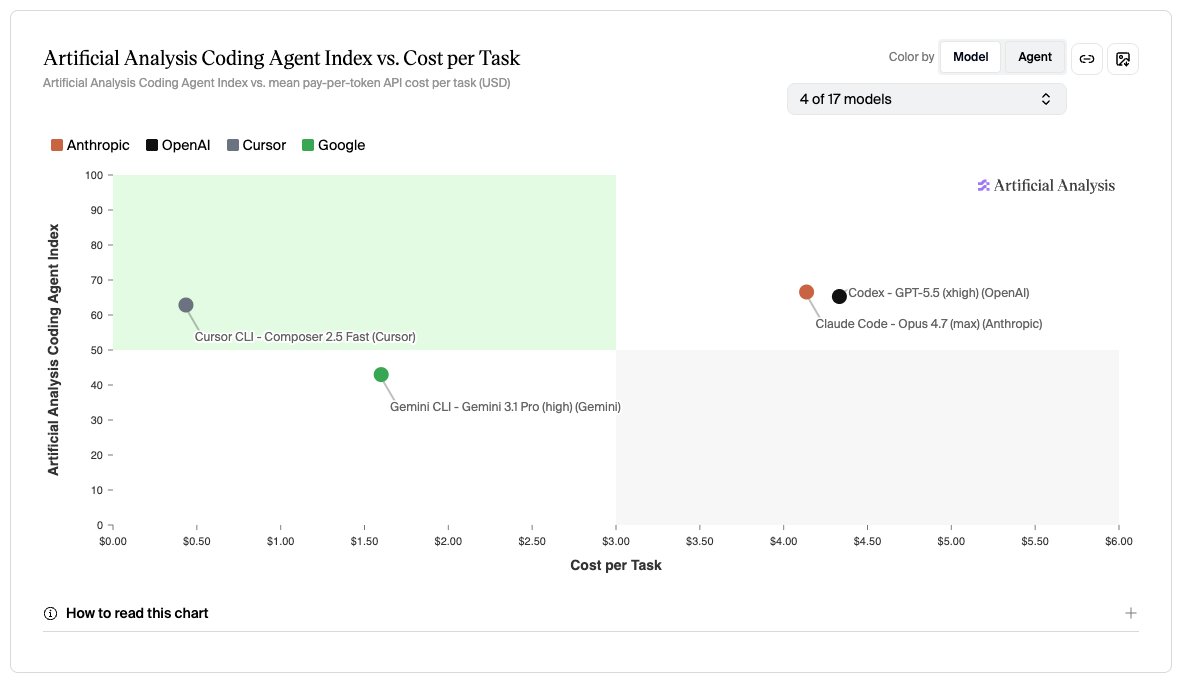
This second chart – based on Artificial Analysis' coding-agent runs, which can test Composer through Cursor's own harness – includes Composer, and here it is the most efficient model by far, the best ROI in this comparison. Definitely an option to watch for API usage.
Low, Medium, High, Extra
If token volume is the real cost, the reasoning level is the first dial that changes it. Most tools now have some reasoning setting: low, medium, high, extra, max, and so on. The rule is simple: use the cheapest level that reliably solves the task.
For Angular work: low for tiny edits, medium for normal implementation, high for tricky bugs, component creation and refactorings, and extra/Pro/Max when a bad result would cost much more than the model usage.
In practice, I often just use High as my default (for GPT and Opus), because it is usually good enough and I don't want to waste time tuning. I know I will get hate for this, but the truth is that my time is precious and I don't care as much since I can use the subsidized subscription anyway. And I still have the option to upgrade my sub if necessary 😏
Fast Mode
Reasoning level is one dial; fast mode is the other. Fast mode is interesting because speed matters. If an agent is too slow, I lose focus. But fast mode is also a cost feature. In Codex, speed configurations increase credit consumption. In the Claude API, Fast mode gives faster Opus responses at a premium.
So I would definitely try it, experiment with it, and if your time is really precious, just use it.
How I Would Control Costs in a Team
Cost control is mostly workflow control. I would define simple rules from the beginning:
- start with medium reasoning for normal implementation work
- use high/extra only when the task deserves it
- keep tasks focused
- start a fresh thread when the context becomes messy
- keep project instructions short and useful
- watch terminal output size
- keep humans responsible for the final review
This is not only about saving money. Agents are better when the task is clear.
Agentic Engineering Workshop
And here is the uncomfortable truth about cost control: the token price is the wrong dial. The model, the app, my Angular Guardrails, my Angular Coding Style Guide, and the review workflow together decide what an accepted change really costs you – and that system is something you can train.
If you want to keep AI coding costs under control and optimize for cost per accepted, reviewed, merged change instead of price per token – join our Agentic Engineering Workshop, available in English and German. There, advanced Angular developers move from vibe coding to traceable Agentic Engineering workflows: AI-ready project setup, guardrails, spec-first and plan-first workflows, UX and component prototyping, code review, testing, and brownfield refactoring.
- 🤖 Agentic Engineering Workshop – 2 days, remote
Conclusion
The cheapest serious setup today is still a subsidized individual subscription. If you have no access yet, I would start with OpenAI and Anthropic for roughly €40/month, and maybe add Cursor for another €20 for one month. That gives you Codex, Claude Desktop app, and Cursor on real Angular tasks, which is much more useful than reading another benchmark table.
Then keep what actually changes your daily workflow. If you hit limits, upgrade the tool that is limiting you: OpenAI or Anthropic from €20 to €100, and only then maybe to €200 for serious heavy use. For companies, the answer may be business or enterprise seats, pooled credits, API usage, or an IDE-based setup with your own provider keys – WebStorm with AI Assistant and Junie, or VS Code with its AI extensions.
So my recommendation is not "buy tool X". Build a small, serious AI coding workflow now, measure cost per accepted, reviewed, merged change, and keep humans responsible for quality.
Teams that learn this professionally will not only write code faster. They will turn the same budget into far more accepted, reviewed, merged changes – and that advantage compounds every month.
In the next post, I will look at the other half of the question: what we actually share with AI coding tools, and how I would think about privacy, retention, EU regulation, and company policy. In the personal verdict, I pull models, harnesses, costs, and privacy together.
Thank you for reading 🙏 this blog post was written by Alexander Thalhammer. For feedback, remarks or questions, please reach out to me ❤️