

In my last article about Hashbrown, I showed how an LLM-based chat assistant can be integrated into an Angular application. Using tool calling, the language model can invoke functions that provide data or trigger actions in the frontend.
This article goes a step further: The LLM now selects one or more UI components and displays them directly in the chat. Responses are therefore no longer limited to text, but are enhanced with visual and interactive elements.
📂 Source Code (🔀 branch hashbrown_ui)
Demo Application
To demonstrate how a language model answer with components, an extended version of the solution from the previous article is used. It presents flight components directly within the chat history:
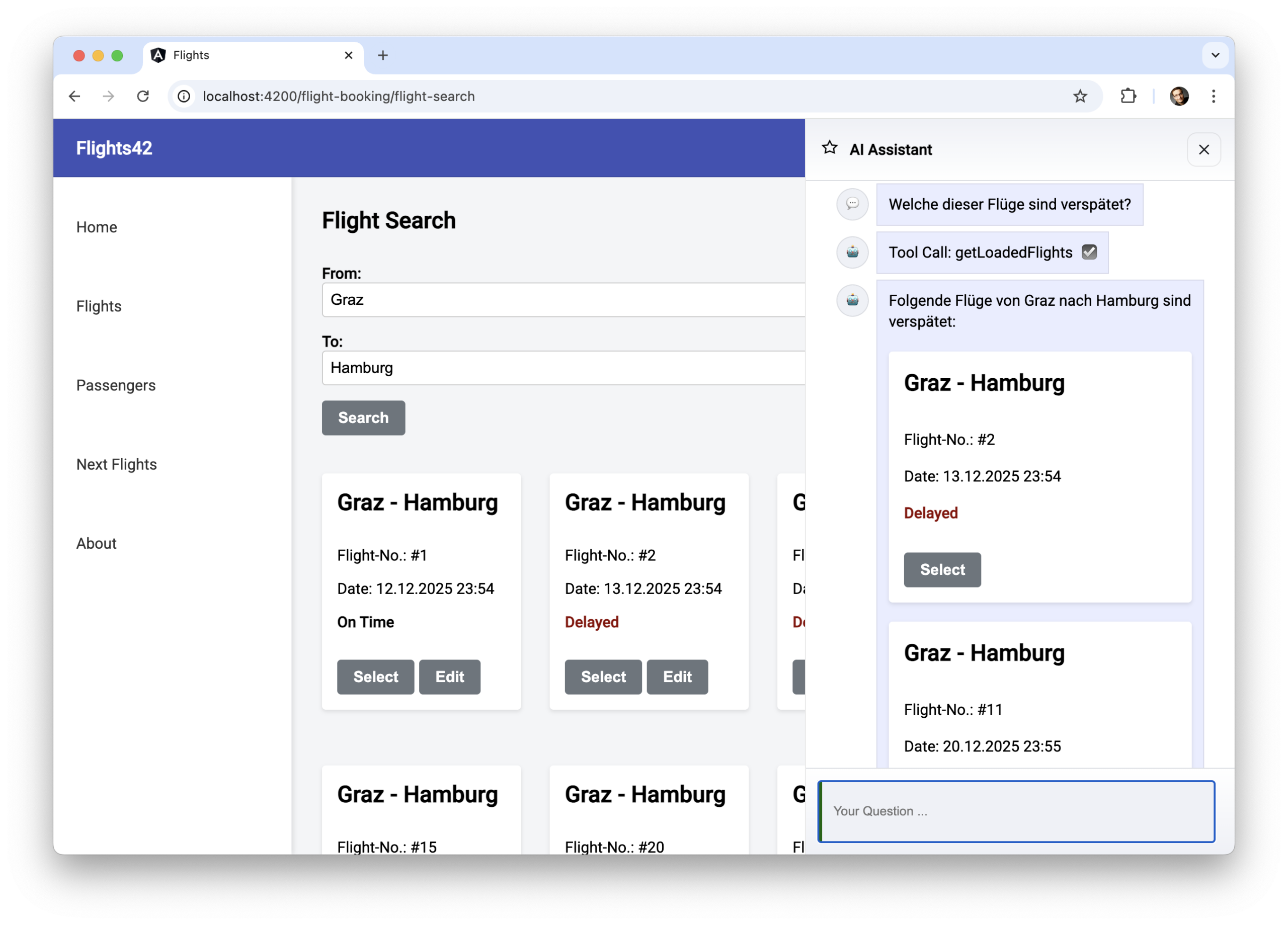
The LLM can also choose to include multiple components in a single response:
UI chat with uiChatResource
The uiChatResource provided by Hashbrown supports not only tool calling but also answering questions using components. It can be used as a replacement for the chatResource in the previous article:
@Component([…])
export class AssistantChatComponent {

  message = signal('');

  chat = uiChatResource({
    model: 'gpt-5-chat-latest',
    system: `
      You are an UI assistent that helps with finding flights […]
    `,
    tools: [
      findFlightsTool,
      getLoadedFlights,
      getBookedFlights,
      […]
    ],
    components: [
      flightWidget,
      messageWidget
    ],
  });

  […]

  submit() {
    const message = this.message();
    this.message.set('');
    this.chat.sendMessage({ role: 'user', content: message });
  }
}
The components provided to the LLM must be registered under components\. These are Angular components that -- similar to tools -- are described using the Skillet schema language. The next section will discuss this in more detail.
It is important to note that when using the uiChatResource, the LLM answers each question with one or more components. Therefore, this example also registers a messageWidget, which simply receives and displays a string.
To present the components selected by the LLM in the chat history, the component hb-render-message provided by Hashbrown is used:
@for (message of messageModels(); track $index) {
<article class="msg assistant">
  <div class="avatar">{{ message.icon }}</div>
  <div>
    <div class="bubble">
      @if (message.role === 'assistant') {
        <hb-render-message [message]="message" />
      }
      @else {
        <app-message [data]="message.contentString"></app-message>
      }

      @for(toolCall of message.toolCalls; track toolCall.toolCallId) {
         […]
      }
    </div>
  </div>
</article>
}
This component is only necessary for responses from the LLM. Such responses are indicated by the role assistant. The user's requests in this example are purely textual. They are located in the content property.
As content also allows other types like number or JSON, it must be converted to a string before app-message can display it. This and similar tasks, such as selecting an icon for the respective role (assistant , user), are handled by a projection using computed.
messageModels = computed(() =>
  this.chat.value().map((message) => ({
    ...message,
    contentString: String(message.content),
    icon: this.icons[message.role] || '❓',
    toolCalls: message.role === 'assistant' ?
      message.toolCalls : [],
  }))
);
Components for chat: Dumb Components with Smart Wrappers
The components offered to the LLM are either Dumb Components or, as in the case of the flightWidget, a smart wrapper around a Dumb Component:
@Component({
  selector: 'app-flight-widget',
  imports: [FlightCardComponent],
  template: `
    <div class="flight">
      <app-flight-card [item]="flight()" [selected]="isSelected()">
        <div>
          @if(isBooked()) {
          <button class="btn btn-default" (click)="checkIn()">Check in</button>
          } @else if (isSelected()){
          <button class="btn btn-default" (click)="select(false)">
            Remove
          </button>
          } @else {
          <button class="btn btn-default" (click)="select(true)">Select</button>
          }
        </div>
      </app-flight-card>
    </div>
  `,
  styles: `
    .flight {
      margin: 20px 0;
    }
  `,
})
export class FlightWidgetComponent {
  router = inject(Router);
  store = inject(FlightBookingStore);

  flight = input.required<Flight>();
  status = input<'booked' | 'other'>('other');

  isBooked = computed(() => this.status() === 'booked');
  isSelected = computed(() => this.store.basket()[this.flight().id]);

  checkIn(): void {
    this.router.navigate(['/checkin', this.flight().id]);
  }

  select(selected: boolean): void {
    this.store.updateBasket(this.flight().id, selected);
  }
}
This wrapper delegates its inputs to the wrapped dumb component and handles its events. In the latter case, it triggers actions in the stores of the individual features or initiates route changes.
The key aspect here is the input status, which indicates whether a given flight is already booked or found through a flight search. The LLM system must derive this value from the conversation history. As we will see at the end of the article, smaller, cost-effective models like Gemini Flash require some assistance with this task.
Based on the value of status, the widget selects a button for the flight map: Booked flights get a Check in button, and flights found during the flight search get a button to add the flight to the shopping cart or remove it again.
Describing Components
Hashbrown's exposeComponent function describes the provided components:
import { exposeComponent } from '@hashbrownai/angular';
import { s } from '@hashbrownai/core';
[…]

export const flightWidget = exposeComponent(FlightWidgetComponent, {
  name: 'flightWidget',
  description: `
    Displays a flight or flight ticket. Use this instead of textual
    descriptions of flights or tickets.
    `,
  input: {
    flight: FlightSchema,
    status: s.enumeration(
      Whether the flight is booked or not […],
      ['booked', 'other']
    ),
  },
});
The LLM uses the stored textual description to decide when to use the component. The individual inputs also need to be described. For this, the Hashbrown's Skillet schema language is leveraged. The example sets up the status input as an enumeration with two possible values. To describe the flight input, it delegates to an existing schema:
import { s } from "@hashbrownai/core";

export const FlightSchema = s.object('Flight to be displayed', {
  id: s.number('The flight id'),
  from: s.string('Departure city. No code but the city name'),
  to: s.string('Arrival city. No code but the city name'),
  date: s.string('Departure date in ISO format'),
  delay: s.number('If delayed, this represents the delay in minutes'),
});
Further Details & Practical Application
If you want to go beyond individual examples and look at these topics in a
structured, end-to-end way, we cover them in depth in the Angular Architecture Workshop.
The focus is on real-world architecture decisions – including how and where AI
fits into enterprise Angular applications.

English Version | German Version
Under the Hood: Structured Output
To determine which components should be displayed in the chat history, Hashbrown instructs the LLM to respond only with JSON documents. Such responses are also known as structured output.
These JSON documents received by the model are stored as a string in the content property and contain the components to be displayed along with the input values to be passed:
[…]
{
    "role": "assistant",
    "content": "{\"ui\":[{\"messageWidget\":{\"$props\":{\"data\":\"Yes, you have already booked a flight to France.\"}}},{\"flightWidget\":{\"$props\":{\"flightInfo\":{\"id\":2,\"from\":\"London\",\"to\":\"Paris\",\"date\":\"2025-12-05T21:15:10.716Z\",\"delay\":0,\"status\":\"booked\",\"delayInfo\":\"delayed\"}}}}]}",
    "toolCalls": []
},
[…]
Hashbrown passes the possible components, along with their inputs and descriptions, in a separate section of each request. Technically, this is a JSON schema derived from Skillet.
Supporting Different Models
Hashbrown uses JSON-based responses (structured output) to select the desired components. However, some models, such as Google Gemini, do not (yet) support the combination of structured output and tool calling. This problem can be solved when bootstrapping the application using the emulateStructuredOutput property:
bootstrapApplication(AppComponent, {
  providers: [
    […]
    provideHashbrown({
      baseUrl: 'http://localhost:3000/api/chat',
      emulateStructuredOutput: true,
    }),
  ],
});
If the application sets this property to true, Hashbrown defines a pseudo-tool that allows the LLM to select one or more of the offered components. Hashbrown also instructs the language model to respond with a call to this tool.
Weaker Models: Few Shot Prompting to Help get Things Moving
To ensure the model always responds with some free text and optionally with one or more components, the rules in the resource's system prompt must be extended. To also help less powerful, inexpensive models like Gemini Flash, this prompt is further enhanced with a few examples:
[…]

## Rules:
[…]
- Answer questions with the messageWidget to provide some text to the user.
- When appropriate, *also* answer with other components (widgets), e.g.,
      the flightWidget to display information about a flight or a ticket
- Instead of describing a flight, use the flightWidget
- Don't call the same tool more than once with the same parameters!

## EXAMPLE

- User: Which flights did I book?
- Assistant:
  - UI: messageWidget(You've booked these 3 flights)
  - UI: flightWidget({id: 0, from: '...', to:'...', ...})

## NEGATIVE EXAMPLE

Don't call the same tool several times in a row with the same parameters:

- User: Search for flights from A to B
- Assistant:
  - Tool: findFlights({from: 'A', to: 'B'})
  - Tool: findFlights({from: 'A', to: 'B'})
  - Tool: findFlights({from: 'A', to: 'B'})

[…]
Placing such examples in the prompt has been proven to improve the quality of model responses. When multiple examples are placed, it is referred to as few-shot prompting; when only a single example is provided, the term one-shot prompting is used.
The same technique is necessary so that weaker models can correctly derive the flight status (booked, other) from the conversation history:
export const flightWidget = exposeComponent(FlightWidgetComponent, {
  name: 'flightWidget',
  description: […],
  input: {
    flight: FlightSchema,
    status: s.enumeration(
      `Whether the flight is booked or not.

      A flight has the status 'booked' **only** when retrieved
      via the tool 'getBookedFlights'.

      ## Example for infering a status 'booked'
      - User: Which flights did I book?
      - Assistant:
          - Tool: getBookedFlights()
          - UI: flightWidget({flightInfo: { id: 0, ..., status: 'booked' }})

      ## Example for infering a status 'other'
      - User: Which of the found flights is the earliest one?
      - Assistant:
          - Tool: getLoadedFlights()
          - UI: flightWidget({flightInfo: { id: 0, ..., status: 'other' }})
      `,
      ['booked', 'other']
    ),
  },
});
Examples written in prose -- like the ones shown -- are easy to write and read. However, prose is also prone to errors, as such examples can use components and parameters that no longer exist. The prompt function provided by Hashbrown for tagging strings offers a solution:
uiChatResource({
  system: prompt`
    [...]
    <user>Hello</user>
    <assistant>
      <ui>
        <app-message
            data="How may I assist you?" />
      </ui>
    </assistant>
  `,
  components: [
    exposeComponent(MessageComponent, { ... })
  ]
});
The tag function prompt checks whether these examples, which must be in the displayed XML dialect, correlate with the registered components. Currently, this function can only be used for the system prompt in the resource. However, since our example overrides the system prompt server-side for security reasons, and examples are also necessary within the component descriptions, it is limited to prose examples.
Conclusion
LLMs can be used to control interactive UI components via Structured Output, provided these components and their inputs are described and registered in a structured manner. Combined with Hashbrown and Angular, this creates AI-powered user interfaces that go far beyond traditional chat interfaces.
At the same time, it becomes clear that smaller models need to be supported by targeted prompting and examples to deliver consistent results. Few-shot prompting and clearly described components form the technical basis for this.