


Signals Forms is the new Forms implementation in Angular. However, Reactive Forms will be supported for a long time, and there is already a lot of code using it. Hence, it is important to be able to use both forms implementations in the same application and even in the same form. This allows us to migrate existing forms step by step and to reuse existing code.
For this, Angular provides two bridges: SignalFormControl and compatForm. The first one allows us to use Signal Forms in Reactive Forms, while the second one supports using Reactive Forms in Signal Forms. In this article, I show how to use both bridges and how to mix them in the same form.
The following picture shows the example I'm using here. The solid borders denote Signal Forms, and the dashed borders are seen around a Reactive Form:
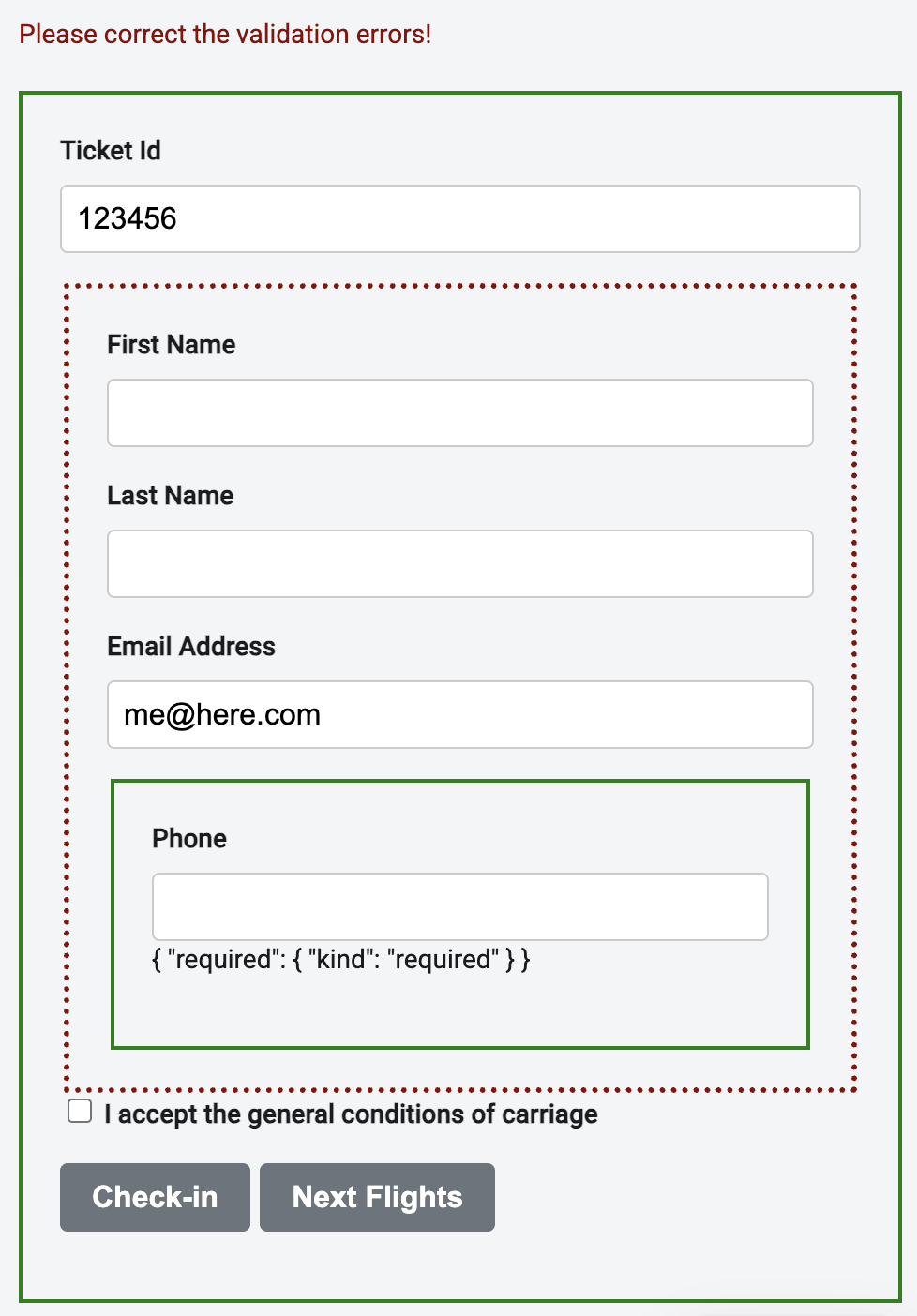
SignalFormControl: Signal Forms within Ractive Forms
SignalFormControl, introduced with Angular 21.2, can be used in a Reactive Form and consists of a Signal validated by a Signal Form schema. Hence, it is a bridge (adapter) between both worlds.
This new class is used like a FormControl, but instead of reactive validators, it takes a Signal Forms schema:
protected readonly phoneNumber = new SignalFormControl('', (path) => {
  required(path);
});
As ordinary form controls, it can be placed in a FormGroup:
protected readonly passengerGroup = this.formBuilder.nonNullable.group({
  firstName: '',
  lastName: '',
  email: 'me@here.com',
  phoneNumber: this.phoneNumber,
});
From the FormGroup's perspective, the SignalFormControl is just an ordinary form control that implements the typical AbstractControl interface. Hence, the SignalFormControl's state is propagated upwards. For instance, if the SignalFormControl is invalid, the whole FormGroup is invalid.
This is also the case for the value property. For instance, when printing out the passengerGroup's value in our example, we can see that it contains the value of the phoneNumber SignalFormControl:
{
  "passenger": {
      "firstName": "John",
      "lastName": "Doe",
      "email": "john@doe.com",
      "phoneNumber": "133"
  }
}
In the template, the SignalFormControl is used as an ordinary FormControl:
<fieldset [formGroup]="passengerGroup">
    <input formControlName="firstName" id="firstName" />
    <input formControlName="lastName" id="lastName" />
    <input formControlName="email" id="email" />

    <!-- Signal Form (SignalFormControl) -->
    <fieldset>
       <input formControlName="phoneNumber" id="phoneNumber" />
    </fieldset>

</fieldset>
Under the hood, the control uses a signal. To get it, we can access its sourceValue property:
protected readonly fullPhoneNumber = computed(
  () => '+43 ' + this.phoneNumber.sourceValue());
compatForm: Reactive Forms within Signal Forms
While SignalFormControl allows us to use Signal Forms in Reactive Forms, the compatForm helper, which has already been part of Angular since version 21.0, allows us to use Reactive Forms in Signal Forms. You can also mix both bridges when migrating a large form.
Modern Angular
More about Signal Forms can be found in my new book Modern Angular - Architecture, Concepts, Implementation. This book covers everything you need for building modern business applications with Angular: from Signals and state patterns to architecture, AI assistants, testing, and practical solutions for real-world projects.
To implement this for, we can put the passengerGroup from the previous section into a signal:
protected readonly checkinFormModel = signal({
  ticketId: '',
  conditionsAccepted: false,
  passenger: this.passengerGroup,
});
This signal acts as the basis for a Signal Form. To respect the passengerGroup, we pass it to compatForm instead of to the form function:
protected readonly checkinForm = compatForm(this.checkinFormModel, (path) => {
  required(path.ticketId);
});
Now, we can bind the invidiual parts of the form using the typical directives from Signal Forms and Reactive Forms:
<!-- Signal Form (compatForm) -->
<form>
    <input [formField]="checkinForm.ticketId" />

    <!-- Reactive Form -->
    <fieldset [formGroup]="passengerGroup">
        <input formControlName="firstName" id="firstName" />
        <input formControlName="lastName" id="lastName" />
        <input formControlName="email" id="email" />

        <!-- Signal Form (SignalFormControl) -->
        <fieldset>
          <input formControlName="phoneNumber" id="phoneNumber" />
        </fieldset>

    </fieldset>
    [...]
</form>
Also, here, form state is propagated upwards. If, for instance, the phoneNumber or firstName is invalid, the entire form will be invalid as well.
However, here we have to remember that our Signal-based form models contain a FormGroup. If we want to get a simple JavaScript object with the entire form content, we have to replace this FormGroup with its value:
const { passenger, ...header } = this.checkinFormModel();

const checkinInfo = {
  ...header,
  passenger: {
    ...passenger.value,
  },
};
Conclusion
With the new Signal Forms, Angular offers a modern and flexible alternative to the established Reactive Forms. Thanks to the provided bridges, both approaches can be seamlessly combined, and existing applications can be migrated step by step. This enables future-proof development without forgoing proven functionality.