


Signal-based resolvers: parallel instead of waterfall, blocking or non-blocking
Resolvers are as old as the Angular Router itself. They load data before a route is activated and return an Observable or a Promise for it. In a world where data access increasingly goes through resource, rxResource, and httpResource, that feels out of place. With version 22.2.0-next.5, the router therefore gains an experimental alternative: Router Resources. They not only fit Signals better, they also bring a performance benefit, because the router loads them in parallel instead of one after another.
This article explains the new API, shows both flavors using our demo application Flights42, and then looks into how Router Resources work together with Signal Stores.
📂 Source code (branch: 22.2.0-next.5)
What Are Router Resources?
With Router Resources, a route gets a resources property that returns ordinary resources. The router takes care of their lifecycle and passes the results on to the component.
The second reason for the new API is at least as important as the nicer interface: performance. The router processes classic resolvers sequentially along the route hierarchy. If the parent route needs 2 seconds for its data and the child route 3, the user waits 5 seconds for the navigation. Router Resources, by contrast, all start at the same time, even when they block. In the same example, the navigation now takes only 3 seconds, as long as the slowest resource:
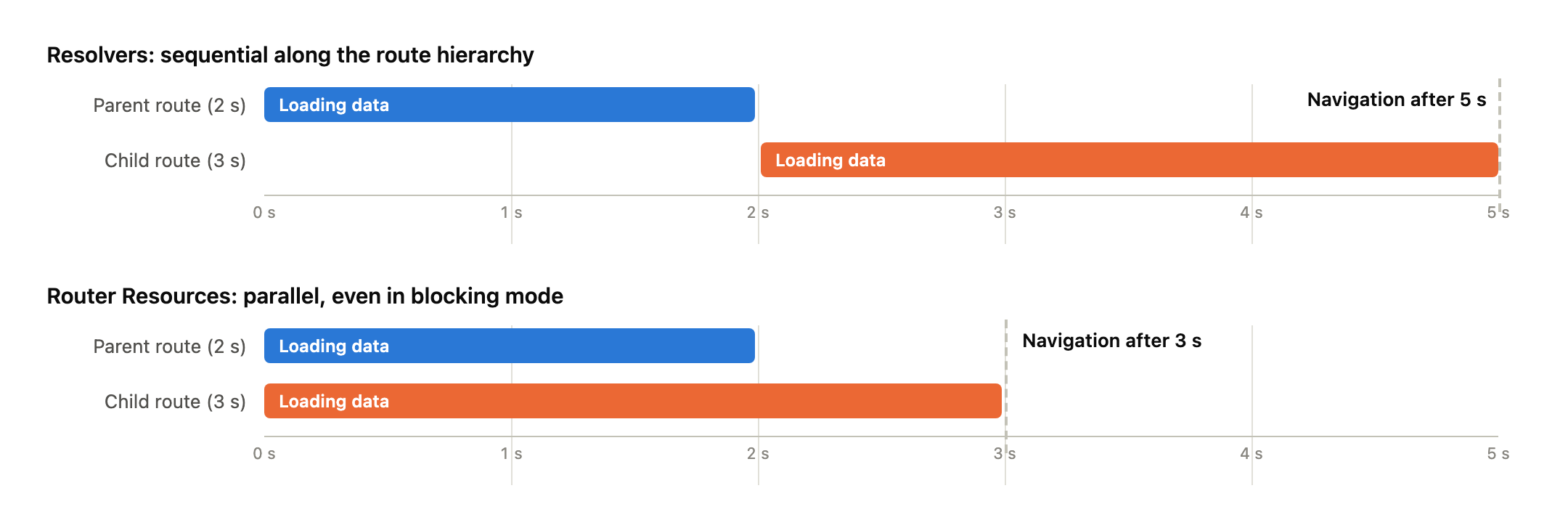
Besides such blocking Router Resources, Router Resources can also be defined as non-blocking. This means the router doesn't wait at all. It activates the route immediately and hands the still-loading resource to the component, which then renders the loading state itself.
Setting Up Router Resources
The feature is enabled via withRouterResources when configuring the router:
// src/app/app.config.ts

import {
  ɵwithRouterResources as withRouterResources,
  provideRouter,
  withComponentInputBinding,
} from '@angular/router';

[...]

export const appConfig: ApplicationConfig = {
  providers: [
    [...]
    provideRouter(
        routes,
        withComponentInputBinding(),
        withRouterResources()
    ),
  ],
};
Router Resources are still experimental. That's why the imports start with the ɵ prefix: in 22.2.0-next.5, the router exports the new symbols only privately, so the demo renames them to their official names on import. In addition, withComponentInputBinding is used so that the router binds the results of the resources to the component as inputs.
The resources property isn't part of the public Route type yet either. The runtime already evaluates it; for the compiler, the demo adds it via a small type declaration:
// src/app/domains/shared/util-common/resource-route.d.ts

import { Resource } from '@angular/core';
import {
  ɵResourceContext as ResourceContext,
  ɵResourceResult as ResourceResult,
} from '@angular/router';

declare module '@angular/router' {
  interface Route {
    resources?: (
      ctx: ResourceContext,
    ) => ResourceResult | Promise<ResourceResult>;
  }

  interface ActivatedRoute {
    resources?: Record<string, Resource<unknown> & { reload(): boolean }>;
  }
}
The second part of the declaration, resources on the ActivatedRoute, comes into play further below when reloading.
Blocking Router Resources
With these preparations in place, the first Router Resource can be defined. The route for editing a passenger loads the record before the component appears:
// src/app/domains/ticketing/ticketing.routes.ts

{
  path: 'passenger-edit/:id',
  component: PassengerEdit,
  resources: (ctx) => ({
    passenger: createSimplePassengerResource(ctx.params),
  }),
},
The resources function runs in an injection context and receives a ResourceContext. Among other things, it provides params, queryParams, and data as Signals. The factory function derives the id from them and creates a perfectly ordinary httpResource:
// .../feature-booking/passenger-edit/simple-passenger-resource.ts

import { computed, inject, Signal } from '@angular/core';
import { Params } from '@angular/router';

import { PassengerClient } from '../../data/passenger-client';

export function createSimplePassengerResource(params: Signal<Params>) {
  const passengerClient = inject(PassengerClient);
  const id = computed(() => Number(params()['id'] ?? 0));
  return passengerClient.findPassengerResourceById(id, {
    withDefaultValue: false,
  });
}
Without any further ado, such a resource is blocking. Just like with a resolver, the router waits until the value is available and only then activates the route. Thanks to withComponentInputBinding, it's not the resource itself that ends up in the component, but the already unwrapped value:
// src/app/domains/ticketing/feature-booking/passenger-edit/passenger-edit.ts

@Component({ [...] })
export class PassengerEdit {
  [...]
  protected readonly passenger = input.required<Passenger>();
}
This is the same input a resolver populated before. For the component, the switch is invisible, which makes migration pleasant. If the route parameter changes later while the component is reused, the resource fetches the new value on its own, because ctx.params is a Signal.
One detail deserves attention: the call above uses withDefaultValue: false to disable the httpResource's default value. In 22.2.0-next.5, a resource with a default value doesn't block, because from the router's point of view a value is already present. This detail is expected to change, though. Until then, leave out defaultValue if the resource is supposed to block.
Non-Blocking Router Resources
Navigation shouldn't always wait for data. Often it's better to show the target page right away and make the loading state visible there. That's exactly what nonBlocking is for. The demo's luggage management uses it for its detail route:
// src/app/domains/luggage/feature-luggage/luggage.routes.ts

import { ɵnonBlocking as nonBlocking, Routes } from '@angular/router';

[...]

{
  path: ':id',
  component: LuggageDetail,
  resources: (ctx) => ({
    luggage: nonBlocking(createLuggageResource(ctx.params)),
  }),
},
The factory function createLuggageResource is structured like the passenger example and delegates to the LuggageClient. Its loader is deliberately slow so the effect becomes visible:
// src/app/domains/luggage/data/luggage-client.ts

findLuggageById(id: Signal<number>) {
  return resource({
    params: id,
    loader: async ({ params: id }) => {
      // Deliberately delayed to make the loading state visible
      await new Promise((resolve) => setTimeout(resolve, 2000));
      return this.getLuggage().find((item) => item.id === id);
    },
  });
}
The router now activates the route immediately. In this case, the component doesn't receive the unwrapped value but the complete Resource as its input:
// src/app/domains/luggage/feature-luggage/luggage-detail/luggage-detail.ts

@Component({ [...] })
export class LuggageDetail {
  readonly luggage = input.required<Resource<Luggage | undefined>>();
}
This makes all of the resource's state Signals available in the template, such as isLoading and error:
<!-- src/app/domains/luggage/feature-luggage/luggage-detail/luggage-detail.html -->

@let resource = luggage();
@let item = resource.value();

@if (resource.isLoading()) {
  <p>Loading luggage …</p>
} @else if (resource.error()) {
  <p>Luggage could not be loaded.</p>
} @else if (item) {
  <form> [...] </form>
}
The division of labor is clear: blocking resources deliver finished values and guarantee that the target page is complete. Non-blocking resources deliver the loading lifecycle along with the data and leave rendering the intermediate state to the target page.
Modern Angular
✓ Already updated to Angular 22!
You'll find more on resources, Signals, and modern Angular architecture in my new eBook Modern Angular. It covers Signals, architecture, testing, AI assistants, and practical solutions for modern business applications.
Reload and Redirect
Two more capabilities set Router Resources apart from resolvers. The first concerns reloading. Anyone who wanted to fetch a resolver's data again had to re-activate the route, for instance with onSameUrlNavigation: 'reload'. That repeats the entire navigation, including guards and resolvers. A Router Resource, on the other hand, can be reloaded on its own, without the router starting a navigation.
With a blocking resource, however, the component only receives the value, not the resource itself. Access to it is provided by the ActivatedRoute, which offers all of the route's resources under their keys:
// src/app/domains/ticketing/feature-booking/passenger-edit/passenger-edit.ts

import { ActivatedRoute } from '@angular/router';

[...]

@Component({ [...] })
export class PassengerEdit {
  [...]
  private readonly passengerResource =
    inject(ActivatedRoute).resources?.['passenger'];

  protected reload(): void {
    // Reloads only this resource without re-activating the route
    this.passengerResource?.reload();
  }
}
The ?. accounts for the fact that the demo can also run the same route with a resolver; in that case, there is no resource. A button in the template calls reload. Since the router binds the value of a blocking resource to the input via an effect, the new record arrives in the component on its own once loaded. In the demo, this also resets the form, because passengerModel is a linkedSignal on the input: local changes are discarded, and the record comes fresh from the server.
The second capability concerns missing data. The httpResource from the blocking example reports an unknown passenger as an error, since the API responds with 404. With a blocking resource, the router then cancels the navigation and emits a NavigationError; the user stays on the previous page. Usually, a redirect is the better reaction, for example to a not-found page. For this, the loader throws a RedirectCommand. The router cancels the navigation and redirects to the given URL.
Since httpResource has no loader of its own, the demo falls back on resource for this. The new factory function calls the PassengerClient and translates the 404 error into a redirect:
// .../feature-booking/passenger-edit/passenger-resource.ts

import { HttpErrorResponse } from '@angular/common/http';
import { inject, resource, Signal } from '@angular/core';
import { Params, RedirectCommand, Router } from '@angular/router';
import { firstValueFrom } from 'rxjs';

import { PassengerClient } from '../../data/passenger-client';

export function createPassengerResource(params: Signal<Params>) {
  const passengerClient = inject(PassengerClient);
  const router = inject(Router);

  return resource({
    params: () => Number(params()['id'] ?? 0),
    loader: async ({ params: id }) => {
      try {
        return await firstValueFrom(passengerClient.findById(String(id)));
      } catch (error) {
        if (error instanceof HttpErrorResponse && error.status === 404) {
          // Cancels the navigation and redirects instead of failing it
          throw new RedirectCommand(router.parseUrl('/not-found'));
        }
        throw error;
      }
    },
  });
}
In the demo, the route passenger-edit/:id now uses this factory function instead of createSimplePassengerResource; the route not-found shows a plain notice page. Navigating to passenger-edit/999999 takes you there without the target page ever appearing. This only works with blocking resources, because only there is the router still waiting for the result. With non-blocking resources, the navigation has already completed, an error ends up in error(), and the component decides for itself how to react.
Router Resources and Signal Stores
In many applications, it's not the route that loads the data but a Signal Store. In the demo, the PassengerDetailStore manages the current passenger. It is given an id and then loads the record on its own via an embedded resource. How do you combine such a store with a blocking Router Resource?
The demo shows the following solution. A hand-written resource sets the id on the store in its loader, waits until the store has finished loading, and then returns its value:
// .../feature-booking/passenger-edit/store-passenger-resource.ts

export function createStorePassengerResource(params: Signal<Params>) {
  const store = inject(PassengerDetailStore);
  const passengerLoaded = waitFor(store.passengerIsLoading, false);

  return resource({
    params: () => Number(params()['id'] ?? 0),
    loader: async ({ params: id, abortSignal }) => {
      store.setPassengerId(id);
      await passengerLoaded(abortSignal);
      return store.passengerValue();
    },
  });
}
The helper function waitFor bridges the gap between the Signal world and the Promise world of the loader. It observes the given Signal with an effect and resolves a Promise as soon as the expected value arrives. I'll skip reproducing it here; the linked original is short.
This solution works, but I'm still not entirely happy with it. The store already loads reactively as soon as its id changes. The resource on top exists only so that the router has something to wait for. That's a second wrapper around a mechanism that is already complete on its own.
The wrapper can be avoided by turning things around: instead of building a resource around the store, the store hands out its resource itself. A small Signal Store is enough for that. It creates the resource in withProps and provides it in two flavors: the writable one internally, the read-only one to the outside:
// .../feature-booking/passenger-edit/passenger-store.ts

export const PassengerStore = signalStore(
  { providedIn: 'root' },

  withState({
    passengerId: 0,
  }),

  withProps((store) => {
    const _passenger = inject(PassengerClient).findPassengerResourceById(
      store.passengerId,
      { withDefaultValue: false },
    );

    return {
      _passenger,
      passenger: _passenger.asReadonly(),
    };
  }),

  withMethods((store) => ({
    // Accepts a value or a signal
    load: signalMethod<number>((id) => patchState(store, { passengerId: id })),
  })),
);
The underscore in _passenger is more than a convention: NgRx Signals treats members named this way as private and removes them from the store's public type. Only passenger is visible from the outside, the read-only view of the same resource provided by asReadonly. It can only be changed through load. This method is based on signalMethod and accepts either a value or a Signal; in the latter case, it keeps the id reactively up to date. The factory function for the route passes the id Signal to load and returns the store's resource:
// .../feature-booking/passenger-edit/shared-passenger-resource.ts

export function createSharedPassengerResource(params: Signal<Params>) {
  const store = inject(PassengerStore);
  const id = computed(() => Number(params()['id'] ?? 0));
  store.load(id);
  return store.passenger;
}
Store and router now share the same resource. The router waits for it and binds its value to the component, parameter changes with a reused component still reach the store via the Signal, and anyone who needs the value or loading state outside the route reads it directly from the store. Since the resource does without a default value, it blocks as intended.
Router Resources and Stores: An Assessment and an Alternative
Above all, these considerations show one thing: patterns for combining Router Resources and stores still have to establish themselves. Each of the variants shown comes at a price. The bridge via waitFor wraps the store a second time, the shared store has to be built specifically for this purpose and hand out its resource, and the guard forgoes blocking. Angular and NgRx may also still need to take a step toward each other here.
If you don't want to block anyway, you need neither of them. A guard that kicks off the store synchronously and returns true right away is enough:
export const passengerGuard: CanActivateFn = (route) => {
  const store = inject(PassengerDetailStore);
  store.setPassengerId(Number(route.paramMap.get('id') ?? 0));
  return true;
};
The navigation goes through without delay, the store loads in the background, and the component takes value and loading state directly from the store. This corresponds to the non-blocking behavior from above but gets by without any additional resource. The two blocking variants thus remain reserved for the cases where the router really should wait for store data.
Learn More: Angular Architecture Workshop (Remote, Interactive, Advanced)
Become an expert in enterprise-wide and long-lived Angular applications with our Angular Architecture Workshop!

German Version | English Version
Summary
Router Resources bring the loading of route data into the Signal world. A route declares its data as ordinary resources, the router starts them all in parallel and binds the results to the component as inputs. The old resolver waterfall is gone; in the example, the waiting time shrank from 5 to 3 seconds.
Blocking resources behave like resolvers with a better interface, non-blocking ones deliver the loading lifecycle directly to the target page. Via the ActivatedRoute, a resource can be reloaded without a new navigation, and a RedirectCommand in the loader redirects when data is missing. The interplay with Signal Stores deserves a second look: if you need to block, let the store hand out its resource itself or bridge it with a resource of your own; if you don't, simply kick it off via a guard. All of this is still experimental, but the direction is right.