

With Angular 22, several central Signal APIs leave their experimental status: the Resource API and Signal Forms are now stable and ready for production use. In parallel, OnPush becomes the new default change detection strategy, and the framework gains more ergonomic building blocks for modern, reactive applications with @Service, injectAsync, and debounced.
This article highlights the most important innovations in Angular 22 using concrete examples and also picks up selected highlights from Angular 21.1 and 21.2.
📂 Source Code (Branch ng22)
OnPush as the New Default Change Detection Strategy
A decision that has been discussed in the Angular community since the very beginning is now reality: OnPush is the new default change detection strategy. This shift makes perfect sense with the rise of Signals and Zone-less Angular: anyone using Signals receives precise notifications about changes, and OnPush takes optimal advantage of them. The result is a performant change detection that focuses specifically on the components affected by changes.
If you need the previous behavior, set the strategy manually to Eager:
import { ChangeDetectionStrategy, Component } from '@angular/core';

@Component({
  selector: 'app-legacy',
  changeDetection: ChangeDetectionStrategy.Eager,
  template: `...`
})
export class LegacyCmp { [...] }
The Eager setting replaces the original Default setting, which is now deprecated. In this case, change detection checks the entire component tree for changes.
To avoid breaking changes, ng update activates the Eager option when updating the Angular version if OnPush was not explicitly set.
Resource API Becomes Stable in Angular 22
The Resource API has so far been the missing link in the Signal ecosystem: it enables reactive, asynchronous derivation of data, typically HTTP requests that are triggered after Signal changes. Despite its central role, it remained in experimental status for a long time. That changes abruptly with Angular 22: resource, rxResource, and httpResource are now stable and can be safely used in production.
The most convenient entry point is the httpResource function. It receives a lambda expression that returns an HTTP request. This expression is reactive: if a Signal used within it changes, the request is automatically restarted.
import { httpResource } from '@angular/common/http';
import { ChangeDetectionStrategy, Component, signal } from '@angular/core';
import { Flight } from '../../data/flight';

@Component({
  selector: 'app-flight-search',
  changeDetection: ChangeDetectionStrategy.OnPush,
  [...]
})
export class FlightSearch {
  protected readonly filter = signal({ from: 'Hamburg', to: 'Graz' });

  protected readonly flightsResource = httpResource<Flight[]>(
    () => ({
      url: 'https://demo.angulararchitects.io/api/flight',
      params: {
        from: this.filter().from,
        to: this.filter().to,
      },
    }),
    { defaultValue: [] },
  );

  protected readonly flights = this.flightsResource.value;
  protected readonly error = this.flightsResource.error;
  protected readonly isLoading = this.flightsResource.isLoading;

  protected search(): void {
    this.flightsResource.reload();
  }
}
The type parameter Flight[] defines the expected response type. The defaultValue argument ensures that the component is not confronted with undefined at startup. If the resource should not trigger a request, it is sufficient to return undefined:
protected readonly flightsResource = httpResource<Flight[]>(
  () => {
    const filter = this.filter();
    if (!filter.from || !filter.to) {
      return undefined;
    }
    return {
      url: 'https://demo.angulararchitects.io/api/flight',
      params: { from: filter.from, to: filter.to },
    };
  },
  { defaultValue: [] },
);
The resource manages its state via Signals: value contains the loaded data, error provides error information, and isLoading indicates the loading state. In addition, the resource knows a more detailed status with the values idle, loading, reloading, error, resolved, and local (for locally overridden values).
In the template, these signals can be used directly, for instance to display the loading state and to iterate over the loaded data:
@if (flightsResource.isLoading()) {
  <div>Loading ...</div>
}

@if (flightsResource.error()) {
  <div>Error: {{ flightsResource.error() }}</div>
} @else {
  <div class="row">
    @for (flight of flightsResource.value(); track flight.id) {
      <app-flight-card [item]="flight" />
    }
  </div>
}
Race conditions are handled automatically: if multiple requests arrive in quick succession, only the result of the most recent one is used and older ones are cancelled where still possible. This matches the behavior of switchMap in RxJS.
Incremental Hydration Now Enabled by Default
With Angular 22, provideClientHydration() enables Incremental Hydration automatically. If you don't need it, you disable it explicitly with the new withNoIncrementalHydration() feature. A bundled schematic migration helps with the update.
Signal Forms Becomes Stable and Production-Ready
Signal Forms can now also be used in production. The path from the experimental API to the stable version was remarkably fast. This was made possible through extensive internal case studies at Google, in which typical form applications were systematically examined.
The heart of Signal Forms is the form function. It receives a Signal containing the form data as well as an optional schema with validation rules:
import { linkedSignal } from '@angular/core';
import { form, minLength, required } from '@angular/forms/signals';

@Component({ [...] })
export class FlightEdit {
  private readonly store = inject(FlightDetailStore);

  protected readonly flight = linkedSignal(() =>
    normalizeFlight(this.store.flight()),
  );

  protected readonly flightForm = form(this.flight, (path) => {
    required(path.from);
    required(path.to);
    required(path.date);
    minLength(path.from, 3);
  });
}
The result is a FieldTree: a deeply nested Signal structure in which each property is represented as a Signal with form status (value, dirty, invalid, errors). For template binding, the FormField directive is used:
<input [formField]="flightForm.from" id="flight-from" />
<div>{{ flightForm.from().errors() | json }}</div>
New @Service Decorator: Register Services More Concisely
A striking new addition is the new @Service decorator. It replaces the common cases in which you previously wrote @Injectable() or @Injectable({ providedIn: 'root' }), and is a better match for the actual intent of providing a service:
import { Service } from '@angular/core';

@Service()
export class FlightClient { [...] }
By default, the service is provided in the root scope. If you don't want that, you can provide the service manually instead, for example in app.config.ts, at the component level, or at the route level. In this case, you set autoProvided to false:
@Service({ autoProvided: false })
export class TabRegistry { [...] }injectAsync: Inject Services Lazily
With injectAsync, dependencies can be injected lazily, that is, only when they are actually needed. This is especially useful for services that load extensive libraries and are only required upon a specific user action.
import { injectAsync } from '@angular/core';

@Component({ [...] })
export class CheckinPage {
  private readonly upgradeService = injectAsync(() =>
    import('./upgrade-service').then((m) => m.UpgradeService),
  );

  protected async upgrade(): Promise<void> {
    const flightNumber = this.checkinFormModel().ticketId;
    const upgradeService = await this.upgradeService();
    upgradeService.upgrade(flightNumber);
  }
}
The injectAsync function receives a lambda expression that returns a Promise. The result is a function whose first call takes care of loading the service. The import of UpgradeService, and thus the loading of the associated bundle, only happens on the first call to upgrade().
For lazy loading to work, the injected service must be auto-provided, that is, either decorated with @Injectable({ providedIn: 'root' }) or with the new @Service() decorator.
Prefetching with injectAsync and onIdle
Lazy loading inevitably means a delay on the first call. To avoid this, the bundle can be loaded in advance.
For exactly this purpose, injectAsync offers the prefetch option: it points to a function that returns a Promise. As soon as the Promise resolves, Angular begins loading the service.
This mechanism can be used together with the helper function onIdle. It returns a Promise and resolves it as soon as the browser has nothing to do:
import { injectAsync, onIdle } from '@angular/core';

private readonly upgradeService = injectAsync(
  () => import('./upgrade-service').then((m) => m.UpgradeService),
  { prefetch: onIdle },
);
Internally, onIdle delegates to requestIdleCallback and falls back to setTimeout if the browser doesn't support this API. If needed, a timeout can be configured after which prefetching will be triggered at the latest:
injectAsync(
  () => import('./upgrade-service').then((m) => m.UpgradeService),
  { prefetch: () => onIdle({ timeout: 100 }) },
);
If you want to adjust the behavior project-wide, you can swap out the underlying IdleService via provideIdleServiceWith, typically in app.config.ts.
Resource Composition via Snapshots
A fundamental principle of reactive programming is deriving values from one another. A Computed is created from one or more Signals and updates as soon as its sources change. With Resources, this kind of derivation was previously only possible indirectly: you could project their individual signals (value, error, isLoading), but not the Resource as a whole. Since Angular 21.2, there is a dedicated concept for this: using so-called snapshots, a Resource can be fully transformed into a new Resource without touching the original loading logic.
The starting point is the snapshot signal of a Resource, which contains the complete current state including status and value. A snapshot therefore provides the entire state as an object with Signals. This object can be mapped to a new object with Signals derived from it. From this derived snapshot, resourceFromSnapshots in turn builds a new Resource.
For illustration, consider an example that filters the loaded data, for instance to display only luggage items above a certain minimum weight:
import {
  linkedSignal,
  Resource,
  resourceFromSnapshots,
  ResourceSnapshot,
  Signal,
} from '@angular/core';

export function withMinWeight(
  input: Resource<Luggage[]>,
  minWeight: Signal<number>,
): Resource<Luggage[]> {
  const derived = linkedSignal<
    { snap: ResourceSnapshot<Luggage[]>; min: number },
    ResourceSnapshot<Luggage[]>
  >({
    source: () => ({ snap: input.snapshot(), min: minWeight() }),
    computation: ({ snap, min }) => {
      if (snap.status === 'resolved') {
        return { ...snap, value: snap.value.filter((item) => item.weight >= min) };
      }
      return snap;
    },
  });

  return resourceFromSnapshots(derived);
}
Via the computation callback of the linkedSignal, you decide how the new snapshot is composed from the source signals. If either the source resource or the minWeight signal changes, the computation is automatically re-executed. The derived resource therefore always remains consistent with its inputs.
The pattern can be used generically for arbitrary transformations. An interesting use case, which the Angular team also describes alongside snapshots, is to keep the most recently loaded value during reloading instead of displaying undefined:
export function withPreviousValue<T>(input: Resource<T>): Resource<T> {
  const derived = linkedSignal<ResourceSnapshot<T>, ResourceSnapshot<T>>({
    source: input.snapshot,
    computation: (snap, previous) => {
      if (snap.status === 'loading' && previous?.value?.status === 'resolved') {
        return { ...snap, value: previous.value.value };
      }
      return snap;
    },
  });

  return resourceFromSnapshots(derived);
}
The previous argument of the computation callback contains the most recently produced snapshot of the derived resource. This way, the previous value can be selectively carried over into the new snapshot.
debounced: Debouncing for Signals and Resources
By nature, Signals know nothing of time: unlike Observables, they therefore have no concept of delay or throttling. This has so far made debouncing in pure Signal chains impossible, at least if you don't want to break this mental model.
For forms, the Angular team has therefore built debouncing directly into Signal Forms, which covers a large part of the use cases. For everything beyond that, there is now the debounced function.
Unlike Signals, Resources are well aware of time. This is exactly where debounced comes in. The function creates a Resource whose value is updated with the specified delay. The status of the resource indicates whether the value is still within the pending window:
import { debounced } from '@angular/core';

const filter = signal('');
const debouncedFilter = debounced(filter, 300); // 300ms

effect(() => console.log(debouncedFilter.value()));
FormRoot and Submission API in Signal Forms
Since Angular 21.2, the Submission API for Signal Forms has been available. It allows you to define the entire logic for submitting a form directly in the call to form:
import { FormRoot, submit } from '@angular/forms/signals';

@Component({
  imports: [ [...], FormRoot ],
  [...]
})
export class FlightEdit {
  protected readonly flightForm = form(this.flight, flightSchema, {
    submission: {
      action: async (form) => this.save(form),
      ignoreValidators: 'none',
      onInvalid: (form) => this.reportValidationError(form),
    },
  });
}
The action property contains the asynchronous save logic and can return server-side validation errors as its return value, which Signal Forms then takes directly into the form state. The ignoreValidators option controls whether failing or still pending validators block the submission (none | pending | all). onInvalid is called when validation prevents submission.
In the template, the FieldTree, which represents the entire form, is bound to the form tag via the new FormRoot directive. This directive takes care of three tasks: it suppresses the browser's default validation behavior (such as the native tooltips on required fields), connects the action from the submission configuration with the submit event of the form, and prevents duplicate validation messages. To trigger the submit event, an ordinary button without an explicit type attribute is sufficient. Within a form, it acts as a submit button by default:
<form [formRoot]="flightForm">
  [...]
  <button>Save</button>
</form>
If additional submission actions are needed, e.g. for an approval workflow, the submit helper function helps, which only executes the submission if the form is valid:
import { submit } from '@angular/forms/signals';

protected async requestApproval(): Promise<void> {
  await submit(this.flightForm, {
    action: async (form) => {
      await this.store.requestApproval(form().value());
    },
    ignoreValidators: 'none',
    onInvalid: (form) => this.reportValidationError(form),
  });
}
The onInvalid handler is also well suited for automatically setting focus to the first invalid input field after a failed validation. Signal Forms provides the focusBoundControl() method for this:
private reportValidationError(form: FieldTree<Flight>): void {
  this.snackBar.open('Please correct the validation errors', 'OK');
  const errors = form().errorSummary();
  if (errors.length > 0) {
    errors[0].fieldTree().focusBoundControl();
  }
}Modern Angular
✓ Already updated to Angular 22!
You'll find more on Signal Forms and modern Angular architecture in my new eBook Modern Angular. It covers Signals, architecture, testing, AI assistants, and practical solutions for modern business applications.
CSS Classes for Signal Forms
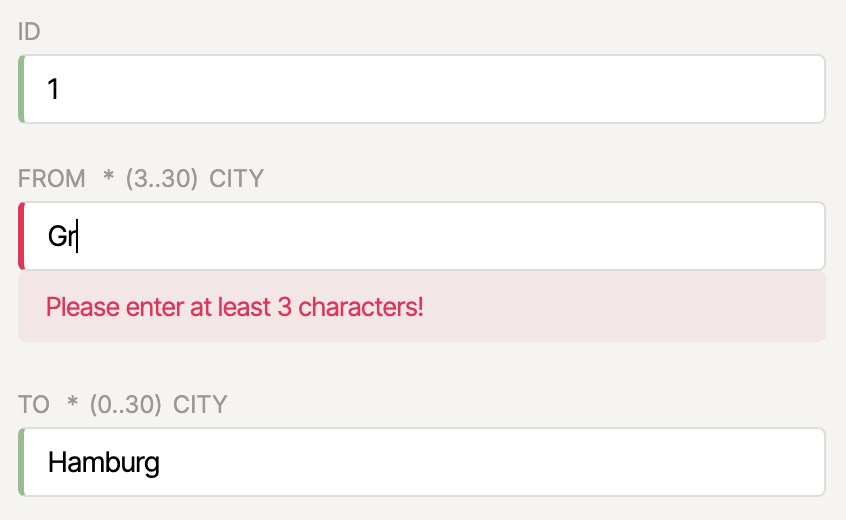
Since Angular 21.2, Signal Forms supports conditional CSS formatting, as you know it from Template-driven and Reactive Forms. Via provideSignalFormsConfig, you first define a mapping of CSS class names to form status predicates:
import { provideSignalFormsConfig } from '@angular/forms/signals';

export const appConfig: ApplicationConfig = {
  providers: [
    [...],
    provideSignalFormsConfig({
      classes: {
        'ng-invalid': field => field.state().invalid(),
        'ng-valid':   field => field.state().valid(),
        'ng-dirty':   field => field.state().dirty(),
        'ng-pristine': field => !field.state().dirty(),
        'ng-pending': field => field.state().pending(),
      }
    }),
  ],
};
The corresponding CSS rules might then look like this, for example:
input.ng-valid {
  border-left: 3px solid darkseagreen;
}

input.ng-invalid.ng-dirty {
  border-left: 3px solid var(--color-error);
}

input.ng-pending {
  border-left: 3px solid var(--color-border);
}
Signal Forms automatically applies the configured classes to the bound input fields:
If you want to use exactly the same classes as with Reactive or Template-driven Forms, you can use the predefined configuration object NG_STATUS_CLASSES from the compat namespace:
import { NG_STATUS_CLASSES } from '@angular/forms/signals/compat';

provideSignalFormsConfig({
  classes: NG_STATUS_CLASSES
}),
Interop of Signal Forms with Reactive Forms
Signal Forms integrates seamlessly with existing Reactive Forms. The bridge compatForm from @angular/forms/signals/compat allows you to connect a Signal Form model with reactive form controls:
import { compatForm, SignalFormControl } from '@angular/forms/signals/compat';

@Component({ [...] })
export class CheckinPage {
  protected readonly address = new SignalFormControl(
    this.addressFormModel(),
    (path) => {
      required(path.street);
      required(path.zipCode);
      required(path.country);
    },
  );

  protected readonly checkinForm = compatForm(this.checkinFormModel, (path) => {
    required(path.ticketId);
  });
}
SignalFormControl behaves like a regular AbstractControl and can be embedded directly into existing Reactive Forms structures. Conversely, Signal Forms also understands legacy form controls, CVA-based (Control Value Accessor) inputs, and classical validators. Signal Forms can therefore also work with existing legacy form controls. The interop bridge to CVA can be disabled per field if needed:
<input ngNoCva [field]="myField">validateStandardSchema with Dynamic Rules
Standard Schema is a community-driven interface that validation libraries such as Zod and Valibot implement. Since Signal Forms ships with a function called validateStandardSchema that directly understands this interface, schemas from all these libraries can be used for form validation without having to write a dedicated adapter.
Since Angular 21.2, the schema can also adapt dynamically. Instead of a fixed schema object, you pass validateStandardSchema a lambda expression that is internally converted into a computed. If a Signal used within it changes, the Computed is automatically re-evaluated and the updated validation rules apply immediately:
import { Signal } from '@angular/core';
import { SchemaPathTree, validateStandardSchema } from '@angular/forms/signals';
import { z } from 'zod';
import { Flight } from './flight';

const FlightZodSchema = z.object({
  id: z.number().int(),
  from: z.string().min(3).max(20),
  to: z.string().min(3).max(20),
  date: z.string(),
  delayed: z.boolean(),
});

const StrictFlightZodSchema = z.object({
  id: z.number().int(),
  from: z.string().min(10).max(30),
  to: z.string().min(10).max(30),
  [...]
});

export function validateWithSchema(
  path: SchemaPathTree<Flight>,
  strict: Signal<boolean>,
) {
  validateStandardSchema(
    path,
    () => strict() ? StrictFlightZodSchema : FlightZodSchema,
  );
}
This allows, for example, context-dependent validation strategies. The form automatically switches between the lenient and the strict schema as soon as the strict signal changes.
disabled, readonly, and hidden with the when Property
Signal Forms knows the helper functions disabled, readonly, and hidden to control input fields depending on the form state. The new feature: the condition is now passed via a when property in the parameter object. This makes the API more consistent and makes it possible, in the error case, to also return an explanatory string instead of true:
import { disabled, hidden, readonly } from '@angular/forms/signals';

disabled(path.delay, {
  when: (ctx) => (ctx.valueOf(path.delayed) ? false : 'not delayed'),
});

readonly(path.delay, {
  when: (ctx) => ctx.valueOf(path.delayed),
});

hidden(path.delay, {
  when: (ctx) => ctx.valueOf(path.delayed),
});
The ctx parameter provides contextual access to other field values, so that complex, cross-field conditions can be expressed cleanly.
Route Auto Cleanup for Environment Injectors
In Angular, services can also be configured at the route level, namely via the providers property of a route configuration. So far, however, there has been a catch: services registered this way were not cleaned up when leaving the route, but continued to live until the application was closed. The reason lies in the historical behavior of the underlying Environment Injectors. They are the counterpart to those providers that were previously set up at the NgModule level, and their original lifecycle behavior was to be preserved.
Since Angular 21.1, this can be changed. With withExperimentalAutoCleanupInjectors, the Environment Injectors of a route, including all service instances registered there, are automatically destroyed when leaving the route:
import {
  provideRouter,
  withComponentInputBinding,
  withExperimentalAutoCleanupInjectors,
} from '@angular/router';

export const appConfig: ApplicationConfig = {
  providers: [
    provideRouter(
      routes,
      withComponentInputBinding(),
      withExperimentalAutoCleanupInjectors(),
    ),
    [...]
  ],
};
The feature remains experimental for the time being.
Determining Active Routes with isActive as a Signal
With isActive, Angular 22 brings a new way to programmatically determine whether a route is active. The function returns a Signal and is automatically re-evaluated in the template as soon as the route state changes:
import { isActive, Router } from '@angular/router';

@Component({ [...] })
export class BookingNavigation {
  private readonly router = inject(Router);

  protected readonly flightSearchActive = isActive(
    '/ticketing/booking/flight-search', this.router
  );
  protected readonly passengerSearchActive = isActive(
    '/ticketing/booking/passenger-search', this.router
  );
  protected readonly summaryActive = isActive(
    '/ticketing/booking/summary', this.router,
    { paths: 'exact' }
  );
}
The optional third parameter accepts IsActiveMatchOptions and controls how exact the comparison should be:
paths('exact'|'subset'): Must all segments match, or is a subset sufficient?matrixParams('exact'|'subset'|'ignored'): Comparison of the matrix parameters of the matching segments.queryParams('exact'|'subset'|'ignored'): Comparison of the query parameters.fragment('exact'|'ignored'): Comparison of the URL fragment.
By default, subset matching applies for paths: a route is considered active if it is a subset of the current URL. In the example, paths: 'exact' was set for summaryActive, so that the route must match exactly. In the template, you use the signal directly for the active CSS class:
<a [routerLink]="['./flight-search']" [class.active]="flightSearchActive()">
  Flight
</a>
HttpClient in Angular 22: FetchBackend as the Default
From Angular 22 onwards, the HttpClient uses the FetchBackend by default. The explicit withFetch() is therefore deprecated and can be removed.
The background: the Fetch API is now available in all relevant browsers and modern JavaScript runtimes. Compared to XMLHttpRequest (XHR), it offers a more modern, Promise-based API, better support for streaming scenarios, and is better suited as a shared HTTP abstraction for browsers and SSR. However, Fetch does not support upload progress events.
Accordingly, Angular 22 replaces the previous blanket reportProgress option (deprecated) with two dedicated variants that toggle upload and download progress separately:
// Download progress (works with Fetch)
http.get('/large-file', { reportDownloadProgress: true, observe: 'events' });

// Upload progress (requires withXhr())
http.post('/upload', file, { reportUploadProgress: true, observe: 'events' });
If reportUploadProgress is used together with the FetchBackend, Angular throws an exception. This is a deliberately hard hint that withXhr() is required in this case.
If you need the original behavior, for example for a progress indicator during upload, switch back to XHR:
provideHttpClient(withXhr());During version upgrades, ng update automatically adds withXhr(). This prevents unwanted behavior changes in existing applications.
Template Syntax Improvements in Angular 22
Angular 21.1, 21.2, and the preview versions of Angular 22 have brought a number of useful extensions for template expressions, which are summarized here. Examples from the respective pull requests serve as illustrations.
Since Angular 21.1, templates support object spread, array spread, and rest arguments in function calls, that is, syntax that was previously only allowed in TypeScript classes:
<div [class]="{ ...baseClasses, active: isActive() }"></div>
<ul>
  @for (item of [...preferred, ...rest]; track $index) {
    <li>{{ item }}</li>
  }
</ul>
{{ sum(...numbers()) }}
Also since 21.1, @switch supports multiple consecutive @case markers for the same block, analogous to fall-through in other languages:
@switch (state) {
  @case ('a')
  @case ('b') { <p>A or B</p> }
  @case ('c') { <p>C</p> }
  @default    { <p>Otherwise</p> }
}
Angular 21.2 added arrow functions with implicit return values in template expressions. They are especially handy in combination with @for and event bindings:
@for (item of items(); track item.id) {
  <button (click)="select((x) => x.id === item.id)">…</button>
}
Arrow functions with a block body ({ … }) and pipes within the body are not allowed. Functions that only use their own parameters are hoisted by the compiler to the module level; functions related to the template context are stored on the view to guarantee identity stability.
Also since 21.2, type checks with instanceof are possible directly in the template:
@if (event instanceof MouseEvent) {
  <p>ClientX: {{ event.clientX }}</p>
}
Exhaustive case distinctions for @switch also arrived in 21.2: with @default never; at the end of a @switch block, TypeScript checks at compile time whether all variants of a union type are covered. If the union is later extended and a new value is not handled, compilation fails:
state: 'loggedOut' | 'loading' | 'loggedIn' = 'loggedOut';@switch (state) {
@case ('loggedOut') { <button>Login</button> }
@case ('loading') { <p>Loading ...</p> }
@case ('loggedIn') { <p>Welcome back!</p> }
@default never;
}Here, the @switch expression (state) itself is the union. In the @default branch, TypeScript recognizes that, after covering all cases, state has the type never. If the union is later extended e.g. by 'banned' without a corresponding @case, the compiler complains.
Often, however, you don't switch on the union itself, but on one of its properties, such as the discriminator of a discriminated union. TypeScript can then narrow the queried property, but cannot recognize whether the overarching union is thereby fully covered. Angular 22 closes this gap. With never(<expression>), you can explicitly specify which expression should be checked for full coverage:
state!: { mode: 'show'; menu: number } | { mode: 'hide' };@switch (state.mode) {
@case ('show') { {{ state.menu }} }
@case ('hide') {}
@default never(state);
}The specification never(state) explicitly tells the compiler to check full coverage against the overarching state union. If it is later extended by another mode without a corresponding @case, the template compiler reports the error.
Angular 22 brings two further refinements in handling null and undefined. The behavior of ?. in templates now corresponds exactly to JavaScript semantics: if the chain breaks at a null or undefined position, the result is undefined. If you need the old Angular-specific behavior, you can wrap the expression with $null(...):
{{ user?.profile?.name }} <!-- now: undefined if the chain breaks -->In addition, the type-check block now allows true TypeScript narrowing via ?.. After a truthiness check, the type is narrowed as in regular TS code, so that subsequent access without ?. is type-safe:
@Component({
  template: `
    @if (user?.isMember) {
      {{ user.isMember }}
    }
  `,
})
export class UserComponent {
  user?: { isMember: boolean };
}
Finally, in Angular 22, // and /* … */ comments are also allowed within HTML element definitions. This is handy for structuring long attribute lists:
<div
  // primary button
  class="btn btn-primary"
  /*
    Note: only takes effect when `loading` is false
  */
  [disabled]="loading()"
></div>@defer: Optional Timeout for on idle
@defer (on idle) can now receive a timeout in milliseconds, analogous to IdleRequestOptions.timeout. This prevents a defer block from waiting endlessly for an idle phase that never occurs:
@defer (on idle(2000)) {
  <heavy-widget />
}
More at a Glance
-
httpResourceand Transfer State: Resources that are preloaded on the server now interact seamlessly with the HTTP Transfer State. This prevents redundant HTTP requests during the first render in the browser. The client simply uses the data already fetched on the server side. -
Web MCP Tools (
provideExperimentalWebMcpTools,declareExperimentalWebMcpTool): Angular applications can register AI tools directly in the injector. When the injector is destroyed, the tools are automatically removed again, ideal in combination with route providers andwithExperimentalAutoCleanupInjectors. -
ApplicationRef.bootstrapwith config:bootstrap()on theApplicationRefnow accepts a configuration object analogous tocreateComponent. This is particularly relevant for micro frontends that are loaded and bootstrapped on demand into specific areas of the page:appRef.bootstrap(MyComponent, { hostElement: document.querySelector('#root')! }). -
Bootstrap under Shadow Roots: Angular can now be started directly under a shadow root. Styles are correctly registered with the parent shadow root in the
SharedStylesHost. This is another step toward clean Web Component and micro frontend integration. -
Wildcard routes with trailing segments (since 21.1): The wildcard segment
**may now be surrounded by leading and trailing segments, e.g.'foo/**/bar'. Previously, this was only possible with a custom path matcher. This is particularly useful for shell applications that need to load the appropriate micro frontend based on a pattern. -
AI runtime debugging: In dev mode, Angular registers AI debugging tools in the page. Among them is
angular:di-graph, which provides the complete dependency injection graph (element and environment injectors) for in-page AI assistants. In the future, this will enable AI-assisted analyses of the DI graph directly in the browser. -
Trailing-slash location strategies (since 21.2): With
TrailingSlashPathLocationStrategyandNoTrailingSlashPathLocationStrategy, there are two new subclasses that control whether URLs in the address bar should end with or without a trailing/. -
heightinImageLoaderConfig(since 21.2): The image loader now accepts aheightspecification in addition towidth. -
Custom transformations for image loaders (since 21.1): The built-in loaders for Cloudflare, Cloudinary, ImageKit, and Imgix accept a
transformproperty for provider-specific URL options:provideCloudflareLoader('https://cdn.example/', { transform: { format: 'webp', sharpen: 50 } }). -
TypeScript 6 (since 21.2): Angular now supports TypeScript 6. TypeScript 5.9 is no longer supported.
-
Node.js 26: Angular now officially compiles and runs on Node.js 26.
Learn More: Angular Architecture Workshop (Remote, Interactive, Advanced)
Become an expert in enterprise-wide and long-lived Angular applications with our Angular Architecture Workshop!

German Version | English Version
FAQ on Angular 22
What are the most important new features in Angular 22?
The Resource API (resource, rxResource, httpResource) and Signal Forms are stable. OnPush is the new default change detection strategy, and Incremental Hydration is enabled by default. On top of that, there are @Service, injectAsync with onIdle prefetching, the debounced function, and numerous extensions to template syntax and the router.
Is Signal Forms ready for production in Angular 22?
Yes. Signal Forms has left experimental status. Together with the Submission API, dynamic schemas via validateStandardSchema, conditional CSS classes, and interop with Reactive Forms, a production-ready, Signal-based form stack is available.
Do I need to adjust my change detection strategy after updating to Angular 22?
Usually not. For existing components without an explicit strategy, ng update automatically sets ChangeDetectionStrategy.Eager to preserve the previous behavior. If you want to actively benefit from OnPush, you can migrate gradually, component by component.
Does the @Service decorator completely replace @Injectable()?
No. @Service() is a more ergonomic shorthand for the most common case (providedIn: 'root'). @Injectable() remains available and continues to make sense wherever different provider configurations are used.
Conclusion
Angular 22 marks an important point of maturity in the Signal era: with the stable Resource API and Signal Forms, two of the central building blocks for modern, reactive Angular applications are now ready for production use. The new @Service decorator, the debouncing function debounced, dynamic schemas, and the Submission API round out the picture and show how consistently the Angular team is working on a coherent, ergonomic API design.
The extensions to the template syntax and the innovations in the Router, such as auto cleanup for route injectors and the new reactive isActive function, complete a release that is impressive in its breadth. Anyone who has held off on the update over the past few months now gets a stable foundation that allows the move to signal-based development even without experimental features.