


Depending on the context, AI assistants can select display components from a predefined catalog. However, an application can go one step further and generate code to provide fully dynamic parts of the application.
That is exactly what this article is about: we derive the code required to transform the data from a free-text request, and then the application displays the result as a chart. To avoid compromising the security of our system, we execute the generated code in a sandbox.
📂 Source Code (🔀 branch hashbrown_chart_runtime)
Example and Approach
To demonstrate how AI assistants and code generation work together, our sample application allows users to generate charts for reports dynamically. Users describe the requirements in free text and shortly afterwards the application presents the chart:
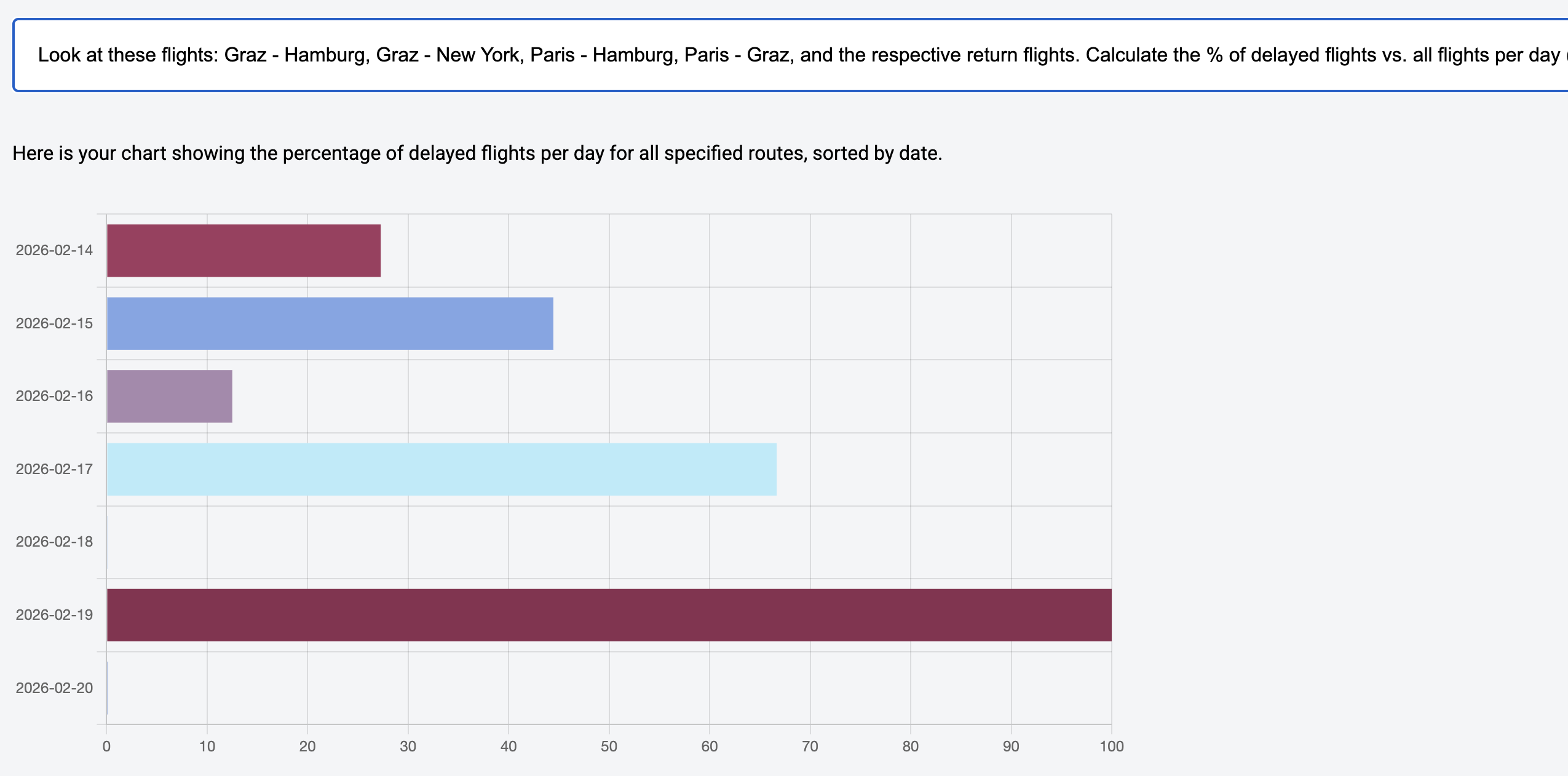
In the scenario shown, the following requirement was used:
Look at these flights: Graz - Hamburg, Graz - New York,
Paris - Hamburg, Paris - Graz, and the respective return
flights. Calculate the % of delayed flights vs. all flights
per day (ignore the time). Sort by date.
At first glance, this request seems solvable with concepts we already discussed in the previous articles: the LLM can load the required data via tool calling, select a chart component, and render it with the loaded data.
Even though that is correct, this perspective misses a crucial point: between retrieving and displaying the data, we must transform the data. In our case, the total number of flights and the number of delayed flights per day must be aggregated and related to each other.
Simply put, LLMs are trained to continue a text and answer questions based on it. Calculations like the ones needed here are not among their core competencies. However, these models are very good at describing what needs to be done to produce the desired result. This is exactly where we start: we let the LLM derive the required processing steps from the request in the form of JavaScript code. At runtime, this can lead to code like this one:
// Code generated by an LLM to prepare data
// to be displayed in a chart.

const routes = [
  { from: 'Graz', to: 'Hamburg' },
  { from: 'Hamburg', to: 'Graz' },
  { from: 'Graz', to: 'New York' },
  { from: 'New York', to: 'Graz' },
  { from: 'Paris', to: 'Hamburg' },
  { from: 'Hamburg', to: 'Paris' },
  { from: 'Paris', to: 'Graz' },
  { from: 'Graz', to: 'Paris' },
];

let flights = [];

routes.forEach((route) => {
  flights = flights.concat(loadFlights(route));
});

// Aggregate by date
const flightsByDate = {};

for (const flight of flights) {
  const date = flight.date.split('T')[0]; // ignore time

  if (!flightsByDate[date]) {
    flightsByDate[date] = { total: 0, delayed: 0 };
  }

  flightsByDate[date].total++;

  if (flight.delay > 0) {
    flightsByDate[date].delayed++;
  }
}

// Create data sorted by date
const data = Object.keys(flightsByDate)
  .sort()
  .map((date) => {
    const total = flightsByDate[date].total;
    const delayed = flightsByDate[date].delayed;
    const percentage = ((delayed / total) * 100) || 0.1;

    return { name: date, value: percentage };
  });

generateChart({ data });
To do its job, the code delegates to two functions provided by the application: at the beginning it calls loadFlights to retrieve the required data, and at the end it passes the aggregated values to generateChart.
The LLM therefore not only generates code; it also decides which application functions the code should delegate to in order to answer the request. Instead of returning full flight objects, functions could also return pre-aggregated values to make reports more efficient.
Implementation with Hashbrown
To implement the concept shown, Hashbrown provides two building blocks: a structuredCompletionResource and a JavaScript runtime.
The structuredCompletionResource sends a request to the language model and returns its response. In contrast to the previously used chatResource and uiChatResource, this Resource API implementation is stateless. So, this is not about a longer conversation with the LLM, but about receiving a single answer to a concrete request. For our purpose, this answer should be an object that contains both a user-facing message and the generated source code.
The resource forwards the generated source code to the runtime using tool calling; the runtime executes it. For security reasons, execution happens in a sandbox that has no direct access to the application. The next listing illustrates how these two building blocks work together:
import {
  createRuntime,
  createRuntimeFunction,
  createToolJavaScript,
  structuredCompletionResource,
} from '@hashbrownai/angular';

[...]

@Component({
  selector: 'app-reporting',
  imports: [...],
  templateUrl: './reporting.component.html',
  styleUrl: './reporting.component.css',
})
export class ReportingComponent {
  message = signal('');
  input = signal<string | undefined>(undefined);
  data = signal<DataItem[]>([]);

  runtime = createRuntime({
    functions: [
      createRuntimeFunction(/* ... */),
      createRuntimeFunction(/* ... */),
    ],
  });

  generator = structuredCompletionResource({
    model: 'gpt-5-chat-latest',
    input: this.input,
    system: `
      You are Report42, a UI assistant that [...]
      Take the user's request [...] and generate JavaScript code that [...]
    `,
    schema: s.object(Whether request was successful, {
      type: s.enumeration(Success or error?, ['success', 'error']),
      message: s.string(Additional information for the user),
      code: s.string(The generated JavaScript code),
    }),
    tools: [
      createToolJavaScript({
        runtime: this.runtime,
      }),
    ],
  });

  submit(): void {
    this.input.set(this.message());
  }

  [...]
}
The example two-way bindings the message Signal to a textbox the user enters their requirement in. As soon as the user confirms the input, the submit method copies it to the input signal that triggers the structuredCompletionResource.
The createRuntime function receives the functions that the generated code is allowed to call and creates the JavaScript runtime. The runtime is registered as a tool for the structuredCompletionResource. Additionally, the configured system prompt explains how the LLM should turn the request into source code.
The schema defines how the LLM must structure its response. Besides indicating whether code generation was successful, this response contains user-facing feedback and the generated source code itself.
The next sections take a closer look at the description of the registered functions and the system prompt.
Modern Angular
This article is extracted from my new book Modern Angular - Architecture, Concepts, Implementation. This book covers everything you need for building modern business applications with Angular: from Signals and state patterns to architecture, AI assistants, testing, and practical solutions for real-world projects.
Runtime Functions
The function createRuntimeFunction creates a function that the generated code can call inside the JavaScript runtime. Here is the definition of the loadFlights function:
createRuntimeFunction({
  name: 'loadFlights',
  description: `
    Searches for flights and returns them.

    ## Rule
    For the search parameters, airport codes are NOT used but the city name.
    First letter in upper case.
  `,
  args: s.object('search parameters for flights', {
    from: s.string('airport of departure'),
    to: s.string('airport of destination'),
  }),
  result: s.array(loaded flights, FlightSchema),
  handler: async (input) => {
    const flightService = inject(FlightService);
    const result = flightService.find(input.from, input.to);
    return await firstValueFrom(result);
  },
});
The language model evaluates the description and the schema for the arguments (args). Based on this, it decides whether and how to call the function. Thanks to the schema for the result, the model also knows what to expect as a return value. It is based on a central schema that describes the structure of flights:
import { s } from '@hashbrownai/core';

export const FlightSchema = s.object('Flight to be displayed', {
  id: s.number('The flight id'),
  from: s.string('Departure city. No code but the city name'),
  to: s.string('Arrival city. No code but the city name'),
  date: s.string('Departure date in ISO format'),
  delay: s.number('If delayed, this represents the delay in minutes'),
});
Let's also have a look at the definition of the generateChart function:
createRuntimeFunction({
  name: 'generateChart',
  description: Creates a chart,
  args: s.object(Chart description, {
    data: s.array(
      name/value pairs to display in chart,
      s.object(a single name/value pair to display in the chart, {
        name: s.string(name),
        value: s.number(the value to display),
      })
    ),
  }),
  handler: async (input) => {
    this.data.set(input.data);
  },
});
There is a subtle but important detail here: the handler forwards the received data directly to the component. Unlike loadFlights, generateChart is therefore not a data source, but a sink that places data from the runtime into a signal.
For rendering the chart, the application uses the popular library chart.js. The individual rendering calls are handled by an effect (not shown here).
System Prompt with One-Shot Prompting
The system prompt passed to structuredCompletionResource defines guardrails for generating source code. It defines the core steps, shows an example, and specifies general rules:
You are Report42, a UI assistant that helps passengers with creating and
displaying a chart with flight information.

- Voice: clear, helpful, and respectful.
- Audience: power users who want to get a chart

## Your Tasks

1. Take the user's request for a chart and generate JavaScript code that ...

   a) uses the tool _loadFlights_ as often as needed to retrieve the needed data

   b) Aggregate the received data according to the user's request.
      Replace 0 with 0.1

   c) Pass the data to the tool _generateChart_ to display a chart

2. Pass the JavaScript code to the runtime

## Example for the JavaScript Code

- User: How many flights are there from Graz to London and from Graz to Munich?
- Assistant
- Code:

  const flights1 = loadFlights({ from: 'Graz', to: 'London' });
  const flights2 = loadFlights({ from: 'Graz', to: 'Munich' });
  const data = [
    { name: 'Graz - London', value: flights1.length },
    { name: 'Graz - Munich', value: flights2.length },
  ];
  generateChart({ data });

- Answer: Here is your chart.

## Rules

- Never use additional web resources for answering requests
- **Always** pass the generated code to the JavaScript runtime
Providing such an example -- also called one-shot prompting -- has been proven to improve the performance of LLMs on tasks like this.
Conclusion
Language models are not designed to reliably perform complex aggregations or calculations on their own. Their strength lies in answering questions. This can also include answers with precise processing steps expressed as JavaScript code.
Tool calling enables generated code to invoke clearly described application functions such as loadFlights or generateChart, while structured output forces the model response into a fixed, validatable structure consisting of code, status, and user feedback.
A JavaScript engine executes the generated code in isolation and prevents unwanted interference with the application. Tools like Hashbrown make code generation, tool calling, and structured output very easy -- and they also provide such a runtime.