Local models are gaining ground. A model running on your own hardware keeps sensitive data on your premises, removes the dependency on a single provider, and makes costs predictable. For many companies, especially in regulated industries, this kind of sovereign AI is a requirement.
However, the models you can host yourself usually trail the frontier models. One reason is that the strongest models are not available as open weights.
In this article, I show patterns that make agentic applications fast and reliable on such models. I developed them in an application that I built to demonstrate a wide range of agentic use cases. The following dashboard shows one part of this application:
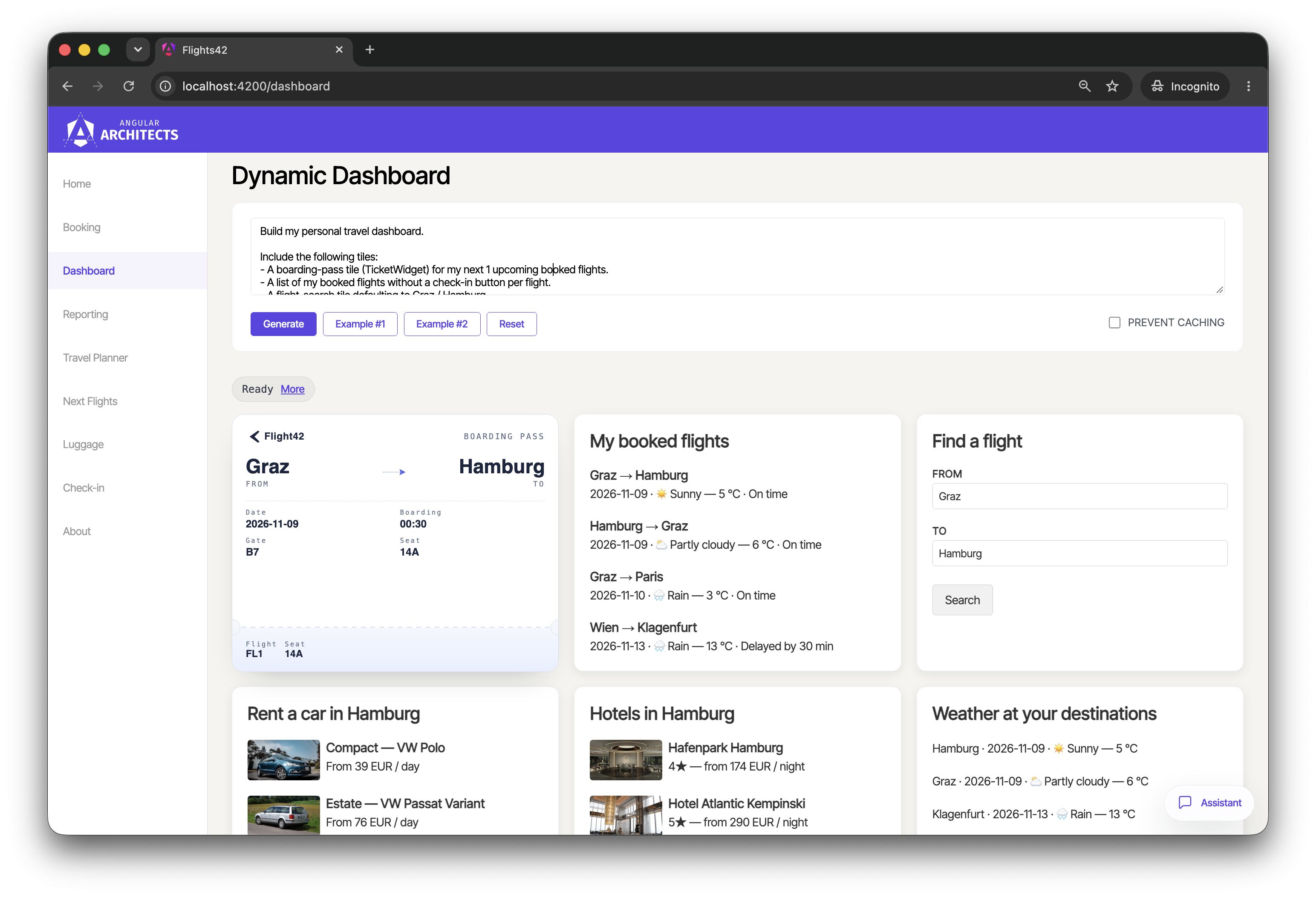
I moved this application to Gemma 4, an open-weight model by Google. While the agents run on Mastra and the frontend uses CopilotKit for Angular, AG-UI, and A2UI, the patterns apply regardless of framework and model. Many of them also make frontier models faster and cheaper.
📂 Source code (branch AGU-gemma)
Model Settings for Local Models
The first measures concern how the agents call the model: thinking, the temperature, the number of steps, and timeouts. They only touch the configuration of the AI server and leave tools, prompts, and the UI unchanged.
Turning Thinking Off
Like many current models, Gemma 4 can think before it answers. In a reasoning step that the user does not see, it weighs the request, the rules of the system prompt, and possible next steps. This often improves complex answers but costs time and computing power.
In my measurements, thinking made Gemma about three times slower. A typical chat turn, such as a question about booked flights, took 2.5 seconds on median without thinking and 7.8 seconds with it. The number of output tokens grew by a factor of three to five. At the same time, my evals showed no gain in reliability that would justify this latency. For an interactive application, such a delay is not an option.
Agentic applications can often do without thinking because much of their work consists of choosing a tool and filling in its parameters. In my application, this worked well because most user requests are close to a tool call: Did I book Paris? translates directly into a call of findBookedFlights with the destination Paris. For requests that need more planning, such as Maximize my time in Rome, I added tools tailored to them, as described below. The remaining reasoning moves into the tools, the code, and the agent loop. When the model makes a mistake, the tool result tells it, and the model corrects itself in the next step. Tasks that require weighing many constraints or planning several steps ahead can still benefit from thinking.
Without thinking, the model decides on its tool call in a single pass. It still processes all instructions, but no explicit reasoning phase weighs the rules of the system prompt or checks the result. In my experiments, the text closest to the decision therefore tended to win. In one case, I had to move a general rule from the system prompt into the description of a tool so that Gemma would follow it.
For reproducible experiments without managing GPU infrastructure, I use Gemma 4 through Cloudflare Workers AI. Since Gemma 4 is an open-weight model, the same architectural patterns also apply when deploying it on your own infrastructure. On Workers AI, every request has to set chat_template_kwargs: { enable_thinking: false } to turn thinking off. The application does this in the configuration of the AI server.
Agentic UI with Angular
If you don’t just want to connect an agent but embed Agentic UI into a scalable architecture:
In my book Agentic UI with Angular, I cover the underlying patterns and trade-offs in depth.
Allowing More Steps and Cutting Off Hanging Requests
Without thinking, the model corrects mistakes in the next step instead of in its reasoning. That is why it needs more steps. Mastra stops after five model calls unless configured otherwise. A request that changes a travel plan, for example, needs a search, the change itself, a check of the result, and a closing message. This leaves a single step for corrections. Whenever Gemma needed more, the closing message was cut off: the plan changed, but the user got no answer. The application therefore allows eight steps. For tools that change data, retries require that a failed call has no side effects: the tool validates its input before it changes anything, or a repeated call does no harm.
The second problem is long-running requests. During my measurements, single steps sometimes ran for minutes without producing text or a tool call, and one request even hung for almost an hour before it failed. A cap on the output tokens per step and a timeout per request prevent this.
The configuration of the AI server takes care of both problems and of thinking. On the one hand, it sets up model options that allow eight steps, cap the output tokens per step, and set the temperature to 0. At this temperature, the model favors the most likely next token, which makes its tool calls more reproducible. On the other hand, it passes a fetch function to the model provider. This function turns thinking off and adds a timeout to every request. This results in the constants model and defaultOptions, which the agents use as follows:
// ai-server/src/mastra/agents/dashboard-agent.ts
import { Agent } from '@mastra/core/agent';

import { defaultOptions, model } from '../config.js';
import { renderDashboard } from '../tools/render-dashboard.js';
import { dashboardAgentPrompt } from './dashboard-agent.prompt.js';

export const dashboardAgent = new Agent({
  id: 'dashboardAgent',
  name: 'Flight42 Dashboard Composer',
  instructions: dashboardAgentPrompt,
  model,
  tools: { renderDashboard },
  defaultOptions: { ...defaultOptions, maxSteps: 1 },
});
The dashboard agent overrides maxSteps because it makes exactly one tool call per turn.
Measuring Success with Evals
I measured the effect of every change in this article right before and right after applying it. Without these numbers, it is hard to tell a real improvement from luck. Several fixes that looked obvious had no effect or even made things worse.
For this, the repository contains an eval that runs as an Angular unit test in Node.js. It creates the real agent stores with their frontend tools and sends typical prompts through CopilotKit to the running agents. This way, the eval uses the same tool descriptions and stores as the application. Its checks compare what the user sees with reference data. For every turn, the eval also reports the duration, the input and output tokens, and failed tool calls.
At temperature 0, three runs per prompt show the direction of an effect rather than exact rates. They suffice for clear differences in latency and tokens. For reliability, they show a trend, not proof. Even at this temperature, the answers are not fully deterministic, because inference servers process requests in batches and tiny rounding differences on the GPU can tip the choice of a token. It also pays off to read the traces before blaming the model, because a failure can come from a bug in the eval itself.
You find the eval in the repository.
Rendering Tool Results Instead of Copying Data
Several measures that made the application faster share one idea: the model should not pass data on. The UI takes the data from the tool results or from the agent state.
Tool Call Renderers Instead of Component Tools
Agentic UI frameworks such as CopilotKit for Angular let an agent render components in the chat. A common approach registers each component as a tool the model can call. The model first calls a tool that loads the data and then calls the component tool with this data as arguments. In the following figure, the tool findBookedFlights loads the booked flights, and the model passes each of them on to a flightWidget:

For a compact model, this has three drawbacks. First, it has to decide to call the component at all. Second, it has to copy every value character by character into the arguments, including ids and full ISO dates. Third, every copied value costs output tokens, the slowest part of a model response.
A tool call renderer reverses the direction. The framework renders the result of a tool call with a component, and the model only writes the accompanying text:

In the chat, this looks as follows:
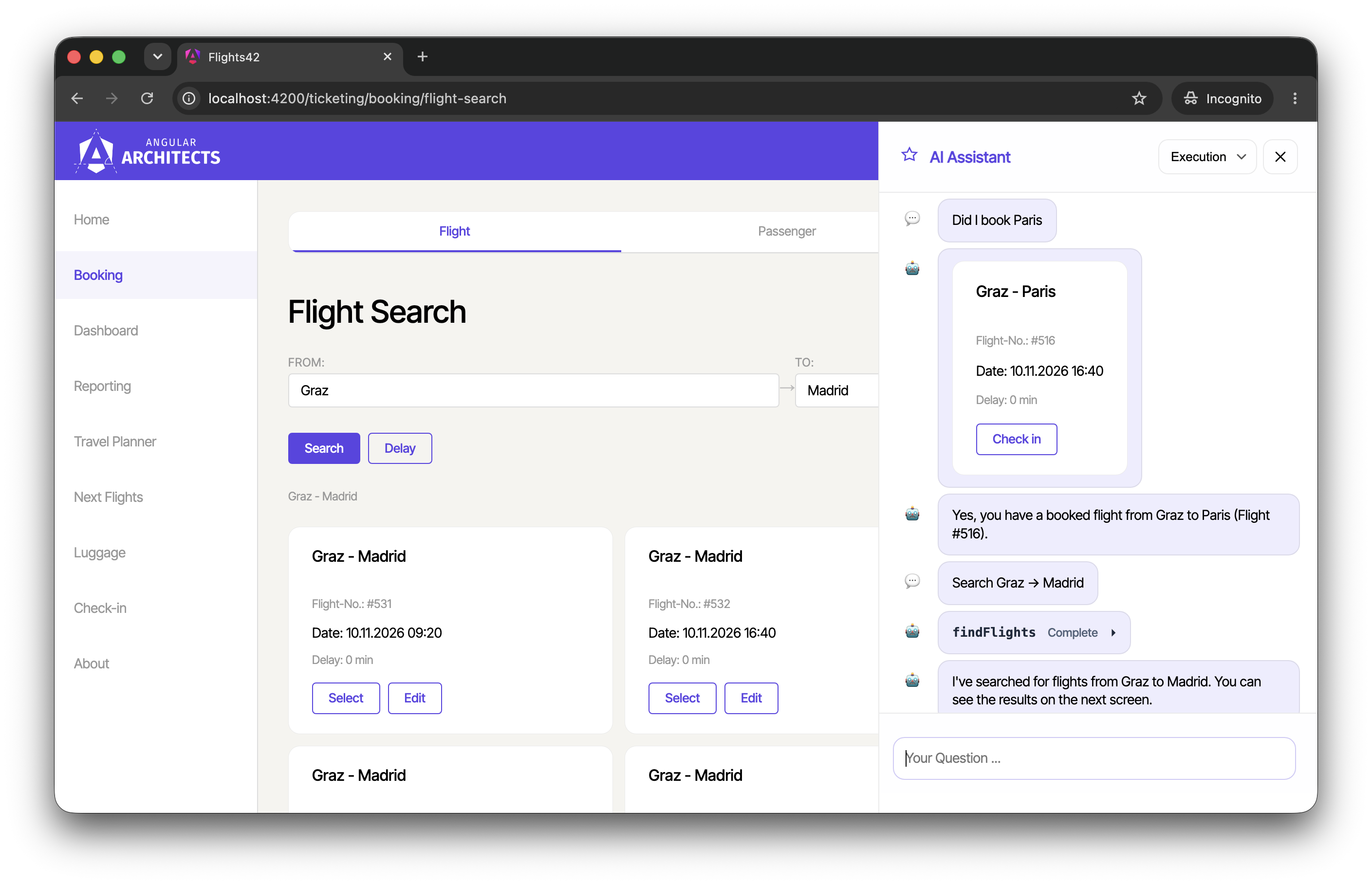
The card with the check-in button comes from the tool result, and the model only confirms the booking in one sentence. Since the renderer shows everything the tool returns, the tool takes optional filters for the route and the flight id. The model only has to pick the right filter. The component looks like this:
// src/app/domains/ticketing/ui/flight-widget.ts
import { [...] } from '@angular/core';
import { RouterLink } from '@angular/router';
import { type AngularToolCall, type ToolRenderer } from '@copilotkit/angular';
import { z } from 'zod';

import { FlightCard } from './flight-card/flight-card';

const flightSchema = z.object({
  id: z.number(),
  from: z.string(),
  to: z.string(),
  date: z.string(),
  delay: z.number(),
});

const bookedFlightsSchema = z.object({
  flights: z.array(flightSchema),
});

[...]

@Component({
  selector: 'app-flight-widget',
  imports: [FlightCard, RouterLink],
  template: `
    @for (flight of flights(); track flight.id) {
      <app-flight-card [item]="flight" [readonly]="true">
        <button
          class="btn btn-default"
          [routerLink]="['/checkin', { ticketId: flight.id }]">
          Check in
        </button>
      </app-flight-card>
    }
  `,
  [...]
})
export class FlightWidget implements ToolRenderer<FindBookedFlightsArgs> {
  readonly toolCall = input.required<AngularToolCall<FindBookedFlightsArgs>>();

  protected readonly flights = computed(() =>
    parseFlights(this.toolCall().result),
  );
}

function parseFlights(result: string | undefined) {
  [...]
}
The types ToolRenderer and AngularToolCall come from @copilotkit/angular, the package of CopilotKit for Angular. The component receives the tool call, including its result, via the input toolCall. The function parseFlights validates the result with the Zod schema bookedFlightsSchema. The function registerRenderToolCall provided by CopilotKit for Angular registers the component as a renderer for the tool findBookedFlightsTool:
// src/app/domains/ticketing/ai/ticketing-agent-store.ts
import { registerRenderToolCall } from '@copilotkit/angular';
import { z } from 'zod';

import { FlightWidget } from '../ui/flight-widget';
import { TICKETING_AGENT_ID } from './agent-ids';

export function injectTicketingAgentStore() {
  registerRenderToolCall({
    name: 'findBookedFlightsTool',
    args: z.object({
      from: z.string().optional(),
      to: z.string().optional(),
      flightId: z.number().optional(),
    }),
    component: FlightWidget,
    agentId: TICKETING_AGENT_ID,
  });
  [...]
}
Like the other register functions of CopilotKit for Angular, registerRenderToolCall needs an injection context. The property agentId restricts the renderer to one agent. In the demo, the helper function initAgentStore abstracts this call.
For the question Did I book Paris?, this change made the answer about a third faster and roughly halved the output tokens. More important, the model no longer needs the flight data at all. This enables the minimal tool results I describe below.
A2UI with a Narrow DSL Instead of Full Markup
The dashboard shown at the beginning is the most complex generated UI in the application. It uses A2UI, a protocol for user interfaces that an agent generates. Users describe the tiles they want in natural language, and the agent builds the dashboard.
Its migration to Gemma 4 was easy because the dashboard agent already followed the principle of the previous section. As described in my article on A2UI with a DSL, the model does not write A2UI. Instead, it makes a single renderDashboard call with a list of tiles such as { "type": "delayShareChart", "from": "Graz", "to": "Hamburg" }. The server translates this spec into A2UI and loads the data for the tiles.
I introduced this DSL for speed and cost. It also helps compact models: a few tiles with flat arguments are much easier to write than component trees and the data they show. The prompt of the dashboard agent is correspondingly short:
// ai-server/src/mastra/agents/dashboard-agent.prompt.ts
export const dashboardAgentPrompt = `
You produce a compact spec for the Flight42 dashboard.

Each turn ends with **exactly one** renderDashboard tool call. Its
input is { tiles: Tile[] }. The server compiles this spec into the
final UI — you never produce A2UI directly.

Tiles render in the order you list them. Use proper city names
(e.g. "Graz", "Hamburg") — never airport codes.

Tile reference:

- { "type": "flightsTable", "from": string, "to": string,
       "maxRows"?: number }
  (default: 30)
[...]
- { "type": "delayShareChart", "from": string, "to": string,
       "chartType"?: "pie" | "bar" }
  (default: "pie")
[...]
- { "type": "bookedFlightsList",
       "showCheckInButton"?: boolean,
       "showWeather"?: boolean,
       "maxRows"?: number }
  (defaults: showCheckInButton true, showWeather true, maxRows no limit)
[...]

Honour user limits ("show only 5 …", "top 3 …") by emitting the matching
maxRows / maxItems / count. [...]

Button clicks on the dashboard arrive as a log_a2ui_event tool call
[...]
`;
The entire prompt has about 2,300 characters, a few hundred tokens. My original approach let the model write A2UI based on detailed examples and ended up with over 43,000 input tokens per dashboard.
On top of that, the server caches the DSL:
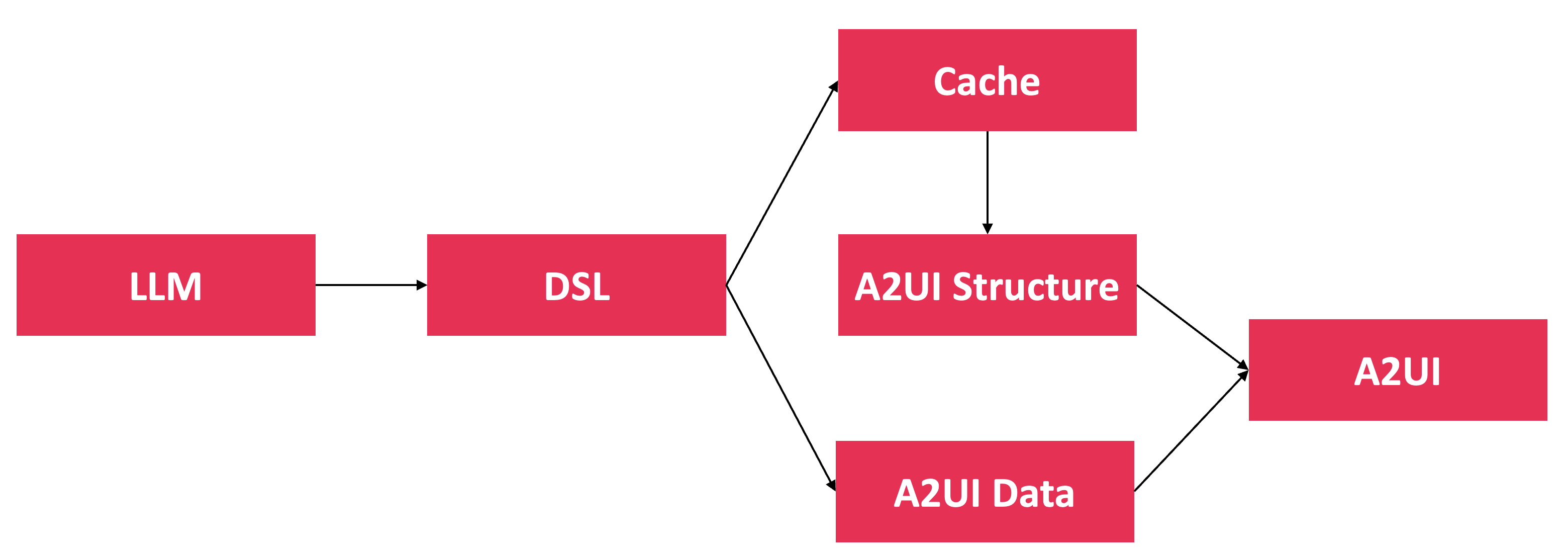
A2UI separates the structure of a surface from its data. The message updateComponents describes the components, and updateDataModel provides the values they bind to. As long as the request stays the same, the structure stays the same, too. The server therefore uses a hash of the request as the key for the cached DSL. On a cache hit, it derives the structure from the DSL without calling the model and only loads fresh data. In production, the key should also contain a version of the DSL and the tool definitions, as well as everything else the structure depends on, such as the permissions of the user.
However, the cache only saves a few seconds. The big performance boost comes from reducing the task to a narrow DSL. The DSL alone brought the dashboard from about 40 seconds down to a few seconds and cut its tokens by a factor of 30.
Tool Design for Compact Models
With a frontier model, a generic set of tools is often enough. With a compact model, the design of each tool decides whether a request succeeds.
Let the Model Ask for Minimal or Full Results
Once the UI renders the tool results, the model rarely needs the data. Still, every value in a tool result costs input tokens. Sometimes the model does need the values, though. For Did I book Paris?, it only has to know that the user saw a card. For When does my flight to Paris leave?, it needs the date.
Hence, findBookedFlights has a required parameter detail. With "minimal", the model only gets a short note. With "full", it gets all fields. The parameter is required because Gemma tends to omit optional fields. In another project, Gemma left out an optional boolean for the same decision in every run, while a required enum worked in all my test runs.
Mastra supports this with toModelOutput. The tool returns the full result, which goes to the UI, and toModelOutput decides what the model sees. In the next step of the same run, the model therefore gets the note instead of the flight data:
// ai-server/src/mastra/tools/find-booked-flights.ts
import { createTool, isValidationError } from '@mastra/core/tools';
import { z } from 'zod';

import {
  type BookedFlight,
  getBookedFlights,
} from '../data/booked-flights-store.js';
[...]

const detailSchema = z.enum(['minimal', 'full']).describe(`
  "minimal" if the user only asks whether a flight is booked or wants to see
  flights: you get only the id and route of each flight. "full" if you must
  answer a question about the flights, e.g. their date or delay: you get all
  fields.
`);

[...]

export const findBookedFlightsTool = createTool({
  id: 'findBookedFlights',
  description: `
    Shows the flights that are already booked by the current passenger as cards
    to the user and returns them. Calling it is what displays the cards, in the
    current answer only. [...]
  `,
  inputSchema: z.object({
    from: z.string().optional().describe('Departure city, e.g. "Graz". [...]'),
    to: z.string().optional().describe('Destination city, e.g. "Paris". [...]'),
    flightId: z.coerce.number().optional().describe('Flight id, e.g. 516. [...]'),
    detail: detailSchema,
  }),
  outputSchema,
  execute: async ({ from, to, flightId, detail }) => {
    const flights = await getBookedFlights();
    return {
      flights: flights.filter([...]),
      detail,
    };
  },
  toModelOutput: (output) => {
    if (isValidationError(output)) {
      return { type: 'json', value: output };
    }
    if (output.detail === 'full') {
      return { type: 'json', value: { flights: output.flights } };
    }
    return { type: 'text', value: toShownNote(output.flights) };
  },
});

function toShownNote(flights: BookedFlight[]): string {
  [...]
  return (
    `These booked flights were shown to the user as cards in this answer: ${routes}. ` +
    'Their dates and delays are not part of this result: never mention them. ' +
    'The cards are not visible in later answers: call findBookedFlightsTool again when asked.'
  );
}
The function toModelOutput projects the tool result onto what the model is supposed to see. It only receives the result and not the arguments of the tool call. That is why execute passes the parameter detail through to the result: the projection needs it to decide between the short note and the full data.
The note tells the model which flights the user saw as cards, that their dates and delays are not part of the result, and that the cards are not visible in later answers. The last sentence and the tool description make clear that calling the tool is what displays the cards. Without such a hint, Gemma answered repeated requests in my other project with text, as the result was already in the history.
Left to decide, Gemma consistently chose "minimal" for Did I book …? and "full" for When …? and Is … delayed?. When I forced minimal results, it did not invent a date but pointed to the card.
Tailoring Tools to Use Cases
The application also contains a travel planner. It creates a trip with flights and hotels, and users refine it in a chat. Up to now, the travel planner offered generic tools for changing a plan, such as replaceFlightInPlan. For a request like Maximize my time in Rome, the model had to work out what this means. It had to read the plan, search for an earlier flight into Rome and a later one out of it, pick the alternatives, and replace both flights. A model needs reasoning to get from such a goal to concrete checks of flight availability and a choice among alternatives:
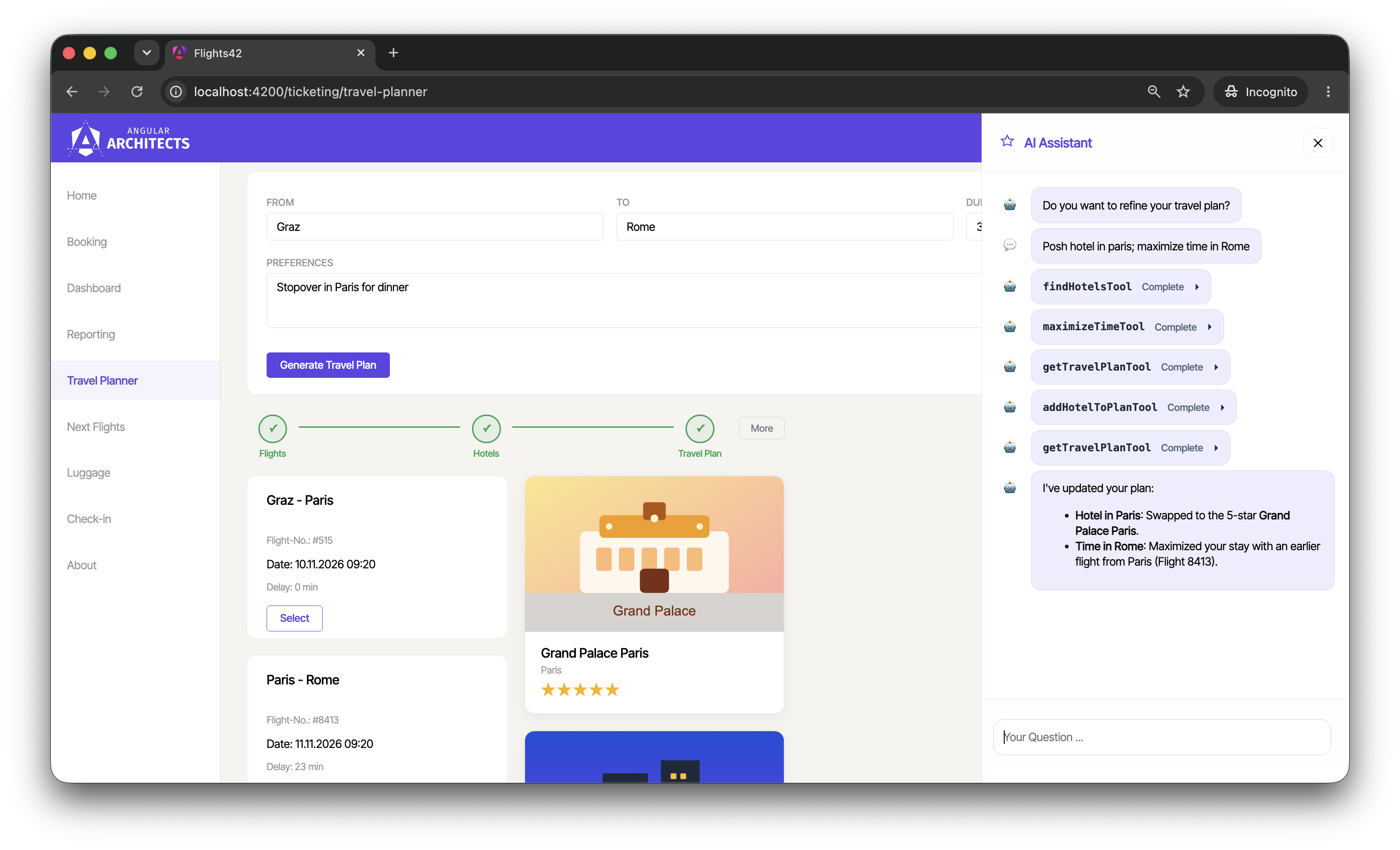
Gemma does not handle this well, all the more so with thinking turned off. Hence, the travel planner now provides the tools maximizeTime and minimizeTime. They take a city and replace the flight into it with the earliest or latest one of the same day. They do the same for the flight out of the city:
// ai-server/src/mastra/tools/plan/time-in-city.tool.ts
import { createTool } from '@mastra/core/tools';
import { z } from 'zod';

import { canonicalCity } from '../city-aliases.js';
import { searchFlights } from '../search-flights.js';
import type { PlanFlight } from './plan-schemas.js';
import { commitPlan, type PlanToolContext, readPlan } from './plan-store.js';

type Goal = 'maximize' | 'minimize';

const inputSchema = z.object({
  city: z.string().describe('City of the plan, e.g. "Rome".'),
});

export const maximizeTimeTool = createTool({
  id: 'maximizeTime',
  description: `
    Maximizes the time in a city of the current travel plan and commits the plan:
    takes the earliest flight into the city and the latest flight out of it, each on
    its current day. Use it for "maximize my time in Rome", "mehr Zeit in Paris".
  `,
  inputSchema,
  execute: (input, context) => {
    [...]
  },
});
The demo keeps the flight selection simple: the tool sorts the flights of the same day by departure time and takes the first or the last one. A production version would also consider arrival times, prices, and the effect on the other stops of the trip. An earlier flight into Rome, for instance, also shortens the stay in the previous city.
The request got much faster: its duration and its input tokens dropped to well under half.
Such tools make the behavior more deterministic and predictable. Code compares the flight times, and the model only maps the request to the tool. The price is flexibility, as the application only covers the cases someone thought of up front. A user who wants to maximize the morning in one city and the afternoon in another will not succeed without a further tool.
This creates a trade-off between control and autonomy:
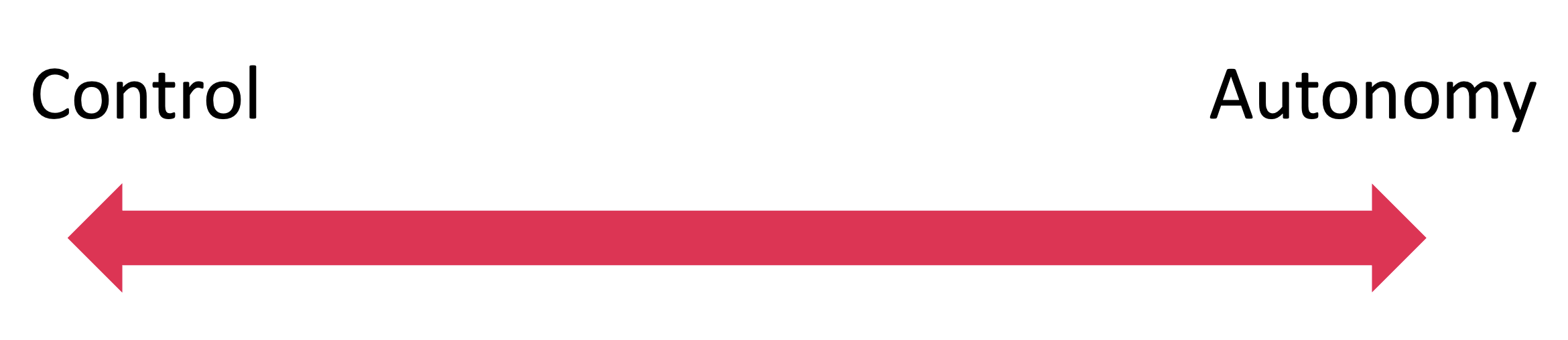
The weaker the model, the further an application has to move towards control. With a frontier model, you can leave more decisions to the model.
List Manipulation
Tailored tools pay off for lists as well. One agent of the application lets users plan several bookings as a list of steps. With getPlan and setPlan alone, the model would have to write out the whole list again to move a single step, including every flight id and description. Hence, the agent offers tools for specific changes such as updatePlanStep, movePlanStep, swapPlanSteps, and reversePlan. For Swap steps 1 and 3, the model calls swapPlanSteps with the ids of both steps, and the code performs the change.
App Logic Compensating Errors
Not every mistake needs a better prompt. If the application can detect and fix a mistake deterministically, a few lines of code are cheaper and more reliable. The travel planner returns a trip as a list of flights and a list of hotels, and the order of the hotels has to follow the route. If the model mixes up this order, the client fixes it before storing the plan.
Error Messages That Name the Fix
In my agentic-sales project, which I also moved to Gemma 4, I show that error messages are a valuable feedback channel. The model reads every tool error, so the message should say what went wrong and what to do instead. A message like Filter value must be a scalar names the problem but not the fix.
Gemma passed lists such as ["Europe", "Americas"] as filter values and tried to exclude values with a filter. The server now accepts lists, and for everything else, the message names the expected shape with an example and the alternative for excluding values:
// server/apis/request-parsing.ts
import type { Column, FilterScalar, FilterValue } from '../data/sales-dal.ts';

export class BadRequest extends Error {}

[...]

function parseFilterValue(value: unknown, column: Column): FilterValue {
  if (value === null || isFilterScalar(value)) {
    return value;
  }
  if (Array.isArray(value) && value.length > 0 && value.every(isFilterScalar)) {
    return value;
  }
  throw new BadRequest(
    `Filter value for '${column.name}' must be a value or a non-empty list of values, ` +
      'e.g. "Bags" or ["Bags", "Apparel"]. A filter can\'t exclude values: ' +
      'load the rows without it and select them afterwards.',
  );
}
Failures must also be impossible to misread. After five failed calls of addDashboardItem, Gemma answered I've added the bar chart to your dashboard. Now these tools fail with The dashboard was not changed: ….
Using the Words of the User
It helps when the name or the description of a tool contains the words users use. The model then maps a request to the tool more easily. The description of maximizeTime shown above, for instance, mentions maximize my time in Rome and the German mehr Zeit in Paris.
Accepting Numbers and Booleans Written as Strings
Gemma sometimes writes numbers and booleans as strings, for example "count": "2" or "showCheckInButton": "true" in the dashboard spec. A strict schema rejects them, and the user gets no dashboard. Where the intent is unambiguous, it makes sense to accept such values.
The function z.coerce.number() converts numbers. For booleans, a preprocessor maps only the strings "true" and "false". The function z.coerce.boolean() would not work here because it turns every non-empty string, including "false", into true. The JSON schema the model sees still says integer and boolean:
// ai-server/src/mastra/dashboard-dsl/dashboard-spec.ts
import { z } from 'zod';

const positiveInt = z.coerce.number().int().positive();

const flag = z.preprocess(
  (value) => (value === 'true' ? true : value === 'false' ? false : value),
  z.boolean(),
);

export const dashboardTileSchema = z.discriminatedUnion('type', [
  [...]
  z.object({
    type: z.literal('boardingPasses'),
    count: positiveInt
      .max(8)
      .nullish()
      .describe('Number of upcoming booked flights to show. Defaults to 2.'),
  }),
  z.object({
    type: z.literal('bookedFlightsList'),
    showCheckInButton: flag
      .nullish()
      .describe(
        'Whether to render a "Check in" button per booked flight. Defaults to true.',
      ),
    [...]
  }),
  [...]
]);
Prompt Engineering for Compact Models
With weaker models, the good old knowledge about prompt engineering becomes especially important. Strong models benefit from it too, even though they can work out a lot on their own. In my experiments, examples and negative examples proved particularly effective. Both work better in the description of the tool or parameter the decision is about than in the system prompt.
Examples Next to the Decision
In my experiments, Gemma followed examples much more reliably than rules.
A rule in the system prompt says to render a search form when the user asks for flights without naming both cities. After Search Graz → Madrid, a follow-up such as And back sometimes led to such a form instead of a search. An example in the description of findFlights resolved this in my evals:
// src/app/domains/ticketing/ai/tools/find-flights.tool.ts
import { z } from 'zod';

import { createFrontendTool } from '../../../shared/util-copilotkit/tool-definition';
[...]

export const findFlightsTool = createFrontendTool({
  name: 'findFlights',
  description: `
    Searches for flights and redirects the user to the result page where the found flights are shown.

    [...]

    Example:
    - Previous search: Graz → Madrid
    - User: "And back"
    - Call: findFlights({ "from": "Madrid", "to": "Graz" })
    - WRONG: rendering a search form, as both cities are known
  `,
  parameters: z.object({
    from: z.string().describe('airport of departure'),
    to: z.string().describe('airport of destination'),
  }),
  handler: async ({ from, to }) => {
    [...]
  },
});
Keep in mind that Gemma copies examples almost literally. When a prompt contained only a German example reply, Gemma answered English questions in German. One example per language resolved this in my tests.
Negative Examples for Similar Tools
Examples show what to do. When two tools look similar, the model also needs to know when not to use one of them. The example in the description of findFlights already names a wrong reaction.
The agent that plans bookings as a list of steps shows this. Gemma read a request like Move 1 to 5 as moving step 1 of the plan to position 5. The user wanted to rebook flight 1 to flight 5 instead. The new tool addRebooking alone did not help, as Gemma kept choosing movePlanStep. A negative example in the description of movePlanStep alone did not help either. Together, they resolved the issue in my evals:
// src/app/domains/ticketing/ai/tools/plan/move-plan-step.tool.ts
import { [...] } from '@angular/core';
import { z } from 'zod';

import { createFrontendTool } from '../../../../shared/util-copilotkit/tool-definition';
import { PlanStore } from '../../plan/plan-store';

export const movePlanStepTool = createFrontendTool({
  name: 'movePlanStep',
  description: `
    Moves a single step to a new 1-based position in the plan, shifting the others.
    [...]

    Negative example:
    - User: "Move 1 to 5"
    - WRONG: movePlanStep, as numbers without the word "step" are flight ids
    - Call instead: addRebooking({ "cancelFlightId": 1, "bookFlightId": 5 })
    [...]
  `,
  parameters: z.object({ [...] }),
  handler: async ({ id, toPosition }) => {
    const store = inject(PlanStore);
    store.moveStep(id, toPosition);
    return { moved: id, toPosition };
  },
});
The place of the guidance matters, too. Examples for this request in the system prompt did not fix it. Instead, they broke other requests of the same agent.
A more precise wording such as Move flight 1 to flight 5 also works without these changes. However, Gemma then looked up the flights first. It needed more than twice the input tokens and about three times as long.
Further Prompting Techniques
The prompts in the application have used further well-known techniques for a long time, and they help compact models, too:
- Role and structure: Each prompt starts with the role of the agent and groups its rules under headings.
- Explicit steps: Multi-step tasks list their steps in order, for instance deriving a rough travel plan first and calling the workflow second.
- Invariants: The prompt describes what a valid result looks like, such as a travel plan in which every overnight stay has a hotel. The model can check its changes against these rules.
Frontier models often get by with a short prompt and the tool descriptions. Mid-sized models often need considerably more instructions. In the application, several prompts were already extensive before the migration to Gemma 4. They go back to an earlier optimization for GPT-5.6 Luna.
The good news is that the prompts can grow iteratively and in a targeted way: each failure that the evals reveal shows where an instruction or an example is missing.
Interested in production-ready Agentic UI architectures?
In my workshop, we dive into AG-UI, A2UI, MCP Apps, HITL patterns, and modern Angular architectures for real-world agentic systems.

Conclusion
A local model such as Gemma 4 can drive a real Agentic UI if the architecture takes over what the model cannot do reliably. The measures that paid off are turning thinking off, tool call renderers, a narrow DSL, minimal tool results, use-case-specific tools, error messages that name the fix, and examples next to the decision.
This makes the application more deterministic and less autonomous. Where to place it between control and autonomy depends on the model and the use case. Evals show whether a measure helps, and many of these measures pay off with frontier models, too.
FAQ
Can agentic applications run on local models?
Yes. The sample application in this article runs six agents with tool calling, generative UI via A2UI, and multi-step workflows on Gemma 4 26B A4B, an open-weight model you can host yourself. For reproducible experiments, I used it through Cloudflare Workers AI instead of my own hardware. The patterns apply to self-hosted deployments as well, while the latency figures depend on the hardware. Compared to frontier models, the application needs more deterministic logic: tool call renderers, narrow DSLs, tools tailored to use cases, and helpful error messages.
Why turn off thinking for Gemma 4?
In my measurements, thinking made Gemma about three times slower and multiplied the output tokens without a reliability gain that would justify this latency. Agentic applications can move the remaining reasoning into tools and code, and the model corrects mistakes in the next step instead.
Does CopilotKit for Angular work with local models?
Yes. CopilotKit for Angular talks to the agents via AG-UI and does not depend on the model. The sample application configures the model in the Mastra backend, so the move from OpenAI to Gemma 4 left the connection between frontend and agents unchanged. Some measures in this article still touch the frontend, such as tool call renderers and the descriptions of frontend tools.
What is a tool call renderer in CopilotKit for Angular?
A tool call renderer is an Angular component that CopilotKit uses to display the result of a tool call. Unlike with a component tool, the model does not have to call it and copy data into its arguments. This saves output tokens and avoids copying errors.
How does A2UI work with compact models?
Instead of writing A2UI markup, the model produces a compact, application-specific DSL. The server translates it into A2UI and loads the data. This reduces the task to a few flat arguments that compact models handle much better than full markup.
Do these measures only apply to Gemma 4?
No. They apply to every compact or self-hosted model. Many of them, such as rendering tool results and narrow DSLs, also make frontier models faster and cheaper.