The long-awaited Signal Forms bridge a crucial gap between Angular's new reactive side and user interaction. While currently experimental and intended to gather initial feedback, they offer a window into a possible future for the framework.
In this article, I'll go into the details of this new library. In addition to the basics, I'll discuss more advanced aspects such as the many types of custom validators , conditional validation, subforms, and custom controls.
📂 Source Code (🔀 see Branch signal-forms)
Example Application
In this article, I use a form for managing flights to explain the individual details. This form is simple, yet comprehensive enough to demonstrate all aspects of Signal Forms:
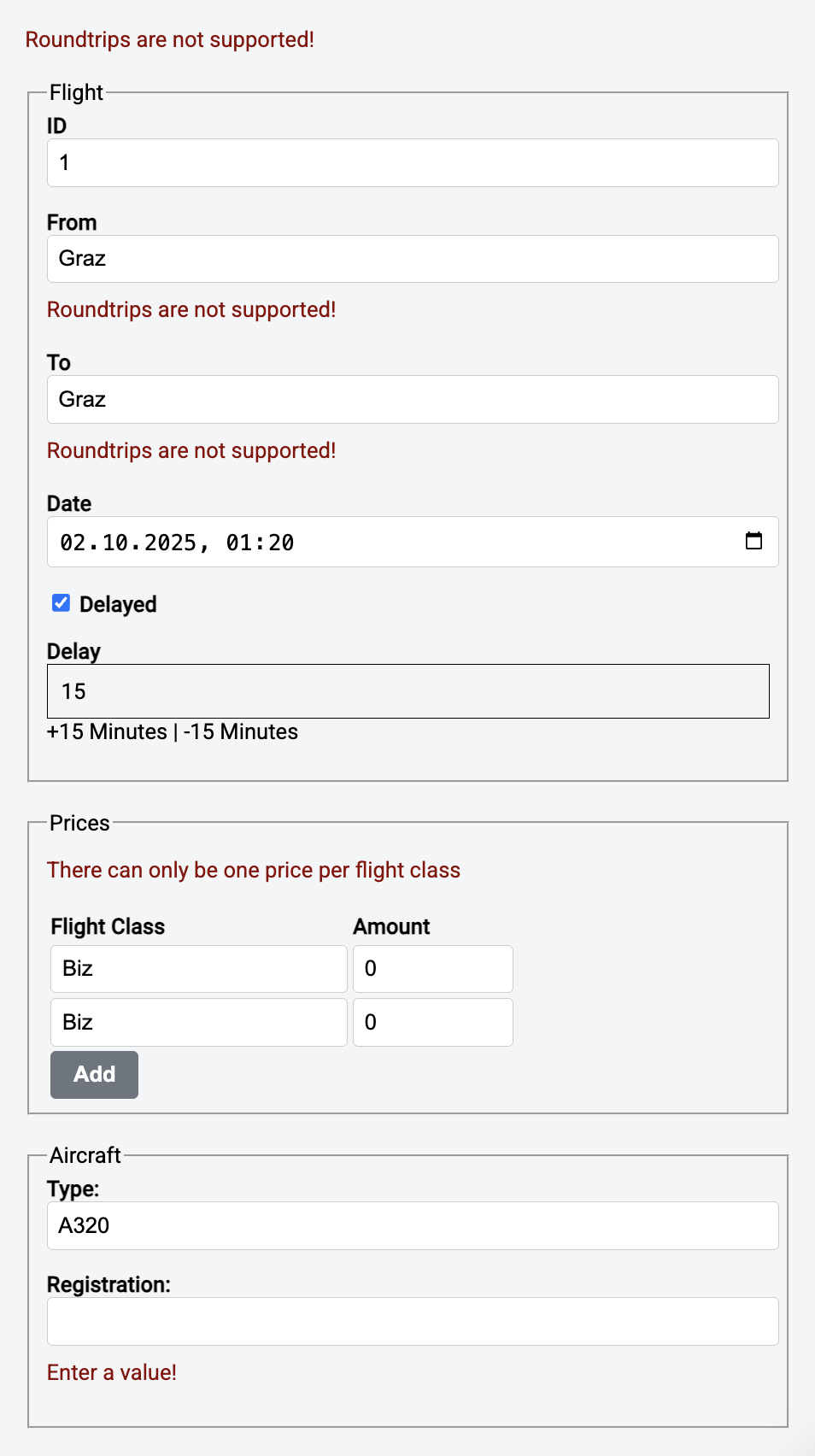
Validation rules can apply to individual fields or multiple fields. The latter applies to the check for round trips, which includes the From and To fields . There is also a conditional rule: Delay is only a mandatory field with a minimum value of 15 minutes if the checkbox Delayed has been activated. Aircraft is a nested form, and behind the prices is an array that is displayed by further nested forms. The flight classes must be unique across all prices.
A First Signal Form
Our example receives the flight to be displayed from a service named FlightDetailStore. Since it is also responsible for data consistency, it only publishes read-only data. On the other hand, we want to modify the data using the form. Strictly speaking, a two-way binding should transfer the user input directly to the bound flight object. This bridge requires a local working copy that is represented by a linked signal:
import {
  form,
  required,
  minLength,
  validate,
  submit,
  Field,
} from '@angular/forms/signals';

[…]

@Component({
  imports: [
    Field,
    JsonPipe,
    […]
  ],
  […]
})
export class FlightEditComponent {
  private store = inject(FlightDetailStore);

  […]

  flight = linkedSignal(() => this.store.flightValue());

  flightForm = form(this.flight, (path) => {
    required(path.from);
    required(path.to);
    required(path.date);

    minLength(path.from, 3);

    const allowed = ['Graz', 'Hamburg', 'Zürich'];
    validate(path.from, (ctx) => {
      const value = ctx.value();
      if (allowed.includes(value)) {
        return null;
      }

      return {
        kind: 'city',
        value,
        allowed,
      };
    });
  });

  save(): void {
    submit(this.flightForm, async (form) => {
      const result = await this.store.saveFlight(form().value());

      if (result.status === 'error') {
        return {
          kind: 'processing_error',
          error: result.error,
        };
      }
      return null;
    });
  }
}
The linked signal flight encompasses the entire flight. The signal form makes the individual fields accessible as Signals. The application creates this Signal Form using the form function from angular/forms/signals. In addition to the Signal flight, the function form receives a schema with validation rules. Angular provides the required and minlength rules out of the box.
In addition, validate sets up a custom rule that checks from against three defined airports. In case of an error, this validator returns a ValidationError, which identifies the detected validation error with a string kind. The validator can also further describe the error using additional properties that it can freely specify. If a validator detects multiple errors, it can also return an array of ValidationErrors. If the validator cannot detect any errors, it returns the value null – true to the motto: no complaints are praise enough.
The save method sends the form contents back to the store. The submit function provided by Signal Forms bridges the gap between the form and the store. It accepts both the flightForm Signal and an action to be executed. The latter is only executed if there are no validation errors.
If an error occurs during saving, the action returns a ValidationError. Alternatively, it could return an array containing multiple ValidationError objects. The function submit adds these errors in the Signal Form.
To bind the individual fields of the Signal Form to the template, the Field directive is used:
<form class="flight-form">
  <div class="form-group">
    <label for="flight-id">ID</label>
    <input
      [field]="flightForm.id"
      type="number"
      class="form-control"
      id="flight-id"
    />
  </div>

  <div class="form-group">
    <label for="flight-from">From</label>
    <input
      [field]="flightForm.from"
      class="form-control"
      id="flight-from"
    />
    <!-- Field level errors -->
    <pre>{{ flightForm.from().errors() | json }}</pre>
  </div>
    […]
</form>
Please note that when binding a number you need to use a <input type="number" ...>.
The Signal Form uses its properties to inform about its current state. For example, flightForm.from() provides numerous properties that inform whether the from field has been changed and correctly validated. Examples include the dirty and invalid properties.
Behind errors is an array containing all validation errors detected for the field, which the component outputs for illustrative purposes. Figure 2 shows this array in a case where both the required validator specified above and the custom city validator are triggered.
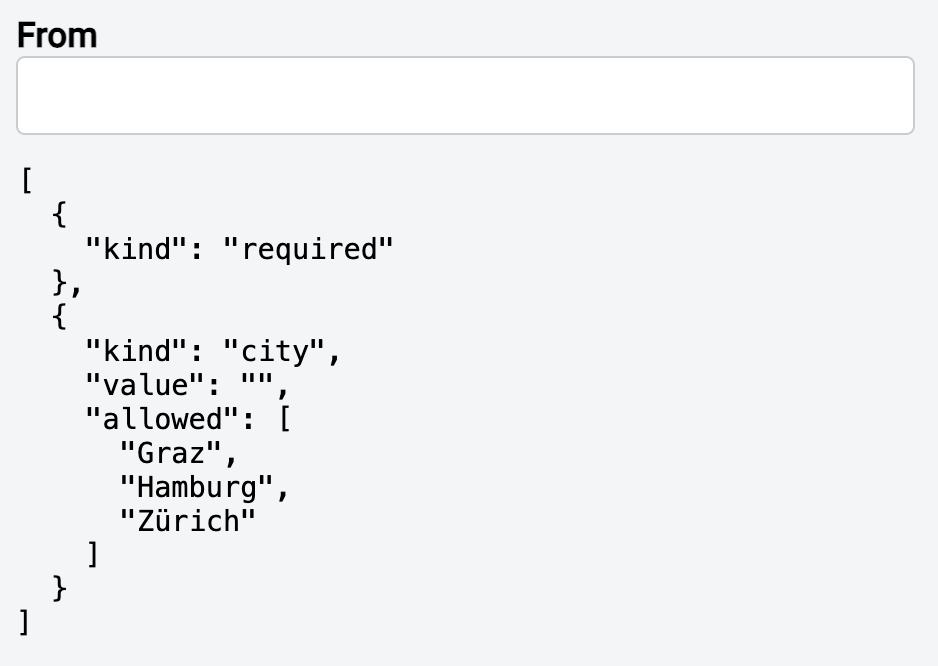
The minLength validator isn't triggered because it doesn't report errors for empty fields. This usual approach supports optional fields. However, if the field isn't optional, a required validator takes care of the empty field.
The brackets used indicate that the individual properties are Signals. Thus, Angular updates the data binding even when using Zone-less and OnPush without further action when the properties change.
Refactoring Validators into Functions
To improve clarity and reuse, it is advisable to outsource custom validators to separate functions. They must at least accept the property to be validated. The type SchemaPath<T> is used for this purpose. A SchemaPath<string> for example, refers to a property of type string:
function validateCity(
  path: SchemaPath<string>,
  allowed: string[]
): void {
  validate(path, (ctx) => {
    const value = ctx.value();
    if (allowed.includes(value)) {
      return null;
    }

    return {
      kind: 'city',
      value,
      allowed,
    };
  });
}
The validator shown here accepts the airports passed to the allowed parameter. To use the validator, the application calls it in the schema:
flightForm = form(this.flight, (path) => {
  […]
  validateCity(schema.from, ['Graz', 'Hamburg', 'Zürich']);
});
Showing Validation Errors
So far, we've only returned the errors object to indicate validation errors. However, the validators provided by Angular also give us the option to specify an error message for the user:
required(path.from, { message: 'Please enter a value!' });The validator places this error message in the message property of the respective ValidationError object. This means the application only needs to output all message properties it finds in the errors array. In the example discussed, the ValidationErrorsComponent takes care of this task:
@Component({
  selector: 'app-validation-errors',
  imports: [],
  templateUrl: './validation-errors.component.html',
  styleUrl: './validation-errors.component.css',
})
export class ValidationErrorsComponent {
  errors = input.required<ValidationError.WithField[]>();
  showFieldNames = input(false);

  errorMessages = computed(() =>
    toErrorMessages(this.errors(), this.showFieldNames())
  );
}

function toErrorMessages(
  errors: ValidationError.WithField[],
  showFieldNames: boolean
): string[] {
  return errors.map((error) => {
    const prefix = showFieldNames ? toFieldName(error) + ': ' : '';

    const message = error.message ?? toMessage(error);
    return prefix + message;
  });
}

function toFieldName(error: ValidationError.WithField) {
  return error.field().name().split('.').at(-1);
}

function toMessage(error: ValidationError): string {
  switch (error.kind) {
    case 'required':
      return 'Enter a value!';
    case 'roundtrip':
    case 'roundtrip_tree':
      return 'Roundtrips are not supported!';
    case 'min':
      console.log(error);
      const minError = error as MinValidationError;
      return `Minimum amount: ${minError.min}`;
    default:
      return error.kind ?? 'Validation Error';
  }
}
If a validation error does not have a message property, a standard error message determined by toMessage is used. The template displays the error messages obtained in this way:
@if (errorMessages().length > 0) {
<div class="validation-errors">
    @for(message of errorMessages(); track message) {
    <div>{{ message }}</div>
    }
</div>
}
The consumer must now delegate to the ValidationErrorsComponent for each field and pass the errors array:
<div>
  <label for="flight-from">From</label>
  <input [field]="flightForm.from" id="flight-from" />
  <app-validation-errors [errors]="flightForm.from().errors()" />
</div>
Using Separate Schemas
To make the individual components clearer, the schema can be refactored to a separate constant:
export const flightSchema = schema<Flight>((path) => {
  required(path.from);
  required(path.to);
  required(path.date);

  minLength(path.from, 3);
  validateCity(schema.from, ['Graz', 'Hamburg', 'Zürich']);
});
The call to the function form can then refer to it:
flightForm = form(this.flight, flightSchema);Schemas can also reference each other. This is useful, for example, if a form requires a schema with additional validation rules:
export const flightFormSchema = schema<Flight>((path) => {
  apply(path, flightSchema);
  required(path.id);
});
Another case where schemas refer to other schemas is conditional validation rules. The next section discusses this.
More: Modern Angular Workshop
Subscribe to our Modern Angular Workshop to stay up to date!

English Version | German Version
Validating Against Zod and Other Standard Schema Implementations
Often, there is already something such as a Zod schema that describes rules for valid objects. Perhaps you already have them for server-side core or you generate it out of a respective JSON Schema or Open API document. Fortunatelly, you can directly validate against such schemas:
export const flightSchema = schema<Flight>((path) => {
  validateStandardSchema(ZodFlightSchema);
});
This not only works with Zod but also with all the other schema libraries following the Standard Schema definition.
Combined with the submit function discussed above, this is a very quick and effective way for establishing a client-side validation without a lot of effort.
Conditional Validation
Some validation rules only apply under specific circumstances. In the application shown, delay only needs to be validated if delayed has the value true. This simple case is representative of more complex ones where the value of one field affects the validation of other fields.
Such situations can be handled with the applyWhenValue function. It accepts the path to be validated, a predicate — typically a lambda expression — and a schema. If the predicate returns true, applyWhenValue applies the schema:
export const flightSchema = schema<Flight>((path) => {
  […]
  applyWhenValue(path, (flight) => flight.delayed, delayedFlight);
});
The schema contains the conditional validation rules:
export const delayedFlight = schema<Flight>((path) => {
  required(path.delay);
  min(path.delay, 15);
});
There are a few alternatives to applyWhenValue. One of them is applyWhen , whose predicate receives the current context, which provides access to the entire field state:
applyWhen(path, (ctx) => ctx.valueOf(path.delayed), delayedFlight);In addition, the required validator has a when property that also accepts such a predicate:
required(path.delay, {
  when: (ctx) => ctx.valueOf(path.delayed)
});
In addition, the schema can also specify under which circumstances the field directive should disable a field:
disabled(path.delay, (ctx) => !ctx.valueOf(path.delayed));The functions hidden and readonly can be used to hide or make fields read-only in the same way.
However, there is one thing that is special about disabled. Instead of true, you can also return a reason for the disabling:
disabled(path.delay, (ctx) => !ctx.valueOf(path.delayed) ? 'not delayed' : false);All the reasons why a field is currently disabled are found in its disabledReasons Signal:
@for(reason of flightForm.delay().disabledReasons(); track $index) {
<p>Disabled because {{ reason.message }}</p>
}
Multi-Field Validators
Multi-field validators are validators that include multiple fields in the validation process. To do this, a validator needs to be provided for a common parent. For example, if a validator needs to ensure that from and to have different values, the application can implement it as a validator for the entire flight:
function validateRoundTripTree(schema: SchemaPath<Flight>) {
  validateTree(schema, (ctx) => {
    const from = ctx.field.from().value();
    const to = ctx.field.to().value();

    if (from === to) {
      return {
        kind: 'roundtrip_tree',
        field: ctx.field.from,
        from,
        to,
      };
    }
    return null;
  });
}
As usual, this validator must be included in the schema:
export const flightSchema = schema<Flight>((path) => {
  […]
  validateRoundTrip(path);
});
Validators always return error messages for the validated level. In this case, this is the flight itself, not from or to. Therefore, the application also uses the flight's errors array:
<app-validation-errors [errors]="flightForm().errors()" />
<form>[…]</form>
In the initially shown screen shot (see above), this is the first error message that the component places above the form. Validation errors from lower levels do not appear in errors. To retrieve these, the application can access the errors array on the respective levelor a parent's errorSummary:
<app-validation-errors [errors]="flightForm().errorSummary()" />
<form>[…]</form>
Since this will reveal error messages for different levels and fields, it makes sense to output the name of the affected field for each error. This information can also be found in the individual ValidationError objects. The ValidationErrorsComponent in my examples (see branch signal-forms-example), which is somewhat more comprehensive than the variant discussed here, takes advantage of this option.
Tree Validators
Tree validators are special multi-field validators that can store error messages at all levels. To do so, they store the affected field in the ValidationError object:
function validateRoundTripTree(schema: SchemaPath<Flight>) {
  validateTree(schema, (ctx) => {
    const from = ctx.field.from().value();
    const to = ctx.field.to().value();

    if (from === to) {
      return {
        kind: 'roundtrip_tree',
        field: ctx.field.from,
        from,
        to,
      };
    }
    return null;
  });
}
After registering in the schema, the error message now appears at field level:
export const flightSchema = schema<Flight>((path) => {
  […]
  validateRoundTripTree(path);
});
In the initial screen shot shown above, this error message is the second one from the top.
Since each validator can return multiple error messages in the form of an array, a tree validator can also return error messages for different fields. This makes it ideal for complex rules. Simple rules, however, can also be implemented as conventional validators that have access to neighboring fields:
validate(path.to, (ctx) => {
  if (ctx.value() === ctx.valueOf(path.from)) {
    return { kind: 'roundtrip'};
  }
  return null;
});
Asynchronous Validators
Asynchronous validators do not deliver the validation result instantly, but rather determine it asynchronously. Typically, this is done via an HTTP call. The validateAsync function provided by Signal Forms enables this approach. It defines four mappings:
- params maps the form state to parameters
- factory creates a resource with these parameters
- onSuccess maps the result determined by the resource to a ValidationError or a ValidationError array
- onError maps an possible error returned by the resource to a ValidationError or a ValidationError array
The following listing demonstrates this using an rxResource that uses the rxValidateAirport function to simulate an HTTP call for validating an airport:
function validateCityAsync(schema: SchemaPath<string>) {
  validateAsync(schema, {
    params: (ctx) => ({
      value: ctx.value(),
    }),
    factory: (params) => {
      return rxResource({
        params,
        stream: (p) => {
          return rxValidateAirport(p.params.value);
        },
      });
    },
    onSuccess: (result: boolean, _ctx) => {
      if (!result) {
        return {
          kind: 'airport_not_found_http',
        };
      }
      return null;
    },
    onError: (error, _ctx) => {
      console.error('api error validating city', error);
      return {
        kind: 'api-failed'
      };
    },
  });
}

// Simulates a server-side validation
function rxValidateAirport(airport: string): Observable<boolean> {
  const allowed = ['Graz', 'Hamburg', 'Zürich'];
  return of(null).pipe(
    delay(2000),
    map(() => allowed.includes(airport))
  );
}
As usual, this validator must also be stored in the schema:
export const flightSchema = schema<Flight>((path) => {
  […]
  validateCityAsync(path.from);
});
As long as at least one synchronous validator fails, Angular doesn't execute asynchronous validators. This prevents unnecessary server calls. While Signal Forms waits for the result of an asynchronous validator, the pending property of the affected field is true:
@if (flightForm.from().pending()) {
  <div>Waiting for Async Validation Result</div>
}
HTTP Validators
Most asynchronous validators initiate HTTP requests. Therefore, validateHttp provides a simplified version that directly returns a request for an HttpResource:
function validateCityHttp(schema: SchemaPath<string>) {
  validateHttp(schema, {
    request: (ctx) => ({
      url: 'https://demo.angulararchitects.io/api/flight',
      params: {
        from: ctx.value(),
      },
    }),
    onSuccess: (result: Flight[], _ctx) => {
      if (result.length === 0) {
        return {
          kind: 'airport_not_found_http',
        };
      }
      return null;
    },
    onError: (error, _ctx) => {
      console.error('api error validating city', error);
      return {
        kind: 'api-failed'
      };
    },
  });
}
As usual, onSuccess maps the result of the resource to ValidationError objects and onError projects errors provided by the resource to this type. Here, too, you should remember to anchor the validator in the schema:
export const flightSchema = schema<Flight>((path) => {
  […]
  validateCityHttp(path.from);
});
Nested Forms and Form Groups
So far, we've only bound a flat flight object to a form. However, Signal Forms also support more complex structures. To illustrate this, I've assigned an aircraft and several prices to the flight:
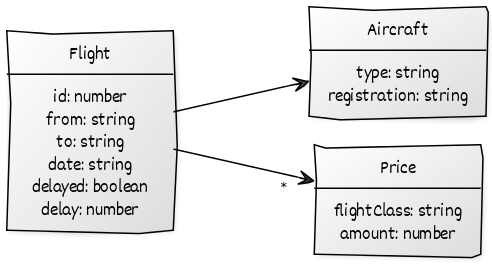
There is a separate scheme for the aircraft:
export const aircraftSchema = schema<Aircraft>((path) => {
  required(path.registration);
  required(path.type);
});
The flight schema uses the aircraft schema:
export const flightSchema = schema<Flight>((path) => {
  […]
  apply(path.aircraft, aircraftSchema);
});
Accessing the aircraft is easy. It can be accessed directly via the flight. To avoid long chains like flightForm.aircraft.registration().errors(), I create an alias for each additional level using let:
@let aircraftForm = flightForm.aircraft;

<fieldset>
  <legend>Aircraft</legend>

  <div class="form-group">
    <label for="type">Type:</label>
    <input id="type" class="form-control" [field]="aircraftForm.type" />
    <app-validation-errors [errors]="aircraftForm.type().errors()" />
  </div>
  <div class="form-group">
    <label for="registration">Registration:</label>
    <input
      id="registration"
      class="form-control"
      [field]="aircraftForm.registration"
    />
    <app-validation-errors [errors]="aircraftForm.registration().errors()" />
  </div>
</fieldset>
Nested Forms and Form Arrays
The repeating group with the prices is designed similarly to the subform with the airplane. First, you need to set up a schema:
export const priceSchema = schema<Price>((path) => {
  required(path.flightClass);
  required(path.amount);
  min(path.amount, 0);
});
Unlike before, the flight schema must set up the pricing scheme for each individual price. Therefore, the applyEach function is used here instead of apply:
export const flightSchema = schema<Flight>((path) => {
  […]
  applyEach(path.prices, priceSchema);
});
In the template, the individual prices must now be iterated and corresponding fields must be presented for each price:
@let priceForms = flightForm.prices;

<fieldset>
  <legend>Prices</legend>
  <app-validation-errors
    [errors]="priceForms().errors()"
  />
  <table>
    <tr>
      <th>Flight Class</th>
      <th>Amount</th>
      <th></th>
    </tr>
    @for(price of priceForms; track price) {
    <tr>
      <td>
        <input [field]="price.flightClass" />
      </td>
      <td><input type="number" [field]="price.amount" /></td>
      <td>
        <app-validation-errors
          [errors]="price().errorSummary()"
        />
      </td>
    </tr>
    }
  </table>
  <button (click)="addPrice()" type="button">
    Add
  </button>
</fieldset>
The Add button adds a new price to the array. This causes Angular to present fields for it as well:
addPrice(): void {
  const pricesForms = this.flightForm.prices();
  pricesForms().value.update((prices) => [...prices, { ...initPrice }]);
}
Validating Form Arrays
Validation rules can be defined for all nodes in the object graph shown. Arrays like our prices are no exception. The following listing demonstrates this using a validator that iterates through all prices and checks for duplicates:
function validateDuplicatePrices(prices: SchemaPath<Price[]>) {
  validate(prices, (ctx) => {
    const prices = ctx.value();
    const flightClasses = new Set<string>();

    for (const price of prices) {
      if (flightClasses.has(price.flightClass)) {
        return {
          kind: 'duplicateFlightClass',
          message: 'There can only be one price per flight class',
          flightClass: price.flightClass,
        };
      }
      flightClasses.add(price.flightClass);
    }

    return null;
  });
}
As always, you have to remember to include the validation rule:
export const flightSchema = schema<Flight>((path) => {
  […]
  validateDuplicatePrices(path.prices);
});
Subforms
The code of large forms can quickly become unwieldy. Therefore, it's a good idea to break them down into multiple components. These components each receive a portion of the entire Signal Form via data binding:
<app-validation-errors [errors]="flightForm().errors()" />
<form class="flight-form" novalidate>

  <app-flight [flight]="flightForm"></app-flight>
  <app-prices [prices]="flightForm.prices"></app-prices>
  <app-aircraft [aircraft]="flightForm.aircraft"></app-aircraft>

  <div class="mt-40">
    <button class="btn btn-default" type="button" (click)="save()">Save</button>
  </div>

</form>
Angular represents these individual parts as FieldTree<T>. Inputs must be set up for this:
@Component({
  imports: [
    Field,
    ValidationErrorsComponent
  ],
  […]
})
export class AircraftComponent {
  aircraft = input.required<FieldTree<Aircraft>>();
}
For arrays like the price array in our example, the same procedure applies:
@Component([…])
export class PricesComponent {
  prices = input.required<FieldTree<Price[]>>();
  […]
}
Debouncing
Especially in reactive UIs with search inputs, debouncing is essential: instead of firing an HTTP request on every keystroke, we wait until the user has stopped typing for a few milliseconds. In our example, this behavior appears in the flight search form:

Also the form's behavior for debouncing is specified in its schema. For this, the debounce function can be used:
filterForm = form(this.filter, (schema) => {
  debounce(schema, 300);

  required(schema.from);
  minLength(schema.from, 3);
});
In most cases, just calling debounce with the debounce time in milliseconds is exactly what you need. However, if you want to control the debounce time using code, you can also pass in a respective debouncer function:
filterForm = form(this.filter, (schema) => {
  debounce(schema, (ctx, _abortSignal) => {
    return new Promise((resolve) => {
      console.log('value', ctx.value())
      console.log('pathKeys', ctx.pathKeys())
      setTimeout(resolve, 300);
    })
  });

  required(schema.from);
  minLength(schema.from, 3);
});
Meta Data
Instead of telling users after they entered something that it was invalid, Signal Forms can provide metadata that tells them upfront what they are expected to enter:
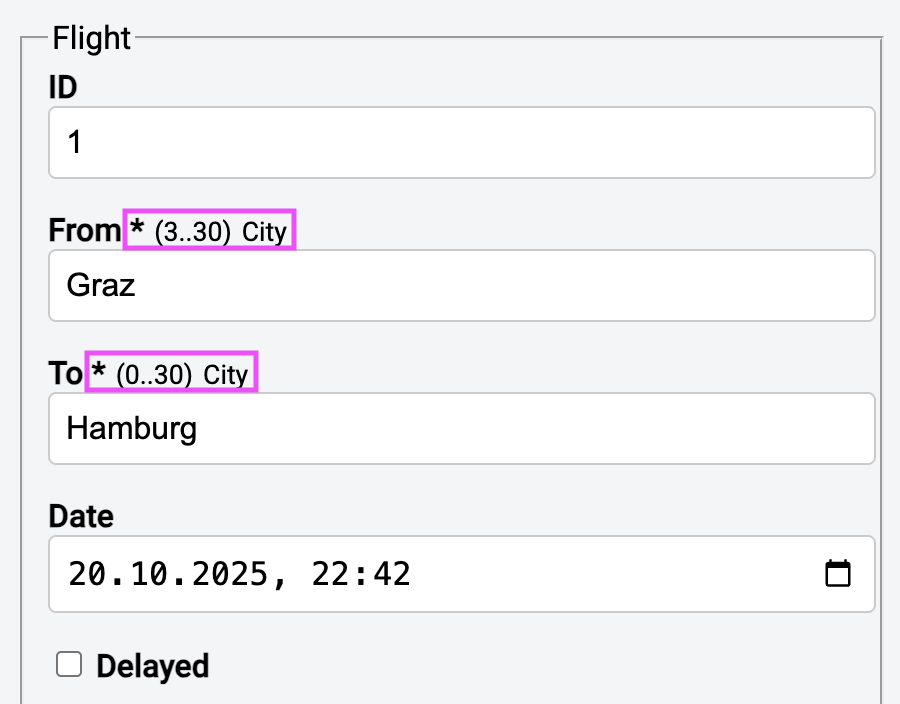
For displaying the meta data, the our example uses a component app-field-meta-data:
<div class="form-group">
  <label for="flight-from">
    From
    <app-field-meta-data [field]="flightForm.from" />
  </label>
  <input class="form-control" [field]="flightForm.from" id="flight-from" />
  [...]
</div>
To read the metadata, call the metadata method with a key, e.g., REQUIRED or MIN_LENGTH. As we will see in a second, you can also define your own keys, such as CITY or CITY2. What you get back is either the metadata property itself or a Signal containing the property (more about this below), which you can display to the user:
import { Component, computed, input } from '@angular/core';
import { FieldTree, REQUIRED, MIN_LENGTH, MAX_LENGTH } from '@angular/forms/signals';
import { CITY, CITY2 } from '../properties';

@Component({
  selector: 'app-field-meta-data',
  imports: [],
  templateUrl: './field-meta-data.component.html',
  styleUrl: './field-meta-data.component.css',
})
export class FieldMetaDataComponent {
  field = input.required<FieldTree<unknown>>();

  fieldState = computed(() => this.field()());

  isRequired = computed(() => this.fieldState().metadata(REQUIRED)());
  minLength = computed(() => this.fieldState().metadata(MIN_LENGTH)() ?? 0);
  maxLength = computed(() => this.fieldState().metadata(MAX_LENGTH)() ?? 30);
  length = computed(() => `(${this.minLength()}..${this.maxLength()})`);

  city = computed(() => this.fieldState().metadata(CITY));
  city2 = computed(() => this.fieldState().metadata(CITY2)());

}
Here is the template for this component:
@if(isRequired()) {
<span class="info">*</span>
}
<span class="info info-small">{{ length() }}</span>
@if(city()) {
<span class="info info-small">City</span>
}
@if(city2()) {
<span class="info info-small">City</span>
}
You create your own simple property with createMetadataKey:
import { createMetadataKey, orMetadataKey } from "@angular/forms/signals";

//
//  Property
//
export const CITY = createMetadataKey<boolean>();

//
//  AggregateProperty
//
export const CITY2 = orMetadataKey();
Now it gets a bit spicy: Besides simple properties, there are also aggregate properties: Let’s say different validators define different values for the same property of the same field. An aggregate property defines how these values are combined ("aggregated") into the final value.
The orMetadataKey combines them via a logical OR (value1 || value2 || value3). Besides this, there is, for instance, an andMetadataKey and a listMetadataKey. The latter puts all values into an array.
Currently, when retrieving an aggregate value via metadata, we get a Signal. For a simple property, we directly get its value.
With the metadata function, we can define metadata for fields. You can call it directly in the schema, but most likely, you’ll call it inside a custom validator where you already define what you expect from the user:
export function validateCityHttp(schema: SchemaPath<string>) {
  metadata(schema, CITY, () => true);

  validateHttp(schema, { ... });
}
Custom Fields
So far, we've only used the Field directive with standard HTML tags. Now the question arises as to how to make this directive work with our own widgets. For example, our application uses a DelayStepperComponent to change the flight delay in 15-minute increments. This should be able to be bound to a field with Field, just like all other fields:
<div>
  <label for="delay">Delay</label>
  <app-delay-stepper id="delay" [field]="flightForm.delay" />
  <app-validation-errors [errors]="flightForm.delay().errors()" />
</div>
In the past, such widgets had to be provided with a so-called Control Value Accessor. Unfortunately, this wasn't exactly straightforward. Signal Forms makes the whole process much simpler: The widget implements the FormValueControl<T> interface, which simply enforces a ModelSignal named value. It also defines other optional properties such as disabled or errors, which the widget can access as needed:
@Component([…])
export class DelayStepperComponent implements FormValueControl<number> {
  value = model(0);

  disabled = input(false);
  errors = input<readonly ValidationError.WithOptionalField[]>([]);

  constructor() {
    effect(() => {
      console.log('DelayStepperComponent, errors', this.errors());
    });
  }

  inc(): void {
    this.value.update((v) => v + 15);
  }

  dec(): void {
    this.value.update((v) => Math.max(v - 15, 0));
  }
}
The DelayStepperComponent uses the disabled property to inform whether the field is disabled due to a rule in the schema. It receives all validation errors from Signal Forms via errors. This property is displayed with an effect for the sake of demonstration. The disabled property is used alongside the value in the template:
@if(disabled()) {
<div class="delay">No Delay!</div>
} @else {
<div class="delay">{{ value() }}</div>
<div>
  <a (click)="inc()">+15 Minutes</a> |
  <a (click)="dec()">-15 Minutes</a>
</div>
}
Conclusion
Signal Forms impressively demonstrate how Angular is evolving toward an cleaner, more reactive way of working. They combine the world of Signals with the everyday challenges of form processing – from simple required fields to complex, nested form structures with asynchronous validation. It's already clear that many previous pain points when working with forms can be solved much more elegantly and consistently.
Even though the library is currently still experimental, it's worth taking a closer look: Signal Forms provide a window into the framework's potential future. Those who engage with it early on will not only better understand the framework's direction but can also actively contribute feedback and thus help shape its further development. This opens an exciting new chapter for Angular developers who implement complex applications with sophisticated forms.