Questionnaires instead of prompts: what a System One model brings to chat assistants and generated dashboards
Agentic UI puts a model between the user and the application. Every message leads to at least one model call that picks a tool, fills in its arguments, and decides which widget to show. With an LLM, this call often takes seconds, and it costs money every time. For a user interface, both hurt.
Jev takes a different route. It is the first model of a class that its vendor TypeSafe calls System One. Such a model does not write text. It answers predefined questions with predefined options, and it needs about 100 milliseconds for that. I was lucky enough to get an early preview. In this article, I summarize what you can expect from Jev for Agentic UI.
The repository has two branches. The branch main combines Angular, CopilotKit, AG-UI, and Jev. The branch console-chat only uses Jev on the console and gives a quick overview.
What Is Jev?
An LLM receives a prompt and generates text token by token. If an application needs a decision, it has to ask for structured output, parse it, and validate it. Jev skips these steps. It receives a state, for instance the conversation so far, and a set of typed questions. For each question, it returns one of the answers you defined, together with a probability for every option.
A good mental model is a questionnaire. You hand the model a form along with the text it should judge. The model ticks one box per question. It cannot write anything in the margins. Your code reads the ticked boxes and decides what happens next: call a tool, show a widget, or ask the user a follow-up question.
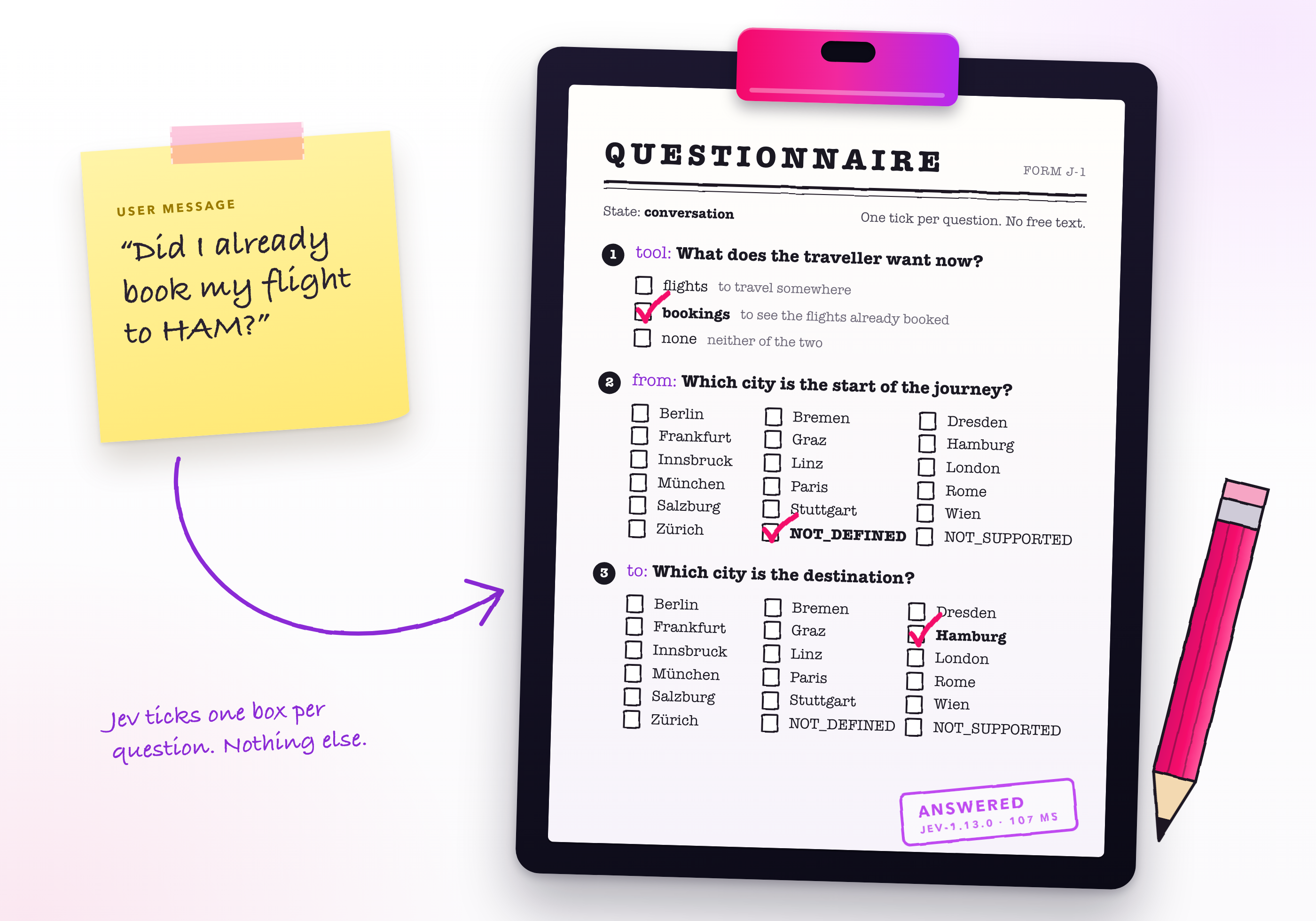
Two properties follow from this design. First, the answers are typed. What reaches your code is always a value your code expects. Second, all questions of a request are answered in parallel and independently of one another. According to TypeSafe, adding questions barely changes the response time.
The Example Application
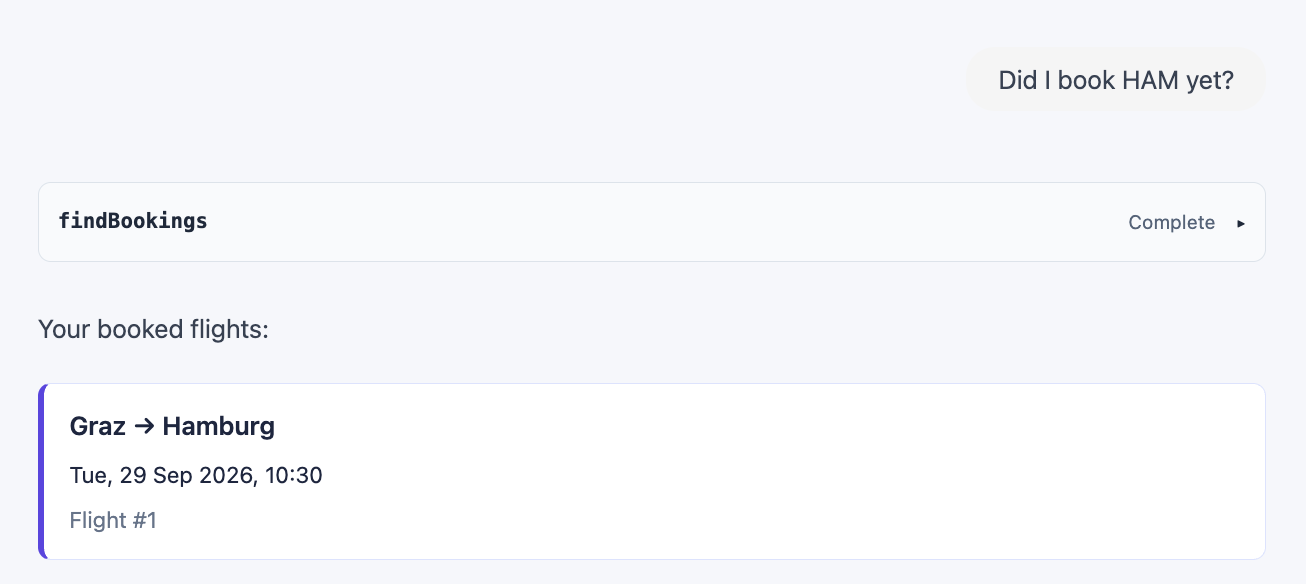
The example is a small flight assistant with two views. In the chat, users ask for flights or for their bookings. Jev picks the tool and its arguments. The server runs the tool and streams the result via AG-UI. On the client side, CopilotKit displays each flight as a widget:
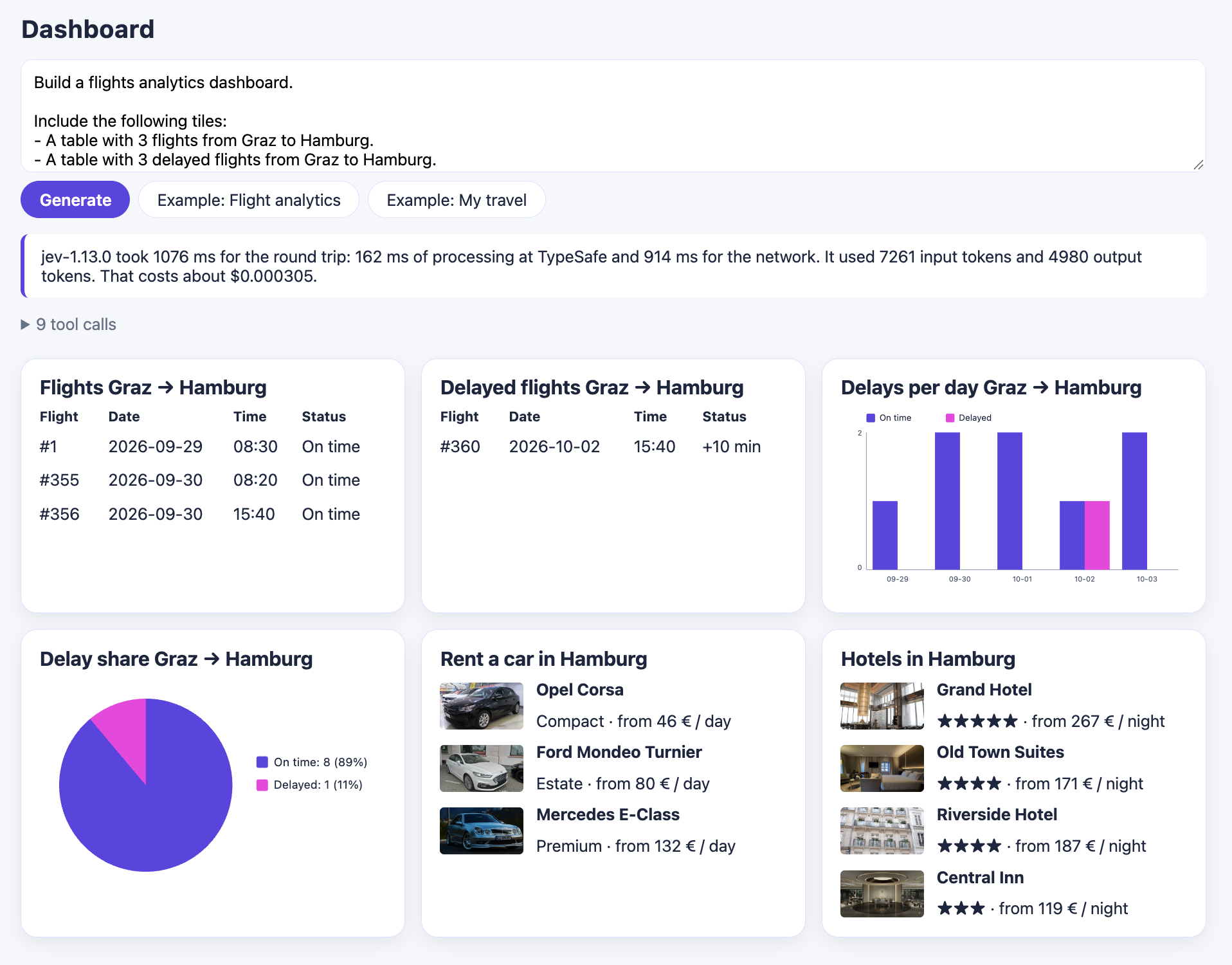
The dashboard goes one step further. Users describe the tiles they want to see. Jev answers a larger questionnaire about this description: which tiles are requested, for which route, with how many entries, and in which order. The server then calls the needed tools and sends the dashboard to the client as A2UI:
Getting Started
The SDK comes via npm:
npm install @typesafe-ai/sdkTypeSafe also provides a skill that teaches coding agents the question types, patterns, and best practices. For Claude Code, it is installed as a plugin. For other agents, the skills CLI does the job:
# Claude Code
claude plugin marketplace add typesafe-ai/skills
claude plugin install typesafe@typesafe-ai

# Other agents
npx skills add typesafe-ai/skills --skill typesafe-ai
Defining the Questionnaire
The questionnaire for our chat consists of three questions. The first one selects the tool. The other two determine its arguments:
import { choice } from '@typesafe-ai/sdk';

[...]

const CITIES = {
  'Berlin': null, 'Bremen': null, 'Dresden': null, 'Frankfurt': null,
  'Graz': null, 'Hamburg': null, 'Innsbruck': null, 'Linz': null,
  'London': null, 'München': null, 'Paris': null, 'Rome': null,
  'Salzburg': null, 'Stuttgart': null, 'Wien': null, 'Zürich': null,
} as const;

const CITY_OPTIONS = {
  ...CITIES,
  'NOT_DEFINED': 'No place is named for this end of the journey.',
  'NOT_SUPPORTED': 'A place is named, but it is not one of the cities listed here.',
} as const;

const CITY_NAMES = Object.keys(CITIES);

const QUESTIONS = {
  tool: choice(
    'A traveller writes to an assistant that searches flights and lists the flights ' +
      'they have booked. `conversation` is the exchange so far; the last entry is the ' +
      'new message. What do they want now?',
    {
      flights: 'To travel somewhere, or to see connections between two places.',
      bookings: 'To see the flights they have already booked: their own reservations.',
      none:
        'Neither: a greeting, a thank-you, or something this assistant cannot do, ' +
        'such as hotels or trains.',
    },
  ),

  from: choice(
    'Which city does the traveller now name as the start of the journey, the place departed ' +
      'from? The last entry of `conversation` is the new message; earlier entries count only ' +
      'when the new message builds on them, as a return flight does.',
    CITY_OPTIONS,
  ),

  to: choice(
    'Which city does the traveller now name as the end of the journey, the destination? ' +
      'The last entry of `conversation` is the new message; earlier entries count only when ' +
      'the new message builds on them, as a return flight does.',
    CITY_OPTIONS,
  ),
};
Each question is a choice. It takes the question text and an object with the possible answers. The keys are the options, and the values describe them. If a key speaks for itself, as the city names do, null is enough. The name conversation in the question texts points to the property of the same name in the state that we pass along later.
The possible answers must be defined up front. This is why the two city questions get two additional options. NOT_DEFINED covers messages that name no city. NOT_SUPPORTED covers cities the airline does not serve. Without these options, the model would have to tick one of the 16 cities even when the message names none of them.
Currently, a question can have up to 255 options. Larger sets call for some creativity. I come back to this at the end of the article.
Further Question Types
Besides choice, there are two further question types:
noulasks a yes/no question and returns the probability that the answer is yes.scorerates the state along ordered levels that you describe yourself, for instance the urgency of a request from "can wait" to "act now". The result can also lie between two levels.
The dashboard uses one noul per tile type to find out which tiles the description asks for:
import { noul } from '@typesafe-ai/sdk';

[...]

const QUESTIONS = {
  hotels: noul(`Do they ask for hotels?`),
  [...]
};
Asking Jev
One call sends the state together with all questions:
import { TypeSafeClient } from '@typesafe-ai/sdk';

[...]

const client = new TypeSafeClient();
const state = { conversation };
const result = await client.systemOne({ state, questions: QUESTIONS });
The client expects the API key in the environment variable TYPESAFE_API_KEY. As this key has to stay secret, the call belongs on the server.
The state can be any JSON structure. Here, it only contains the conversation, an array with the messages of the user and the assistant. This history allows users to refer to the flight that was just discussed. If someone looks for flights from Graz to Hamburg and then asks for the return flight, it is clear what is meant: Hamburg becomes the start and Graz the destination. The question texts shown above prepare Jev for this case. They state that earlier entries only count when the new message builds on them.
Agentic UI with Angular
If you don’t just want to connect an agent but embed Agentic UI into a scalable architecture:
In my book Agentic UI with Angular, I cover the underlying patterns and trade-offs in depth.
Reading the Result
For the question Did I already book my flight to HAM?, Jev returned the following result:
{
  "model": "jev-1.13.0",
  "answers": {
    "tool": {
      "type": "choice",
      "choice": "bookings",
      "confidence": 0.99,
      "probabilities": {
        "flights": 0,
        "none": 0,
        "bookings": 1
      }
    },
    "from": {
      "type": "choice",
      "choice": "NOT_DEFINED",
      "confidence": 0.92,
      "probabilities": {
        "Paris": 0,
        "Salzburg": 0,
        [...]
        "NOT_DEFINED": 0.93,
        [...]
      }
    },
    "to": {
      "type": "choice",
      "choice": "Hamburg",
      "confidence": 0.99,
      "probabilities": {
        [...]
        "Hamburg": 1,
        "NOT_SUPPORTED": 0,
        [...]
      }
    }
  },
  "usage": {
    "input_tokens": 891,
    "output_tokens": 365
  }
}
The answers object mirrors the questionnaire with one entry per question. Each entry contains three pieces of information:
choiceis the selected option.probabilitiesholds a value for every option.confidenceis a number between 0 and 1. It summarizes how clearly one option stands out from the others.
In this example, Jev selects the tool bookings and recognizes the airport code HAM as Hamburg. The message names no departure city, so from results in NOT_DEFINED. With these answers, the code calls the bookings tool and filters for flights to Hamburg.
The confidence is useful for the control flow. Below a threshold, the application can ask the user to confirm or to clarify. Thanks to as const in the questionnaire, the result is also fully typed. The property result.answers.to.choice is a union of the city names and the two special options and not just a string. The usage section reports the tokens the request consumed.
Comparison
I compared duration and cost with OpenAI's Luna. For this, I ported the application to Luna (see branch openai). Then, I sent the requests shown in the screenshots three times to each model and picked the best run for this comparison.
I chose Luna because it is strong enough for this use case. According to TypeSafe, Jev can even keep up with the larger Terra.
| Chat: Luna | Chat: Jev | Dashboard: Luna | Dashboard: Jev | |
|---|---|---|---|---|
| Model | gpt-5.6-luna | jev-1.13.0 | gpt-5.6-luna | jev-1.13.0 |
| Round trip | 1,069 ms | 716 ms | 3,207 ms | 1,078 ms |
| Processing at the provider | 708 ms | 107 ms | 2,590 ms | 204 ms |
| Network | 361 ms | 609 ms | 617 ms | 874 ms |
| Input tokens | 856 | 937 | 7,494 | 7,260 |
| Output tokens | 23 | 370 | 326 | 4,982 |
| Cost per request | $0.000199 | $0.000039 | $0.000542 | $0.000305 |
Duration
The most striking number is the processing time at the provider. For the chat request, Jev needs 107 ms and Luna 708 ms. For the dashboard, it is 204 ms versus 2,590 ms. This makes Jev more than 6 times faster in the first case and more than 12 times faster in the second one.
The gap in the round trip is smaller because the network dominates Jev's total time. In my measurements, the network took longer for TypeSafe than for OpenAI. This share depends on my location and on where the endpoints are hosted. It says little about the model itself.
The repeated runs revealed another difference. Jev's processing time stayed between 107 and 204 ms across all six runs. Luna varied between 708 and 1,683 ms for the chat request, and one of its dashboard runs took almost 13 seconds.
Cost
The calculation uses the list prices of both vendors as of September 20, 2026, the day of the measurements. All prices are in USD per million tokens:
| Model | Input | Cached input | Output |
|---|---|---|---|
| gpt-5.6-luna | $0.20 | $0.02 | $1.20 |
| jev-1.13.0 | $0.042 | n/a | $0.00 |
The chat request costs about a fifth with Jev. For the dashboard, Jev comes in at a bit more than half of Luna's price. Here, Luna already benefits from prompt caching, as 7,491 of its 7,494 input tokens came from the cache.
Jev reports far more output tokens than Luna. They do not show up on the bill, though, because TypeSafe only charges for input tokens.
Three runs per request are a spot check and not a benchmark. The tendency is clear, though.
Interested in production-ready Agentic UI architectures?
In my workshop, we dive into AG-UI, A2UI, MCP Apps, HITL patterns, and modern Angular architectures for real-world agentic systems.
Assessment and Outlook
Performance and Cost
Performance and cost are very promising for Agentic UI. With processing times between 100 and 200 ms, the model no longer determines how responsive the application feels. I also expect the class of models that Jev has made popular to be a good fit for local execution, for example in the browser. This would remove the network share as well.
What Remains Your Job
One simplification helps in the examples shown here: the selection of widgets and tiles is directly tied to the respective tool calls. Decoupling the two would be possible, but with Jev it means programming work. The same applies to mapping values between tool results and widgets or follow-up tool calls. You have to write this code yourself. An LLM, by contrast, takes over such tasks without much effort on our side.
Further Use Cases
Agentic UI is only one field of application. The documentation shows several others:
- Routing: classify incoming requests and hand each one to plain code, a specialized LLM, or a human.
- Guardrails: screen the messages going into and coming out of an LLM application.
- Reranking for RAG: judge retrieved passages before they reach the answering model.
- Verification: check citations or extracted fields against the source document.
- Classification at scale: sort tickets, documents, or product data and moderate content.
Thinking in Classes
You have to get used to working with questionnaires and predefined options, which are classes in the end. Some use cases and their implementation need a different way of thinking. One challenge is that not everything can be expressed as a class.
The examples in Jev's documentation show some approaches for this. Date values can be split into their parts: year, month, and day. Separate questions then determine these parts, and code puts them together. You can also proceed hierarchically. An example is to first ask for the continent, then for the country, and only then for the airport.
A further approach works when the wanted value already appears in the message, for instance a number or a quantity. In this case, you can pre-filter the message with a regular expression and offer the values found as options.
Outlook: Polyglot and Hybrid Approaches
Another way to deal with values that do not fit into classes is a polyglot approach. It combines Jev with a very lean language model such as Gemini Nano. Such models are demonstrably good at extraction tasks. I can imagine both of them running in the browser.
A hybrid of both worlds is an exciting prospect, too. Its advantage would be that developers do not have to deal with two kinds of models and mediate between them.
So, is Jev just a trend or a game changer? For the decisions inside an Agentic UI, I see the potential for a game changer. The selected tool and its arguments arrive typed, with probabilities, and after 100 to 200 ms of processing. Free-form values and generated text still need a language model. This is why I find the combination of both worlds the most interesting prospect.